

Anjuta Review



What is Anjuta?
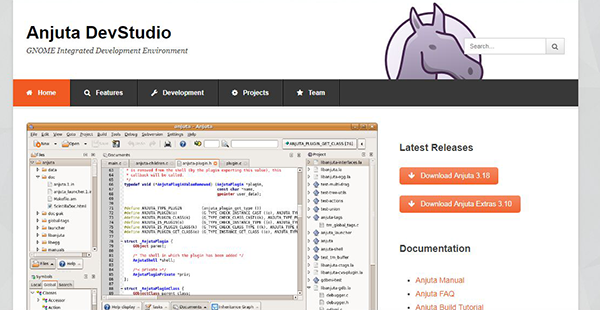
Anjuta is an innovative and versatile integrated development environment (IDE) for GNOME projects. It’s a simple-to-operate yet powerful software that provides an extensible and customizable IDE framework to fulfill the most demanding programming needs. The program offers implementations for the basic development tools and exhibits stellar support for C/C++, Java, Python, JavaScript, and Vala programming languages.
It delivers power and usability for seamless IDE experience without overloading user’s senses. Anjuta features a set of cutting-edge programming facilities which include easy-to-use user-interface, interactive debugger, file manager, project manager, project wizards, source code editor, integrated Glade User Interface (GUI) designer, integrated GDB, integrated Devhelp API help browser, version control, profiler, and plugins. These tools and features work in unison to set the stage for efficient app development.
Show MoreOverview of Anjuta Benefits
Anjuta is a sophisticated IDE that is friendly and easy to use for C/C++ programmers. The software is extensible with plugins; it gives users the freedom to implement or extend almost all its features via plugins. Its IDE plugin framework is built on the reliable Libanjuta framework which makes it easy for developers to dynamically enable or disable plugins at will. The application maintains a persistent set of active plugins for each project thus simplifying projects with varying levels of complexity.
Its simple user-interface adopts an advanced and flexible docking system that enables users to customize the layout to suit the way they work. The IDE allows to you to drag and drop the views to maintain unique layouts for different projects. It avails minimizable docks that eliminate clutters in the main workspace.
The source code editor provides powerful tools that facilitate reliable and stable code editing. Anjuta provides two editors (Scintilla-based editor and the GtkSourceView-based editor) which can be used interchangeably barring some slight differences in their functionalities. Both editors support syntax highlighting for the common programming language and display versatility via the code completion feature. They autocomplete common symbols and offer type-ahead suggestions to expedite code editing. Additionally, the editor utilizes incremental search feature to allow users to search instantly as they type search strings.
Anjuta comes with an integrated Glade User Interface (GUI) designer. This is a robust GTK+/GNOME graphical user interface the takes a WYSIWYG approach to empower programmers to create application’s interface visually. The project manager is another noteworthy feature of Anjuta. This feature ensures project processing is instantly and directly done within the existing project structure. This makes it easy for all projects to be developed or maintained outside the platform without the need to convert from or to an Anjuta-specific format.
Show MoreOverview of Anjuta Features
- Interactive debugger
- File manager
- Project manager
- Project wizards
- Source code editor
- Integrated Glade User Interface (GUI) designer
- Integrated GDB
- Integrated Devhelp API help browser
- Version control
- Profiler
- Plugins
Anjuta Position In Our Categories
Since businesses have special business-related needs, it is only practical that they abstain from buying a one-size-fits-all, ”best” software. Be that as it may, it would be futile to try to find such a software solution even among popular software products. The practical step to undertake should be to narrow down the numerous critical functions that merit scrutiny including crucial features, pricing, skill levels of the employees, organizational size, etc. After which, you must follow through your research comprehensively. Read some of these Anjuta reviews and check out the other software options in your shortlist more closely. Such comprehensive research ascertain you circumvent unsuitable applications and choose the system that delivers all the tools your business requires in growing the business.
Position of Anjuta in our main categories:
TOP
50
Anjuta is one of the top 50 IDE Software products
If you are interested in Anjuta it may also be a good idea to investigate other subcategories of IDE Software gathered in our base of SaaS software reviews.
Since each organization has unique business requirements, it is sensible for them to refrain from searching for a one-size-fits-all perfect software system. Needless to say, it would be pointless to try to find such a system even among market-leading software platforms. The smart thing to do would be to jot down the various important factors that need consideration such as required features, budget, skill levels of employees, company size etc. Then, you should do your groundwork thoroughly. Read some Anjuta IDE Software reviews and look into each of the other solutions in your shortlist in detail. Such comprehensive homework can ensure you reject ill-fitting applications and choose the app that presents all the aspects you need for business success.
How Much Does Anjuta Cost?
Anjuta Pricing Plans:
Free Trial
Anjuta
Free
What are Anjuta pricing details?
Anjuta Pricing Plans:
Free Trial
Anjuta
Free
Anjuta is a free IDE, thus the vendor provides no enterprise pricing details.
User Satisfaction
Positive Social Media Mentions
64
Negative Social Media Mentions
1
We know that when you decide to buy a IDE Software it’s crucial not only to see how experts rank it in their reviews, but also to discover if the actual clients and businesses that use it are genuinely satisfied with the service. That’s why we’ve created our behavior-based Customer Satisfaction Algorithm™ that gathers customer reviews, comments and Anjuta reviews across a wide array of social media sites. The information is then displayed in a simple to understand form revealing how many customers had positive and negative experience with Anjuta. With that information available you should be ready to make an informed purchasing decision that you won’t regret.
Technical details
Devices Supported
- Windows
- Linux
- Mac
Deployment
- On Premise
Language Support
- English
Pricing Model
- Free
Customer Types
- Small Business
- Medium Business
What Support Does This Vendor Offer?
- phone
- live support
- training
- tickets
What integrations are available for Anjuta?
No available information.

Anjuta
is waiting for
your first review.

Write your own review of this product
ADD A REVIEWMore reviews from 0 actual users:


Join a community of 7,369 SaaS experts
Thank you for the time you take to leave a quick review of this software. Our community and review base is constantly developing because of experts like you, who are willing to share their experience and knowledge with others to help them make more informed buying decisions.
Sign in with LinkedIn
Why we require LinkedIn?
- Show the community that you're an actual user.
- We will only show your name and profile image in your review.
- You can still post your review anonymously.
OR
Sign in with company emailSign in with company email
Popular Anjuta Alternatives





Top Competitors To Anjuta By Price
Product name:
Price:




Trending IDE Software Reviews


Anjuta Comparisons
Product name:







Page last modified


Did you find this review useful?
Yes
No
Thank you for your feedback
How can we make this page better?
Unsure about this software?
FIND ALTERNATIVES
 Why is FinancesOnline free?