
- Home
- IDE Software
- Aqua Data Studio

Aqua Data Studio Review



What is Aqua Data Studio?
Aqua Data Studio is a database integrated development environment used by database developers, database administrators, and analysts to develop, access, manage, and analyze data. This productivity software is developed by AquaFold together with other innovative software solutions and tools for software professionals. Aqua Data Studio can handle different types of databases, such as relational, nosql, and cloud database. Supporting all the major database vendors and operating systems, the software is trusted by many IT professionals, large corporations, educational institutions, and companies in a variety of industries.
Aqua Data Studio is a universal IDE for databases, allowing the effortless designing, administration, and automation of the latest types of databases. It permits users to explore and analyze data through the aid of beautiful visualizations and dashboards that they can create and share with their colleagues. Aqua Data Studio has an advanced query and analysis tool that enables users to connect to any database server and write SQL statements automatically. With its table data editor, users will be able to easily alter table data with a grid similar to Excel.
The database IDE also delivers a set of integrated SQL debuggers for tracing and debugging stored procedures, functions, and packages. Aqua Data Studio features a tool which makes searching for database objects a breeze. To reverse engineer existing databases and design detailed physical database models, it provides a tool called ER or Entity Relationship Modeler. Furthermore, Aqua Data Studio offers a suite of database administration tools which are customized for various database vendors. The software also comes with interactive shells that automate database tasks. The other features included in Aqua Data Studio are version control, compare and synchronization tools, import and export tools, Secure Shell Environment, and open APIs.
Show MoreOverview of Aqua Data Studio Benefits
Database IDE With A Workspace Environment
Aqua Data Studio is a modern database IDE that provides users with a workspace environment to streamline and automate the administration and designing of databases, regardless of their type or class. This workspace environment enables them to organize and navigate through query windows, files, and documents with flexibility.
Visual Analytics
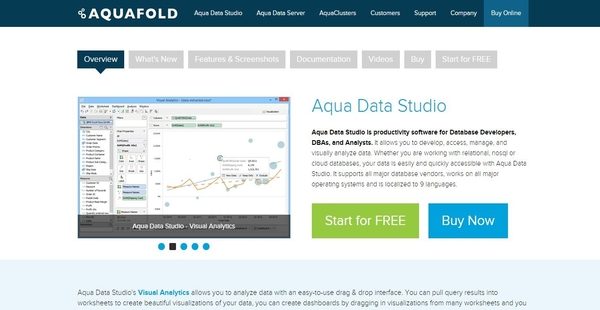
Visual analytics is among the noteworthy features available in Aqua Data Studio. Designed with an easy-to-use drag-and-drop interface, Aqua Data Studio lets users create different visual representations of data by pulling in query results and aggregating datasets into individual pages which are referred to as worksheets.
These worksheets then together with the visual representations that comprise them can be placed on dashboards that provide a single and summary view of the worksheets. The layout of the dashboards can also be customized and their content can be filtered, making them more interactive. These dashboards can be shared with colleagues and customers, and worksheets can be saved in workbooks so others can explore and analyze data.
Advanced Query And Analysis Tools
Aqua Data Studio is built with query and analysis tools which permit users to connect to database servers and create and execute queries effortlessly. One of these tools is its powerful visual query builder which enables them to construct SQL queries without the need of typing any SQL statements. In addition, they will be able to directly select tables or views directly from Aqua Data Studio’s UI using column selection options. A rich set of visual options are also provided in order for users to combine SQL properties which include JOINs, indexes, operators, aliases, and criteria.
Another query and analysis tool offered by Aqua Data Studio is its advanced query analyzer. This tool helps users save time in writing SQL statements. It has the capability to automatically insert frequently used SQL statements in a code such as select, deselect, or insert. Through its SQL abbreviation feature, users can define SQL abbreviations to automatically complete lengthy blocks of SQL statements with just a few keystrokes. The query analyzer delivers a feature called Pivot and Charts which assist users in quickly analyzing large amount of table data and generating graphical representations of datasets.
Powerful Table Data Editor
Aqua Data Studio is equipped with a powerful table data editor that has grid editing features and functionalities similar to Excel. Users will be able to fill, copy or paste, or find and replace cell data like how they do it in Excel. The table data editor also checks whether the entered data has the proper format based on its type. In addition, color codes are applied to cells as users edit table data. This way, they can easily track the changes they have made.
Object Search And Visual Editing
To quickly search for objects within a database, Aqua Data Studio introduces a tool named as Object Search Tool. With this tool, database objects can be searched based on type, schema name, object name, column name, index columns, constraint columns, trigger columns, or systems objects. Search results can also be filtered and sorted. As users browse database objects, Aqua Data Studio lets them visually edit these objects.
Entity Relationship Modeler
Aqua Data Studio comes with an ER or Entity Relationship modeler which is used to build and manage ER diagrams and physical database models. It supports the creation of physical database models for all major RDBMS or Relational Database Management System vendors and versions. The modeler permits users to reverse engineer existing databases so they can generate and visualize database structures and models. They can import tables and views from databases to their ER models as well as compare two ER models. The ER modeler can also forward engineer models into databases. Thus, ER diagrams are converted into DDL or Data Definition Language scripts.
Schema Comparison With Synchronization
The database IDE provides compare and synchronization tools which enable users to identify the differences in DDL between two schema objects from different databases. Through the aid of a color-coded grid, they will be able to quickly view the differences between schema objects. Differences can be deployed from the source schema to the target schema, allowing synchronization between the two schemas. Additionally, the results of the schema comparison can be saved as an HTML report.
Interactive Database Shells
Aqua Data Studio is built with interactive database shells which make the administration of databases a breeze. One of these database shells is the FluidShell, a database shell which integrates the functionality of a Unix shell with the SQL command line. As a result, it enables users to automatically extract, transform, and load data from a single database shell.
Another database shell included in Aqua Data Studio is the MongoShell. This is a JavaScript shell which also utilizes the versatility of the Unix shell and combines it with the native mongo command line. MongoShell is used for the administration and maintenance of MongoDB clusters.
Integrated SQL Debuggers
Summing it up, Aqua Data Studio offers integrated SQL debuggers for Oracle, IBM DB2 UDB, Microsoft SQL Server, and Sybase ASE. With these debuggers, users can debug stored procedures, functions, and packages. They will be able to easily assess the variables and conditional flows of codes by setting breakpoints and using stepping functionalities – step into, step over, and step return.
Show MoreOverview of Aqua Data Studio Features
- Universal IDE for Databases
- Visual Analytics
- Query and Analysis
- Visual Query Builder
- Query Analyzer
- Object Search Tool
- Visual Object Editing
- Table Data Editor
- ER Entity Relationship Modeler
- Schema Compare with Synchronization and Data Compare File Compare
- FluidShell
- MongoShell for MongoBD
- Database Administration Tools
- Integrated SQL Debuggers
- Import and Export
- SSH (Integrated Secure Shell)
- Open APIs
- Integrated SVN, Git, CVS and Perforce Version Control
- Spectacular 2D and 3D Charts
- Visual Explain Plans
Aqua Data Studio Position In Our Categories
Because businesses have their own business-related wants, it is practical they avoid choosing a one-size-fits-all, “perfect” software. Still, it is hard to chance on such application even among well-known software solutions. The reasonable step to do is to set down the various major functions that entail careful thought like important features, price terms, technical skill aptitude of the employees, company size, etc. Thereafter, you should follow through the product research exhaustively. Read some of these Aqua Data Studio evaluations and check out each of the software products in your list more closely. Such all-encompassing product research makes sure you weed out mismatched applications and buy the one which has all the aspects your business requires.
Position of Aqua Data Studio in our main categories:
TOP
50
Aqua Data Studio is one of the top 50 IDE Software products
If you are interested in Aqua Data Studio it might also be beneficial to analyze other subcategories of IDE Software gathered in our database of B2B software reviews.
Each enterprise has different requirements and requires a software that can be customized for their size, type of employees and clients, and the specific industry they are in. For these reasons, no software can provide perfect functionality out-of-the-box. When you search a software app, first be sure what you want it for. Read some Aqua Data Studio IDE Software reviews and ask yourself do you need basic tools or do you want sophisticated tools? Are there any industry-specific tools that you are searching for? Obtain the answers to these queries to help your search. There are plenty of factors that you need to consider and these include your budget, specific business needs, your organization size, integration needs etc. Take your time, check out a few free trials, and finally zero in on the platform that presents all that you want to boost your organization effectiveness and productivity.
How Much Does Aqua Data Studio Cost?
Aqua Data Studio Pricing Plans:
Free Trial
Single-user license
$499.00 per User
1 to 20 users
$499.00 per user
21 to 50 users
$469.00 per user
51 to 100 users
$439.00 per user
101+ users
$409.00 per user
Aqua Data Studio Licensing
Contact vendor
What are Aqua Data Studio pricing details?
Aqua Data Studio Pricing Plans:
Free Trial
Single-user license
$499.00 per User
1 to 20 users
$499.00 per user
21 to 50 users
$469.00 per user
51 to 100 users
$439.00 per user
101+ users
$409.00 per user
Aqua Data Studio Licensing
Contact vendor
Aqua Data Studio can be availed on a per-user basis, and discounts are offered depending on the number of users in your organization. You can also visit its official website to get more information about the SMB and enterprise pricing options that you can choose from, and contact the vendor to request a quote. Here are the details:
$499 Per User
- One single-user license of Aqua Data Studio provides a user unlimited native support to 28 major database vendors along with generic JDBC/ODBC support for any number of additional database vendors.
Aqua Data Studio Pricing With Quantity Discounts
- 1 to 20 users – $499.00 per user
- 21 to 50 users – $469.00 per user
- 51 to 100 users – $439.00 per user
- 101+ users – $409.00 per user
Aqua Data Studio Licensing
- Licensing Options
- Single license key per user – Normally used by groups with less than 50 users.
- One Enterprise license for single key distribution for named users – Generally used by groups with 50 to 200 licenses.
- One Enterprise license for single key distribution for all users – Generally used by organizations with 200+ licenses.
- Subscription -Provide access to customer support, maintenance and upgrades to the purchased software product.
- Evaluation – You may download and evaluate a fully functional version of Aqua Data Studio for 14 days before purchasing a license.
User Satisfaction
Positive Social Media Mentions
123
Negative Social Media Mentions
0
We are aware that when you decide to buy a IDE Software it’s vital not only to see how experts rank it in their reviews, but also to check whether the real users and companies that bought this software are genuinely happy with the service. Because of that need we’ve created our behavior-based Customer Satisfaction Algorithm™ that gathers customer reviews, comments and Aqua Data Studio reviews across a vast range of social media sites. The information is then presented in a simple to digest format indicating how many clients had positive and negative experience with Aqua Data Studio. With that information available you will be ready to make an informed buying choice that you won’t regret.
Video
Technical details
Devices Supported
- Windows
- Linux
- Mac
- Web-based
Deployment
- Cloud Hosted
- Open API
Language Support
- English
- Chinese
- German
- Hindi
- Japanese
- Spanish
- French
- Russian
- Italian
- Dutch
- Portugese
- Polish
- Turkish
- Swedish
Pricing Model
- Annual Subscription
- Quote-based
Customer Types
- Small Business
- Large Enterprises
- Medium Business
What Support Does This Vendor Offer?
- phone
- live support
- training
- tickets
What integrations are available for Aqua Data Studio?
Aqua Data Studio supports the following database platforms:
- SQL Server
- Oracle
- MongoDB
- MySQL
- PostreSQL
- Excel

Aqua Data Studio
is waiting for
your first review.

Write your own review of this product
ADD A REVIEWMore reviews from 0 actual users:


Join a community of 7,369 SaaS experts
Thank you for the time you take to leave a quick review of this software. Our community and review base is constantly developing because of experts like you, who are willing to share their experience and knowledge with others to help them make more informed buying decisions.
Sign in with LinkedIn
Why we require LinkedIn?
- Show the community that you're an actual user.
- We will only show your name and profile image in your review.
- You can still post your review anonymously.
OR
Sign in with company emailSign in with company email
Popular Aqua Data Studio Alternatives



Top Competitors To Aqua Data Studio By Price
Product name:
Price:




Trending IDE Software Reviews


Aqua Data Studio Comparisons
Product name:





Page last modified


Did you find this review useful?
Yes
No
Thank you for your feedback
How can we make this page better?
Unsure about this software?
FIND ALTERNATIVES
 Why is FinancesOnline free?