

Commusoft Review


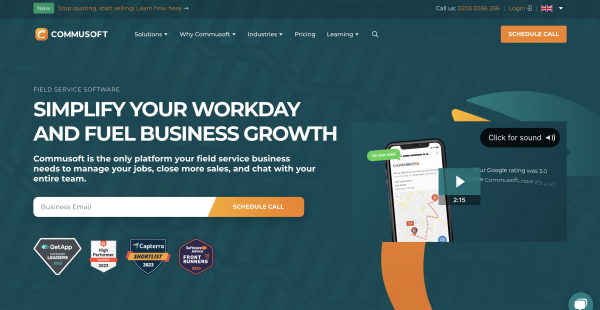

What is Commusoft?
Commusoft is a leading field service management software company designed to empower service-oriented businesses across various industries. This comprehensive platform provides many features and tools to enhance the customer experience, streamline operations, and promote business growth. With Commusoft, a company’s field service operations can be well managed. Some of the most important features include advanced dispatching and scheduling tools, customer management tools for keeping detailed records technicians have the right parts, and streamlined invoicing and payment processing for faster financial transactions. The software also has good reporting and analytics features that give useful information about how a business is doing and where it could improve. Commusoft also makes it easier to talk to customers by using automated tools like feedback requests and appointment reminders. People who work in the service industry worldwide use Commusoft to improve customer satisfaction, streamline operations, and make more money. In today’s cutthroat business world, it is a complete solution that makes field service management easier to understand.
Show MoreOverview of Commusoft Benefits
Enhanced Efficiency
Commusoft automates various aspects of your field service operations, reducing manual tasks and paperwork. This makes the job go faster and makes the business more productive. By making things like scheduling, inventory management, and billing easier, Commusoft lets your team focus on giving great customer service. Also, automating repetitive tasks reduces the chance of human error and ensures that data entry is correct.
Scheduling and Dispatch
The software has advanced scheduling and dispatch tools that let you optimize technician schedules, give jobs to technicians in an efficient way, and cut down on travel time, all of which save money. The software also sends out notifications and updates in real-time. This ensures that technicians are always aware of any changes to their schedule and improves overall efficiency and customer satisfaction. It also makes it easy for technicians to coordinate with clients and talk to them, speeding up service and reducing response times.
Customer Management
Commusoft helps you keep detailed records of your customers, such as their service history, preferences, and contact information. This information makes it possible to provide personalized service and makes customers happier. Also, Commusoft’s customer management feature makes it easy to track how customers have talked to you and when.
Inventory Management
You can keep track of your stock in real time, ensuring you have the right parts and tools to finish jobs quickly. This cuts down on wait times and improves customer service. Also, Commusoft’s inventory management feature lets you set up automatic reordering for items that are used often. This keeps you from running out of stock and keeps things running smoothly.
Mobile Accessibility
Technicians can use their mobile devices to check job details, customer information, and work orders in the field. This ensures they have all the information they need to do their jobs well. Thanks to mobile access, technicians can create invoices, change the status of jobs, and keep track of tasks they’ve already done while on the go. This increases productivity and efficiency by streamlining the workflow and eliminating the need to complete paperwork by hand.
Invoicing and Payments
Commusoft makes the billing process easier, so you can make invoices quickly and correctly. You can also take payments right there, reducing how long it takes to get paid. Also, Commusoft lets you email invoices directly to clients, so you don’t have to print them out and mail them. This not only saves customers and businesses time and money, but it also makes things easier and better for the environment.
Show MoreOverview of Commusoft Features
- Reporting and Analytics
- Compliance and Documentation
- Customer Communication
- Scalability
- Cost Savings
- Integration
- Customer Loyalty
What Problems Will Commusoft Solve?
Problem #1: Poor dispatching and scheduling can cause delays in delivering goods or services, leaving customers unhappy and reducing productivity.
Solution: Commusoft offers advanced scheduling and dispatch tools, enabling businesses to optimize technician schedules, assign jobs efficiently, and reduce travel time. This leads to improved resource utilization and on-time service delivery.
Problem #2: Lack of customer information can lead to misunderstandings and miscommunications between businesses and their customers, resulting in dissatisfaction and a loss of trust.
Solution: With Commusoft, companies can keep full records of their customers, including their contact information, preferences, and service histories. This lets you give more personalized service, improve customer communication, and cross-sell or up-sell extra services.
Problem #3: Inventory Management Challenges can result in stockouts, overstocking, and the inefficient use of resources.
Solution: Commusoft offers real-time inventory tracking, ensuring organizations have the supplies and tools to quickly finish jobs. This lessens delays, raises customer satisfaction, and controls inventory costs.
Problem #4: Manual and time-consuming invoicing can cause mistakes, hold up the processing of payments, and impair the effectiveness of financial management.
Solution: Commusoft automates the billing process for efficient and precise invoice generation. Additionally, it permits on-site payment acceptance, minimizing billing delays and enhancing cash flow.
Awards & Quality Certificates

Commusoft Position In Our Categories
Since businesses have distinct business demands, it is rational they steer clear of selecting a one-size-fits-all, ”best” business program. Be that as it may, it would be almost impossible to pinpoint such application even among branded software systems. The best step to do should be to narrow down the varied critical functions which require inspection including major features, packages, technical skill aptitude of staff, business size, etc. Next, you should perform the product research thoroughly. Browse through some Commusoft reviews and scrutinize each of the software products in your list in detail. Such all-encompassing research ensures you steer clear of ill-fitting software solutions and pay for the one that includes all the function your business requires to achieve growth.
Position of Commusoft in our main categories:
TOP
3
Commusoft is one of the top 3 Field Service Management Software products
If you are considering Commusoft it could also be sensible to analyze other subcategories of Field Service Management Software collected in our database of B2B software reviews.
Every company has its own characteristics, and might call for a specific Field Service Management Software solution that will be adjusted to their company size, type of customers and employees and even individual niche they support. We advise you don't count on locating an ideal services that will work for every company no matter what their background is. It may be a good idea to read a few Commusoft Field Service Management Software reviews first and even then you should keep in mind what the software is supposed to do for your company and your staff. Do you need a simple and straightforward app with just essential functions? Will you really make use of the complex tools required by experts and large enterprises? Are there any particular features that are especially practical for the industry you work in? If you ask yourself these questions it is going to be much easier to find a reliable app that will fit your budget.
How Much Does Commusoft Cost?
Commusoft Pricing Plans:
Free Trial
Commusoft Jobs: Go Paperless
Contact Vendor
Commusoft Jobs: Customer Journey
Contact Vendor
Commusoft Jobs: Automation
Contact Vendor
Commusoft Sales: Sales Starter
Contact Vendor
Commusoft Sales: Sales Growth
Contact Vendor
Commusoft Sales: Sales Team
Contact Vendor
Commusoft Chat: Chat Lite
Contact Vendor
Commusoft Chat: Chat Pro
Contact Vendor
What are Commusoft pricing details?
Commusoft Pricing Plans:
Free Trial
Commusoft Jobs: Go Paperless
Contact Vendor
Commusoft Jobs: Customer Journey
Contact Vendor
Commusoft Jobs: Automation
Contact Vendor
Commusoft Sales: Sales Starter
Contact Vendor
Commusoft Sales: Sales Growth
Contact Vendor
Commusoft Sales: Sales Team
Contact Vendor
Commusoft Chat: Chat Lite
Contact Vendor
Commusoft Chat: Chat Pro
Contact Vendor
Commusoft offers flexible pricing options for its leading software solutions. All plans are priced per license per month on a 12-month contract. Get in touch for a quote on the following plans:
Commusoft Jobs:
Go Paperless – By Quote
- Core features include jobs, invoices, and mobile app
- Track vehicles to plan and schedule work
- Manage parts and suppliers for streamlined purchasing
- Design and build custom forms
- Secure jobs with service contracts and PPM
- Streamline communications using online portals
Customer Journey – By Quote
- Everything in Go Paperless +
- Enable customers to book services online
- Help the scheduling team with route optimization
- Control the flow of stock with a multi-location system
- Automate invoicing and streamline cash flow
- Handle large clients with SLA monitoring and a customer portal
Automation – By Quote
- Everything in Customer Journey +
- Automate everyday processes to streamline operations
- Book multiple jobs with mass scheduling
- Safeguard data with customizable security roles
- Keep the team accountable with full system audits
- Access additional account storage per licensed user
Commusoft Sales:
Sales Starter – By Quote
- Know every interaction and detail across each opportunity
- Track and organize opportunities across one default sales pipeline
- Build proposals with a drag-and-drop editor
- Allow customers to view and accept proposals online
- Offer customers multiple options and add-ons
- Template opportunities, proposals, and options
- Understand and control profit margins for each proposal
Sales Growth – By Quote
- All features included in Commusoft Sales Starter +
- Automate customer follow-ups with sequences
- Increase profits with upselling tools
- Edit sales pipeline stages to suit company needs
- Create as many sales pipelines
- Include add-ons at the option level for customization
Sales Team – By Quote
- Contact Commusoft for more information
Commusoft Chat:
Chat Lite – By Quote
- Securely chat with the entire company on one platform
- Create channels, group chats, and direct messages
- Log job conversations directly to the job record
- Chat from the web or mobile with Android and iOS apps
Chat Pro – By Quote
- Contact Commusoft for more information
User Satisfaction
Positive Social Media Mentions
23
Negative Social Media Mentions
0
We are aware that when you choose to get a Field Service Management Software it’s important not only to see how experts evaluate it in their reviews, but also to check if the real users and companies that bought these solutions are indeed content with the product. That’s why we’ve created our behavior-based Customer Satisfaction Algorithm™ that aggregates customer reviews, comments and Commusoft reviews across a vast range of social media sites. The data is then presented in an easy to digest form showing how many clients had positive and negative experience with Commusoft. With that information available you will be equipped to make an informed purchasing decision that you won’t regret.
Video
Technical details
Devices Supported
- Windows
- Android
- iPhone/iPad
- Mac
- Web-based
Deployment
- Cloud Hosted
Language Support
- English
Pricing Model
- Quote-based
Customer Types
- Small Business
- Medium Business
What Support Does This Vendor Offer?
- phone
- live support
- training
- tickets
What integrations are available for Commusoft?
- Gmail
- MailChimp
- Zapier
- Xero
- Sage Accounting
- FreeAgent
- QuickBooks Online
- QuickBooks Desktop
- SumUp
- Stripe
- Zapier
- Outlook Calendar
- Google Calendar

Commusoft
is waiting for
your first review.

Write your own review of this product
ADD A REVIEWMore reviews from 0 actual users:


Join a community of 7,369 SaaS experts
Thank you for the time you take to leave a quick review of this software. Our community and review base is constantly developing because of experts like you, who are willing to share their experience and knowledge with others to help them make more informed buying decisions.
Sign in with LinkedIn
Why we require LinkedIn?
- Show the community that you're an actual user.
- We will only show your name and profile image in your review.
- You can still post your review anonymously.
OR
Sign in with company emailSign in with company email
Popular Commusoft Alternatives

Top Competitors To Commusoft By Price
Product name:
Price:
Trending Field Service Management Software Reviews
Commusoft Comparisons
Product name:

Page last modified
Award Winner


Did you find this review useful?
Yes
No
Thank you for your feedback
How can we make this page better?
Unsure about this software?
FIND ALTERNATIVES
 Why is FinancesOnline free?