
- Home
- CAD Software
- LibreCAD

LibreCAD Review



What is LibreCAD?
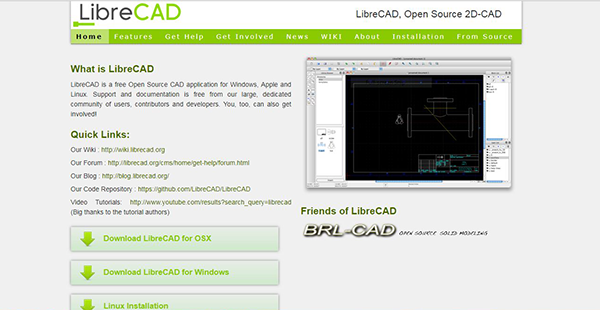
LibreCAD is an extensive, free, and open-source 2D computer-aided design program that you can easily download, install, and use. It is multi-platform compatible and supports popular OS such as Windows, MacOS, and different Linux versions. Although it doesn’t have 3D capability, the software offers an array of tools and various options that lets you create complex designs from a basic 2D model.
LibreCAD is intended for creators of industrial designs as well as for professionals looking for a precision drawing tool for use in small design projects. it is straightforward to use, has multi-language capability, and boasts of an active global community where you can get vital document and free expert support.
Show MoreOverview of LibreCAD Benefits
LibreCAD is an all-in-one, free CAD application that allows industrial designers and graphics enthusiasts to create CAD projects of the highest standard. It’s an easy-to-use solution that permits users to create complex models, edit previous models, and a lot of layers in a couple of minutes.
When launched, the software presents a window with layer tools and the main working area. Most of the categories including layer, block, draw, dimension, and others can easily be accessed via the menu bar. The interface is highly customizable; it gives you the freedom to drag the elements over the working area and set them where you deem fit. The GUI is built on Qt4 libraries which means it can easily operate on different platforms without altering its look and performance.
LibreCAD is an open-source application available under the General Public License (GPLv2). This means it’s free to use, customize, and copy this feature-packed solution. It accords users the freedom to download, deploy, or distribute it freely without the fear of copyright breach.
Another thing worth mentioning is that LibreCAD is a cross-platform, community-driven program. Users enjoy the user and developer support from an experienced developer team and active community worldwide. The solution is also available in multiple languages, with more being frequently added to eliminate language barrier. Better still, LibreCAD is available for all the major operating systems (OS) namely Windows, Linux, and MacOS.
Show MoreOverview of LibreCAD Features
- Open and save
- Export multiple file format
- Modify features
- Draw point
- Dimensions
- Snap
- Info
LibreCAD Position In Our Categories
Knowing that businesses have specific business demands, it is only reasonable that they abstain from deciding on a one-size-fits-all, “perfect” business program. Needless to say, it would be futile to chance on such an app even among recognizable software systems. The reasonable thing to undertake should be to spell out the various critical aspects which require investigation like major features, costing, technical skill aptitude of staff members, business size, etc. Next, you should double down on your research comprehensively. Browse through these LibreCAD evaluations and explore the other applications in your list in detail. Such all-encompassing research makes sure you take out unsuitable applications and choose the system which provides all the function your company requires in growing the business.
Position of LibreCAD in our main categories:
TOP
50
LibreCAD is one of the top 50 CAD Software products
There are popular and widely used applications in each software category. But are they necessarily the best fit for your company’s unique wants? A trendy software solution may have thousands of subscribers, but does it provide what you require? For this reason, do not blindly shell out for popular systems. Read at least a few LibreCAD CAD Software reviews and consider the aspects that you want in the software such as the cost, main features, available integrations etc. Then, select a few systems that fit your needs. Check out the free trials of these platforms, read online reviews, get explanations from the maker, and do your research meticulously. This profound research is sure to assist you select the best software solution for your organization’s special needs.
How Much Does LibreCAD Cost?
LibreCAD Pricing Plans:
Free Trial
LibreCAD
Free
What are LibreCAD pricing details?
LibreCAD Pricing Plans:
Free Trial
LibreCAD
Free
LibreCAD is a free open source software, there are no enterprise pricing plans. Users can download, install, and use the software without using a single cent.
User Satisfaction
Positive Social Media Mentions
48
Negative Social Media Mentions
2
We realize that when you make a decision to purchase a CAD Software it’s vital not only to learn how professionals evaluate it in their reviews, but also to find out if the actual users and companies that purchased these solutions are genuinely content with the product. Because of that need we’ve designer our behavior-based Customer Satisfaction Algorithm™ that aggregates customer reviews, comments and LibreCAD reviews across a vast range of social media sites. The information is then featured in a simple to digest format revealing how many clients had positive and negative experience with LibreCAD. With that information at your disposal you should be prepared to make an informed purchasing decision that you won’t regret.
Video
Technical details
Devices Supported
- Windows
- Linux
- Mac
Deployment
- On Premise
Language Support
- English
Pricing Model
- Free
Customer Types
- Small Business
- Medium Business
What Support Does This Vendor Offer?
- phone
- live support
- training
- tickets
What integrations are available for LibreCAD?
LibreCAD integrates with the following applications:
- JetBrains
LibreCAD User Reviews
LibreCAD average rating:
4/5
Overall impression
5/5
Customer Support
4/5
Value for Money
4/5
Ease of Use
Write your own review of this product
ADD A REVIEWThe most favorable review

PROS: For its free price, I can already create amazing 2D and 3D design.
CONS: More add-ons and templates will be awesome. But for software without a charge, that may already be asking for too much.
The least favorable review
PROS: If you are only beginning at designing, this is the best program to use as it is free. The UI is also easy to use.
CONS: I can't think of anything to complain about this software. Now, that's a first for me.
More reviews from 10 actual users:
Sort by:
Latest
- Latest
- Most useful
- Most positive
- Most negative
Free software that is great for designing
Read full review >
4/5
Overall impression
4/5
Customer Support
3/5
Value for Money
4/5
Ease of Use
Published on: 18.10.2021
Company Size: 11-50 Employees
Industry: Information Technology and Services
PROS: It's great because it is free and offers the same features as the other software you have to pay for. It also has a simple interface, making it easy to use. I can use it to measure and add details to my designs.
CONS: Unless you update it to the latest version, you tend to experience some issues with its performance. Other than that, it is great for a free software.
A very helpful application
Read full review >
4/5
Overall impression
3/5
Customer Support
4/5
Value for Money
3/5
Ease of Use
Published on: 18.09.2021
Company Size: More than 100 Employees
Industry: N/A
PROS: It is free to use and can cater to any language.
CONS: It can be hard to learn how to use it.
A lovely editing software
Read full review >
4/5
Overall impression
4/5
Customer Support
4/5
Value for Money
4/5
Ease of Use
Published on: 02.09.2021
Company Size: More than 100 Employees
Industry: N/A
PROS: It is free and is very easy to use because of its simple interface.
CONS: The professional version is quite pricey.
2D and 3D design is superb
Read full review >
5/5
Overall impression
5/5
Customer Support
4/5
Value for Money
4/5
Ease of Use
Published on: 03.04.2021
Company Size:
Industry: N/A
PROS: For its free price, I can already create amazing 2D and 3D design.
CONS: More add-ons and templates will be awesome. But for software without a charge, that may already be asking for too much.
A great application for designing
Read full review >
4/5
Overall impression
4/5
Customer Support
4/5
Value for Money
4/5
Ease of Use
Published on: 01.01.2021
Company Size: More than 100 Employees
Industry: N/A
PROS: It is relatively easy to use. It allows me to create jpg and png picture groups. I can also create a pdf configuration for logos. Because of its easy to use features, I was also able to topographic outlines easily. Overall, it is a great application for beginners and experts alike. I can honestly say that I am pleased with the features it offers.
CONS: The vector feature and 3D model plans need improvement. There were some errors whenever I create vectors. The programming should also be fixed as it causes errors at times.
A great alternative for AutoCAD
Read full review >
5/5
Overall impression
5/5
Customer Support
4/5
Value for Money
5/5
Ease of Use
Published on: 29.12.2020
Company Size: 1-10 Employees
Industry: N/A
PROS: LibreCAD is free, so that's a plus point. It also runs on Linux and Wintel Machines. Also, since it is similar to AutoCAD and Photoshop, it is quite easy to use.
CONS: The UI needs improvement, but I have no complaints as it has no cost.
It is absolutely free
Read full review >
4/5
Overall impression
4/5
Customer Support
3/5
Value for Money
4/5
Ease of Use
Published on: 10.04.2020
Company Size: More than 100 Employees
Industry: N/A
PROS: If you are only beginning at designing, this is the best program to use as it is free. The UI is also easy to use.
CONS: I can't think of anything to complain about this software. Now, that's a first for me.
I love drawing using LibreCAD
Read full review >
5/5
Overall impression
4/5
Customer Support
5/5
Value for Money
4/5
Ease of Use
Published on: 02.04.2020
Company Size: More than 100 Employees
Industry: N/A
PROS: It is absolutely free and I can easily control the dimension of drawn lines, which makes it very convenient.
CONS: I am in love with LibreCAD. I don't have anything bad to say.
Easy to use design software
Read full review >
4/5
Overall impression
3/5
Customer Support
3/5
Value for Money
3/5
Ease of Use
Published on: 27.03.2020
Company Size: More than 100 Employees
Industry: N/A
PROS: I can use it to design 2D models and 3D footprint designs. It is also very customizable.
CONS: The layering is hard to track and some files can't be converted.
I am very pleased with LibreCAD
Read full review >
4/5
Overall impression
3/5
Customer Support
4/5
Value for Money
3/5
Ease of Use
Published on: 07.03.2020
Company Size:
Industry: N/A
PROS: It offers a lot of tools to create amazing designs. It is also easy to use and save your outputs. The best part is it is free, so people who can't afford expensive software can readily use this.
CONS: There are some issues in printing the drawings. It is not as accurate on print like the one you drew initially.


Join a community of 7,369 SaaS experts
Thank you for the time you take to leave a quick review of this software. Our community and review base is constantly developing because of experts like you, who are willing to share their experience and knowledge with others to help them make more informed buying decisions.
Sign in with LinkedIn
Why we require LinkedIn?
- Show the community that you're an actual user.
- We will only show your name and profile image in your review.
- You can still post your review anonymously.
OR
Sign in with company emailSign in with company email
Popular LibreCAD Alternatives





Top Competitors To LibreCAD By Price
Product name:
Price:




Trending CAD Software Reviews




LibreCAD Comparisons
Product name:








LibreCAD user reviews
Free software that is great for designing
Read full review >
4/5
Overall impression
4/5
Customer Support
3/5
Value for Money
4/5
Ease of Use
Published on: 18.10.2021
Company Size: 11-50 Employees
Industry: Information Technology and Services
A very helpful application
Read full review >
4/5
Overall impression
3/5
Customer Support
4/5
Value for Money
3/5
Ease of Use
Published on: 18.09.2021
Company Size: More than 100 Employees
Industry: N/A
A lovely editing software
Read full review >
4/5
Overall impression
4/5
Customer Support
4/5
Value for Money
4/5
Ease of Use
Published on: 02.09.2021
Company Size: More than 100 Employees
Industry: N/A
2D and 3D design is superb
Read full review >
5/5
Overall impression
5/5
Customer Support
4/5
Value for Money
4/5
Ease of Use
Published on: 03.04.2021
Company Size:
Industry: N/A
A great application for designing
Read full review >
4/5
Overall impression
4/5
Customer Support
4/5
Value for Money
4/5
Ease of Use
Published on: 01.01.2021
Company Size: More than 100 Employees
Industry: N/A

Page last modified



Did you find this review useful?
Yes
No
Thank you for your feedback
How can we make this page better?
Unsure about this software?
FIND ALTERNATIVES
 Why is FinancesOnline free?