

Shotcut Review



What is Shotcut?
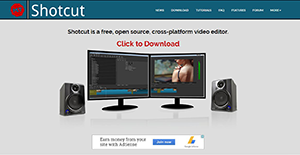
Shotcut is a free and open-source video editing and encoding software that is available for Windows, Mac, and Linux devices. The platform works with resolutions as high as 4K and has a broad format support which highlights its impressive capability. Although, the program is not as professionally and intuitively presented as its competitors, beneath its rough appearance lies a powerful program.
It’s an ideal solution for enthusiastic filmmakers thanks to its array of editing features and audio/video effects. It’s not the most beautiful software available, but you will find little or no culpability in its functionality. Some of the features that make Shotcut a top-notch editor include: Wide format support, multiple audio features, video effects, editing features, cross-platform and codec independent, display and monitoring, and hardware support.
Show MoreOverview of Shotcut Benefits
Shotcut is a reliable, cross-platform video editor that makes editing task simple and effective. Its open source nature means you can alter its source codes to create a high-quality, easily integrated, and secure application. The software is also free, but that doesn’t mean it compromises the basic editing features. It comes with all the tools of a classic video editing program, plus a host of other options that bring it up to date.
Its interface is well laid out to bring the efficiency refinement of features scrutinized by many hands. The preview panel offers a gateway to the quick start guide while the view menu gives you the control over the features displaying on your screen. Its set of features is impressive, but the highlight is innumerous audio and video filters. The filters are fully customizable and can be combined and layered in a raft of interesting ways. Making adjustments is super easy thanks to the straightforward system of sliders and checkboxes. The system is brilliant enough to make the advanced effects easy to understand.
The software is expertly built for a wide format support. Its FFmpeg enables the platform to support hundreds of video and audio formats and codec. It also supports the most popular image formats like GIF, PNG, JPEG, TGA, SVG, TIFF, BMP, plus image sequences. Its native timeline editing eliminates the need for importing media files. In addition, the multi-format timeline allows you to mix & match frames and resolutions within a single project.
Show MoreOverview of Shotcut Features
- Wide format support
- Multiple audio features
- Video effects
- Editing features
- Cross-platform
- Codec independent
- Display and monitoring
- Hardware support
Shotcut Position In Our Categories
Since businesses have special business demands, it is only practical that they avoid choosing a one-size-fits-all, “perfect” business application. Just the same, it would be hard to try to find such an app even among well-known software solutions. The better thing to do would be to note down the different important functions that need inspection including major features, budget, technical skill capability of staff, company size, etc. Thereafter, you should follow through the product research exhaustively. Have a look at some Shotcut reviews and scrutinize the other applications in your shortlist more closely. Such well-rounded research ascertains you avoid poorly fit software solutions and select the one which has all the benefits your business requires for optimal results.
Position of Shotcut in our main categories:
TOP
50
Shotcut is one of the top 50 Video Editing Software products
There are well-liked and widely used applications in each software group. But are they necessarily the best fit for your company’s unique wants? A market-leading software application may have thousands of users, but does it offer what you need? For this reason, do not blindly invest in popular systems. Read at least a few Shotcut Video Editing Software reviews and mull over the elements that you wish to have in the software such as the cost, main features, available integrations etc. Then, select a few apps that fit your wants. Check out the free trials of these products, read online opinions, get explanations from the vendor, and do your research meticulously. This in-depth homework is certain to assist you find the finest software application for your organization’s special requirements.
How Much Does Shotcut Cost?
Shotcut Pricing Plans:
Free Trial
Shotcut
Free
What are Shotcut pricing details?
Shotcut Pricing Plans:
Free Trial
Shotcut
Free
Shotcut is a free editing solution, and comes with no enterprise pricing fees to worry about.
User Satisfaction
Positive Social Media Mentions
190
Negative Social Media Mentions
5
We know that when you decide to buy a Video Editing Software it’s important not only to find out how professionals score it in their reviews, but also to discover whether the real people and businesses that purchased these solutions are genuinely content with the product. That’s why we’ve devised our behavior-based Customer Satisfaction Algorithm™ that gathers customer reviews, comments and Shotcut reviews across a broad array of social media sites. The data is then featured in a simple to digest form indicating how many customers had positive and negative experience with Shotcut. With that information at your disposal you will be ready to make an informed buying choice that you won’t regret.
Video
Technical details
Devices Supported
- Windows
- Linux
- Mac
Deployment
- On Premise
Language Support
- English
- Swedish
Pricing Model
- Free
Customer Types
- Small Business
- Medium Business
- Freelancers
What Support Does This Vendor Offer?
- phone
- live support
- training
- tickets
What integrations are available for Shotcut?
Shotcut integrates with the following applications:
- The Qt company
- Webm
- FFmpeg

Shotcut
is waiting for
your first review.

Write your own review of this product
ADD A REVIEWMore reviews from 0 actual users:


Join a community of 7,369 SaaS experts
Thank you for the time you take to leave a quick review of this software. Our community and review base is constantly developing because of experts like you, who are willing to share their experience and knowledge with others to help them make more informed buying decisions.
Sign in with LinkedIn
Why we require LinkedIn?
- Show the community that you're an actual user.
- We will only show your name and profile image in your review.
- You can still post your review anonymously.
OR
Sign in with company emailSign in with company email
Popular Shotcut Alternatives


Top Competitors To Shotcut By Price
Product name:
Price:



Trending Video Editing Software Reviews

8.5
100%
8.0
100%

9.1
100%


Shotcut Comparisons
Product name:





Page last modified



Did you find this review useful?
Yes
No
Thank you for your feedback
How can we make this page better?
Unsure about this software?
FIND ALTERNATIVES
 Why is FinancesOnline free?