
- Home
- IDE Software
- Stylus Studio

Stylus Studio Review



What is Stylus Studio?
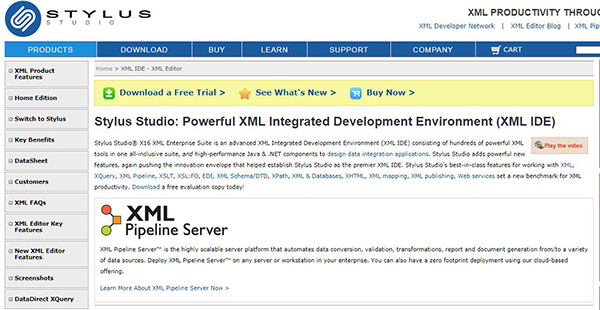
Stylus Studio is an advanced Extensible Markup Language (XML), integrated development environment (IDE) that streamlines XML programming and enhances productivity via innovation. The program provides an all-inclusive suite of powerful XML tools and flexible deployment options that accelerate working with XSLT, XML Schema, XML, XQuery, web services, XML mapping, electronic data exchange (EDI), XML pipeline, XML publishing, and more. It provides high performance .NET and Java components that empower developers to create data integrations applications and set the point of reference for XML productivity.
Stylus Studio is a grade above other XML development tools thanks to its support for XQuery debugging, visual XQuery editing, and XQuery mapping. Some of its main features include XML editing tools, XML publishing tools, XML pipeline tools, schema tools, XQuery development tools, XSLT development tools, XPath development tools, XML mapping tools, Legacy data integration, Java &XML development, web services development tools, and general editing tools.
Show MoreOverview of Stylus Studio Benefits
Stylus Studio is a powerful XML development tool that delivers innovation, value, and developer productivity in a unified suite. One of its most popular features is the XML pipeline server. This is a scalable server platform designed to systematize validation, transformations, report, data conversion, and document generation from/to multiple data sources. The XML pipeline server can be deployed on any workstation or server in your business. However, developers can opt for the cloud offering which delivers a convenient, zero footprint deployment.
Another notable feature is the XML publishing module provides robust tools crafted to streamline XML publishing. The XML report designer allows developers to generate advanced document layouts for multi-channel publishing, XML content management, and single source publishing applications. Stylus Studio presents an intuitive visual interface that empowers developers and programmers to create advanced document layout. The XML publisher exhibits excellent support for multiple heterogeneous data sources such as web services, relational databases, and XML & XML schema documents.
Additionally, Stylus Studio provides powerful web service call composer that helps developers build innovative web service applications. The software also features a robust XML editor that provides a comprehensive set of features including integrated troubleshooting utilities and XML editing views which enables users to work with XML documents with ease. It includes various synchronized, visual XML editing views including grip view, tree view, and text view. The HTML WYSIWYG designer view enables users with little or no HTML syntax knowledge to effortlessly edit content. HTML content edited using the Designer view is lightweight and can be easily be rendered in all browsers.
Show MoreOverview of Stylus Studio Features
- XML editing tools
- XML publishing tools
- XML pipeline tools
- Schema tools
- XQuery development tools
- XSLT development tools
- XPath development tools
- XML mapping tools
- Legacy data integration
- Java &XML development
- Web services development tools
- General editing tools.
Stylus Studio Position In Our Categories
Because businesses have particular business-related wants, it is prudent that they avoid preferring a one-size-fits-all, ideal software. Needless to say, it is difficult to try to pinpoint such an app even among branded software products. The best thing to do would be to set down the different critical factors that demand scrutiny including key features, budget, technical skill ability of staff members, business size, etc. Thereafter, you must double down on the research comprehensively. Go over these Stylus Studio analyses and scrutinize the other software options in your list more closely. Such comprehensive product research ensures you keep away from unfit apps and select the one which delivers all the aspects your company requires.
Position of Stylus Studio in our main categories:
TOP
50
Stylus Studio is one of the top 50 IDE Software products
If you are interested in Stylus Studio it could also be sensible to analyze other subcategories of IDE Software collected in our base of B2B software reviews.
It is essential to keep in mind that virtually no software in the IDE Software category is an ideal solution able to fulfill all the needs of various company types, sizes and industries. It may be a good idea to read a few Stylus Studio IDE Software reviews first as certain software can perform well just in a very narrow set of applications or be prepared with a really specific industry in mind. Others might work with an idea of being easy and intuitive and therefore lack complicated elements welcomed by more experienced users. There are also software that support a large group of users and provide a powerful feature set, however this frequently comes at a higher cost of such a solution. Ensure you're aware of your needs so that you select a solution that offers all the features you look for.
How Much Does Stylus Studio Cost?
Stylus Studio Pricing Plans:
Free Trial
XML enterprise suite
$695/user
XML professional suite
$450/user
XML home edition
$99/user
What are Stylus Studio pricing details?
Stylus Studio Pricing Plans:
Free Trial
XML enterprise suite
$695/user
XML professional suite
$450/user
XML home edition
$99/user
Stylus Studio offers a straightforward enterprise pricing structure with three pricing plans:
XML enterprise suite @ $695/user
- XML editing tools
- XML publishing tools
- XML pipeline tools
- Query development tools
- Schema tools
- XLST development tools
- XML mapping tools
- Legacy data integration, EDI, and data conversion tools
- Java and XML development tools
- Web service development tools
- General editing tools
- SQL editor
XML professional suite @ $ 450/user
- XML editing tools
- Schema tools
- Query development tools
- XLST development tools
- XML mapping tools
- General editing tools
XML home edition @ $99/user
- Schema tools
- XLST development tools
- XML mapping tools
- General editing tools
User Satisfaction
Positive Social Media Mentions
0
Negative Social Media Mentions
0
We know that when you make a decision to buy a IDE Software it’s important not only to see how professionals rank it in their reviews, but also to discover if the actual people and enterprises that use this software are indeed happy with the service. Because of that need we’ve created our behavior-based Customer Satisfaction Algorithm™ that aggregates customer reviews, comments and Stylus Studio reviews across a wide array of social media sites. The data is then featured in an easy to digest way revealing how many clients had positive and negative experience with Stylus Studio. With that information at your disposal you will be prepared to make an informed purchasing decision that you won’t regret.
Video
Technical details
Devices Supported
- Windows
- Linux
- Mac
Deployment
- On Premise
Language Support
- English
Pricing Model
- One-time payment
Customer Types
- Small Business
- Large Enterprises
- Medium Business
What Support Does This Vendor Offer?
- phone
- live support
- training
- tickets
What integrations are available for Stylus Studio?
No available information.

Stylus Studio
is waiting for
your first review.

Write your own review of this product
ADD A REVIEWMore reviews from 0 actual users:


Join a community of 7,369 SaaS experts
Thank you for the time you take to leave a quick review of this software. Our community and review base is constantly developing because of experts like you, who are willing to share their experience and knowledge with others to help them make more informed buying decisions.
Sign in with LinkedIn
Why we require LinkedIn?
- Show the community that you're an actual user.
- We will only show your name and profile image in your review.
- You can still post your review anonymously.
OR
Sign in with company emailSign in with company email
Popular Stylus Studio Alternatives




Top Competitors To Stylus Studio By Price
Product name:
Price:


Trending IDE Software Reviews





Stylus Studio Comparisons
Product name:








Page last modified


Did you find this review useful?
Yes
No
Thank you for your feedback
How can we make this page better?
Unsure about this software?
FIND ALTERNATIVES
 Why is FinancesOnline free?