
- Home
- CAD Software
- ArCADia BIM

ArCADia BIM Review



What is ArCADia BIM?
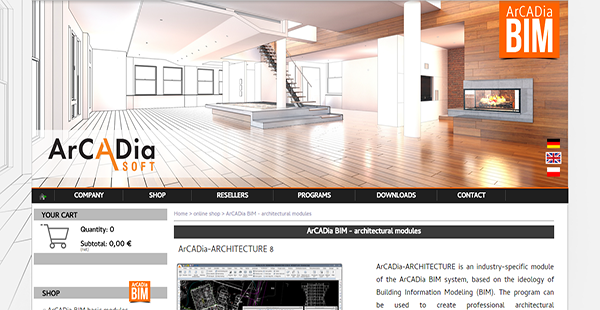
ArCADia BIM is a CAD-based BIM system utilizing object-oriented architectural design, easy documentation creation and tools that subscribe to BIM technology. You can draw CAD drawings from objects such as multilayer wall, windows and doors, while keeping to DWG format compatibility. The system suits projects tied to architecture, such as water, sewage, electrical, gas and communication installations.
ArCADia BIM, the base model of the ArCADia system, consists of the standard system tools, architectural and structural modeling and drawing tools for installations built on an advanced CAD engine.
The base model lets you cover the entire BIM design, from architecture to internal installations. You can also integrate the building design to external networks via add-in modules. It adapts to a range of industries and helps you consolidate multiple and simultaneous efforts in the design stage so errors are minimized, if not eliminated.
The system allows different teams working in the same building design stage to sync their designs with each other and avoid overlaps. It is easy to spot inaccuracies even before construction starts, avoiding costly mistakes and deadline overruns.
At the core of ArCADia is a collision check feature that spots potential inter-team issues. It highlights the elements resulting in a possible design conflict by merging design documents with the architectural design you have created n ArCADia. The project director is given a consolidated model where she can spot overlaps or other issues easily.
A feedback mechanism is in place to allow teams to render the changes, if any, leading to an error-free final version.
Show MoreOverview of ArCADia BIM Benefits
Avoid Design Collisions, Costly Errors
ArCADia BIM generates a consolidated design model that merges the design documents of different project teams such as electrical, sewage and utilities. This way, you can spot any inconsistency or overlap using a single source of truth. Potential conflicts are also highlighted by the system, listing the factors leading to the future issue. This helps you prevent costly mistakes even before they surface. A feedback mechanism is in place to help teams correct slips, until you come up with an error-free, future-proof final design ready for the construction stage.
Expansive Design Network
Even as ArCADia BIM allows you to sync the works of your different teams, you can connect the consolidated building design model to external networks. For instance, integrate your DWG-compatible design with public works or a utility company’s CAD blueprint. This gives you a bird’s eye view of your project vis-a-vis its environs.
Extensive Library of Objects
You can choose from a rich set of objects to render the design more accurately. Objects include doors, windows, columns, stairs, ceilings, walls, dormer and dormer windows and roofs. Likewise, the system allows you to create a list of installation elements provided by the manufacturer or your design team. You can even extend the library by adding in industry-specific modules, which provide you with an advanced feature for calculations and verifications.
Advanced drawing tools include hatch patterns, multiline, new types of 3D objects, photorealistic visualization auxiliary grid and polar tracking.
Show MoreOverview of ArCADia BIM Features
- Document Comparison
- Merge Documents
- Building Drawing Management
- Element Inserting
- Walls
- Ceilings
- ArCADia-TERIVA Ceilings
- Binding Joists
- Columns
- Chimneys
- Terrain
- 3D View
- Auxiliary Elements
- Expanded graphics engine
What Problems Will ArCADia BIM Solve?
Because ArCADia BIM offers users the ability to complete a project in one BIM environment, data loss can be minimized when moving it between programs. It provides users with quick collision detection and document merging when looking at project changes
Awards & Quality Certificates


ArCADia BIM Position In Our Categories
Knowing that businesses have distinct business-related needs, it is only practical that they steer clear of seeking a one-size-fits-all, ”best” business program. Nonetheless, it is difficult to try to pinpoint such an app even among sought-after software systems. The logical step to undertake can be to note down the varied main factors that necessitate deliberation such as critical features, costing, technical skill capability of staff members, organizational size, etc. Next, you must do your research thoroughly. Have a look at these ArCADia BIM reviews and look into the other solutions in your shortlist more closely. Such all-encompassing product investigation ascertains you stay away from unfit apps and pay for the system that includes all the aspects your company requires.
Position of ArCADia BIM in our main categories:
TOP
20
ArCADia BIM is one of the top 20 CAD Software products
It's crucial to keep in mind that virtually no software in the CAD Software category will be a perfect solution able to match all the needs of different company types, sizes and industries. It may be a good idea to read a few ArCADia BIM CAD Software reviews first as specific solutions may excel only in a very narrow set of applications or be designed with a very specific type of industry in mind. Others can work with an intention of being easy and intuitive and as a result lack complicated functions needed by more experienced users. You can also find apps that support a large group of customers and offer a rich feature base, however this frequently comes at a more significant price of such a software. Ensure you're aware of your requirements so that you choose a service that provides specifically the functionalities you look for.
How Much Does ArCADia BIM Cost?
ArCADia BIM Pricing Plans:
Free Trial
ArCADia 11
€945
What are ArCADia BIM pricing details?
ArCADia BIM Pricing Plans:
Free Trial
ArCADia 11
€945
ArCADia BIM is offered at an enterprise pricing rate of €945. Contact ArCADia Soft for more product information.
ArCADia 11 – €945
- Document Comparison
- Merge Documents
- Building Drawing Management
- Element Inserting
- Walls
- Ceilings
- ArCADia-TERIVA Ceilings
- Binding Joists
- Columns
- Chimneys
- Terrain
- 3D View
- Auxiliary Elements
- Expanded graphics engine
User Satisfaction
Positive Social Media Mentions
293
Negative Social Media Mentions
0
We are aware that when you choose to buy a CAD Software it’s vital not only to see how professionals rank it in their reviews, but also to discover if the real users and enterprises that bought this software are genuinely happy with the service. That’s why we’ve created our behavior-based Customer Satisfaction Algorithm™ that collects customer reviews, comments and ArCADia BIM reviews across a wide array of social media sites. The data is then featured in a simple to digest way showing how many users had positive and negative experience with ArCADia BIM. With that information at your disposal you will be ready to make an informed buying choice that you won’t regret.
Video
Technical details
Devices Supported
- Windows
Deployment
- On Premise
Language Support
- English
- German
- Polish
Pricing Model
- One-time payment
Customer Types
- Small Business
- Medium Business
- Freelancers
What Support Does This Vendor Offer?
- phone
- live support
- training
- tickets
What integrations are available for ArCADia BIM?
No information available.
ArCADia BIM User Reviews
ArCADia BIM average rating:
5/5
Overall impression
5/5
Customer Support
5/5
Value for Money
5/5
Ease of Use
Write your own review of this product
ADD A REVIEWMore reviews from 1 actual users:
Sort by:
Latest
- Latest
- Most useful
- Most positive
- Most negative
Best CAD/BIM Alternative
Read full review >
5/5
Overall impression
5/5
Customer Support
5/5
Value for Money
5/5
Ease of Use
Published on: 03.01.2021
Company Size: 1-10 Employees
Industry: Information Technology and Services
PROS: Affordability, suitable for micro, SME and large industry users. Also, requiring a light specs PC; which is a great bonus.
CONS: To increase add-ons.


Join a community of 7,369 SaaS experts
Thank you for the time you take to leave a quick review of this software. Our community and review base is constantly developing because of experts like you, who are willing to share their experience and knowledge with others to help them make more informed buying decisions.
Sign in with LinkedIn
Why we require LinkedIn?
- Show the community that you're an actual user.
- We will only show your name and profile image in your review.
- You can still post your review anonymously.
OR
Sign in with company emailSign in with company email
Popular ArCADia BIM Alternatives





Top Competitors To ArCADia BIM By Price
Product name:
Price:




Trending CAD Software Reviews



8.0
100%

6.3
100%
ArCADia BIM Comparisons
Product name:






ArCADia BIM user reviews
Best CAD/BIM Alternative
Read full review >
5/5
Overall impression
5/5
Customer Support
5/5
Value for Money
5/5
Ease of Use
Published on: 03.01.2021
Company Size: 1-10 Employees
Industry: Information Technology and Services

Page last modified



Did you find this review useful?
Yes
No
Thank you for your feedback
How can we make this page better?
Unsure about this software?
FIND ALTERNATIVES
 Why is FinancesOnline free?