

BlueJ Review



What is BlueJ?
BlueJ is an integrated Java development environment designed primarily for beginner-level programming, learning and teaching. Suited for small-scale development, the free technology provides an easy-to-use and interactive interface designed for interactive creation and invocation of objects.
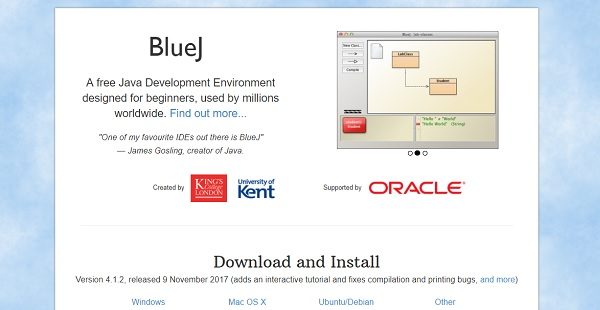
With a design that is notably different from other IDE software, BlueJ was created specifically to promote the learning and teaching of object-oriented programming. Its main screen visually displays the graphic class structure of an application under development, via a UML-like diagram. Users can interactively create and test objects. The interactive functionalities merged with a straightforward and clean user interface results to easy experimentation of objects that are under development.
Show More
Overview of BlueJ Benefits
BlueJ is a development environment that is specifically designed to aid in introductory Java programming. Its interface is smaller and simpler compared to professional-level IDE software that tend to overwhelm beginners. The straightforward and basic display help new users get started on basic development more easily and quickly.
Since it was customized for teaching, BlueJ was created with good principles and methods of instructions in mind. The program has a renowned textbook for teaching introductory universities and college courses with BlueJ, as well as a webpage containing comprehensive teaching resources.
BlueJ allow users to interact with objects – from inspecting their value, calling methods on them, pass them as parameters, and more. Users can also directly invoke Java expressions without compiling, making BlueJ an effective graphical shell/REPL for Java.
BlueJ is portable and supports deployment on a variety of operating systems. The free technology runs on Windows, Mac OS X, Linux and other platforms which run Java. It can also run without installation from a USB stick.
BlueJ has a number of innovative features that are not available in other IDEs. Original BlueJ features include its object bench, code pad, and scope coloring. Unique scope highlighting, where the background of each code block is colored, helps users scan codes more quickly and recognizes misplaced curly brackets.
Show MoreOverview of BlueJ Features
- Straightforward and clean IDE interface
- Designed for teaching
- With supplemetary BlueJ textbook
- With portal of teaching resources
- Allows interaction among objects
- Runs on Windows, Mac OS X, Linux and other platforms which run Java
- Runs without installation from a USB stick.
- Offers innovative tools such as an object bench, code pad, and scope coloring
BlueJ Position In Our Categories
Keeping in mind companies have particular business wants, it is wise they abstain from getting a one-size-fits-all, ”best” software product. Nevertheless, it is troublesome to try to find such a software system even among well-known software systems. The rational step to undertake should be to take note of the different significant factors which require deliberation like key features, costing, skill capability of the users, organizational size, etc. Next, you must double down on the research exhaustively. Go over some BlueJ evaluations and check out the other solutions in your shortlist more closely. Such well-rounded product research ensures you avoid unfit applications and choose the system which meets all the function your company requires to achieve growth.
Position of BlueJ in our main categories:
TOP
50
BlueJ is one of the top 50 IDE Software products
If you are interested in BlueJ it may also be a good idea to analyze other subcategories of IDE Software collected in our database of B2B software reviews.
Each company has different needs and needs an application that can be personalized for their size, kind of staff members and buyers, and the specific industry they are in. For these reasons, no platform can proffer perfect functionality off-the-shelf. When you search a software product, first be sure what you want it for. Read some BlueJ IDE Software reviews and ask yourself do you want basic tools or do you require complex features? Are there any industry-specific tools that you are seeking? Get the answers to these queries to aid your search. There are plenty of aspects that you need to consider and these include your budget, particular business needs, your organization size, integration needs etc. Take your time, use a few free trials, and finally select the system that presents all that you want to enhance your company competence and productivity.
How Much Does BlueJ Cost?
BlueJ Pricing Plans:
Free Trial
BlueJ
Free
What are BlueJ pricing details?
BlueJ Pricing Plans:
Free Trial
BlueJ
Free
There are no enterprise pricing plans, BlueJ is available for free.
User Satisfaction
Positive Social Media Mentions
180
Negative Social Media Mentions
7
We are aware that when you decide to buy a IDE Software it’s vital not only to learn how professionals rank it in their reviews, but also to discover whether the real clients and businesses that bought this software are genuinely satisfied with the product. That’s why we’ve designer our behavior-based Customer Satisfaction Algorithm™ that collects customer reviews, comments and BlueJ reviews across a broad range of social media sites. The information is then featured in a simple to digest format showing how many users had positive and negative experience with BlueJ. With that information at your disposal you will be ready to make an informed buying decision that you won’t regret.
Video
Technical details
Devices Supported
- Windows
- Linux
- Mac
Deployment
- On Premise
- Open API
Language Support
- English
Pricing Model
- Free
Customer Types
- Small Business
- Freelancers
What Support Does This Vendor Offer?
- phone
- live support
- training
- tickets
What integrations are available for BlueJ?
BlueJ integrates with the following:
- CleanProjectExtension
- INGInious
- Simple GUI Extension
- PMD Extension for Blue J
- Class Card
- Multi-Project Workspace
- Roles of Variables
- CNU BlueJ Code Formatter
- Objectdraw Invoker
- Lego NXT
- Main Runner
- SyntaxSourcePrinter
- ACM Invoker
- Submitter
- Checksytle
- Env3d
- PatternCoder
- Class Wizard
- UML Extension
- BlueJ Extension Manager
- BlueJScript
- Jeliot 3
- Remote File Manager
- Sequece Diagram Editor

BlueJ
is waiting for
your first review.

Write your own review of this product
ADD A REVIEWMore reviews from 0 actual users:


Join a community of 7,369 SaaS experts
Thank you for the time you take to leave a quick review of this software. Our community and review base is constantly developing because of experts like you, who are willing to share their experience and knowledge with others to help them make more informed buying decisions.
Sign in with LinkedIn
Why we require LinkedIn?
- Show the community that you're an actual user.
- We will only show your name and profile image in your review.
- You can still post your review anonymously.
OR
Sign in with company emailSign in with company email
Popular BlueJ Alternatives




Top Competitors To BlueJ By Price
Product name:
Price:




Trending IDE Software Reviews



BlueJ Comparisons





Page last modified


Did you find this review useful?
Yes
No
Thank you for your feedback
How can we make this page better?
Unsure about this software?
FIND ALTERNATIVES
 Why is FinancesOnline free?