

CADopia Review



What is CADopia?
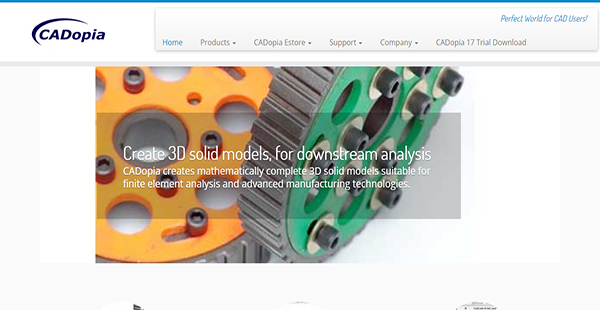
CADopia is a powerful CAD application with industry standard tools and features and a native Autodesk DWG support. It has an advanced 3D functionality that enables you to create 3D solid models that you can utilize for fine downstream element analysis and cutting-edge manufacturing innovations.
CADopia provides you with the means to produce architectural drawings with annotations and dimensions that are accurate as well. Thus, you have projects with complete details that you can confidently share with colleagues and clients.
Furthermore, you can use CADopia in generating highly detailed drawings of steel and concrete structures. This is especially beneficial when the time comes to bring your ideas to life.
Show MoreOverview of CADopia Benefits
Native DWG Support
CADopia’s standard file format is DWG. Because of its native support for the extension, you can also use the software for AutoCAD drawings. As such, you can maintain a high rate of productivity, as you are able to utilize data from files created with another software. Additionally, this feature allows you to collaborate seamlessly with your colleagues or external associates as they can open your drawings in their own systems.
Advanced 3D Modelling
CADopia makes use of the ACIS solid modelling engine to enable you to create highly detailed 3D objects. The solution also has a host of features for your models to be utilized for downstream engineering analysis and manufacturing.
Complete Drafting Tools
With CADopia, you have within your reach every tool you need for precise drafting. The application even has a WYSIWYG editor with grip points for you to see the exact representation of your ideas.
User-Friendly Interface
CADopia does not entail lengthy training sessions and hours upon hours of use for you to be familiar with it. Instead, it enables you to work comfortably and productively because of its user-friendly tools that you are accustomed to. On top of that, the software offers standard command interfaces, shortcuts, and more to let you navigate the application seamlessly.
Printing & Plotting Support
In case you want to present your projects in printed form, you can swiftly arrange it with the help of CADopia. The application also allows you to customize paper sizes and convert them into different image formats to make it more convenient for you to share your CAD drawings.
Power Trim
Trimming can be a laborious enterprise. However, CADopia makes the task less arduous by providing you with a power trimming tool. This enables you to trim or extend one or multiple entities expeditiously just by detailing a path. While you are about that task, the software also works on trimming the entities.
Quick Modifications
Editing objects and other things take a lot of time. But with CADopia’s quick modification feature, you can rapidly draw and edit by combing your frequently used commands. This lets you save time and allows you to be more efficient.
Show MoreOverview of CADopia Features
- Multiple File Support
- Layer Management
- Viewing Options
- Blocks & External References
- Hatch & Color Fill
- Audio Notes
- Wipeouts
- Tables
- Migration Assistant
- Text & Editing Tools
- 3D Solid Modelling
- Printing & Plotting
- Customization
CADopia Position In Our Categories
Keeping in mind companies have their own business-related requirements, it is prudent they abstain from preferring an all-in-one, ”best” system. Nonetheless, it would be futile to come across such a software product even among widely used software systems. The correct step to do is to tabulate the numerous key functions which require investigation like key features, price terms, skill competence of the employees, company size, etc. Thereafter, you should follow through the research through and through. Read some of these CADopia review articles and scrutinize the other applications in your shortlist more closely. Such all-encompassing product investigation guarantees you circumvent poorly fit apps and select the system which meets all the benefits your business requires in sustaining growth.
Position of CADopia in our main categories:
TOP
50
CADopia is one of the top 50 Architecture Software products
TOP
50
CADopia is one of the 50 CAD Software products
If you are considering CADopia it might also be beneficial to examine other subcategories of Architecture Software listed in our database of SaaS software reviews.
Since each enterprise has unique business needs, it is prudent for them to abstain from looking for a one-size-fits-all perfect software application. Needless to say, it would be pointless to try to find such a platform even among widely used software applications. The clever thing to do would be to catalog the various important factors that require consideration such as main features, budget, skill levels of employees, company size etc. Then, you should do your homework thoroughly. Read some CADopia Architecture Software reviews and investigate each of the other apps in your shortlist in detail. Such exhaustive research can make sure you discard ill-fitting platforms and choose the app that presents all the elements you need for business success.
How Much Does CADopia Cost?
CADopia Pricing Plans:
Free Trial
STANDARD Download (64 bit)
$445.00/one-time payment
STANDARD Download (32 bit)
$545.00/one-time payment
STANDARD CD (64 bit)
$445.00/one-time payment
STANDARD CD (32 bit)
$445.00 one-time payment
PROFESSIONAL Download (64 bit)
$545.00/one-time payment
PROFESSIONAL Download (32 bit)
$545.00/one-time payment
PROFESSIONAL CD (64 bit)
$545.00/one-time payment
PROFESSIONAL CD (32 bit)
$545.00/one-time payment
What are CADopia pricing details?
CADopia Pricing Plans:
Free Trial
STANDARD Download (64 bit)
$445.00/one-time payment
STANDARD Download (32 bit)
$545.00/one-time payment
STANDARD CD (64 bit)
$445.00/one-time payment
STANDARD CD (32 bit)
$445.00 one-time payment
PROFESSIONAL Download (64 bit)
$545.00/one-time payment
PROFESSIONAL Download (32 bit)
$545.00/one-time payment
PROFESSIONAL CD (64 bit)
$545.00/one-time payment
PROFESSIONAL CD (32 bit)
$545.00/one-time payment
CADopia has two enterprise pricing options. The Standard and Professional editions can be acquired by purchasing a downloadable file or by ordering a physical installation CD. The software is also available in either 32-bit or 64-bit.
STANDARD
Download (64 bit) – $445.00/one-time payment
Download (32 bit) – $545.00/one-time payment
CD (64 bit) – $445.00/one-time payment
CD (32 bit) – $445.00/ one-time payment
- AutoCAD DWG Support
- DXF Support
- Template Drawings Support
- Drawing Web Format
- File Audit & Recovery
- Popular Raster Files Support
- File Export
- Layer Management
- Viewing Options
- Dimensions
- Blocks & External References
- Hatch & Color Fill
- True Color Support
- Voice Notes
- Wipeout
- Tables & Tables Editing
- Migration Assistant
- Multiline Text Editor
- Spellcheck
- TrueType Fonts
- Multi-Language Character Support
- Printing & Plotting
- Customization
PROFESSIONAL
Download (64 bit) – $545.00/one-time payment
Download (32 bit) – $545.00/one-time payment
CD (64 bit) – $545.00/one-time payment
CD (32 bit) – $545.00/ one-time payment
- All Standard Features
- DGN Import
- PDF Import
- Convert to DWG with Layers
- Curved Text
- 3D Solid Modelling
- AutoLisp Support
- COM API Support
User Satisfaction
Positive Social Media Mentions
0
Negative Social Media Mentions
0
We are aware that when you make a decision to purchase a Architecture Software it’s crucial not only to learn how professionals score it in their reviews, but also to find out whether the real users and businesses that bought these solutions are genuinely happy with the service. That’s why we’ve designer our behavior-based Customer Satisfaction Algorithm™ that aggregates customer reviews, comments and CADopia reviews across a wide array of social media sites. The data is then featured in an easy to digest format showing how many customers had positive and negative experience with CADopia. With that information at your disposal you will be equipped to make an informed buying choice that you won’t regret.
Technical details
Devices Supported
- Windows
Deployment
- On Premise
Language Support
- English
- Chinese
- German
- Japanese
- Spanish
- French
- Russian
- Italian
- Portugese
- Polish
Pricing Model
- One-time payment
Customer Types
- Small Business
- Large Enterprises
- Medium Business
What Support Does This Vendor Offer?
- phone
- live support
- training
- tickets
What integrations are available for CADopia?
CADopia Professional users have access to the program’s COM API.

CADopia
is waiting for
your first review.

Write your own review of this product
ADD A REVIEWMore reviews from 0 actual users:


Join a community of 7,369 SaaS experts
Thank you for the time you take to leave a quick review of this software. Our community and review base is constantly developing because of experts like you, who are willing to share their experience and knowledge with others to help them make more informed buying decisions.
Sign in with LinkedIn
Why we require LinkedIn?
- Show the community that you're an actual user.
- We will only show your name and profile image in your review.
- You can still post your review anonymously.
OR
Sign in with company emailSign in with company email
Popular CADopia Alternatives





Top Competitors To CADopia By Price
Product name:
Price:





Trending Architecture Software Reviews


CADopia Comparisons
Product name:








Page last modified



Did you find this review useful?
Yes
No
Thank you for your feedback
How can we make this page better?
Unsure about this software?
FIND ALTERNATIVES
 Why is FinancesOnline free?