
- Home
- Architecture Software
- Domus Cad Pro

Domus Cad Pro Review



What is Domus Cad Pro?
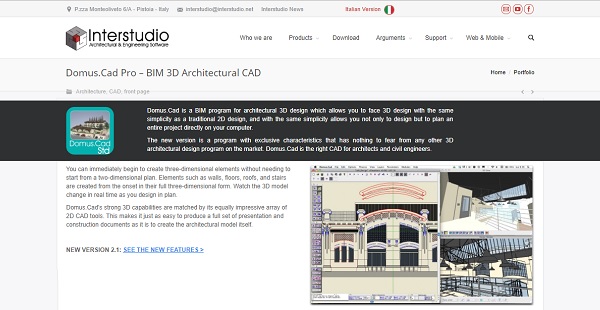
Domus Cad Pro is a Building Information Modeling (BIM) software for architectural design. The program allows users to face 3D design with the same simplicity as a traditional 2D design and has features to plan an entire project directly on a computer.
The latest version of Domus Cad Pro has characteristics not found in any other 3D architectural design program on the market. Architects and engineers can easily begin to build 3D elements without needing to start from a two-dimensional plan. Walls, floors, roofs, stairs and other elements are created from the onset in full 3D form, with changes updated in real time.
Domus Cad Pro’s advanced 3D features go alongside its extensive array of 2D CAD tools. The combination makes it possible to develop a full set of presentation and construction documents as it is to build an architectural model.
Show MoreOverview of Domus Cad Pro Benefits
Architects and engineers can work much faster as Domus Cad Pro does not require them to start from a two-dimensional plan in order to generate 3D details. Elements such as walls, floors, roofs, stairs and more are created in full three-dimensional form from the onset. By allowing users to work much faster, more projects can be done.
Domus Cad Pro is intuitive and easy to learn. Procedures such as element insertion, movement, and modification were designed to not be complicated, thus allowing users to design projects much easily.
Drawings can be rendered using fills and materials that can be applied to both 2D and 3D elements. Fill tiles can also be customized, and each element can be assigned with a specific color and reflective details. 2D elements such as polygons and segments can be effortlessly converted into a detailed 3D object. These extensive features allow users to create models that are very specific, down to the last detail.
The 3D modeling capabilities of Domus Cad Pro allows users to extrude and rotate 3D forms, either from any drawn polygon or line or elements. It can work its way around any axes, which is useful for modelling furniture, building cornices, structural elements and any unique architectural form.
Domus Cad Pro has a unique “fusion” process that instantly merges the various wall elements as they are placed, moved or changed. This helps users create an initial drawing more quickly.
The interactive 3D and walkthroughs features of Domus Cad Pro allows users to draw or edit and see the model change in real time as they progress. A user simulate different lighting conditions and do walkthroughs in order to better understand and review an architectural space. You can directly edit the 3D model elements in the 3D Window. By having these realistic interactive features, both the designer and client are able to visualize a project more clearly.
Domus Cad Pro has a vectorial rendering engine that deliver editable elevations, sections, perspectives and axonometries. All these are presented in an interactive 3D view. Drawings are generated in high quality down to the small details, with realistic colors available in interactive 3D view.
Models built using Domus Cad Pro can be exported in 3DS format and other formats, such as Artlantis, DXF 3D and DWG. Land models can be built with DomusTerra and enhanced alongside the architectural model. Importing capabilities support a wide range of graphic formats – from TIFF, JPG, PICT, GIF, TGA, BMP, PNG and many more.
Show MoreOverview of Domus Cad Pro Features
- 3D Architectural Modelling
- 3D Rendering
- 3D Walkthroughs
- 2D CAD Tools
- Import-Export Functionalities
- Drawing Tools
- Project Management Solutions
Domus Cad Pro Position In Our Categories
Because companies have distinct business-related requirements, it is sensible they abstain from picking a one-size-fits-all, “perfect” business program. Nonetheless, it is nearly futile to come across such application even among popular software solutions. The right step to do should be to shortlist the numerous key functions that entail examination including essential features, packages, technical skill aptitude of the employees, organizational size, etc. Next, you should conduct the research fully. Browse through some of these Domus Cad Pro analyses and explore each of the solutions in your list more closely. Such detailed product investigation ascertain you steer clear of ill-fitting software products and select the one which provides all the function your business requires in growing the business.
Position of Domus Cad Pro in our main categories:
TOP
50
Domus Cad Pro is one of the top 50 Architecture Software products
If you are interested in Domus Cad Pro it might also be sensible to check out other subcategories of Architecture Software gathered in our base of SaaS software reviews.
It is important to realize that almost no service in the Architecture Software category is an ideal solution that can meet all the requirements of different business types, sizes and industries. It may be a good idea to read a few Domus Cad Pro Architecture Software reviews first as certain services can dominate exclusively in a very small set of applications or be designed with a very specific industry in mind. Others may operate with an intention of being simple and intuitive and consequently lack complex functionalities welcomed by more experienced users. You can also come across software that support a large group of users and offer a complex feature toolbox, however that in most cases comes at a higher cost of such a service. Ensure you're aware of your requirements so that you select a solution that has specifically the functionalities you search for.
How Much Does Domus Cad Pro Cost?
Domus Cad Pro Pricing Plans:
Free Trial
CD Pack
$ 1,149 one-time payment
Rent-To-Own Internet Pack
$349/year
What are Domus Cad Pro pricing details?
Domus Cad Pro Pricing Plans:
Free Trial
CD Pack
$ 1,149 one-time payment
Rent-To-Own Internet Pack
$349/year
SMB and enterprise pricing for Domus Cad Pro depends on the number of licenses to be purchased. Review these details to know the plan that is best suited for your business:
CD Pack = $ 1,149 one-time payment; Special price: $ 919/one-time payment
- Domus Cad Pro on CD
- Accompanied by software protection device
- No expiration date
- Manual, Release Notes, Examples and all other documents on CD
- Assistance and upgrades for 1 year
Rent-To-Own Internet Pack = $ 349/year; Special price: $ 275/year
- Domus Cad Pro program (no software protection device necessary, internal expiration date 1 year)
- Manual, Release Notes and examples for downloaded from our internet site
- Assistance and upgrades for 1 year
- At the end of each year, users have the option of repurchasing the same packet or upgrading to one of the other packets at a discount equal to 5O% of what they’ve already paid.
User Satisfaction
Positive Social Media Mentions
0
Negative Social Media Mentions
0
We are aware that when you choose to buy a Architecture Software it’s crucial not only to learn how experts score it in their reviews, but also to check whether the actual clients and businesses that bought this software are indeed happy with the service. That’s why we’ve created our behavior-based Customer Satisfaction Algorithm™ that gathers customer reviews, comments and Domus Cad Pro reviews across a vast array of social media sites. The data is then displayed in a simple to understand form revealing how many users had positive and negative experience with Domus Cad Pro. With that information at your disposal you should be ready to make an informed purchasing decision that you won’t regret.
Video
Technical details
Devices Supported
- Windows
- Mac
Deployment
- On Premise
Language Support
- English
- Italian
Pricing Model
- One-time payment
- Annual Subscription
Customer Types
- Small Business
- Large Enterprises
- Medium Business
- Freelancers
What Support Does This Vendor Offer?
- phone
- live support
- training
- tickets
What integrations are available for Domus Cad Pro?
Domus Cad Pro integrates with the following business systems and applications:
- Artlandis
- DomusTerra
- Nonio C

Domus Cad Pro
is waiting for
your first review.

Write your own review of this product
ADD A REVIEWMore reviews from 0 actual users:


Join a community of 7,369 SaaS experts
Thank you for the time you take to leave a quick review of this software. Our community and review base is constantly developing because of experts like you, who are willing to share their experience and knowledge with others to help them make more informed buying decisions.
Sign in with LinkedIn
Why we require LinkedIn?
- Show the community that you're an actual user.
- We will only show your name and profile image in your review.
- You can still post your review anonymously.
OR
Sign in with company emailSign in with company email
Popular Domus Cad Pro Alternatives


Top Competitors To Domus Cad Pro By Price
Product name:
Price:



Trending Architecture Software Reviews


Domus Cad Pro Comparisons
Product name:




Page last modified



Did you find this review useful?
Yes
No
Thank you for your feedback
How can we make this page better?
Unsure about this software?
FIND ALTERNATIVES
 Why is FinancesOnline free?