

Quantower Review



What is Quantower?
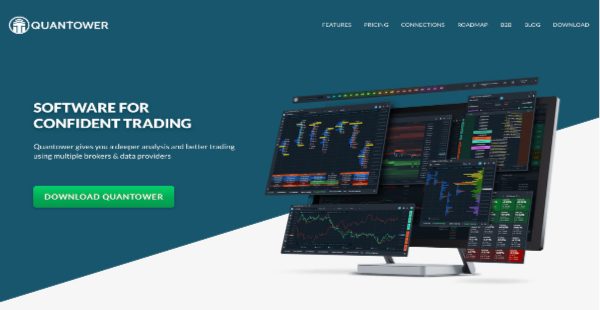
Quantower is a trading software that can be used with multiple brokers and various data providers. This app is packed with powerful trading features and is ideal for businesses of all sizes.
Quantower has a user-friendly interface with a single command center and the option to add more workspaces and screens to your workflow. The app also has different types of charts that help you analyze market trends.
Quantower has Volume Analysis tools such as data types, time histogram, time statistics, cluster charts, side profiles, and custom profiles. Another important feature is the Power Trades Scanner tool that helps you find zones with large volume traded in a very short period of time.
The basis volume interval is used to determine how strong the zone is. This is beneficial because it can help you examine whether a phenomenon breaks an existing trend or forms a new one. Another benefit is knowing the direction of price movements. The probability of price movement up and down in the short term is always 50/50. Quantower’s features will help you analyze where the price will go, thus helping you with decision-making.
Show MoreOverview of Quantower Benefits
Multiple Brokers
Trading can be complicated, especially since you are managing multiple brokers and dealing with different markets. Since Quantower already uses multiple brokers and has access to multiple markets, you don’t need to juggle multiple accounts. When you need a specific broker, exchange, or data provider, you can add it using API.
Graphical Visualization of Market Data
Quantower has charting functionalities that show you the different market trends that are happening. The app shows various chart styles and several technical indicators in a multi-chart layout. This is beneficial for observing gaps, reversal points, and other price movements. Quantower also has an array of drawing tools to help you observe and study the current financial market trends so that you can make better trading decisions.
Analytics Tools
Quantower has Analytics tools that let you acquire data from multiple sources. Since you have a network of brokers and liquidity providers at your disposal when you use the app, you can also send trading orders to your broker of choice under one connection.
Adjustable Interface
Quantower has an adjustable interface. The app lets you create as many workspaces as you need and you can easily switch between screens with one click. This is beneficial for your overall productivity. Then you can bind panels as one entity and integrate them into any of your workspaces. The app also has a single command center where you can oversee everything in one place.
Show MoreOverview of Quantower Features
- Single Command Center
- Multiple Workspaces and Screens
- Charting
- Order Execution
- Analytics
Awards & Quality Certificates


Quantower Position In Our Categories
Because businesses have distinctive business-related wants, it is reasonable that they abstain from subscribing to an all-encompassing, “perfect” business application. Nevertheless, it is almost impossible to try to discover such a software product even among popular software solutions. The correct thing to undertake should be to take note of the various key factors which call for a scrutiny like important features, packages, skill aptitude of the users, company size, etc. Thereafter, you must double down on your research thoroughly. Go over these Quantower review articles and explore the other software options in your shortlist more closely. Such detailed research ensures you take out unfit apps and choose the one that has all the tools your company requires.
Position of Quantower in our main categories:
It's important to note that virtually no service in the Financial Reporting Software category is an ideal solution able to meet all the requirements of all business types, sizes and industries. It may be a good idea to read a few Quantower Financial Reporting Software reviews first as some solutions might dominate just in a really narrow set of applications or be created with a very specific industry in mind. Others can operate with a goal of being simple and intuitive and consequently lack complex functionalities welcomed by more experienced users. You can also find software that cater to a wide group of users and offer a rich feature set, however that frequently comes at a higher cost of such a software. Make sure you're aware of your requirements so that you select a service that has specifically the features you search for.
How Much Does Quantower Cost?
Quantower Pricing Plans:
Free Trial
Free Quantower
$0
Crypto Package
$40/month
Multi-asset Package
$50/month
All-in-one Package
$100/month
Custom Package
Contact vendor
What are Quantower pricing details?
Quantower Pricing Plans:
Free Trial
Free Quantower
$0
Crypto Package
$40/month
Multi-asset Package
$50/month
All-in-one Package
$100/month
Custom Package
Contact vendor
Quantower does not have a free trial, but there is a free version of the app available. The vendor offers the following enterprise pricing plans:
Free Plan – $0
- 1 connection
- 1 overlay for a single chart
- 2 technical indicators
- Basic chart drawing tools
- Basic technical indicators
- Market data
- Multiple templates
- Multiple workspaces
- Standard and custom timeframes
- All trading operations
- Chart and mouse trading
- Time and tick chart aggregations
- Settings backup manager
- Historical symbols
- Market depth panel
- DOM trader panel
- Time and sales
- Exchange times
- Stat matrix
- RSS reader
- Order flow surface
- Access via API
- Algo extension for visual studio
Crypto Package (Monthly) – $40/month
Crypto Package (Annual) – $480/year
Crypto Package (Lifetime) – Contact vendor
- All features in Free Quantower
- Crypto connections
- Volume analysis
- Advanced features
Multi-asset Package (Monthly) – $50/month
Multi-asset Package (Annual) – $600/year
Multi-asset Package (Lifetime) – Contact vendor
- All features in Crypto Package
- All connections
All-in-one Package (Monthly) – $100/month
All-in-one Package (Annual) – $1200/year
All-in-one Package (Lifetime) – Contact vendor
- All features in Multi-asset Package
- Paid features
Custom Package – Contact vendor
User Satisfaction
Positive Social Media Mentions
30
Negative Social Media Mentions
1
We know that when you choose to buy a Financial Reporting Software it’s important not only to find out how experts score it in their reviews, but also to find out whether the real people and businesses that use these solutions are actually satisfied with the product. Because of that need we’ve devised our behavior-based Customer Satisfaction Algorithm™ that aggregates customer reviews, comments and Quantower reviews across a vast array of social media sites. The information is then displayed in a simple to digest way indicating how many people had positive and negative experience with Quantower. With that information at hand you will be equipped to make an informed purchasing decision that you won’t regret.
Technical details
Devices Supported
- Windows
- Web-based
Deployment
- Cloud Hosted
- On Premise
Language Support
- English
Pricing Model
- Free
- Monthly payment
- One-time payment
- Annual Subscription
- Quote-based
Customer Types
- Small Business
- Large Enterprises
- Medium Business
- Freelancers
What Support Does This Vendor Offer?
- phone
- live support
- training
- tickets
What integrations are available for Quantower?
No information available.

Quantower
is waiting for
your first review.

Write your own review of this product
ADD A REVIEWMore reviews from 0 actual users:


Join a community of 7,369 SaaS experts
Thank you for the time you take to leave a quick review of this software. Our community and review base is constantly developing because of experts like you, who are willing to share their experience and knowledge with others to help them make more informed buying decisions.
Sign in with LinkedIn
Why we require LinkedIn?
- Show the community that you're an actual user.
- We will only show your name and profile image in your review.
- You can still post your review anonymously.
OR
Sign in with company emailSign in with company email
Popular Quantower Alternatives





Top Competitors To Quantower By Price
Product name:
Price:

By quote

By quote


Trending Financial Reporting Software Reviews




Quantower Comparisons
Product name:









Page last modified



Did you find this review useful?
Yes
No
Thank you for your feedback
How can we make this page better?
Unsure about this software?
FIND ALTERNATIVES
 Why is FinancesOnline free?