
- Home
- POS Systems
- Quickflora

Quickflora Review



What is Quickflora?
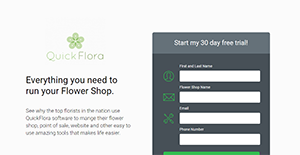
Quickflora is a reliable point of sale platform designed by florists for florists. The software has a robust set of features that streamline the operations for event planning boutique and retail flower shop owners. The system is built on world class technology that gives you an edge over your competitors.
It is fully compatible with mobile and tablets and is the perfect system for flower shop looking to lower expenses to increase profitability.
Quickflora is acclaimed by flower shop operators in USA and Canada. It revolutionizes the way they run businesses helping them save money and time. Besides, the advanced marketing, reporting, as well as delivery capabilities make this platform great.
Show MoreOverview of Quickflora Benefits
Quickflora is a system with no limits. It is designed by an independent company which means there are no wire service fees required for its use. Also, you will not be required to use mandatory credit card systems; the software gives you the freedom to bring your own.
Its ease of use is a superb aspect that makes the software stand out. In the modern world, it’s critical that your POS system is as easy to use as possible. Quickflora obeys this rules, and it makes it easy for your staff to get up to speed in a manner that is friendly to all. Whether you are an existing or a new shop owner, there is no worry. The platform makes it incredibly easy by giving you the option to use the touch screen, a mouse, or F keys. You have the freedom to decide the method that works for you.
Quckflora can also help you create a modern floral e-commerce site. The website is important as it helps you to capture more orders and increase the productivity of your business. Also, the platform gives you the opportunity to join the mobile revolution that is already causing ripples in the flower business. It provides a convenient channel where you can connect with new floral shoppers. It simply helps you to cast a wide net and take advantage of the modern flower business.
Show MoreOverview of Quickflora Features
- Automated enclosure card printing that saves time and looks professional.
- Automated routing and mapping for dispatch managers to speed up deliveries.
- Automated trip sheet to smartphones and tablets for drivers to increase efficiency.
- Automated credit card batch processing to increase cash flow and fraud screening features.
- Fully integrated A/R system, so you collect your money as fast as possible.
- Integrated emails, reminders, and customer profiles to ensure customer loyalty.
- Integrated website information so your latest specials and inventory levels are on your site in real time.
- Internal system messages to inform staff of specials
- Mobile App
Quickflora Position In Our Categories
Knowing that businesses have specific business wants, it is only sensible that they steer clear of going for a one-size-fits-all, ideal solution. However, it is troublesome to find such an app even among widely used software solutions. The correct thing to do should be to note down the different important functions which require examination such as essential features, pricing, technical skill ability of the users, company size, etc. Thereafter, you must conduct your product research to a full extent. Go over these Quickflora analyses and look over the other applications in your shortlist in detail. Such comprehensive research makes sure you weed out unsuitable software products and select the one which delivers all the features your business requires to be successful.
Position of Quickflora in our main categories:
TOP
500
Quickflora is one of the top 500 Sales Tools products
There are well-liked and widely used solutions in each software category. But are they automatically the best fit for your company’s specific needs? A trendy software solution may have thousands of users, but does it present what you need? For this reason, do not blindly invest in popular systems. Read at least a few Quickflora POS Systems reviews and mull over the factors that you want in the software such as the fees, main features, available integrations etc. Then, select a few solutions that fit your wants. Check out the free trials of these apps, read online reviews, get explanations from the seller, and do your homework systematically. This profound homework is certain to aid you select the finest software solution for your organization’s specific wants.
How Much Does Quickflora Cost?
Quickflora Pricing Plans:
Free Trial
Professional
$134
Enterprise
$179
What are Quickflora pricing details?
Quickflora Pricing Plans:
Free Trial
Professional
$134
Enterprise
$179
Depending on the required action, Quickflora offers two enterprise pricing options to choose from. Here are the details:
Professional – $134 (billed annually)
- 1-4 Computers
- Order Entry
- POS
- Delivery Manager
- Reports Manager
- Merchant Processing – Your Processor
- Support Email – 8/5
- Auto Printing
- Address Verification
- Digital Signage
Enterprise – $179 (billed annually)
- 5-9 Computers
- Order Entry
- POS
- Delivery Manager
- Reports Manager
- Merchant Processing – Your Processor
- Support Email – 24/7
- Auto Printing
- Address Verification
- Digital Signage
- Multi Location
- Alerts
*Additional pricing information:
- New account setup – $299
- Computer configuration – $49/computer
- Bundled discount – 199/month (billed annually) professional subscription plus eCommerce site for four computers.
- eCommerce website -$49/month (POS customers) or $99/month standalone fee
- Event manager – $99,month standalone
User Satisfaction
Positive Social Media Mentions
0
Negative Social Media Mentions
0
We realize that when you decide to purchase a POS Systems it’s vital not only to find out how professionals rank it in their reviews, but also to check if the actual clients and companies that purchased these solutions are indeed satisfied with the product. Because of that need we’ve devised our behavior-based Customer Satisfaction Algorithm™ that gathers customer reviews, comments and Quickflora reviews across a wide array of social media sites. The information is then presented in an easy to digest way revealing how many users had positive and negative experience with Quickflora. With that information available you will be equipped to make an informed business decision that you won’t regret.
Video
Technical details
Devices Supported
- Windows
- Android
- iPhone/iPad
- Web-based
Deployment
- Cloud Hosted
Language Support
- English
Pricing Model
- Monthly payment
- One-time payment
Customer Types
- Small Business
- Large Enterprises
- Medium Business
What Support Does This Vendor Offer?
- phone
- live support
- training
- tickets
What integrations are available for Quickflora?
Quickflora integrates with the following business systems and applications:
- QuickBooks
- BloomNation

Quickflora
is waiting for
your first review.

Write your own review of this product
ADD A REVIEWMore reviews from 0 actual users:


Join a community of 7,369 SaaS experts
Thank you for the time you take to leave a quick review of this software. Our community and review base is constantly developing because of experts like you, who are willing to share their experience and knowledge with others to help them make more informed buying decisions.
Sign in with LinkedIn
Why we require LinkedIn?
- Show the community that you're an actual user.
- We will only show your name and profile image in your review.
- You can still post your review anonymously.
OR
Sign in with company emailSign in with company email
Popular Quickflora Alternatives




Top Competitors To Quickflora By Price
Product name:
Price:

by quote

by quote



Trending POS Systems Reviews




Quickflora Comparisons
Product name:





Page last modified



Did you find this review useful?
Yes
No
Thank you for your feedback
How can we make this page better?
Unsure about this software?
FIND ALTERNATIVES
 Why is FinancesOnline free?