

ScaleXP Review



What is ScaleXP?
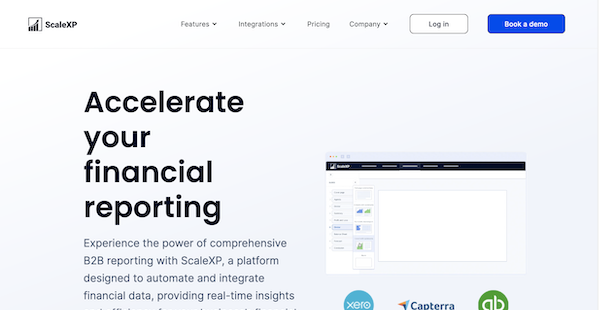
ScaleXP is a financial reporting software that consolidates your financial data, generates real-time insights, and creates financial reports and presentations. It integrates with various data sources like Xero and QuickBooks to provide up-to-date analytics and financial tracking for budgeting and forecasts. It also supports SaaS KPIs to analyze your data.
ScaleXP uses machine learning and natural language processing to recognize revenue and extract financial data from your invoices. It conducts automatic and real-time calculations and detects any changes made to your invoices for better transparency. It also provides a customizable dashboard where you can track your data.
ScaleXP ensures compliance through audit trails that are continuously updated daily. It is designed to adhere to accounting standards, such as IFRS 9. ScaleXP supports various currencies, multiple users, and multiple companies. It also allows you to create professional presentations through built-in templates that you can customize.
Show MoreOverview of ScaleXP Benefits
Accounting Automation
ScaleXP enables you to centralize all your financial data into one platform. It allows you to import CRM data to keep track of conversion rates, sales targets, and budgets. It also provides text recognition for your invoices so that you can extract information like time period, revenue, and expenses. ScaleXP supports prepayments and allows you to import bills and credit notes. It keeps an audit trail for all your uploads and changes. It also adheres to accounting standards to ensure compliance and security.
Reports and Analytics
ScaleXP analyzes your financial data to generate actionable reports and financial insights. It enables you to create forecasts, conduct budget analyses, and generate real-time financial reports. It also supports non-financial insights through the metrics you choose for calculation. ScaleXP consolidates all information through a dashboard that you can customize to show the pertinent data you need to see. It also offers built-in templates for your presentations.
Integrations
ScaleXP provides integrations with various accounting and CRM software. It allows you to sync accounting data from platforms like Xero and QuickBooks. It also enables you to import CRM information from Zoho, HubSpot, and Salesforce, among others. Additionally, you can also import Stripe invoices. ScaleXP supports multiple currencies for better accessibility.
Show MoreOverview of ScaleXP Features
- Budgets and Forecasts
- Deferred Revenues
- CFO Dashboards
- Financial Consolidation
- Prepayments
- Revenue Recognition
- SaaS Metrics
Awards & Quality Certificates

ScaleXP Position In Our Categories
Because businesses have particular business needs, it is only rational they steer clear of paying for an all-encompassing, ideal software solution. Regardless, it is difficult to try to find such application even among widely used software solutions. The best thing to undertake is to write the different main functions which need inspection like major features, price plans, technical skill ability of the employees, business size, etc. After which, you should follow through your research through and through. Have a look at these ScaleXP reviews and look over each of the software systems in your shortlist more closely. Such comprehensive product research guarantee you stay away from poorly fit applications and subscribe to the system that has all the function your company requires.
Position of ScaleXP in our main categories:
Enterprises have different needs and requirements and no software platform can be ideal in such a scenario. It is futile to try to find an ideal out-of-the-box software product that fulfills all your business wants. The intelligent thing to do would be to adapt the system for your unique needs, staff member skill levels, budget, and other aspects. For these reasons, do not rush and invest in well-publicized trendy applications. Though these may be widely used, they may not be the best fit for your unique needs. Do your homework, investigate each short-listed platform in detail, read a few ScaleXP Financial Reporting Software reviews, call the vendor for clarifications, and finally choose the app that offers what you want.
How Much Does ScaleXP Cost?
ScaleXP Pricing Plans:
Free Trial
Reporting
£100/month
Reporting and Automations
£200/month
Reporting, Automation and Sales
£300/month
What are ScaleXP pricing details?
ScaleXP Pricing Plans:
Free Trial
Reporting
£100/month
Reporting and Automations
£200/month
Reporting, Automation and Sales
£300/month
ScaleXP can be purchased through three enterprise pricing plans:
Reporting – £100/month
- 2 Users
- 1 Company
- Reports
- Dashboards
- Presentations
- Up to 10 budgets and forecasts
- Xero and QuickBooks integration
Reporting and Automations – £200/month
- All of Reporting plan features
- 5 Users
- 3 Companies
- Financial Consolidation
- Multi-currency support
- 20 Xero tracking codes or QB classes
- Automated revenue recognition
- Automated prepaid expenses
- Sage, Netvisor, and Zoho integration
Reporting, Automation and Sales – £300/month
- All of Reporting and Automation plan features
- 8 Users
- 5 Companies
- CRM connection
- Booked v. billed automation and alerts
- Sales pipeline forecast
- 100 Xero tracking codes or QB classes
- Custom branded presentations
- 1 Custom report per quarter
- Quarterly account review
- Salesforce, Hubspot, Pipedrive, and Stripe integration
User Satisfaction
Positive Social Media Mentions
5
Negative Social Media Mentions
0
We realize that when you make a decision to buy a Financial Reporting Software it’s important not only to learn how professionals rank it in their reviews, but also to check whether the actual users and companies that purchased this software are actually happy with the product. That’s why we’ve created our behavior-based Customer Satisfaction Algorithm™ that aggregates customer reviews, comments and ScaleXP reviews across a vast range of social media sites. The data is then featured in an easy to digest way showing how many people had positive and negative experience with ScaleXP. With that information at hand you should be prepared to make an informed buying choice that you won’t regret.
Technical details
Devices Supported
- Web-based
Deployment
- Cloud Hosted
Language Support
- English
Pricing Model
- Monthly payment
- Annual Subscription
- Quote-based
Customer Types
- Small Business
- Large Enterprises
- Medium Business
What Support Does This Vendor Offer?
- phone
- live support
- training
- tickets
What integrations are available for ScaleXP?
ScaleXP integrates with the following:
- HubSpot
- NetSuite
- Pipedrive
- QuickBooks
- Sage
- Salesforce
- Stripe
- Xero
- Zoho

ScaleXP
is waiting for
your first review.

Write your own review of this product
ADD A REVIEWMore reviews from 0 actual users:


Join a community of 7,369 SaaS experts
Thank you for the time you take to leave a quick review of this software. Our community and review base is constantly developing because of experts like you, who are willing to share their experience and knowledge with others to help them make more informed buying decisions.
Sign in with LinkedIn
Why we require LinkedIn?
- Show the community that you're an actual user.
- We will only show your name and profile image in your review.
- You can still post your review anonymously.
OR
Sign in with company emailSign in with company email
Popular ScaleXP Alternatives





Top Competitors To ScaleXP By Price
Product name:
Price:




Trending Financial Reporting Software Reviews


ScaleXP Comparisons
Product name:








Page last modified



Did you find this review useful?
Yes
No
Thank you for your feedback
How can we make this page better?
Unsure about this software?
FIND ALTERNATIVES
 Why is FinancesOnline free?