
- Home
- CAD Software
- SolidWorks Premium

SolidWorks Premium Review



What is SolidWorks Premium?
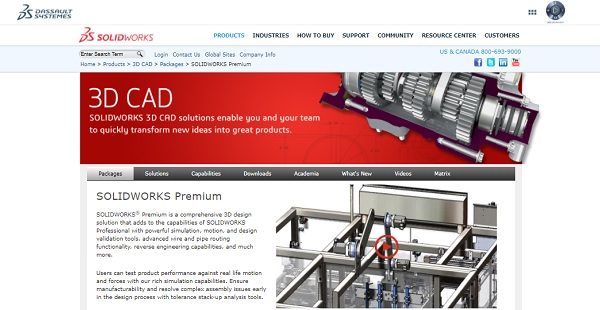
SolidWorks Premium is a computer-aided design software that allows users to create, simulate, publish, and manage 3D models. The technology intends to make engineering processes more efficient with tools for conceptual design, product layout, strength and dynamics analysis, and more.
SolidWorks Premium has rich simulation capabilities to help users test product performance against real life circumstances. Analytical properties help identify and resolve complicated assembly issues during the early stages of product development, thus ensuring manufacturability. The software’s extended tools are capable of incorporating printed circuit board data into a 3D model. Users can also create and document layouts for electrical wiring, piping, and tubing.
Other solutions offered by SolidWorks Premium include Time-based Motion Analysis, Linear Static Analysis for Parts and Assemblies, Routing of Pipes and Tubes, Routing of Electrical Cabling and Wiring Harnesses, Advanced Surface Flattening, and more.
Show MoreOverview of SolidWorks Premium Benefits
SolidWorks Premium boasts of easy-to-use yet powerful 3D CAD design capabilities. The highly intuitive solution helps make product development workflows more efficient in order to save on time and company resources. This also allows users to take their products to market much faster. Excess manufacturing costs are also avoided. The software helps improve quality and reliability of product applications from a variety of industries.
A 3D Solid Modeling feature provides lifelike visualization and pre-manufacturing virtual testing. This helps make product development more productive and helps reduce costs.
SolidWorks Premium is capable of Large Assembly Designs that can contain over 100,000 parts. These complex assembilies are made simpler to manage using easy-to-use tools for creating and managing designs.
Users can create a variety of sheet metal part designs using specialized and flexible SolidWorks Premium tools
SolidWorks Premium has specialized tools for Sheet Metal Designing. These allow users to create sheet metal part designs more quickly and using less resources.
Weldments permit users to build designs with extrusions and conveniently create cut lists and material bills. This streamlines design and manufacturing of welded structures, frames, and bases.
SolidWorks Premium helps develop plastic and cast part designs that are of high quality to ensure that customers’ aesthetics and durability requirements are met.
Fully integrated mold design capabilities allow users to simplify mold design. All file parts update automatically so that changes up to final manufacturing are recorded.
Electrical Cable Harness and Conduit Design features allow users to add wire/cable/harness/conduit systems for a design. Path planning and complete BOMs are also factored in.
Comprehensive features for Piping and Tubing Design help make product development much faster and less expensive. Tools help with the 3D design of piping, hydraulic, pneumatic, and other systems before going into production.
Show MoreOverview of SolidWorks Premium Features
- 3D Solid Modeling
- Large Assembly Design
- Sheet Metal Design
- Weldments
- Plastic and Cast Part Design
- Mold Design
- Electrical Cable Harness and Conduit Design
- Piping and Tubing Design
- CAD Import/Export
- Conceptual Design
- Direct Model Editing
- Advanced Surface Design
- CAD Productivity Tools – SOLIDWORKS Utilities
- Automatic Drawing View Creation and Update
- CAD Dimensioning, Tolerancing, and Annotations
- Bill of Materials (BOM)
- CAD Standards Checking (Design Checker) and Drawing Comparison
- Revision Control
- CAD Search
- Advanced Surface Flattening
- Routing of Rectangular and Other Sections
SolidWorks Premium Position In Our Categories
Knowing that businesses have special business needs, it is only logical that they abstain from seeking a one-size-fits-all, “perfect” software solution. However, it would be hard to try to find such a software solution even among widely used software solutions. The clever thing to undertake would be to shortlist the different significant functions that merit scrutiny such as crucial features, packages, skill ability of staff members, organizational size, etc. Thereafter, you must double down on the research to a full extent. Go over some SolidWorks Premium evaluations and scrutinize the other software programs in your shortlist more closely. Such comprehensive product investigation ensure you weed out unsuitable apps and subscribe to the one that meets all the function your company requires to be successful.
Position of SolidWorks Premium in our main categories:
TOP
5
SolidWorks Premium is one of the top 5 CAD Software products
There are well-liked and widely used applications in each software group. But are they necessarily the best fit for your organization’s unique needs? A popular software application may have thousands of users, but does it provide what you need? For this reason, do not blindly invest in popular systems. Read at least a few SolidWorks Premium CAD Software reviews and think about the elements that you want in the software such as the cost, main functionality, available integrations etc. Then, choose a few systems that fit your needs. Try out the free trials of these apps, read online opinions, get information from the seller, and do your homework thoroughly. This profound groundwork is sure to help you choose the best software application for your company’s unique requirements.
How Much Does SolidWorks Premium Cost?
SolidWorks Premium Pricing Plans:
Free Trial
Quote-based Plan
Contact vendor
What are SolidWorks Premium pricing details?
SolidWorks Premium Pricing Plans:
Free Trial
Quote-based Plan
Contact vendor
Contact the vendor for their enterprise pricing packages and other details.
User Satisfaction
Positive Social Media Mentions
35
Negative Social Media Mentions
1
We are aware that when you make a decision to get a CAD Software it’s crucial not only to learn how experts evaluate it in their reviews, but also to find out if the real users and businesses that bought this software are indeed satisfied with the product. Because of that need we’ve designer our behavior-based Customer Satisfaction Algorithm™ that collects customer reviews, comments and SolidWorks Premium reviews across a wide range of social media sites. The data is then presented in an easy to understand way showing how many customers had positive and negative experience with SolidWorks Premium. With that information available you should be prepared to make an informed buying choice that you won’t regret.
Video
Technical details
Devices Supported
- Windows
- Mac
Deployment
- Cloud Hosted
- On Premise
- Open API
Language Support
- English
- Dutch
- Polish
- Turkish
- Swedish
Pricing Model
- Quote-based
Customer Types
- Small Business
- Medium Business
What Support Does This Vendor Offer?
- phone
- live support
- training
- tickets
What integrations are available for SolidWorks Premium?
SolidWorks Premium integrates with the following business systems and applications:
- 3DQuickForm
- 3DQuickMold
- 3DQuickPress
- 3DQuickStrip
- AeroHydro
- Agni Link
- BatchProcess
- BuiltWorks
- Camnetics
- Centare Group
- CAMWorks
- CFD-CADalyzer
- CheckMate Programming
- CompareWorks
- Conversion Engine
- COSMOSFloWorks
- COSMOSMotion
- COSMOSWorks
- DesignDataManager
- DriveWorks
- DezignWorks
- Dynamic Designer
- eDesignSync
- elecworks for SolidWorks
- FloEFD
- GeometryWorks3D
- Glovius
- GrafiCalc
- hyperMILL
- Inoxtools
- InspectionXpert
- JetBox
- Logopress
- Master SolidWorks Surfacing And Complex Shape Modeling
- Maxwell Render
- MITCalc
- MSC.visualNastran Desktop 2001
- OptisWorks
- PARTshare
- PAS CMM
- Plot Service for PTC Windchill
- Power SubD-NURBS modo
- Power Surfacing
- PowerTools
- QuadriSpace
- Radeon ProRender
- RuleStream
- Sheet Metal Guy
- ShipWorks
- SimMechanics
- SMARTEAM
- SoftOrient
- SoftFit Solver
- SolidProfessor
- SolidWorks/GibbsCAM
- SolidWorks Education Edition
- SolidWorksModel
- SPI –
- SplitWorks
- SurfaceWorks
- TreeWorks
- VisualXPORT for SolidWorks
- Vuuch
- WoodTools
- XNurbs
- Xometry
SolidWorks Premium User Reviews
SolidWorks Premium average rating:
5/5
Overall impression
5/5
Customer Support
4/5
Value for Money
4/5
Ease of Use
Write your own review of this product
ADD A REVIEWThe most favorable review

PROS: Solidworks is a high-end 3D modeling software and which is facilitating for complicated CAD designing.
CONS: Solidworks consumes high memoy capacity and power.
The least favorable review

PROS: This software is straightforward and user-friendly. It's also really cost-efficient.
CONS: It does crash sometimes and it doesn't have autosave. So remember to save your work. It also doesn't have other features that other software has.
More reviews from 14 actual users:
Sort by:
Latest
- Latest
- Most useful
- Most positive
- Most negative
Best in the industry
Read full review >
5/5
Overall impression
5/5
Customer Support
5/5
Value for Money
4/5
Ease of Use
Published on: 06.11.2021
Company Size: 11-50 Employees
Industry: Higher Education
PROS: I love Solid Works! Its plugins and add-ons really upgrade your outputs! Because of its user-friendly interface, creating 3D models is easier even for beginners.
CONS: You need to have a large storage space when you install this software.
Great app, should have more features
Read full review >
4/5
Overall impression
4/5
Customer Support
3/5
Value for Money
3/5
Ease of Use
Published on: 21.08.2021
Company Size: 11-50 Employees
Industry: Mechanical or Industrial Engineering
PROS: This software is straightforward and user-friendly. It's also really cost-efficient.
CONS: It does crash sometimes and it doesn't have autosave. So remember to save your work. It also doesn't have other features that other software has.
So far the most user-friendly app for CAD
Read full review >
4/5
Overall impression
3/5
Customer Support
4/5
Value for Money
4/5
Ease of Use
Published on: 11.07.2021
Company Size: More than 100 Employees
Industry: N/A
PROS: I love its design table since its really helpful in parametric design. It has the ability to automatically draft and design some parts by just typing some data.
CONS: I had trouble when the software was updated because I can no longer open my previous works without having to pay extra.
SolidWorks + its add-ons = INCREDIBLE
Read full review >
4/5
Overall impression
3/5
Customer Support
3/5
Value for Money
4/5
Ease of Use
Published on: 09.07.2021
Company Size: 11-50 Employees
Industry: Mechanical or Industrial Engineering
PROS: SolidWorks is a great tool and here are some of the things that I really like about it: (1) it can make creating technical drawing a lot easier; (2) it's built-in features allow us to do a wide range of tasks; and (3) it can support different projects, even those that are made using another software.
CONS: It's not that user-friendly for me since it has really a lot of tools that are not really intuitive. I also don't like the costing for the basic package and upgrades.
The best 3D software out there!
Read full review >
4/5
Overall impression
4/5
Customer Support
4/5
Value for Money
4/5
Ease of Use
Published on: 08.07.2021
Company Size:
Industry: Design
PROS: It's the most user-friendly among its competitors.
CONS: There are some bugs that make opening a project in another system quite a headache.
SolidWorks is the best!
Read full review >
5/5
Overall impression
5/5
Customer Support
4/5
Value for Money
5/5
Ease of Use
Published on: 04.06.2021
Company Size: More than 100 Employees
Industry: Nanotechnology
PROS: SolidWorks is a robust software. The interface is really user-friendly and the technical support service is top-notch.
CONS: There are some PDM errors, but I don't think it's because of the software.
Our top choice for CAD tool!
Read full review >
4/5
Overall impression
4/5
Customer Support
3/5
Value for Money
4/5
Ease of Use
Published on: 18.03.2021
Company Size: 11-50 Employees
Industry: Design
PROS: Here are the best things about SolidWorks: (1) its parametric sketching feature and all related functionalities are amazing; (2) it is the only CAD tool that has a Mould tool design; and (3) it has many other features that cannot be found in other similar software!
CONS: The photo rendering could be a little faster. But the output is great!
Beginner-friendly CAD software
Read full review >
5/5
Overall impression
5/5
Customer Support
4/5
Value for Money
5/5
Ease of Use
Published on: 12.03.2021
Company Size: 1-10 Employees
Industry: Architecture & Planning
PROS: This program allowed me to finish my tasks a lot faster. I can't believe it! It's easy to learn -- it only took me a few hours to get a good grasp of its interface and functions. It can also render models in just a few minutes! It can also handle heavy data and multiple projects.
CONS: It did crash a few times, but it's due to the mishandling of the user.
Top-tier tool!
Read full review >
5/5
Overall impression
4/5
Customer Support
4/5
Value for Money
5/5
Ease of Use
Published on: 24.01.2021
Company Size: More than 100 Employees
Industry: Think Tanks
PROS: SolidWorks is pretty intuitive and beginner-friendly!
CONS: I wish it can handle bigger data and improve their resource utilization.
Easy to learn, easy to use
Read full review >
4/5
Overall impression
4/5
Customer Support
4/5
Value for Money
4/5
Ease of Use
Published on: 11.01.2021
Company Size: 1-10 Employees
Industry: Machinery
PROS: This software is beginner-friendly. It's easy to learn, especially since it uses industry terms for its commands. And it's a lot cheaper compared to other similar software!
CONS: It's lacking some of the functions that we see in Creo and Siemens NX.
Solid software!
Read full review >
5/5
Overall impression
5/5
Customer Support
5/5
Value for Money
4/5
Ease of Use
Published on: 28.04.2020
Company Size: More than 100 Employees
Industry: Automotive
PROS: This software is super easy to learn and master! I love its ability to produce high-quality 3D CAD models! This is a great industry tool -- from designing to simulating!
CONS: I'm sometimes having a hard time opening projects created in another software. Adding plugins can also be a bit of a headache.
So far the best 3D software I’ve used!
Read full review >
5/5
Overall impression
5/5
Customer Support
4/5
Value for Money
5/5
Ease of Use
Published on: 18.04.2020
Company Size:
Industry: Mechanical or Industrial Engineering
PROS: The user-friendly interface helps a lot in finishing your design.
CONS: I think it's not the best software for designing buildings.
Useful 3d design software
Read full review >
5/5
Overall impression
3/5
Customer Support
3/5
Value for Money
4/5
Ease of Use
Published on: 11.07.2019
Company Size: More than 100 Employees
Industry: Automotive
PROS: User interface is very friendly for especially beginers
CONS: Standart part library like fasteners, bearings are not sufficent
Excellent CAD tool
Read full review >
5/5
Overall impression
4/5
Customer Support
3/5
Value for Money
4/5
Ease of Use
Published on: 10.07.2019
Company Size: More than 100 Employees
Industry: Apparel & Fashion
PROS: Solidworks is a high-end 3D modeling software and which is facilitating for complicated CAD designing.
CONS: Solidworks consumes high memoy capacity and power.


Join a community of 7,369 SaaS experts
Thank you for the time you take to leave a quick review of this software. Our community and review base is constantly developing because of experts like you, who are willing to share their experience and knowledge with others to help them make more informed buying decisions.
Sign in with LinkedIn
Why we require LinkedIn?
- Show the community that you're an actual user.
- We will only show your name and profile image in your review.
- You can still post your review anonymously.
OR
Sign in with company emailSign in with company email
Popular SolidWorks Premium Alternatives





Top Competitors To SolidWorks Premium By Price
Product name:
Price:




Trending CAD Software Reviews




SolidWorks Premium Comparisons
Product name:






SolidWorks Premium user reviews
Best in the industry
Read full review >
5/5
Overall impression
5/5
Customer Support
5/5
Value for Money
4/5
Ease of Use
Published on: 06.11.2021
Company Size: 11-50 Employees
Industry: Higher Education
Great app, should have more features
Read full review >
4/5
Overall impression
4/5
Customer Support
3/5
Value for Money
3/5
Ease of Use
Published on: 21.08.2021
Company Size: 11-50 Employees
Industry: Mechanical or Industrial Engineering
So far the most user-friendly app for CAD
Read full review >
4/5
Overall impression
3/5
Customer Support
4/5
Value for Money
4/5
Ease of Use
Published on: 11.07.2021
Company Size: More than 100 Employees
Industry: N/A
SolidWorks + its add-ons = INCREDIBLE
Read full review >
4/5
Overall impression
3/5
Customer Support
3/5
Value for Money
4/5
Ease of Use
Published on: 09.07.2021
Company Size: 11-50 Employees
Industry: Mechanical or Industrial Engineering
The best 3D software out there!
Read full review >
4/5
Overall impression
4/5
Customer Support
4/5
Value for Money
4/5
Ease of Use
Published on: 08.07.2021
Company Size:
Industry: Design

Page last modified



Did you find this review useful?
Yes
No
Thank you for your feedback
How can we make this page better?
Unsure about this software?
FIND ALTERNATIVES
 Why is FinancesOnline free?