
- Home
- Grammar Checker Software
- Virtual Writing Tutor

Virtual Writing Tutor Review



What is Virtual Writing Tutor?
Virtual Writing Tutor is an English-as-a-second-language grammar checker beneficial for both students and language teachers. The program can also be used by bloggers, writers, and other professionals. The primary goal of this free online grammar checker is to provide learning opportunities for students especially when teachers are not available.
On the other hand, it assists teachers to reduce their workload through automating their proofreading or editing task as well as the process of giving corrective feedback to their students on their assignments. With Virtual Writing Tutor, students can learn ESL independently and by receiving consistent and extensive feedback; and teachers can assign more writing tasks to their students without worrying about checking the assignments of their students.
This won’t be possible, of course, without the robust set of features that are found within the suite. Virtual Writing Tutor uses grammar, spelling, punctuation, paraphrase, and vocabulary checkers. It also has a word counter that shows the number of words in an essay, article, or academic paper. Meanwhile, students can create outlines for their essays using its essay outliner. Last but not the least, Virtual Writing Tutor offers a feature that allows students to play a game of finding common grammar mistakes and second language errors.
Show MoreOverview of Virtual Writing Tutor Benefits
Vocabulary Checker Tools
Virtual Writing Tutor provides a set of tools that helps students and professionals evaluate their vocabulary. Using these tools, they will be able to check the types of words present in their text and refine their word choice. These vocabulary checker tools are divided into four sets: academic and conversation vocabulary, cliches and power words, field-related vocabulary, and target structures.
Academic English Versus Conversational English
Let’s take a closer look at the function of each vocabulary checker tool or option. The tool for academic and conversational vocabulary identifies and generates a list of words that make a text academic or conversational. For instance, there are some verbs that are common in conversational English but rare in academic English: try, buy, put, pay, bring, meet, play, run, eat, watch, pick, and wear. With this tool, users will be able to choose the right words for their academic papers, blog posts, or fiction stories.
Eliminate Cliches And Use Power Words
To write engaging blogs, Virtual Writing Tutor provides bloggers with a tool that helps them point out cliches. Cliches are overused expressions that can make a content sound boring. Through the aid of its cliche and power word checker tool, bloggers will also be able to find the words in their writing that can elicit emotional responses in readers.
Field-Related Vocabulary
Another vocabulary checker tool available in the program is the field-related vocabulary. This tool is ideal for those who want to enrich their vocabulary with words that are used in specific fields of study. It looks for matches between words in a text and the 47 fields of study on FieldStudy.com. Also, the tool lets them access field-related readings, glossaries, and audios which are linked to every match it finds.
Target Structures
The target structure checker tool enables students to check for a list of words in a writing that needs to follow specific structures. As an example, teachers may require students to use particular prepositions, past tense verbs, transition words, or adverbs as they prepare their assignments or thesis papers. Using this tool, students can check whether such words are found in their writing.
Grammar Checking
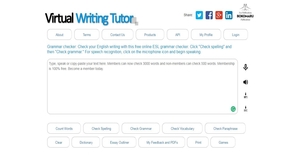
Virtual Writing Tutor features a grammar checker that users can access by clicking on the Check Grammar button within the program. After that, all they need to do is to enter the text in the text area and click the same button; and the program will automatically check for grammar mistakes.
The grammar checker also detects common punctuation errors, contextual spelling errors, word choice errors, and ESL grammar errors. After the program captures the errors, it displays suggestions below the text area. Thus, users can determine why they made those errors and view hints on how they can fix them.
Avoid Plagiarism Using Paraphrase Checker
Plagiarism is a mortal sin especially in journalism; and to avoid committing it, someone needs to learn how to paraphrase effectively. Hence, Virtual Writing Tutor offers a feature that aims to avoid plagiarism and helps users improve their paraphrasing skills. This feature is called Paraphrase Checker. Paraphrase Checker allows students and writers to automatically compare the text they created to the text owned by original authors. It underlines the common words and phrases between the texts and gives a score to rate their similarity.
Create Outlines For Essays
To create persuasive essays, Virtual Writing Tool has an essay outliner that lets students prepare outlines for their essays. The essay outliner enables students to create outlines for opinion essays, prioritized list essays, and argument essays. To make an outline, students can select from the three tools they can access in the essay outliner. Additionally, they will be able to save an outline they created and revise it anytime.
Grammar Checking API Service
To wrap up, the program provides a grammar checking API that lets developers add grammar and spelling checking capabilities to their website. With this API, websites that are offering proofreading or English language learning services will be able to take advantage of the features and tools available in the program.
Show MoreOverview of Virtual Writing Tutor Features
- Check and Enrich Vocabulary
- Vocabulary Checker Tools
- Academic And Conversational Vocabulary
- Cliches And Power Words
- Field-Related Vocabulary
- Target Structures
- Grammar Checker
- Check Spelling And Punctuation
- Paraphrase Checker
- Essay Checker
- Word Counter
- Essay Outliner
- Feedback And Links
- Error Correction Game
- Grammar Checking API Service
- Incorporate To ESL Courses
Virtual Writing Tutor Position In Our Categories
Knowing that businesses have distinct business-related demands, it is prudent they abstain from deciding on a one-size-fits-all, ”best” software. However, it would be futile to try to come across such a software solution even among recognizable software products. The better thing to do should be to shortlist the several chief functions which call for a careful thought like essential features, packages, technical skill aptitude of staff, company size, etc. Next, you must follow through your product research comprehensively. Read these Virtual Writing Tutor evaluations and scrutinize each of the software products in your shortlist in detail. Such well-rounded research makes sure you drop mismatched apps and buy the one that delivers all the features your business requires.
Position of Virtual Writing Tutor in our main categories:
TOP
20
Virtual Writing Tutor is one of the top 20 Grammar Checker Software products
TOP
20
Virtual Writing Tutor is one of the 20 Writing Enhancement Software products
Each company has its own characteristics, and might need a special Grammar Checker Software solution that will be designed for their business size, type of customers and employees and even specific industry they cater to. It's not wise to count on finding an ideal software that is going to work for each business regardless of their history is. It may be a good idea to read a few Virtual Writing Tutor Grammar Checker Software reviews first and even then you should remember what the solution is supposed to do for your business and your staff. Do you need a simple and intuitive solution with only basic functions? Will you really use the complex functionalities required by experts and large enterprises? Are there any specific features that are especially practical for the industry you operate in? If you ask yourself these questions it will be much easier to get a reliable solution that will match your budget.
How Much Does Virtual Writing Tutor Cost?
Virtual Writing Tutor Pricing Plans:
Free Trial
Virtual Writing Tutor
Free
What are Virtual Writing Tutor pricing details?
Virtual Writing Tutor Pricing Plans:
Free Trial
Virtual Writing Tutor
Free
Virtual Writing Tutor is free to use, and comes with no enterprise pricing fees to worry about.
User Satisfaction
Positive Social Media Mentions
30
Negative Social Media Mentions
1
We know that when you decide to purchase a Grammar Checker Software it’s important not only to learn how experts evaluate it in their reviews, but also to check if the real people and enterprises that purchased these solutions are genuinely content with the service. Because of that need we’ve designer our behavior-based Customer Satisfaction Algorithm™ that collects customer reviews, comments and Virtual Writing Tutor reviews across a broad range of social media sites. The data is then featured in an easy to understand way indicating how many clients had positive and negative experience with Virtual Writing Tutor. With that information at your disposal you will be equipped to make an informed purchasing decision that you won’t regret.
Video
Technical details
Devices Supported
- Windows
- Linux
- Mac
- Web-based
Deployment
- Cloud Hosted
- Open API
Language Support
- English
Pricing Model
- Free
Customer Types
- Small Business
- Medium Business
- Freelancers
What Support Does This Vendor Offer?
- phone
- live support
- training
- tickets
What integrations are available for Virtual Writing Tutor?
Virtual Writing Tutor can be integrated with any website or application. It also works with FieldStudy.com.

Virtual Writing Tutor
is waiting for
your first review.

Write your own review of this product
ADD A REVIEWMore reviews from 0 actual users:


Join a community of 7,369 SaaS experts
Thank you for the time you take to leave a quick review of this software. Our community and review base is constantly developing because of experts like you, who are willing to share their experience and knowledge with others to help them make more informed buying decisions.
Sign in with LinkedIn
Why we require LinkedIn?
- Show the community that you're an actual user.
- We will only show your name and profile image in your review.
- You can still post your review anonymously.
OR
Sign in with company emailSign in with company email
Popular Virtual Writing Tutor Alternatives


Top Competitors To Virtual Writing Tutor By Price
Product name:
Price:


Trending Grammar Checker Software Reviews


Virtual Writing Tutor Comparisons
Product name:





Page last modified



Did you find this review useful?
Yes
No
Thank you for your feedback
How can we make this page better?
Unsure about this software?
FIND ALTERNATIVES
 Why is FinancesOnline free?