

VMware vCenter Review



What is VMware vCenter?
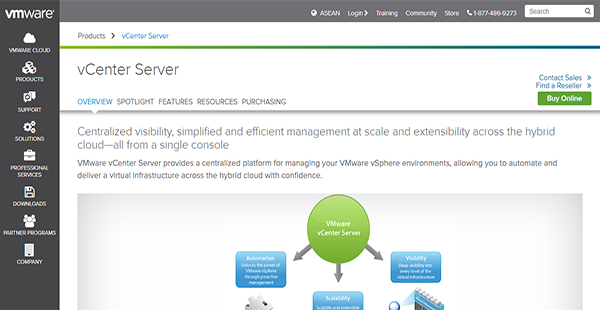
VMware vCenter is an extensible and centralized management platform for VMware vSphere environments. It enables you to deliver a virtual infrastructure by utilizing a hybrid cloud efficiently and with ease automatically. This minimizes the strain on your IT administrators as they can finely control deployments from a single window. Moreover, the solution can accommodate plugins that let IT personnel oversee third-party elements in their data center on the same dashboard. As such, you can have a multifarious management console.
Furthermore, VMware vCenter has a native backup scheduler and backup restoration capabilities that adhere to industry-standard protocols. With these, you can create as many backups as you need and fearlessly restore your system to a previous iteration.
Show MoreOverview of VMware vCenter Benefits
Streamlined Management
Rolling out virtual environments can be a time-consuming and challenging enterprise. But with VMware vCenter, you can streamline the process and experienced simplified management at the same time. On top of that, the time it takes to complete the deployment is reduced, thus allowing your personnel to perform their tasks and maximize time and resources on the dot.
Unified Control
Regardless of the number of vSphere infrastructures you have, you can manage them all from a single vCenter console that you can easily access from any modern browser. This streamlines administration tasks such as role customization, inventory search, and virtual machine provisioning, as you can perform this with a click of a button.
Large-Scale Management
A single instance of VMware vCenter is built to accommodate up to 1,000 hosts and 10,000 virtual machines. If you have 10 instances, you can even link them to manage up to 30,000 virtual machines. This linked mode then enables you to replicate roles, permissions, and licenses across the infrastructure and to achieve simultaneous management of all vCenter servers.
Cost-Effective Integration
Aside from being extensible using web plugins, VMware vCenter can be highly flexible through web services API. This allows you to connect the solution with existing systems in your enterprise and manage them adroitly from one solution.
Show MoreOverview of VMware vCenter Features
- Browser-Based Management
- Linked Mode
- Hybrid Linked Mode
- Systems Management Product Integration
- Native Backup & Restore
- Native Backup Scheduler
- Web Client Plugins
VMware vCenter Position In Our Categories
Since companies have distinct business needs, it is reasonable that they steer clear of going for a one-size-fits-all, “perfect” business program. However, it would be difficult to try to come across such an app even among well-known software solutions. The correct step to undertake can be to write down the various significant functions which merit consideration including crucial features, packages, skill levels of staff, organizational size, etc. The second step is, you must do your product research exhaustively. Read these VMware vCenter evaluations and look over each of the software programs in your shortlist more closely. Such all-encompassing product research guarantee you keep away from unfit apps and choose the system that provides all the tools your company requires.
Position of VMware vCenter in our main categories:
TOP
5
VMware vCenter is one of the top 5 Virtual Desktop Infrastructure Software products
If you are interested in VMware vCenter it could also be sensible to investigate other subcategories of Virtual Desktop Infrastructure Software listed in our database of B2B software reviews.
Organizations have different wants and requirements and no software platform can be just right in such a situation. It is useless to try to find an ideal out-of-the-box software product that meets all your business requirements. The wise thing to do would be to customize the system for your specific wants, staff member skill levels, budget, and other factors. For these reasons, do not hasten and pay for well-publicized popular applications. Though these may be widely used, they may not be the ideal fit for your particular requirements. Do your groundwork, check out each short-listed system in detail, read a few VMware vCenter Virtual Desktop Infrastructure Software reviews, speak to the maker for clarifications, and finally settle for the product that offers what you want.
How Much Does VMware vCenter Cost?
VMware vCenter Pricing Plans:
Free Trial
Foundation
$1,535.00/one-time payment
Standard
$6,175.00/one-time payment
What are VMware vCenter pricing details?
VMware vCenter Pricing Plans:
Free Trial
Foundation
$1,535.00/one-time payment
Standard
$6,175.00/one-time payment
VMware vCenter Server is part of the vSphere suite of products with two types of enterprise pricing. The licensing fees are listed below and are applicable only to US-based customers and do not include support. For more information, you can get in touch with the sales team.
VMware vCenter Server Foundation – $1,535.00/one-time payment
- Management Service
- Database Server
- Inventory Service
- VMware vSphere Clients
- VMware vCenter APIs & .NET
- vCenter Single Sign-On
VMware vCenter Server Standard – $6,175.00/one-time payment
- All Foundation Features
- vCenter Orchestrator
- vCenter Server Linked Mode
- vCenter High Availability
- vCenter Backup & Restore
- vCenter Server Appliance Migration Tool
User Satisfaction
Positive Social Media Mentions
208
Negative Social Media Mentions
2
We are aware that when you decide to purchase a Virtual Desktop Infrastructure Software it’s vital not only to learn how professionals rank it in their reviews, but also to check if the actual people and enterprises that bought these solutions are genuinely satisfied with the product. Because of that need we’ve devised our behavior-based Customer Satisfaction Algorithm™ that collects customer reviews, comments and VMware vCenter reviews across a vast array of social media sites. The information is then displayed in a simple to understand format showing how many users had positive and negative experience with VMware vCenter. With that information available you should be equipped to make an informed buying decision that you won’t regret.
Video
Technical details
Devices Supported
- Windows
- Mac
- Web-based
Deployment
- Cloud Hosted
- Open API
Language Support
- English
- Chinese
- German
- Japanese
- Spanish
- French
- Russian
- Italian
- Dutch
- Portugese
- Polish
- Turkish
- Swedish
Pricing Model
- One-time payment
Customer Types
- Small Business
- Large Enterprises
- Medium Business
What Support Does This Vendor Offer?
- phone
- live support
- training
- tickets
What integrations are available for VMware vCenter?
VMware vCenter is extensible using web plugins and web services API.

VMware vCenter
is waiting for
your first review.

Write your own review of this product
ADD A REVIEWMore reviews from 0 actual users:


Join a community of 7,369 SaaS experts
Thank you for the time you take to leave a quick review of this software. Our community and review base is constantly developing because of experts like you, who are willing to share their experience and knowledge with others to help them make more informed buying decisions.
Sign in with LinkedIn
Why we require LinkedIn?
- Show the community that you're an actual user.
- We will only show your name and profile image in your review.
- You can still post your review anonymously.
OR
Sign in with company emailSign in with company email
Popular VMware vCenter Alternatives


Top Competitors To VMware vCenter By Price
Product name:
Price:


Trending Virtual Desktop Infrastructure Software Reviews


VMware vCenter Comparisons
Product name:


Page last modified



Did you find this review useful?
Yes
No
Thank you for your feedback
How can we make this page better?
Unsure about this software?
FIND ALTERNATIVES
 Why is FinancesOnline free?