

ALVAO Review



What is ALVAO?
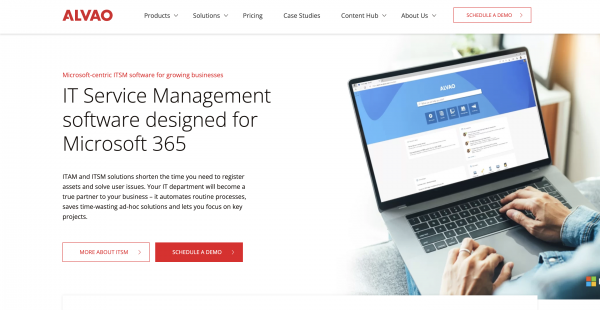
ALVAO Service Desk is a Microsoft-native ITSM platform that centralizes requests across IT, HR, and Facilities. Integrated with Outlook and Teams, it allows employees to create, track, and resolve tickets directly in familiar tools. AI and Copilot features automate repetitive tasks, provide smart suggestions, and power a Teams-based virtual agent for 24/7 self-service. With transparent dashboards, SLA-driven prioritization, Power platform integration, no-code automatization and Power BI reporting, ALVAO delivers clarity and measurable results. Deployable in Azure or on-premises, and aligned with ISO 27001 and SOC 2, it combines security, flexibility, and scalability to streamline service delivery and drive organizational efficiency while ensuring compliance with standards such as Cyber Essentials and DORA.
Show MoreOverview of ALVAO Benefits
Virtualized Asset-to-Asset Linkages
ALVAO uses virtualized asset-to-asset links to pioneer a new method of asset management. Businesses can use this feature to create dynamic connections between assets in a virtual environment, which makes asset management strategies more adaptable and agile. Virtual links enable businesses to optimize resource allocation, quickly adjust to changing setups, and adjust dependencies while fostering a responsive and effective IT environment.
Automated Processes
ALVAO greatly improves operational efficiency by automating and streamlining crucial business processes. Automating repetitive and time-consuming tasks allows for seamless completion, freeing up valuable resources for more strategic endeavors. ALVAO guarantees consistent process execution, lowering error rates and speeding up response times, from ticket routing to approval workflows. With this automation-driven strategy, businesses can concentrate on creating new products and providing high-quality services.
Failure Rate Analysis
ALVAO provides advanced failure rate analysis capabilities to organizations, empowering them. Businesses may learn a great deal about possible weaknesses and areas for development by methodically examining the failure rates of their assets and procedures. Proactively identifying failure patterns minimizes disruptions and downtime by enabling preemptive measures. Failure rate analysis from ALVAO is a strategic tool to guarantee the resilience of vital business processes and maximize asset performance.
Data Reporting
ALVAO provides strong data reporting functionalities, offering a comprehensive view of key performance indicators and operational metrics. Decision-making is facilitated by allowing users to create customized reports that address particular business requirements. ALVAO’s reporting features provide organizations with actionable insights, enabling continuous improvement and strategic planning. Examples of these insights include tracking incident resolution times, asset utilization, and service request trends.
Show MoreOverview of ALVAO Features
- Microsoft 365 Optimization
- Intune integration
- CMDB
- Custom Apps
- Advanced Workflows
- Azure DevOps
- Asset Inventory
- Enterprise API
- Electronic Handover Forms
- SAM Assistant
- Power Automate integration
- SLA Management
- Problem Management
- Release Management
- Customizable Agent Roles
- Advanced Reporting
- Change Management
- Incident Management
- Service Catalog
- Knowledge Base
- Workflow Automation
What Problems Will ALVAO Solve?
Problem #1: An IT team frequently loses track of the staff handling each request when using a shared mailbox for end-user inquiries.
Solution: ALVAO offers the IT team a consolidated view of all tickets and their respective SLAs for each service. This helps both IT and end-users know when the ticket will be resolved. Additionally, ALVAO provides a clearly defined workflow and a range of automation to resolve tickets more efficiently and quickly.
Problem #2: End users often resort to various channels such as IT calls, emails, or in-person visits due to a lack of knowledge regarding the appropriate contact person and communication methods for seeking assistance.
Solution: ALVAO provides a single point of contact for all services within a company. End users can choose from various services in the service catalog, and the Knowledgebase provides help for easy-to-solve issues so that end users do not have to raise a ticket. Additionally, end users can raise tickets directly in Teams so they do not have to switch between apps.
Problem #3: Using spreadsheets to track hardware and software can be difficult and time-consuming for businesses.
Solution: ALVAO agent scan detection provides complete and up-to-date data about all IT assets within an organization. The IT team has a consolidated view of missing licenses, un-updated security software, and old versions of the TPM processor on a particular laptop. The IT manager can also use this accurate data to create a budget for the upcoming year.
Awards & Quality Certificates

ALVAO Position In Our Categories
Bearing in mind companies have unique business-related needs, it is reasonable they avoid selecting a one-size-fits-all, “perfect” software solution. Nevertheless, it is troublesome to try to discover such application even among well-known software systems. The logical thing to do should be to list the numerous chief aspects which call for a research like important features, plans, skill competence of staff members, business size, etc. After which, you should perform the research to a full extent. Have a look at these ALVAO evaluations and explore the other software systems in your shortlist more closely. Such detailed product investigation guarantee you circumvent poorly fit applications and pay for the one that has all the tools your company requires to achieve growth.
Position of ALVAO in our main categories:
TOP
20
ALVAO is one of the top 20 Fixed Asset Management Software products
TOP
50
ALVAO is one of the 50 Help Desk Software products
TOP
20
ALVAO is one of the top 20 IT Asset Management Software products
TOP
100
ALVAO is one of the 100 IT Management Software products
There are well-liked and widely used applications in each software group. But are they necessarily the best fit for your enterprise’s unique needs? A trendy software product may have thousands of users, but does it offer what you need? For this reason, do not blindly spend on popular systems. Read at least a few ALVAO IT Management Software reviews and consider the factors that you wish to have in the software such as the cost, main tools, available integrations etc. Then, shortlist a few apps that fit your needs. Check out the free trials of these platforms, read online reviews, get clarifications from the seller, and do your research meticulously. This profound groundwork is certain to help you choose the best software solution for your organization’s unique needs.
How Much Does ALVAO Cost?
ALVAO Pricing Plans:
Free Trial
Start
Contact vendor
Standard
Contact vendor
Expert
Contact vendor
Enterprise
Contact vendor
What are ALVAO pricing details?
ALVAO Pricing Plans:
Free Trial
Start
Contact vendor
Standard
Contact vendor
Expert
Contact vendor
Enterprise
Contact vendor
ALVAO offers free trial, SMB, and enterprise pricing packages. Explore the details and select the plan that suits your business needs.
Asset Management
Start – By quote
- SLA 99,9%
- Microsoft Azure US/EU/UK
- Asset Management
- Universal Asset Inventory
- Software License
- Management
- Software and Hardware Discovery
Standard – By quote
- Everything in Start+
- Electronic Handover Forms
- Inventory Audits
- Microsoft Intune Connector
Expert – By quote
- Everything in Standard+
- Software Asset Management Assistant
- Asset Management Enterprise API
- Asset Management Custom Apps
- Configuration Management
Enterprise – By quote
- Everything in Expert+
- Independent Reporting Storage
- Sandbox (without SLA guarantee)
Service Desk
Start – By quote
- SLA 99,9%
- Microsoft Azure US/EU/UK
- Service Desk
- Service Catalog
- Change Management
- Recurring Changes
- Incident Management
- Problem Management
- Request Management
- Knowledge Base
- Self Service Portal
- Mobile Access
- Reports & Analytics
- Service Level Management
- Process Workflow
- Custom Fields
- Single Sign-on
- Automate Ticket Routing
- Ticket Prioritization
- Ticket Notifications
- Active Directory Integration
- Multi-Channel Access
Standard – By quote
- Everything in Start+
- Outlook Add-in
- Teams Add-in
- Customer Satisfaction
- Survey
- Advanced Workflows
Expert – By quote
- Everything in Standard+
- Azure DevOps Connector
- Service Desk Enterprise API
- Service Desk Custom Apps
Enterprise – By quote
- Everything in Expert+
- Independent Reporting Storage
- Sandbox (without SLA guarantee)
IT Service Management
Start – By quote
- SLA 99,9%
- Microsoft Azure US/EU/UK
- Service Desk
- Service Catalog
- Change Management
- Recurring Changes
- Incident Management
- Problem Management
- Request Management
- Knowledge Base
- Self Service Portal
- Mobile Access
- Reports & Analytics
- Service Level Management
- Process Workflow
- Custom Fields
- Single Sign-on
- Automate Ticket Routing
- Ticket Prioritization
- Ticket Notifications
- Active Directory Integration
- Multi-Channel Access
- Asset Management
- Universal Asset Inventory
- Software License
- Management
- Software and Hardware Discovery
Standard – By quote
- Everything in Start+
- Outlook Add-in
- Teams Add-in
- Customer Satisfaction
- Survey
- Advanced Workflows
- Electronic Handover Forms
- Inventory Audits
- Microsoft Intune Connector
Expert – By quote
- Everything in Standard+
- Azure DevOps Connector
- Service Desk Enterprise API
- Service Desk Custom Apps
- Standard HW/SW Request
- Forms
- Software Asset Management Assistant
- Asset Management Enterprise API
- Asset Management Custom Apps
- Configuration Management
Enterprise – By quote
- Everything in Expert+
- Independent Reporting Storage
- Sandbox (without SLA guarantee)
User Satisfaction
Positive Social Media Mentions
0
Negative Social Media Mentions
0
We know that when you choose to buy a IT Management Software it’s important not only to find out how professionals evaluate it in their reviews, but also to check if the actual clients and enterprises that purchased it are indeed satisfied with the service. That’s why we’ve created our behavior-based Customer Satisfaction Algorithm™ that gathers customer reviews, comments and ALVAO reviews across a vast array of social media sites. The information is then presented in an easy to digest format indicating how many users had positive and negative experience with ALVAO. With that information at hand you will be prepared to make an informed business choice that you won’t regret.
Video
Technical details
Devices Supported
- Windows
- Android
- iPhone/iPad
- Mac
- Web-based
Deployment
- Cloud Hosted
- On Premise
- Open API
Language Support
- English
- German
- Spanish
- French
- Polish
Pricing Model
- Monthly payment
- Annual Subscription
- Quote-based
Customer Types
- Small Business
- Large Enterprises
- Medium Business
What Support Does This Vendor Offer?
- phone
- live support
- training
- tickets
What integrations are available for ALVAO?
- Outlook
- Microsoft Teams
- Power BI
- Azure DevOps
- Power Automate
- MS Intune
- Microsoft Azure
- Azure Active Directory
- SharePoint
- Microsoft Exchange
- Microsoft To Do
- JIRA
- SAP
- ChatGPT
- Helios
- Microsoft 365
- Microsoft Dynamics 365
- OrcaScan
- Nagios
- Zabbix
- InTune
- Configuration Management
- bmc
- iTop
- OTRS
ALVAO User Reviews
ALVAO average rating:
4/5
Overall impression
5/5
Customer Support
5/5
Value for Money
5/5
Ease of Use
Write your own review of this product
ADD A REVIEWMore reviews from 1 actual users:
Sort by:
Latest
- Latest
- Most useful
- Most positive
- Most negative
Very easy and intuitive
Read full review >
4/5
Overall impression
5/5
Customer Support
4/5
Value for Money
5/5
Ease of Use
Published on: 05.03.2024
Company Size: More than 100 Employees
Industry: Logistics and Supply Chain
PROS: The system is easy to navigate and provides all the functions we need. It supports all scenarios for incident, problem, and change management, along with no-code workflow automation that saves a ton of time daily. The integration with Teams and Azure is pretty good and intuitive. Compared to most ITSM tooIs have tried so far, this has very decent ITAM, including auto-discovery, complete asset history, and very easy to use license management.
CONS: Cons: I have yet to find anything that I disliked. Maybe that I did not have it soon.


Join a community of 7,369 SaaS experts
Thank you for the time you take to leave a quick review of this software. Our community and review base is constantly developing because of experts like you, who are willing to share their experience and knowledge with others to help them make more informed buying decisions.
Sign in with LinkedIn
Why we require LinkedIn?
- Show the community that you're an actual user.
- We will only show your name and profile image in your review.
- You can still post your review anonymously.
OR
Sign in with company emailSign in with company email
Popular ALVAO Alternatives


Top Competitors To ALVAO By Price
Product name:
Price:

by quote

By quote


Trending IT Management Software Reviews
8.0
98%


9.0
98%

ALVAO Comparisons
Product name:


ALVAO user reviews
Very easy and intuitive
Read full review >
4/5
Overall impression
5/5
Customer Support
4/5
Value for Money
5/5
Ease of Use
Published on: 05.03.2024
Company Size: More than 100 Employees
Industry: Logistics and Supply Chain

Page last modified
Award Winner



Did you find this review useful?
Yes
No
Thank you for your feedback
How can we make this page better?
Unsure about this software?
FIND ALTERNATIVES
 Why is FinancesOnline free?