
- Home
- Accounting Software
- CloudBooks

CloudBooks Review



What is CloudBooks?
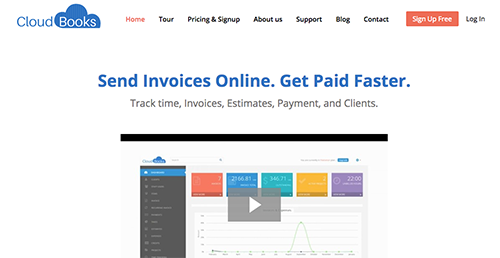
CloudBooks is a user-friendly online invoicing app for freelancers and small companies. This web application offers invoicing, estimates, time tracking, client management, project management and more. CloudBooks’ main features are online invoicing, one-click time tracking, online payments, send estimates for approval, track and bill expense, and automated invoice reminders.
Show MoreOverview of CloudBooks Benefits
A Smoother Payments Process: You can offer your clients different ways of making payments with secure online payment gateways. They can pay through credit cards, checks, PayPal, or cash, and you can get paid faster and on time. After receiving the payment, you can send a personalized automated thank you note.
You Can Monetize Every Billable Minute: You can bill every minute you spend working on a project. CloudBooks informs you where and how you are spending time on client projects and helps monetize this time.
It’s Easy To Monitor and Recoup Expenses: Track the expenses you incur while working on client projects, and invoice them to pass on the costs to the concerned client. CloudBooks enables you to track expenses in real time to ensure you don’t pass them on to the wrong client. It offers hassle-free expense tracking that allows you to add expenses to the concerned invoices quickly and accurately.
It Lets You Optimize Billing: Whether it’s a team of one or numerous teams with multiple members, CloudBooks helps you track time easily to ensure optimal invoicing. You can also track project progress to know the amount of time spent by a team on a particular project. Permission-based access enables you to restrict access to important financial information.
You Can Simplify Recurring Billing and Subscription: CloudBooks helps you schedule recurring invoices for regular clients and send them automatically every billing period. This improves the efficiency of your billing process and saves time. You can also enjoy the advantage of hassle-free subscription renewal and payment collection to optimally leverage your subscription earnings.
It Allows You To Manage Your Earning and Spending: CloudBooks offers detailed reports on payment collection, expenses incurred, and profit & loss to help you gauge your business earnings. You can also look through a range of standard business reports to get better control over company finances.
Show MoreOverview of CloudBooks Features
- Online invoicing
- Expense tracking
- Time tracking
- Recurring invoices
- Auto payment
- Accounting reports and taxes
- Track all invoices
- Online payment
- Turn estimates into invoices
- Know the status of estimates
- Say goodbye to one-size-fits-all estimates
- Monitor your expenses
- Record expenses automatically
- Set up custom expense categories
- Efficiently manage multiple projects
- Simplify time tracking
- Monetize billable hours
- Aging invoice
- Expense reports
- Sales reports
- Stringent data security
What Problems Will CloudBooks Solve?
1. Paperwork: Online invoicing software not only saves you money, time, and labor, but paperwork as well. All the data will be saved to the cloud and will be accessible to you from any place anytime. So, that means no more documentation and carrying large files around wherever you go.
2. Time-consuming process: One of the disadvantages of manual accounting is the amount of time you must put into it because you don’t have any system-based software. Manual accounting can be time consuming and frustrating. CloudBooks helps you to easily create invoices and saves lots of time.
3. Problem in managing customers’ data: One of the biggest problems that people often face is managing customer data which is crucial for businesses. With good invoicing software in place, however, you can store all that data in one place, and also archive it securely.
CloudBooks Position In Our Categories
Since businesses have their own business demands, it is practical that they steer clear of deciding on an all-encompassing, “perfect” software system. Still, it would be almost impossible to try to find such an app even among sought-after software systems. The practicable thing to do is to take note of the various important factors which demand research like major features, price terms, technical skill ability of the employees, organizational size, etc. Then, you should perform your research to a full extent. Have a look at some of these CloudBooks analyses and check out each of the software solutions in your shortlist more closely. Such comprehensive product research ensures you weed out poorly fit applications and select the one which has all the aspects your business requires.
Position of CloudBooks in our main categories:
TOP
500
CloudBooks is one of the top 500 Accounting Software products
Companies have different wants and requirements and no software solution can be perfect in such a condition. It is futile to try to find an ideal off-the-shelf software system that meets all your business requirements. The smart thing to do would be to customize the solution for your specific wants, staff member skill levels, finances, and other elements. For these reasons, do not rush and subscribe to well-publicized popular systems. Though these may be widely used, they may not be the perfect fit for your specific wants. Do your homework, check out each short-listed application in detail, read a few CloudBooks Accounting Software reviews, contact the seller for clarifications, and finally choose the product that provides what you want.
How Much Does CloudBooks Cost?
CloudBooks Pricing Plans:
Free Trial
Free
Free
Freelancer
$2/month
Team
$10/month
Agency
$20/month
What are CloudBooks pricing details?
CloudBooks Pricing Plans:
Free Trial
Free
Free
Freelancer
$2/month
Team
$10/month
Agency
$20/month
CloudBooks offers four pricing plans:
Free
- 1 client
- No users
Freelancer: $2/month
- 25 clients
- 3 users
Team: $10/month
- Unlimited clients
- 5 users
Agency: $20/month
- Unlimited clients
- Unlimited users
User Satisfaction
Positive Social Media Mentions
111
Negative Social Media Mentions
0
We know that when you decide to get a Accounting Software it’s vital not only to see how professionals score it in their reviews, but also to check if the real clients and companies that use it are actually content with the service. That’s why we’ve devised our behavior-based Customer Satisfaction Algorithm™ that gathers customer reviews, comments and CloudBooks reviews across a wide range of social media sites. The information is then displayed in an easy to understand form revealing how many clients had positive and negative experience with CloudBooks. With that information available you should be ready to make an informed buying choice that you won’t regret.
Video
Technical details
Devices Supported
- Windows
- Web-based
Deployment
- Cloud Hosted
Language Support
- English
Pricing Model
- Free
- Monthly payment
Customer Types
- Small Business
- Medium Business
- Freelancers
What Support Does This Vendor Offer?
- phone
- live support
- training
- tickets
What integrations are available for CloudBooks?
CloudBooks supports the following integrations:
- Paypal
- Strive
CloudBooks User Reviews
CloudBooks average rating:
4/5
Overall impression
5/5
Customer Support
5/5
Value for Money
4/5
Ease of Use
Write your own review of this product
ADD A REVIEWMore reviews from 1 actual users:
Sort by:
Latest
- Latest
- Most useful
- Most positive
- Most negative
Very fast and neat invoicing software
Read full review >
4/5
Overall impression
4/5
Customer Support
4/5
Value for Money
5/5
Ease of Use
Published on: 28.04.2021
Company Size: N/A
Industry: N/A
PROS: Easy Invoicing Superb Client Management Very fast software Works on mobile browser too Responsive support
CONS: There are some glitches here and there but the support staff is good.


Join a community of 7,369 SaaS experts
Thank you for the time you take to leave a quick review of this software. Our community and review base is constantly developing because of experts like you, who are willing to share their experience and knowledge with others to help them make more informed buying decisions.
Sign in with LinkedIn
Why we require LinkedIn?
- Show the community that you're an actual user.
- We will only show your name and profile image in your review.
- You can still post your review anonymously.
OR
Sign in with company emailSign in with company email
Popular CloudBooks Alternatives


Top Competitors To CloudBooks By Price
Product name:
Price:





Trending Accounting Software Reviews




CloudBooks Comparisons
Product name:




CloudBooks user reviews
Very fast and neat invoicing software
Read full review >
4/5
Overall impression
4/5
Customer Support
4/5
Value for Money
5/5
Ease of Use
Published on: 28.04.2021
Company Size: N/A
Industry: N/A

Page last modified



Did you find this review useful?
Yes
No
Thank you for your feedback
How can we make this page better?
Unsure about this software?
FIND ALTERNATIVES
 Why is FinancesOnline free?