

Coassemble Review


What is Coassemble?
Coassemble is cloud-hosted learning management system (LMS) designed to give organizations of whatever size and shape one platform for all their learning and training needs. The LMS was previously known as eCoach which was rebranded as it moved away from its start-up stage and into the next level of growth and progress. Coassemble remains true to its original platform which offers a combination of LMS and content creation for the purpose of producing and sharing online training materials for individual users and businesses from whatever industry.
Coassemble’s features and capabilities are aligned to its mission statement of “simplifying the sharing of knowledge to enable success.” Hence, it offers easy-to-use but powerful tools that reinforce the concept of easier knowledge sharing. Users get access to all core LMS features and can still create unlimited content within the web-based solution. It provides dozens of interactive and customizable drag-and-drop templates for quick creation of training and learning courses. Designs are built to be responsive on any device and the LMS gives you the capability to do real-time updating and live editing of your content anytime from anywhere.
Since it’s a cloud-based platform, all of your LMS and course content is hosted online on Coassemble’s robust infrastructure. You won’t need an IT team or technical background to use the software because all updates and improvements are automatically released into your account. Another standout feature of the LMS is its massive integration with over a thousand external apps and services through Zapier, giving you a truly extendable solution that can handle other functions beyond learning management. It works well with leading HR, communication, email, and office tools, and can integrate with popular CRM, social media, online payment, and e-commerce platforms.
There are only two pricing packages offered but they cover the full feature set and services on top of 250 allowable monthly users. You also have the option to add user packs for a small number of users numbering 100 or a large number of users of up to 1,000. You get pricing flexibility with a solution that can scale to the needs of organizations. The vendor even offers a customized plan if your company has special learning requirements. Moreover, Coassemble provides nonprofits with generous discounts for training and onboarding of their employees and volunteers.
Show MoreOverview of Coassemble Benefits
Coassemble provides you with myriad benefits whether you use it for corporate training or educational programs. Here are the details:
All-In-One Training Platform
Coassemble offers a number of content creation and knowledge-sharing benefits from a centralized and easily accessible online location. You can quickly start authoring courses through a selection of more than 40 interactive and customizable templates with drag and drop function. You’ll be able to add videos, images, charts, and other multimedia elements to come up with engaging courses. All templates are mobile-responsive which means users can access all training materials from their mobile devices without sacrificing the quality of any added media. Best of all with Coassemble, you get unlimited course creation and unlimited online storage for your course materials.
SCORM Compliant
If you have an existing training content in SCORM files, you can import them to Coassemble and share it within the platform. Being SCORM compliant through the LMS software allows you to have your learning materials shareable, importable, and workable in any systems and platforms. This ability which is supported by Coassemble translates to faster delivery of training materials, more productivity for both trainers and learners, and lower activity cost.
Detailed Reporting
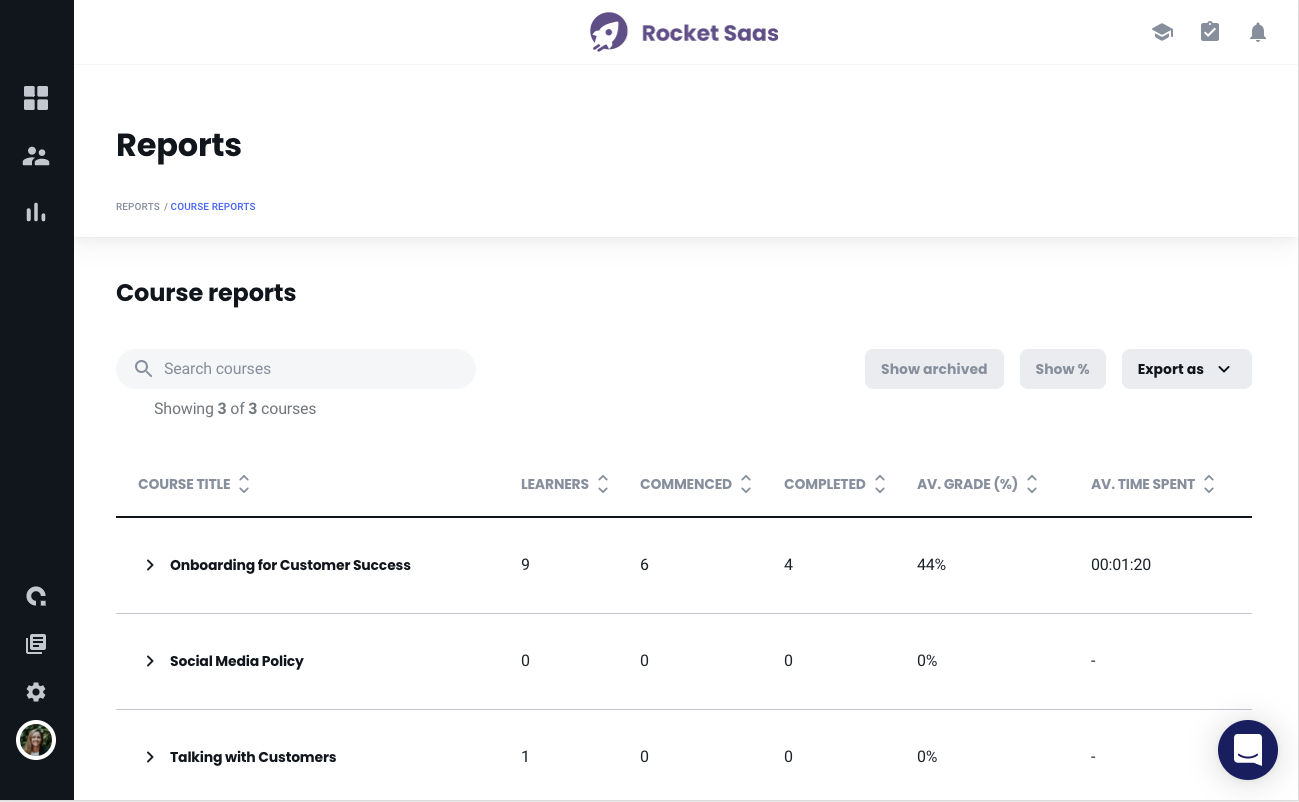
Get insight into your users’ training history, progress, and performance with Coassemble’s advanced and automated reporting. This feature provides you with all the necessary information to help you make data-driven decisions on which type of training and content is more effective for your users. You’ll get all the insights you need with Coassemble analyzing the numbers in the backend to provide you with data on student completion rate, time to complete, learner results, course-specific productivity, and campus usage. These reports are extremely useful as they allow you to make further improvement in your content and make them more effective.
Zapier Integrations
We all know the importance of software to have full integration capability with external services and applications. It lowers cost, effort, and resources and boosts efficiency and productivity. Through Zapier, Coassemble is able to connect and work with more than 1,000 third-party applications and services – name it and most likely than not Coassemble integrates with it. In addition, the solution provides a RESTful API for manipulating and accessing data within Coassemble which is useful for developers and those wishing to integrate with the LMS.
Personalized VIP Support
Coassemble promises to have dedicated teams walk their users through every step of the process from sign-up, content creation and sharing, to using the training materials and analyzing how effective they are in helping users improve. With live chat and local support available, Coassemble users will not be short of personalized assistance when they need it. On the other hand, if users prefer the self-serve route, there is always the platform’s knowledge center with tutorials and how-to’s and other helpful resources.
Show MoreOverview of Coassemble Features
- Assignments & Grading
- Advanced course settings
- Advanced workspace settings
- Advanced reporting
- Advanced permissions
- Unlimited storage
- Zapier integrations
- Custom branding
- Customizable interactive templates
- SCORM file importing
- Video hosting/uploads
- eCoach API access
- Webhooks
- VIP support
- Compliance mapping
- Student Intercom connect
- Training plan
- Account management
What Problems Will Coassemble Solve?
Scenario 1: You, as a training manager, want a simpler but better learning experience for your company’s new hires.
Solution: Coassemble’s learning tools and features have been streamlined and simplified for easy use by both trainers and learners without scrimping on quality and effectiveness. Content creation, delivery, and reporting is fast with real-time editing, SCORM support, and deep analytics.
Scenario 2: The customer support of your previous LMS vendor left much to be desired.
Solution: The customer service and support of Coassemble is world-class and personalized. You’ll be guided every step of the way with regard to the product and its implementation. The support comes integral to the Pro+Us plan that also consists of technical advice and design consulting.
Scenario 3: You have to grab and open other applications outside of your LMS just to send emails or communicate with your co-trainers and students.
Solution: With Coassemble, you get one platform that does it all in one place. It huge integration with external apps means you can email (Gmail, MailChimp), chat and connect in real time (Slack), sell your courses (Shopify), and get paid online for your courses (PayPal, Stripe). Those are just examples. With more than 1,000 integrations, you can do so much more right within Coassemble.
Awards & Quality Certificates

Coassemble Position In Our Categories
Knowing that companies have their own business-related demands, it is sensible they steer clear of purchasing a one-size-fits-all, ”best” solution. Still, it would be almost impossible to try to come across such an app even among well-known software solutions. The better step to undertake is to tabulate the several major functions that entail investigation like major features, pricing, skill ability of staff members, organizational size, etc. Next, you should do your research exhaustively. Read some Coassemble evaluations and check out the other software solutions in your shortlist in detail. Such well-rounded product investigation guarantee you take out mismatched applications and buy the system that offers all the function your company requires.
Position of Coassemble in our main categories:
TOP
10
Coassemble is one of the top 10 Learning Management Systems (LMS) products
Every enterprise has different wants and requires a system that can be customized for their size, type of staff members and clients, and the specific industry they are in. For these reasons, no system can offer perfect tools off-the-shelf. When you search a software system, first be sure what you require it for. Read some Coassemble Learning Management Systems (LMS) reviews and ask yourself do you desire basic features or do you want sophisticated features? Are there any industry-specific features that you are searching for? Find the answers to these queries to assist your search. There are multiple factors that you need to consider and these include your finances, specific business requirements, your organization size, integration needs etc. Take your time, check out a few free trials, and finally choose the app that presents all that you want to improve your organization effectiveness and productivity.
How Much Does Coassemble Cost?
Coassemble Pricing Plans:
Free Trial
Start
$49/month
Unlimited plan
$499/month
What are Coassemble pricing details?
Coassemble Pricing Plans:
Free Trial
Start
$49/month
Unlimited plan
$499/month
Coassemble know that their customers are often buying their business’ first online training platform. Their pricing structure is designed so that you can prove the value of our platform before making any commitments.
User Satisfaction
Positive Social Media Mentions
25
Negative Social Media Mentions
0
We know that when you choose to get a Learning Management Systems (LMS) it’s crucial not only to see how professionals evaluate it in their reviews, but also to check whether the real clients and companies that purchased it are actually content with the product. Because of that need we’ve designer our behavior-based Customer Satisfaction Algorithm™ that collects customer reviews, comments and Coassemble reviews across a broad range of social media sites. The information is then featured in a simple to digest format indicating how many clients had positive and negative experience with Coassemble. With that information at hand you will be ready to make an informed business choice that you won’t regret.
Video
Screenshots


Technical details
Devices Supported
- Windows
- Linux
- Android
- iPhone/iPad
- Mac
- Web-based
- Windows Mobile
Deployment
- Cloud Hosted
Language Support
- English
Pricing Model
- Monthly payment
- Annual Subscription
- Quote-based
Customer Types
- Small Business
- Medium Business
- Freelancers
What Support Does This Vendor Offer?
- phone
- live support
- training
- tickets
What integrations are available for Coassemble?
Through Zapier, you can integrate Coassemble with more than 1,000 applications including the following:
- Paperform
- Google Sheets
- Shopify
- WooCommerce
- Gmail
- Google Slides
- MailChimp
- PayPal
- Accredible Certificates
- BambooHR
- WebMerge
- Typeform
- Excel
- Podio
- Stripe
- GoToWebinar
- AWeber
- Slack
- SignNow
- Campaign Monitors
- Constant Contact
- JotForm
- Google Forms
- Google Drive
Coassemble User Reviews
Coassemble average rating:
5/5
Overall impression
5/5
Customer Support
5/5
Value for Money
5/5
Ease of Use
Write your own review of this product
ADD A REVIEWMore reviews from 1 actual users:
Sort by:
Latest
- Latest
- Most useful
- Most positive
- Most negative
Innovative platform
Read full review >
5/5
Overall impression
5/5
Customer Support
5/5
Value for Money
5/5
Ease of Use
Published on: 21.09.2021
Company Size: 1-10 Employees
Industry: Education Management
PROS: i am happy with the platform. it gave me over 12 tools to run my business smoothly in one pace and also saved me the stress of paying for multiple subscription.
CONS: The platform is a great one, i really did not encounter any issue while using the platform.


Join a community of 7,369 SaaS experts
Thank you for the time you take to leave a quick review of this software. Our community and review base is constantly developing because of experts like you, who are willing to share their experience and knowledge with others to help them make more informed buying decisions.
Sign in with LinkedIn
Why we require LinkedIn?
- Show the community that you're an actual user.
- We will only show your name and profile image in your review.
- You can still post your review anonymously.
OR
Sign in with company emailSign in with company email
Useful Coassemble Resources
Popular Coassemble Alternatives



Top Competitors To Coassemble By Price
Product name:
Price:




Trending Learning Management Systems (LMS) Reviews




Coassemble Comparisons
Product name:






Coassemble user reviews
Innovative platform
Read full review >
5/5
Overall impression
5/5
Customer Support
5/5
Value for Money
5/5
Ease of Use
Published on: 21.09.2021
Company Size: 1-10 Employees
Industry: Education Management

Page last modified



Did you find this review useful?
Yes
No
Thank you for your feedback
How can we make this page better?
Unsure about this software?
FIND ALTERNATIVES
 Why is FinancesOnline free?