
- Home
- IDE Software
- Code Blocks

Code Blocks Review



What is Code Blocks?
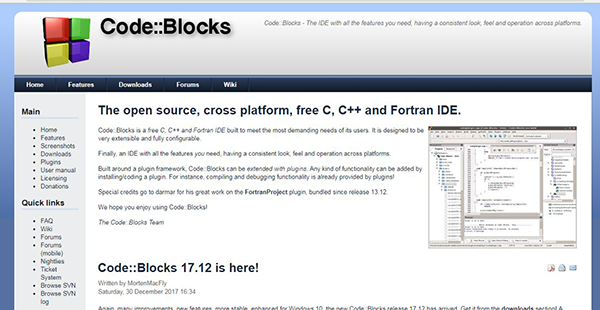
Code::Blocks is a powerful open-source integrated development environment (IDE) for C, C++, and Fortran. It’s a free IDE designed around a plugin architect and is completely configurable and extensible with a consistent operation, look, and feel, across all platforms. The software is built in C++ with wxWidgets as the foundational GUI toolkit.
It supports several compilers including Clang, Visual C++, and GCC with features and capabilities defined by plugins. Users can extend any functionality including debugging and compiling by coding or installing a plugin. Code::Blocks deploys a custom build system that provides vital features such as a debugger, parallel builds, build queues, full breakpoint support, multi-target project, multiple compilers, and ultra-fast inter-project dependencies generations. The program is built to meet all the demanding needs of programmers and developers.
Show MoreOverview of Code Blocks Benefits
Code::Blocks is a fully configurable and extensible IDE that provides functional tools for the demanding needs of developers. It’s a full-featured IDE that provides all the features needed by programmers and developers. Its open-source architecture (under GPLv3) means most of its functionality can be extended via plugins. For instance, its interface is both extensible and fully customizable with a tabbed interface, syntax highlighting, a to-do list manager featuring multiple users, smart indent, class browser, and other features provided via plugins. The interface enables effortless, one-key switch between .c/.cpp and .h files with an open files list for fast switching.
The software provides a powerful debug system featuring enhanced tools such as full code/data breakpoints, user-defined watches, custom memory dumps, call stack, and disassembly listing. The automatic/manual watches provides impressive support for managing user-defined watching via scripting. The debugger features interfaces GNU GDB and offers support for MS CDB which is not fully featured.
Another noteworthy aspect of Code::Blocks is its support for multiple compilers including Open Watcom, Borland C++ 5.5, Clang, MSVC++, GCC, and digital mars. The Compiler module provides workspaces that make it easy for developers to combine multiple projects. It facilitates inter-projects dependencies inside the workspaces and avails a fast custom build system that requires no makefiles.
Code::Blocks is cross-platform and runs on Windows, Mac, and Linux using wxWidgets to maintain a consistent feel, look, and performance across the platforms. It’s written in C++ and requires no proprietary libs or interpreted languages to operate.
Show MoreOverview of Code Blocks Features
- Debugger
- Parallel Builds
- Build Queues
- Smart Indent
- Class browser
- Code completion
- Code folding
- Full breakpoint support
- Multi-target project
- Multiple Compilers
- Ultra-fast inter-project dependencies generations
Code Blocks Position In Our Categories
Keeping in mind businesses have specific business-related wants, it is reasonable they steer clear of buying an all-encompassing, ”best” software solution. Regardless, it would be difficult to try to chance on such a software system even among sought-after software products. The clever thing to do is to write down the varied major aspects which call for a research such as essential features, price plans, technical skill capability of staff members, business size, etc. Thereafter, you must do your product research exhaustively. Have a look at some Code Blocks reviews and check out each of the software options in your shortlist more closely. Such comprehensive product investigation ascertains you drop unsuitable software products and buy the one that has all the benefits your company requires.
Position of Code Blocks in our main categories:
TOP
50
Code Blocks is one of the top 50 IDE Software products
Companies have unique needs and requirements and no software platform can be perfect in such a condition. It is futile to try to find a perfect off-the-shelf software system that fulfills all your business needs. The intelligent thing to do would be to adapt the system for your special needs, employee skill levels, finances, and other factors. For these reasons, do not hurry and invest in well-publicized popular systems. Though these may be widely used, they may not be the best fit for your specific wants. Do your groundwork, look into each short-listed platform in detail, read a few Code Blocks IDE Software reviews, call the maker for explanations, and finally settle for the app that offers what you want.
How Much Does Code Blocks Cost?
Code Blocks Pricing Plans:
Free Trial
Code::Blocks
Free
What are Code Blocks pricing details?
Code Blocks Pricing Plans:
Free Trial
Code::Blocks
Free
Code::Blocks is a free IDE , there are no enterprise pricing plans.
User Satisfaction
Positive Social Media Mentions
20
Negative Social Media Mentions
0
We know that when you choose to get a IDE Software it’s vital not only to learn how professionals evaluate it in their reviews, but also to check if the real people and companies that purchased this software are indeed satisfied with the product. Because of that need we’ve devised our behavior-based Customer Satisfaction Algorithm™ that collects customer reviews, comments and Code Blocks reviews across a wide array of social media sites. The information is then featured in an easy to understand way revealing how many customers had positive and negative experience with Code Blocks. With that information at your disposal you will be prepared to make an informed business choice that you won’t regret.
Video
Technical details
Devices Supported
- Windows
- Linux
- Mac
Deployment
- On Premise
Language Support
- English
Pricing Model
- Free
Customer Types
- Small Business
- Medium Business
- Freelancers
What Support Does This Vendor Offer?
- phone
- live support
- training
- tickets
What integrations are available for Code Blocks?
No available information.
Code Blocks User Reviews
Code Blocks average rating:
5/5
Overall impression
5/5
Customer Support
4/5
Value for Money
4/5
Ease of Use
Write your own review of this product
ADD A REVIEWThe most favorable review

PROS: Compiling C/C++ is an easy job with Code::Blocks. Since it is open-source software, it is flexible and is thus able to support numerous compilers.
CONS: Everything in Code::Blocks works fine for me so I have no complaints.
The least favorable review
PROS: Code::Blocks is a great IDE and I use it mainly for debugging. It is very thorough so I can figure out the exact error. Because of that, we can improve the quality of our output.
CONS: We have to download the compiler we need separately.
More reviews from 14 actual users:
Sort by:
Latest
- Latest
- Most useful
- Most positive
- Most negative
Regarding Code::Blocks
Read full review >
5/5
Overall impression
4/5
Customer Support
4/5
Value for Money
4/5
Ease of Use
Published on: 03.12.2021
Company Size:
Industry: N/A
PROS: As a programming student, I still have a lot to learn and Code::Blocks is helping me increase my knowledge and skill. I find it easy to use because it shares characteristics with Java. If I had used Visual Studio for programming C/C++, I would not be having such an easy time.
CONS: The only problem I have is how difficult it was to use the GNU GCC compiler at the start.
A feature-rich software for C and C++ programming
Read full review >
4/5
Overall impression
3/5
Customer Support
3/5
Value for Money
3/5
Ease of Use
Published on: 13.10.2021
Company Size: 51-100 Employees
Industry: Program Development
PROS: Ever since I was at university, I have been using Code::Blocks. It is lightweight yet it is rich in features. Even if you ask other users, they will say that this is one of the best characteristics of this IDE. That is why I can use it though I have a low-spec computer without worrying about resource drain. It is free to use, too! This is because it is open-source and you can find it in multiple download sites. In line with that, it can work with different platforms and operating systems without issue. And though Code::Blocks is known for C and C++, it can actually be used for Java, Lisp, PHP, SQL, and more. Whichever language you are working with, you will find that the IDE is easy to use.
CONS: The compiler is problematic especially when you are working on a heavy and complex project. Developers of the IDE may also want to work on the autocomplete feature because, currently, it is not very helpful.
C++ newbies will appreciate Code::Blocks
Read full review >
4/5
Overall impression
3/5
Customer Support
3/5
Value for Money
4/5
Ease of Use
Published on: 12.09.2021
Company Size:
Industry: Higher Education
PROS: The best thing about it is the range of options for programming so I am not stuck on C and C++. One more thing I like about it is that there are plenty of libraries available.
CONS: I only have one problem with this IDE. Whenever I encounter an error and remove it, it does not go away completely unless I rebuild the program, which is time-consuming.
An adaptable programming platform
Read full review >
5/5
Overall impression
5/5
Customer Support
4/5
Value for Money
5/5
Ease of Use
Published on: 30.08.2021
Company Size: 1-10 Employees
Industry: Higher Education
PROS: I work with other programming languages other that C/C++ and I like how Code::Blocks is versatile enought to support Java and others. This is something that is clearly demonstrated when I write multiple codes because the editor responds by organizing them in different tabs as I go. What's more, I like how Code::Blocks can work with numerous compilers.
CONS: I am mostly a Mac user so I had to switch to a Windows machine to work on Code::Blocks. I wish they would release a Mac version in the future. Also, I once developed a programming using this software on a Windows PC but it didn't run on other computer, which was a Mac. There was no workaround for it so it was frustrating.
Programming software that helps you learn C
Read full review >
5/5
Overall impression
5/5
Customer Support
4/5
Value for Money
4/5
Ease of Use
Published on: 28.07.2021
Company Size: More than 100 Employees
Industry: Higher Education
PROS: The highlighting feature is one of the best in this IDE. This helps me identify the numerous code formats and also to learn C programming. The interface makes it easy to compile the code, too.
CONS: Code::Blocks is wonderful but I wish it supports python programming as well.
About this IDE
Read full review >
5/5
Overall impression
4/5
Customer Support
4/5
Value for Money
4/5
Ease of Use
Published on: 14.05.2021
Company Size:
Industry: N/A
PROS: Compiling C/C++ is an easy job with Code::Blocks. Since it is open-source software, it is flexible and is thus able to support numerous compilers.
CONS: Everything in Code::Blocks works fine for me so I have no complaints.
A wonderful IDE to use when working with C and C++
Read full review >
4/5
Overall impression
3/5
Customer Support
4/5
Value for Money
3/5
Ease of Use
Published on: 16.04.2021
Company Size: More than 100 Employees
Industry: N/A
PROS: Code::Blocks is a great IDE and I use it mainly for debugging. It is very thorough so I can figure out the exact error. Because of that, we can improve the quality of our output.
CONS: We have to download the compiler we need separately.
An exceptional IDE
Read full review >
4/5
Overall impression
4/5
Customer Support
4/5
Value for Money
4/5
Ease of Use
Published on: 26.03.2021
Company Size: More than 100 Employees
Industry: Computer Software
PROS: From programming to debugging, I use Code::Blocks because of its seamless support for C and C++.
CONS: I have no problems with Code::Blocks except for the fact that it does not come with compilers.
A one-of-a-kind IDE for C and C++ programming
Read full review >
5/5
Overall impression
4/5
Customer Support
4/5
Value for Money
5/5
Ease of Use
Published on: 02.03.2021
Company Size: More than 100 Employees
Industry: Higher Education
PROS: The most important thing about Code::Blocks is its user-friendly nature. Because of that, the ease of working with the different aspects of the program follows, such as in code debugging. It functions excellently in that regard that I have recommended it to other people. On top of it all, it is free and open-source and also flexible enough that it can support numerous compilers. Moreover, I find it useful that there are features that ease the migration of users from other IDEs to Code::Blocks.
CONS: There are no major issues with this IDE that I have encountered. So far, it is still the best in my book.
A great IDE if you are starting out with programming
Read full review >
5/5
Overall impression
4/5
Customer Support
4/5
Value for Money
4/5
Ease of Use
Published on: 03.01.2021
Company Size: 1-10 Employees
Industry: Higher Education
PROS: When I started programming, I was using Code::Blocks. It helped me learn the ropes so I could improve my skills. Even though I am far from being a beginner now, I still use it because of its ease of use and functionality with different computer platforms.
CONS: The code coloring can be confusing because there are too many colors.
A software development program that’s good for beginners
Read full review >
5/5
Overall impression
5/5
Customer Support
5/5
Value for Money
4/5
Ease of Use
Published on: 15.09.2019
Company Size:
Industry: Computer Networking
PROS: Code::Blocks has an excellent interface that lets me go around and do my tasks efficiently and without issue. The best feature of the tool for me is the highlighting feature. It tells me when a code has an error and what kind of error it is so I can debug quickly. I also enjoy the autocompletion of codes that helps accelerate my work. Moreover, it can work with different compilers, which is a definite plus.
CONS: Code::Blocks is an amazing solution but I have two issues with it. One is the huge amount of computing resources it requires to work and two is the cost that can be too steep for some.
Top-notch IDE for developing C & C++ programs
Read full review >
4/5
Overall impression
3/5
Customer Support
3/5
Value for Money
3/5
Ease of Use
Published on: 12.09.2019
Company Size: 11-50 Employees
Industry: Computer Software
PROS: We are a multi-lingual team and the option to choose different languages for the interface is great for us. There are plenty of features that are organized well that makes it easy for us to find them. Best of all, it is lightweight, both in size and price.
CONS: I am not sure if it is a problem on my part but the program I downloaded was lacking compilers so I had to download those separately.
My experience using Code::Blocks
Read full review >
4/5
Overall impression
3/5
Customer Support
3/5
Value for Money
3/5
Ease of Use
Published on: 05.09.2019
Company Size:
Industry: N/A
PROS: Code::Blocks is friendly to the pockets and users because it is affordable and has an intuitive interface. In line with that, I like how it has a spacious window reserved for coding a program. I appreciate that it has a highlighting feature, too, so that I can see where my errors are easily.
CONS: Code::Blocks is an essential tool for any developer and I cannot find anything to be disappointed about with it.
My opinion regarding Code::Blocks
Read full review >
4/5
Overall impression
3/5
Customer Support
3/5
Value for Money
4/5
Ease of Use
Published on: 31.08.2019
Company Size:
Industry: Program Development
PROS: Code::Blocks has all the tools that we require in a user-friendly interface that allows even newbies to programming to code seamlessly. On top of that, there are tutorials that make learning how to use it a breeze.
CONS: I wish that it can support more complex programming languages so that I won't have to use other IDEs.


Join a community of 7,369 SaaS experts
Thank you for the time you take to leave a quick review of this software. Our community and review base is constantly developing because of experts like you, who are willing to share their experience and knowledge with others to help them make more informed buying decisions.
Sign in with LinkedIn
Why we require LinkedIn?
- Show the community that you're an actual user.
- We will only show your name and profile image in your review.
- You can still post your review anonymously.
OR
Sign in with company emailSign in with company email
Popular Code Blocks Alternatives




Top Competitors To Code Blocks By Price
Product name:
Price:




Trending IDE Software Reviews


Code Blocks Comparisons
Product name:





Code Blocks user reviews
Regarding Code::Blocks
Read full review >
5/5
Overall impression
4/5
Customer Support
4/5
Value for Money
4/5
Ease of Use
Published on: 03.12.2021
Company Size:
Industry: N/A
A feature-rich software for C and C++ programming
Read full review >
4/5
Overall impression
3/5
Customer Support
3/5
Value for Money
3/5
Ease of Use
Published on: 13.10.2021
Company Size: 51-100 Employees
Industry: Program Development
C++ newbies will appreciate Code::Blocks
Read full review >
4/5
Overall impression
3/5
Customer Support
3/5
Value for Money
4/5
Ease of Use
Published on: 12.09.2021
Company Size:
Industry: Higher Education
An adaptable programming platform
Read full review >
5/5
Overall impression
5/5
Customer Support
4/5
Value for Money
5/5
Ease of Use
Published on: 30.08.2021
Company Size: 1-10 Employees
Industry: Higher Education
Programming software that helps you learn C
Read full review >
5/5
Overall impression
5/5
Customer Support
4/5
Value for Money
4/5
Ease of Use
Published on: 28.07.2021
Company Size: More than 100 Employees
Industry: Higher Education

Page last modified


Did you find this review useful?
Yes
No
Thank you for your feedback
How can we make this page better?
Unsure about this software?
FIND ALTERNATIVES
 Why is FinancesOnline free?