
- Home
- Business Intelligence Software
- DataPlay Suite

DataPlay Suite Review



What is DataPlay Suite?
DataPlay Suite is a cloud-based data analysis and visualization automation suite that allows users to measure, analyze, and visualize data from various sources as well as automate the presentation generation process for better collaboration, decision-making, and business growth.
As It basically automates business intelligence workflows related to the appropriate processing, reporting, and presentation of relevant data, DataPlay Suite significantly reduces the time it takes to analyze data and create the presentation by as much as 75%.
This suite includes a plethora of systems and tools designed to bolster the productivity of users, thanks to powerful features like integrated project management, team and client collaboration, dynamic data authorization, automated slide generation, intelligent data transformation, and more.
Show MoreOverview of DataPlay Suite Benefits
DataPlay Suite provides you with an integrated suite of smart and intuitive applications that are built to fully automate your research, data analysis and visualization tasks and workflows. It is designed to help you maximize your data analysis and add efficiency to your data visualization and presentation through multiple data format integration, centralized data management, advanced data mining tools, and automated robust data visualizations.
A huge advantage DataPlay Suite brings to the fore is that you can access all your data from any device. This functionality allows you to quickly view your data and make smart business decisions or take actions instantly based on solid, reliable, and recent information.
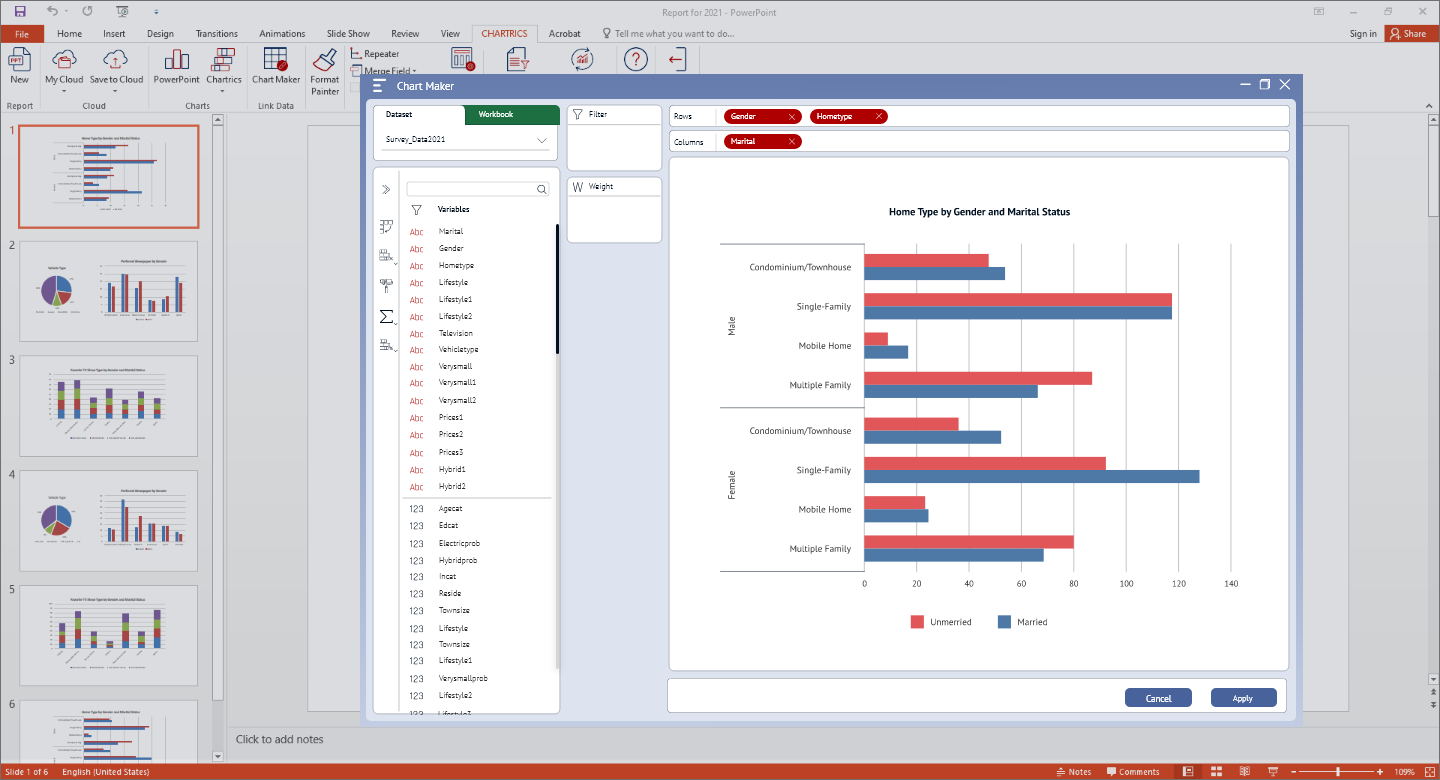
With DataPlay Suite, you have a plethora of visualization options, including the very familiar and user-friendly MS PowerPoint. You can create data-bound charts and presentations using native PowerPoint and Excel components, like dynamic data filtering algorithms, rich sorting and grouping rules, automatic refresh with new data, etc.
DataPlay Suite is equipped with a powerful analyzer tool to help you get the most potential out of your data. This feature helps you and your team uncover trends, patterns, and regularities, by allowing you to use all research data formats upload and manipulation. DataPlay Suite comes with a throng of smart data manipulation tools as well as Association Mining tools for comprehensive data exploration and analysis.
Show MoreOverview of DataPlay Suite Features
- Integrated project and file management
- Automated presentation generation
- Interactive authoring and storytelling
- Simplified tracking of longitudinal studies
- Dynamic user access and role management
- Native PowerPoint and Excel components
- Data-bound charts and presentations
- Dynamic data filtering algorithms
- Rich statistical analysis tools
- Robust sorting and grouping rules
- Comprehensive and intuitive interface
- Reveal new patterns and regularities
- Intuitive data manipulation tools
- Smart set of Association Mining tools
- Industry standard editing and designing functions
What Problems Will DataPlay Suite Solve?
1. Researchers and analysts find it difficult to work with unstructured data from various sources and in different formats
DataPlay Suite is a complete solution for cleaning, editing, analyzing and visualizing data.
DataPlay PowerPoint Add-In has two main working modes:
• Template mode
• Presentation mode
2. Repetitive reports and manual work with presentations
Another powerful DataPlay functionality is that it links the charts to cross-tabulations and actual data rather than bind them with their resulting tables. This allows the users to retain all their manual work while refreshing the values of charts when there’s a change in the dataset. This, in its turn, reduces the time spent on repetitive studies from hours and days to minutes.
3. Collaboration on the project (team/clients)
DataPlay Cloud is the main Administration module of DataPlay used to set up new clients, projects, users and their permissions. Clients in DataPlay Cloud mean a set of projects. While each project represents a separate study with own set of presentations, templates, and datasets.
DataPlay Suite Position In Our Categories
Since companies have specific business wants, it is only practical that they avoid going for a one-size-fits-all, “perfect” software. Still, it is hard to pinpoint such application even among well-known software solutions. The better step to undertake can be to write the different important functions that demand analysis such as major features, price plans, skill levels of staff members, organizational size, etc. After which, you must double down on your product research systematically. Browse through these DataPlay Suite reviews and explore each of the software solutions in your shortlist in detail. Such all-encompassing product research ensure you circumvent ill-fitting applications and subscribe to the one that meets all the features your company requires.
Position of DataPlay Suite in our main categories:
TOP
200
DataPlay Suite is one of the top 200 Business Intelligence Software products
If you are interested in DataPlay Suite it might also be a good idea to examine other subcategories of Business Intelligence Software gathered in our base of B2B software reviews.
Each enterprise has different needs and requires an application that can be customized for their size, kind of employees and buyers, and the specific industry they are in. For these reasons, no system can provide perfect tools off-the-shelf. When you look for a software app, first be sure what you want it for. Read some DataPlay Suite Business Intelligence Software reviews and ask yourself do you desire basic features or do you require sophisticated features? Are there any industry-specific features that you are seeking? Get the answers to these questions to help your search. There are plenty of elements that you need to consider and these include your budget, specific business wants, your organization size, integration requirements etc. Take your time, use a few free trials, and finally choose the app that presents all that you need to improve your firm competence and productivity.
How Much Does DataPlay Suite Cost?
DataPlay Suite Pricing Plans:
Free Trial
Quote-based Plan
Contact vendor
What are DataPlay Suite pricing details?
DataPlay Suite Pricing Plans:
Free Trial
Quote-based Plan
Contact vendor
Contact DataPlay Suite for enterprise pricing information and other product details. You can also submit a request for a demo to see if the software is a perfect fit for your business.
User Satisfaction
Positive Social Media Mentions
2
Negative Social Media Mentions
0
We are aware that when you choose to purchase a Business Intelligence Software it’s important not only to see how experts evaluate it in their reviews, but also to discover if the real people and businesses that use it are genuinely happy with the product. Because of that need we’ve devised our behavior-based Customer Satisfaction Algorithm™ that gathers customer reviews, comments and DataPlay Suite reviews across a wide array of social media sites. The information is then featured in an easy to digest way revealing how many clients had positive and negative experience with DataPlay Suite. With that information at your disposal you should be equipped to make an informed purchasing choice that you won’t regret.
Video
Screenshots
Technical details
Devices Supported
- Windows
- Android
- iPhone/iPad
- Web-based
Deployment
- Cloud Hosted
Language Support
- English
Pricing Model
- Quote-based
Customer Types
- Large Enterprises
- Medium Business
What Support Does This Vendor Offer?
- phone
- live support
- training
- tickets
What integrations are available for DataPlay Suite?
DataPlay Suite integrates with the following business systems and applications:
- Microsoft Excel
- Microsofy PowerPoint
- UTab
- WinCross

DataPlay Suite
is waiting for
your first review.

Write your own review of this product
ADD A REVIEWMore reviews from 0 actual users:


Join a community of 7,369 SaaS experts
Thank you for the time you take to leave a quick review of this software. Our community and review base is constantly developing because of experts like you, who are willing to share their experience and knowledge with others to help them make more informed buying decisions.
Sign in with LinkedIn
Why we require LinkedIn?
- Show the community that you're an actual user.
- We will only show your name and profile image in your review.
- You can still post your review anonymously.
OR
Sign in with company emailSign in with company email
Popular DataPlay Suite Alternatives



Top Competitors To DataPlay Suite By Price
Product name:
Price:

by quote

by quote

By quote


Trending Business Intelligence Software Reviews

8.0
97%




DataPlay Suite Comparisons
Product name:






Page last modified



Did you find this review useful?
Yes
No
Thank you for your feedback
How can we make this page better?
Unsure about this software?
FIND ALTERNATIVES
 Why is FinancesOnline free?