
- Home
- POS Systems
- Datio POS

Datio POS Review



What is Datio POS?
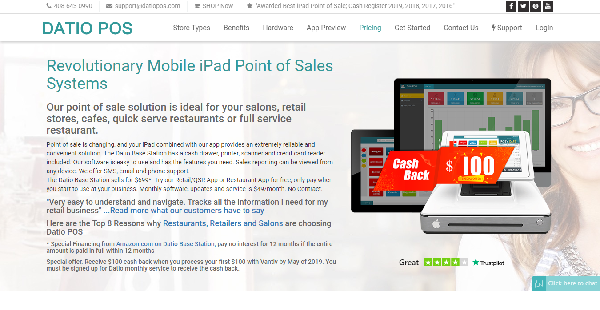
Datio POS is a modern point-of-sale system that is anchored on the Apple iPad, combining modern POS technology, flexibility, and convenience in a single, reliable solution. Built for restaurants, retail, convenience stores, pizzerias, and salons, Datio POS makes it easy for businesses to monitor their revenue, track their inventory, manage schedules, contact and engage customers, and launch and manage promos.
There is a specific Datio POS app for every store type. Each Datio POS app is loaded with certain features that are geared towards the business type it is designed for. For instance, the Datio POS app for Quick Service Restaurants is built with tools that are different from the features included in the Datio POS app for Beauty Salons.
That said, Datio POS app is designed to be intuitive and user-friendly. It doesn’t hamper users with a steep learning curve. The app is simple and easy to navigate, which means users are able to fully utilize it and enjoy its benefits right off the bat.
Show MoreOverview of Datio POS Benefits
Quick Setup
Datio POS is not an intimidating software, even for those who have little technical skills or expertise. You can add items into the system with ease. The user can simply input an item, give it a name and associate that name with a specific amount. Modifiers and options can be added per item. You can make the necessary adjustments if and when you need to make changes to your items and price.
Visual Organization
With Datio POS, you can use colors to help you organize your items. This visual approach to item organization is quite effective. You can group specific food items using specific colors or assign colors to sort and categorizes shoes, shirts, and pants.
Simplify Customer Tipping
Datio POS enables you to manage the way you ask for tips from your customers. You can set default tips based on the services and products your offer. Provide your customers with tipping options such as 5%, 10%, or 20% and let them choose how much they want to give.
Real-Time Sales and Inventory Tracking
In just a few clicks, you can see how much income you are raking in. You can also view your inventory levels and see whether your stocks are in the low or at the optimum level.
Show MoreOverview of Datio POS Features
- Multiple Store Type POS Options
- Item Management
- Color Tagging
- Payment Management
- Tip Management
- Sales Associates
- Gift Cards
- Reporting and Dashboards
What Problems Will Datio POS Solve?
Problem #1: Track inventory
Without a good inventory tracking, you run the risk of getting items out of stock or overstocked. This leaves you with disappointed customers and items that are shelved for extended periods of time, respectively. With Datio POS, you receive alerts through email and SMS when your stock is running low so you can replenish them immediately. For better tracking, you get a built-in scanner.
Problem #2: Manage payments and tips
Having a reliable payment collection method gives your customers the impression of a secure and professional business transaction. Datio POS accepts all forms of cash and credit. It also enables customers to split the bill in cash, check or credit. For easy tipping, you can provide an option for customers to leave a tip right from your screen and then distribute them fairly to the employees.
Problem #3: Track sales
Without clear insight into your sales, you’ll run the risk of mismanaging your time, resources and workflows. Datio POS enables you to view reports in-store and remotely so you can make crucial decisions any time, anywhere. It also has a feature for tracking sales by sales associate. This way, each stylist gets their own tip and you can easily track each sale despite having it in one transaction for separate customers.
Awards & Quality Certificates


Datio POS Position In Our Categories
Since businesses have distinctive business requirements, it is prudent they avoid going for a one-size-fits-all, “perfect” business application. Just the same, it is hard to try to come across such application even among well-known software systems. The rational step to undertake would be to shortlist the several essential functions that entail inspection including crucial features, price plans, technical skill aptitude of staff members, organizational size, etc. Thereafter, you should do the product research to a full extent. Go over some Datio POS evaluations and look over each of the software options in your list more closely. Such all-encompassing research ascertain you circumvent mismatched software products and pay for the one which provides all the function your company requires in sustaining growth.
Position of Datio POS in our main categories:
Each company has its own characteristics, and can call for a special POS Systems solution that will be fit for their business size, type of clients and staff and even individual niche they cater to. You should not count on getting a perfect solution that will work for every company no matter what their history is. It may be a good idea to read a few Datio POS POS Systems reviews first and even then you should remember what the solution is intended to do for your business and your workers. Do you need a simple and straightforward app with only elementary features? Will you really use the advanced functionalities required by experts and large enterprises? Are there any particular features that are especially useful for the industry you work in? If you ask yourself these questions it will be much easier to get a trustworthy solution that will match your budget.
How Much Does Datio POS Cost?
Datio POS Pricing Plans:
Free Trial
Datio POS Terminal
$49/month
Datio Base Station
$699
What are Datio POS pricing details?
Datio POS Pricing Plans:
Free Trial
Datio POS Terminal
$49/month
Datio Base Station
$699
Datio POS offers the following basic and enterprise pricing package:
Datio Base Station – $699 (one-time payment)
- Cash Drawer
- Barcode Scanner
- Printer
- Credit Card Reader
Datio POS Terminal – $49/month
- $10 per additional terminal
- Unlimited Items
- Unlimited Sales Associates
- Phone, SMS or Email-based Tech Support
User Satisfaction
Positive Social Media Mentions
0
Negative Social Media Mentions
0
We are aware that when you decide to buy a POS Systems it’s important not only to find out how experts rank it in their reviews, but also to discover whether the real people and companies that purchased it are actually satisfied with the product. That’s why we’ve devised our behavior-based Customer Satisfaction Algorithm™ that aggregates customer reviews, comments and Datio POS reviews across a broad range of social media sites. The information is then displayed in a simple to understand way revealing how many people had positive and negative experience with Datio POS. With that information at your disposal you should be prepared to make an informed buying decision that you won’t regret.
Video
Technical details
Devices Supported
- iPhone/iPad
Deployment
- On Premise
Language Support
- English
Pricing Model
- Monthly payment
- One-time payment
Customer Types
- Small Business
- Medium Business
What Support Does This Vendor Offer?
- phone
- live support
- training
- tickets
What integrations are available for Datio POS?
Datio POS integrates with the following business systems and applications:
- World Pay
- QuickBooks
- Vantiv
- Apple Pay
- Android Pay

Datio POS
is waiting for
your first review.

Write your own review of this product
ADD A REVIEWMore reviews from 0 actual users:


Join a community of 7,369 SaaS experts
Thank you for the time you take to leave a quick review of this software. Our community and review base is constantly developing because of experts like you, who are willing to share their experience and knowledge with others to help them make more informed buying decisions.
Sign in with LinkedIn
Why we require LinkedIn?
- Show the community that you're an actual user.
- We will only show your name and profile image in your review.
- You can still post your review anonymously.
OR
Sign in with company emailSign in with company email
Popular Datio POS Alternatives





Top Competitors To Datio POS By Price
Product name:
Price:

By quote

by quote
R1,399


Trending POS Systems Reviews
8.9
100%



9.3
97%
Datio POS Comparisons
Product name:







Page last modified



Did you find this review useful?
Yes
No
Thank you for your feedback
How can we make this page better?
Unsure about this software?
FIND ALTERNATIVES
 Why is FinancesOnline free?