
- Home
- Architecture Software
- Drawboard Projects

Drawboard Projects Review


What is Drawboard Projects?
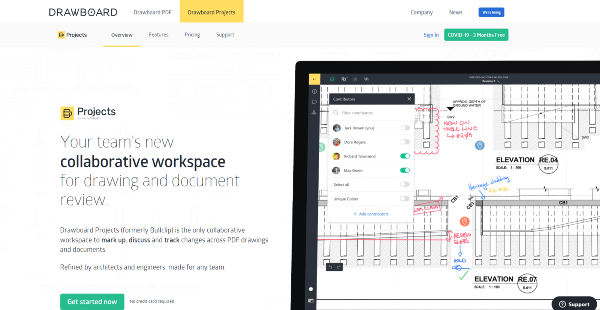
Drawboard Projects (formerly Bullclip) is a collaborative drawing markup platform intended for design, architectural, construction, and engineering businesses. The platform boasts of an easy-to-use interface and accurate digital markup capabilities to help users create, review, and collaborate on projects.
Drawboard Projects has advanced smart rendering technology that generates complex and detailed plans and layouts quickly. The software allows markups to sync in real-time and displays individual layers, thus ensuring team members that they are following updated and official versions. Users can avoid confusion across revisions with version control and markup audit trails. Document tagging, an open API, and Optical Character Recognition (OCR) help team members complete tasks faster.
Show MoreOverview of Drawboard Projects Benefits
With Drawboard Projects, PDF documents and drawings can be marked up or annotated in real time. This is via a technology that leverages on digital inking and vector rendering capabilities and are supported by secure Microsoft Azure storage. Collaborative Markup allows authorized users to work on a project simultaneously whether from one meeting meeting room or from across remote locations around the world. All markups are visible on one live canvas and make use of toggle markup layers. These help teams become more productive and ensure that the group is following updated versions of respective files.
Drawboard Projects can be used across different platforms. Collaborators can even use it on mobile devices, but with the robust capabilities of a desktop feature set. These help teams accomplish more, no matter where they are, thus ensuring that documents and drawings are updated and approved.
Revision Switching allows new versions of existing drawing sets to be uploaded to a entire project. Past revisions will appear in the document as read-only portions, so that users can keep track of corrections and avoid committing the same mistakes again. Drawing Overlays and associated markups presents a detailed change history and allows users to check the incorporated markups.
Drawboard Projects does not compromise on file integrity even as multiple members access the software simultaneously. The system allows layer management and version controls so that team members can make mark up changes to a document and share public updates instantly.
In-app message Timeline enables users to discuss changes, markups and tasks with other collaborators on each Drawing. With real-time communication to explain markups and annotations, collaborators can resolve issues quickly and efficiently.
Team members can do remote whiteboarding by setting up a Drawboard Projects session between offices. These allow users to collaborate on drawings and documents, with everything accessible and traceable afterwards.
Project Owner users can invite users into a project group and assign Administrator, Collaborator or Reader roles. This feature limits access only to authorized personnel and permits external third-party viewing of files, even without a Drawboard Projects product licenses.
Show MoreOverview of Drawboard Projects Features
- Markups sync in real-time
- Toggle markup layers
- Precise, handwritten ink with Windows 10 and iOS
- Annotate digital document
- Revision switching
- Drawing overlays
- Layer management and version controls
- In-app message Timeline
- Remote whiteboarding
- File management functionalities
- Title block recognition
- File tagging for easier search
- Secure document storage
- Project permission levels
Drawboard Projects Position In Our Categories
Since businesses have their own business wants, it is logical that they steer clear of adopting an all-in-one, “perfect” business application. Nonetheless, it would be difficult to come across such a software product even among popular software systems. The clever thing to undertake would be to spell out the various chief factors that need examination including critical features, price plans, skill competence of staff, organizational size, etc. Then, you should do your product research through and through. Read some Drawboard Projects analyses and look over each of the software solutions in your shortlist more closely. Such comprehensive product investigation ensure you steer clear of unfit applications and pay for the one that delivers all the function your company requires in growing the business.
Position of Drawboard Projects in our main categories:
TOP
50
Drawboard Projects is one of the top 50 Architecture Software products
If you are considering Drawboard Projects it might also be a good idea to examine other subcategories of Architecture Software listed in our base of B2B software reviews.
Each business is different, and can call for a specific Architecture Software solution that will be designed for their business size, type of customers and staff and even specific industry they deal with. We advise you don't count on locating an ideal services that is going to be suitable for each business no matter what their background is. It may be a good idea to read a few Drawboard Projects Architecture Software reviews first and even then you should keep in mind what the service is intended to do for your business and your staff. Do you need an easy and straightforward solution with just essential functions? Will you really make use of the advanced tools required by experts and large enterprises? Are there any specific features that are especially practical for the industry you work in? If you ask yourself these questions it will be much easier to get a trustworthy solution that will fit your budget.
How Much Does Drawboard Projects Cost?
Drawboard Projects Pricing Plans:
Free Trial
Basic
$24/user/month
Standard
$44/user/month
Enterprise
Contact vendor
What are Drawboard Projects pricing details?
Drawboard Projects Pricing Plans:
Free Trial
Basic
$24/user/month
Standard
$44/user/month
Enterprise
Contact vendor
Drawboard Projects offers various SMB and enterprise pricing packages for users to choose from, with options to pay monthly or annually. Review the plans below and select the best package for your business:
Basic = $24 user/month or $19 user/month paid annually
- 1,000 Drawings and Documents across all projects
- Unlimited Projects
- Use on Windows 10, iPad, iPhone and in any web browser
- Email Support
Standard = $44 user/month or $35 user/month paid annually
- Unlimited Drawings and Documents across all projects
- Unlimited Projects
- Use on Windows 10, iPad, iPhone and in any web browser
- Email Support
Enterprise = By quote
- Unlimited Drawings and Documents across all projects
- Unlimited Projects
- Use on Windows 10, iPad, iPhone and in any web browser
- Dedicated Support
- Access to API
- Federated Access Logins
- Product Training
User Satisfaction
Positive Social Media Mentions
114
Negative Social Media Mentions
6
We realize that when you make a decision to purchase a Architecture Software it’s crucial not only to learn how professionals score it in their reviews, but also to find out if the real users and businesses that bought this software are genuinely satisfied with the product. That’s why we’ve designer our behavior-based Customer Satisfaction Algorithm™ that gathers customer reviews, comments and Drawboard Projects reviews across a vast array of social media sites. The data is then presented in a simple to understand form revealing how many clients had positive and negative experience with Drawboard Projects. With that information at hand you should be equipped to make an informed business choice that you won’t regret.
Technical details
Devices Supported
- Windows
- iPhone/iPad
- Web-based
Deployment
- Cloud Hosted
- On Premise
- Open API
Language Support
- English
Pricing Model
- Monthly payment
Customer Types
- Small Business
- Large Enterprises
- Medium Business
What Support Does This Vendor Offer?
- phone
- live support
- training
- tickets
What integrations are available for Drawboard Projects?
Drawboard Projects integrates with the following business systems and applications:
- Microsoft Azure
- Synergy

Drawboard Projects
is waiting for
your first review.

Write your own review of this product
ADD A REVIEWMore reviews from 0 actual users:


Join a community of 7,369 SaaS experts
Thank you for the time you take to leave a quick review of this software. Our community and review base is constantly developing because of experts like you, who are willing to share their experience and knowledge with others to help them make more informed buying decisions.
Sign in with LinkedIn
Why we require LinkedIn?
- Show the community that you're an actual user.
- We will only show your name and profile image in your review.
- You can still post your review anonymously.
OR
Sign in with company emailSign in with company email
Popular Drawboard Projects Alternatives




Top Competitors To Drawboard Projects By Price
Product name:
Price:

$24.99

Trending Architecture Software Reviews



Drawboard Projects Comparisons
Product name:








Page last modified



Did you find this review useful?
Yes
No
Thank you for your feedback
How can we make this page better?
Unsure about this software?
FIND ALTERNATIVES
 Why is FinancesOnline free?