
- Home
- Graphic Design Software
- Easy Cut Studio

Easy Cut Studio Review



What is Easy Cut Studio?
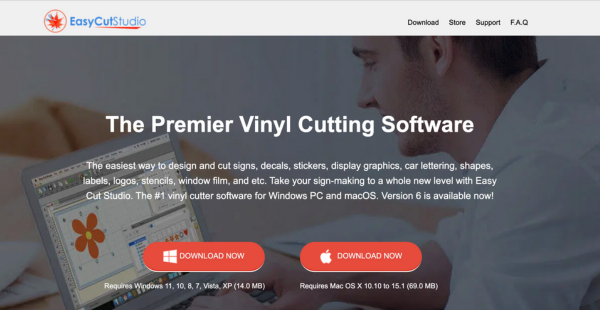
Easy Cut Studio is a sign-making software designed for vinyl cutters and cutting plotters. It operates seamlessly on macOS and Windows platforms, offering accessibility to a broad user base. The software enables users to easily create stunning signage, logos, lettering, stickers, and decals.
Easy Cut Studio can cut TrueType and OpenType fonts directly from your computer. Users can import various vector graphics formats, including SVG, PDF, EPS, AI, and WPC. The platform also offers advanced functionalities like image tracing and vectorization convert raster graphics into editable vector images.
Easy Cut Studio supports contour cutting, welding shapes, and creating intricate rhinestone templates. Overall, Easy Cut Studio is a vital tool for professionals needing efficient design and cutting solutions with broad compatibility across various vinyl cutter models.
Show MoreOverview of Easy Cut Studio Benefits
Easy Cut Studio enhances the vinyl cutting and sign-making experience for users with its intuitive interface and advanced tools. Here are the benefits users can look forward to upon using the software.
Unmatched Image Vectorization
Easy Cut Studio’s advanced image tracing feature allows users to convert bitmap images into fully editable vectors easily. This capability ensures high-quality outlines that are perfect for cutting. It also helps save time and effort in the design process while delivering professional results.
Precision with Node Editing
Easy Cut Studio’s powerful node editing tools enable users to manipulate individual lines, curves, and nodes with precision. This level of control allows for fine-tuning designs to achieve flawless results. This is especially beneficial for intricate artwork or custom designs.
Enhanced Layer Management
Easy Cut Studio has a Layer Manager feature that provides users with greater control over design elements. By enabling or disabling cutting, printing, and editing for specific layers, users can easily manage complex projects. This way, it is simple to hide dimension lines or annotations while focusing on the main design.
Diverse Special Effects
Easy Cut Studio offers unlimited design potential with over 20 unique special effects available. These effects allow users to create eye-catching graphics and signage that stand out. This also helps businesses to differentiate their products and attract attention.
Flexible Cutting Options
Easy Cut Studio allows users to connect their cutting devices via various methods, including serial port, parallel port, USB, or TCP/IP network. This flexibility ensures that Easy Cut Studio can be integrated into diverse hardware setups. This way, the platform accommodates the needs of different users and business environments.
Streamlined Printing Capabilities
Easy Cut Studio supports quick printing, print-and-cut, and direct-to-vinyl cutting of wide-format jobs, all from a single application. This capability streamlines workflows by allowing users to complete various tasks efficiently without needing multiple software solutions.
Rhinestone Design Tools
Easy Cut Studio includes specialized tools that enable users to convert designs into rhinestone templates effortlessly. This feature allows the creation of unique rhinestone graphics, which can add flair to projects and make them appealing to customers looking for custom designs.
Comprehensive Welding Features
Easy Cut Studio’s welding tools allow users to easily merge, subtract, and intersect multiple objects. This feature streamlines the design process, ensures cleaner cuts, and allows for seamless execution of complex designs
User-Friendly Interface
Easy Cut Studio is designed with simplicity in mind. The platform’s interface enables users of all skill levels to navigate and utilize the software effectively. This intuitive design reduces the learning curve. This also allows users to focus on their creativity rather than struggling with complicated software.
Broad Cutter Compatibility
Easy Cut Studio supports over 500 vinyl cutter models so it is a versatile solution for various businesses. This broad compatibility ensures that companies can seamlessly integrate the software into their existing workflows without worrying about hardware limitations.
Show MoreOverview of Easy Cut Studio Features
- Image Vectorization
- Node Editing
- Layer Management
- Special Effects
- Flexible Cutting Options
- Print and Cut
- Rhinestone Design Tools
- Welding Tools
- Font Support (TrueType and OpenType)
- Wide Cutter Compatibility
What Problems Will Easy Cut Studio Solve?
Problem #1: Difficulty Cutting Bitmap Images
Solution: Easy Cut Studio’s advanced vectorization and image tracing capabilities enable users to transform scanned or bitmap images into editable vector outlines effortlessly. This means users can work with virtually any image type. This also ensures high-quality cuts without complicated software or extensive design knowledge.
Problem #2: Concerns with Cutting Thick Material
Solution: Easy Cut Studio has a multi-cut feature that is specifically designed for handling thick materials that require multiple cutting passes. By allowing users to set the number of cuts needed, the software ensures precise and clean results. This makes it easier to work with a wider range of materials without compromising quality.
Problem #3: Material Waste
Solution: Easy Cut Studio‘s nest function helps users maximize material efficiency by intelligently arranging shapes to minimize gaps between cuts. This feature allows for more designs to be cut from a single sheet. This way, users can ultimately save both time and costs associated with material usage.
Awards & Quality Certificates

Easy Cut Studio Position In Our Categories
Knowing that companies have their own business needs, it is only logical that they abstain from paying for a one-size-fits-all, ”best” software solution. Be that as it may, it would be difficult to chance on such an app even among popular software products. The practical step to do should be to set down the several main functions that need examination like essential features, budget, skill competence of the users, business size, etc. The second step is, you should conduct the product research fully. Read some of these Easy Cut Studio evaluations and check out each of the software programs in your shortlist in detail. Such all-encompassing product research guarantee you drop ill-fitting applications and subscribe to the system that meets all the benefits your company requires.
Position of Easy Cut Studio in our main categories:
TOP
100
Easy Cut Studio is one of the top 100 Graphic Design Software products
If you are interested in Easy Cut Studio it could also be beneficial to investigate other subcategories of Graphic Design Software listed in our base of SaaS software reviews.
Since each organization has unique business wants, it is sensible for them to refrain from looking for a one-size-fits-all faultless software system. Needless to say, it would be pointless to try to find such a system even among widely used software platforms. The smart thing to do would be to jot down the various important factors that need consideration such as key features, budget, skill levels of staff members, company size etc. Then, you should do your groundwork thoroughly. Read some Easy Cut Studio Graphic Design Software reviews and investigate each of the other solutions in your shortlist in detail. Such comprehensive research can make certain you weed out ill-fitting systems and zero in on the system that offers all the elements you require for business success.
How Much Does Easy Cut Studio Cost?
Easy Cut Studio Pricing Plans:
Free Trial
Easy Cut Studio 6
$59.95
What are Easy Cut Studio pricing details?
Easy Cut Studio Pricing Plans:
Free Trial
Easy Cut Studio 6
$59.95
Easy Cut Studio provides solutions compatible with both Windows and Mac, including a free trial. Users can take advantage of a one-time purchase option.
Easy Cut Studio 6 – $59.95
- Import File Formats
- Print and Cut Designs
- Create Rhinestone Templates
- Convert Raster Images to SVG
- Use TrueType and OpenType Fonts
User Satisfaction
Positive Social Media Mentions
52
Negative Social Media Mentions
2
We are aware that when you choose to get a Graphic Design Software it’s important not only to find out how experts score it in their reviews, but also to check if the actual clients and businesses that purchased these solutions are genuinely content with the service. That’s why we’ve designer our behavior-based Customer Satisfaction Algorithm™ that gathers customer reviews, comments and Easy Cut Studio reviews across a wide array of social media sites. The information is then displayed in an easy to digest form showing how many clients had positive and negative experience with Easy Cut Studio. With that information at hand you should be prepared to make an informed buying decision that you won’t regret.
Technical details
Devices Supported
- Windows
- Mac
Deployment
- On Premise
Language Support
- English
- Chinese
- German
- Japanese
- Spanish
- French
- Russian
- Dutch
- Portugese
- Polish
Pricing Model
- One-time payment
Customer Types
- Small Business
- Large Enterprises
- Medium Business
- Freelancers
What Support Does This Vendor Offer?
- phone
- live support
- training
- tickets
What integrations are available for Easy Cut Studio?
Easy Cut Studio does not provide information about its integrations.

Easy Cut Studio
is waiting for
your first review.

Write your own review of this product
ADD A REVIEWMore reviews from 0 actual users:


Join a community of 7,369 SaaS experts
Thank you for the time you take to leave a quick review of this software. Our community and review base is constantly developing because of experts like you, who are willing to share their experience and knowledge with others to help them make more informed buying decisions.
Sign in with LinkedIn
Why we require LinkedIn?
- Show the community that you're an actual user.
- We will only show your name and profile image in your review.
- You can still post your review anonymously.
OR
Sign in with company emailSign in with company email
Popular Easy Cut Studio Alternatives


Top Competitors To Easy Cut Studio By Price
Product name:
Price:





Trending Graphic Design Software Reviews


Easy Cut Studio Comparisons
Product name:


Page last modified
Award Winner




Did you find this review useful?
Yes
No
Thank you for your feedback
How can we make this page better?
Unsure about this software?
FIND ALTERNATIVES
 Why is FinancesOnline free?