

Etherpad Review



What is Etherpad?
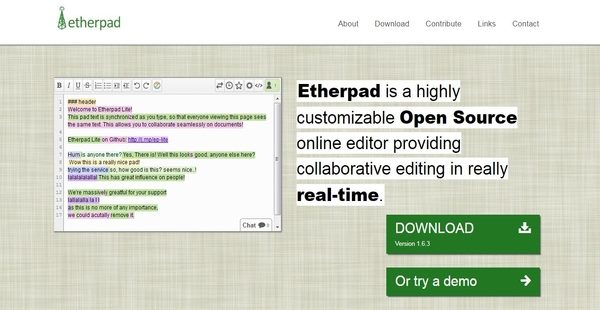
Etherpad is an open source and highly customizable online editing tool that enables students, authors, and professionals to create documents and modify them collaboratively in real time. Providing a truly collaborative environment, the web-based editor allows users to set up collaborative documents online called “pads.” These pads are created so that they will be able to work on the same documents all the same time and interact with each other through a built-in chatbox which is available on each pad.
Furthermore, Etherpad offers an awesome version control feature which allows authors to view and retrieve the previous versions of their documents. They can track the old revisions they made in the documents as well as permanently save specific versions of the documents anytime. The tool also has a time slider which permits users to review the events that have occurred within the pad. Etherpad is built with import and export features that help users output documents to various formats and keep a record of their articles, meetings, and collaborative activities that they can access offline.
Show MoreOverview of Etherpad Benefits
Achieve True And Real-Time Collaborative Editing
Real-time collaboration is the most important benefit that users can get with Etherpad. Built on an architecture where they can create and edit documents live; the tool allows students, writers, and professionals to work on the same documents simultaneously.
Created Collaborative Documents Or Pads
The real-time collaborative editing capability of Etherpad is made possible by its very powerful feature known as “pad.” A pad is a collaborative document that any user can create online. Once a pad is set up, a URL link is generated which can be shared with the rest of the team. Anyone who has such URL link can access the pad and participate in the activities and discussions within it.
Authorship Colors
Etherpad also utilizes authorship colors. Thus, each participant in the pad has a specific color assigned to him or her. This color-coding feature assists users in recognizing which part of the text document or pad was typed by a particular participant. In other words, the contents or texts within the pad are highlighted based on the authors who wrote them.
Built-In Chat Functionality
The collaborative editing tool has a built-in chat functionality. A chatbox is provided for each pad where team members can communicate with each other and make discussions. Users can invite others to join in the pad and participate in the discussions either by using the invite option which is located above the chatbox or by sharing the unique URL link of the pad.
Version Control
Version control is another awesome feature available in Etherpad. The tool has the capability to automatically save documents at a regular time intervals. However, users can also save any version of the documents any time they want. Because of this, collaborators and team members will be able to easily access the previous versions of their documents and restore them any time.
Powerful Time Slider
Etherpad has a time slider which works seamlessly with its version control feature. This time slider enables participants to keep track of all the things that have happened within a particular pad throughout a period of time. Thus, they will be able to view all the changes, edits, and additions made by the collaborators of the pad. The activities and events in the pad are shown like a video presentation. This feature can be used for training new authors and participants about the writing guidelines or project requirements they should be aware of. In addition, the time slider is very useful for those who have failed to attend the collaborative meetings, helping them catch up with the discussions and events.
Extensive Collection Of Plugins
Being a highly customizable online editor, the application provides users with the capability to configure and enhance its features and capabilities to suit their own specific needs. Through the aid of its tons of plugins; they can shape, develop, and extend Etherpad so that it can perform their tasks better and can function according to their existing workflows and processes.
Show MoreOverview of Etherpad Features
- Real-Time Collaborative Editing
- Multi-Player Editor
- Set Up Pads Or Collaborative Documents Online
- Shareable URL Link
- Password-Protected Pads
- Authorship Colors
- Built-In Chatbox
- Version Control
- Time Slider
- Import/Export In Various Formats
- Highly Customizable Editing Application
- Tons of Plugins
- Well-Documented API
Etherpad Position In Our Categories
Bearing in mind businesses have particular business requirements, it is prudent that they abstain from preferring a one-size-fits-all, “perfect” business application. Nevertheless, it is hard to find such a software solution even among sought-after software solutions. The better step to do should be to jot down the numerous significant aspects that merit inspection such as critical features, packages, technical skill competence of staff members, company size, etc. Thereafter, you must conduct your product research systematically. Go over some of these Etherpad reviews and look into the other software options in your list in detail. Such comprehensive research ascertains you drop unfit applications and pay for the system that meets all the benefits your company requires.
Position of Etherpad in our main categories:
TOP
50
Etherpad is one of the top 50 Document Creation Software products
TOP
50
Etherpad is one of the 50 Office Software products
It is important to realize that virtually no app in the Office Software category is an ideal solution able to match all the requirements of various company types, sizes and industries. It may be a good idea to read a few Etherpad Office Software reviews first as some software may dominate just in a very narrow group of applications or be designed with a really specific industry in mind. Others might function with a goal of being easy and intuitive and therefore lack complex elements welcomed by more experienced users. You can also come across apps that support a large group of users and give you a powerful feature base, but that usually comes at a higher cost of such a service. Be certain that you're aware of your requirements so that you get a software that provides all the elements you search for.
How Much Does Etherpad Cost?
Etherpad Pricing Plans:
Free Trial
Etherpad
Free
What are Etherpad pricing details?
Etherpad Pricing Plans:
Free Trial
Etherpad
Free
Etherpad is a freeware. This means you can use the software for free with no enterprise pricing fees to worry about.
User Satisfaction
Positive Social Media Mentions
37
Negative Social Media Mentions
3
We realize that when you make a decision to buy a Office Software it’s crucial not only to see how professionals rank it in their reviews, but also to find out whether the real people and enterprises that purchased this software are actually happy with the product. Because of that need we’ve created our behavior-based Customer Satisfaction Algorithm™ that gathers customer reviews, comments and Etherpad reviews across a broad array of social media sites. The data is then presented in an easy to understand form showing how many people had positive and negative experience with Etherpad. With that information at your disposal you will be prepared to make an informed buying decision that you won’t regret.
Video
Technical details
Devices Supported
- Windows
- Linux
- Mac
- Web-based
Deployment
- Cloud Hosted
- Open API
Language Support
- English
Pricing Model
- Free
Customer Types
- Small Business
- Large Enterprises
- Medium Business
- Freelancers
What Support Does This Vendor Offer?
- phone
- live support
- training
- tickets
What integrations are available for Etherpad?
Etherpad supports integration with the following third-party apps, systems, and services:
- Wordpress
- Drupal plugin
- DokuWiki
- MediaWiki
- PmWiki
- Atlassian
- Django client
- Stud.IP
- Elgg
- Odoo
- ILIAS LMS
- Plone
- Redmine
- Moodle
- Discourse

Etherpad
is waiting for
your first review.

Write your own review of this product
ADD A REVIEWMore reviews from 0 actual users:


Join a community of 7,369 SaaS experts
Thank you for the time you take to leave a quick review of this software. Our community and review base is constantly developing because of experts like you, who are willing to share their experience and knowledge with others to help them make more informed buying decisions.
Sign in with LinkedIn
Why we require LinkedIn?
- Show the community that you're an actual user.
- We will only show your name and profile image in your review.
- You can still post your review anonymously.
OR
Sign in with company emailSign in with company email
Popular Etherpad Alternatives




Top Competitors To Etherpad By Price
Product name:
Price:




Trending Office Software Reviews


Etherpad Comparisons
Product name:






Page last modified



Did you find this review useful?
Yes
No
Thank you for your feedback
How can we make this page better?
Unsure about this software?
FIND ALTERNATIVES
 Why is FinancesOnline free?