

FreeCAD Review



What is FreeCAD?
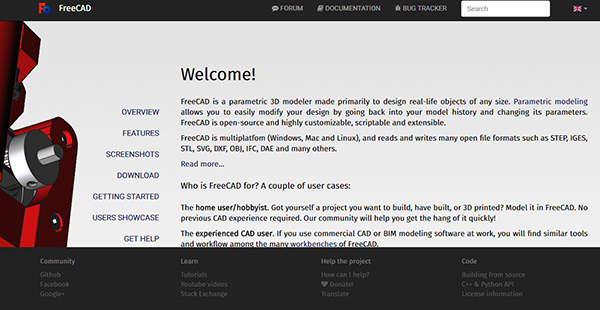
FreeCAD is a customizable, open-source (LGPL v2 license) parametric 3D modeler designed primarily for product design and mechanical engineering. It’s extensible and scriptable CAD software that can be expanded to handle a spectrum of design functions around other engineering specialties including electrical or architectural engineering. The solution is made to craft real-life objects of varying sizes and is ideal for a home user/hobbyist, programmer, experienced CAD user, or educator.
The application provides a toolkit similar to SolidWorks, Catia, or Solid Edge, which automatically qualifies it into the class of CAx, PLM, and MCAD. Its architecture makes it possible to deliver additional functionality without altering the core system. The program is fully multi-platform, and it runs impeccably on Windows, Mac, and Linux. In addition, FreeCAD supports multiple open file formats including STL, IGES, STEP, DXF, IFC, OBJ, DAE, etc.
Show MoreOverview of FreeCAD Benefits
FreeCAD is a general purpose, feature-based 3D parametric modeler that adopts a modular software architecture. Its architecture allows you to extend functionality by adding plugins. It permits you to add extensions as simple as self-recorded macros or Python scripts, or as complex as C++ programmed applications. The application accords you complete access to any aspect of FreeCAD including the Python built-in interpreter and external/macros scripts.
The software runs on a fully parametric model. This simplifies design workflows and allows you to modify the design by referring to your model history before adjusting the parameters. FreeCAD features natively parametric objects which mean their shapes can depend on those of others or even be based on specific properties. Adding new images is a breeze, and users can even fully program them in Python.
FreeCAD comes with a complete Graphical User Interface (GUI) that is based on the Qt framework. It features an Open Inventor-based 3D viewer which allows manageable scene graph representation and fast rendering of three-dimensional scenes. The tools on the interface are classified by workbenches to maintain a highly responsive and uncluttered workspace. The classification allows the display of only the tools you require to accomplish specific tasks.
Additionally, the software has a built-in Python Interpreter as well as a reliable API that handles every aspect of the application, geometry, interface, and geometry representation on the 3D viewer. The geometry kernel that is based on Open CASCADE technology permits complex 3D procedures of compound shapes with built-in support for concepts such as surfaces, nurbs, and breps. It also exhibits native support of IGES and STEP formats, fillets, Boolean operations, and multiple geometric entities.
Show MoreOverview of FreeCAD Features
- Geometry kernel
- Full parametric model
- Modular architecture
- Standard formats
- Sketcher
- Robot simulation
- Rendering
- Architecture
- Path mode
FreeCAD Position In Our Categories
Knowing that companies have distinct business-related demands, it is only practical that they abstain from preferring an all-in-one, ideal solution. Be that as it may, it would be difficult to try to chance on such application even among recognizable software systems. The practical step to do should be to note down the various chief aspects that call for a research like major features, plans, skill levels of staff members, business size, etc. Then, you should double down on your research exhaustively. Browse through these FreeCAD evaluations and explore each of the software programs in your list more closely. Such comprehensive research makes sure you stay away from mismatched apps and subscribe to the system that delivers all the tools your business requires.
Position of FreeCAD in our main categories:
TOP
50
FreeCAD is one of the top 50 CAD Software products
Every enterprise has its own characteristics, and can need a particular type of CAD Software solution that will be fit for their business size, type of clients and staff and even particular industry they cater to. You should not count on getting an ideal solution that will work for every company regardless of their history is. It may be a good idea to read a few FreeCAD CAD Software reviews first and even then you should pay attention to what the solution is supposed to do for your company and your employees. Do you require a simple and intuitive app with only elementary features? Will you actually use the complex tools required by pros and large enterprises? Are there any particular tools that are especially practical for the industry you work in? If you ask yourself these questions it is going to be much easier to locate a reliable solution that will fit your budget.
How Much Does FreeCAD Cost?
FreeCAD Pricing Plans:
Free Trial
Quote-based Plan
Contact vendor
What are FreeCAD pricing details?
FreeCAD Pricing Plans:
Free Trial
Quote-based Plan
Contact vendor
Contact the vendor for their custom enterprise pricing details and other product information.
User Satisfaction
Positive Social Media Mentions
37
Negative Social Media Mentions
0
We realize that when you make a decision to buy a CAD Software it’s crucial not only to see how experts rank it in their reviews, but also to discover if the real users and companies that purchased this software are actually content with the product. Because of that need we’ve created our behavior-based Customer Satisfaction Algorithm™ that aggregates customer reviews, comments and FreeCAD reviews across a broad range of social media sites. The information is then displayed in an easy to digest way showing how many people had positive and negative experience with FreeCAD. With that information available you should be equipped to make an informed purchasing choice that you won’t regret.
Video
Technical details
Devices Supported
- Windows
- Linux
- Mac
Deployment
- On Premise
Language Support
- English
- Dutch
- Polish
- Turkish
- Swedish
Pricing Model
- Quote-based
Customer Types
- Small Business
- Large Enterprises
- Medium Business
What Support Does This Vendor Offer?
- phone
- live support
- training
- tickets
What integrations are available for FreeCAD?
No available information.
FreeCAD User Reviews
FreeCAD average rating:
4/5
Overall impression
5/5
Customer Support
4/5
Value for Money
3/5
Ease of Use
Write your own review of this product
ADD A REVIEWMore reviews from 1 actual users:
Sort by:
Latest
- Latest
- Most useful
- Most positive
- Most negative
A naive review of FreeCAD
Read full review >
4/5
Overall impression
3/5
Customer Support
5/5
Value for Money
4/5
Ease of Use
Published on: 29.05.2021
Company Size: 1-10 Employees
Industry: Information Technology and Services
PROS: Free. I managed to complete my design without any prior knowledge within a couple of hours (I have very little CAD experience, but I do some 2D graphic design from time to time, and I'm a programmer). I often give a new tool a little time so that I can adapt to its unique workflow (I use GIMP, after all) and I will be using FreeCAD again very soon. FreeCAD didn't crash on me, and is fairly lightweight.
CONS: The tool isn't very well suited to performing actions on multiple objects at the same time (yet, or at least in my very limited experience). You can't interact with all screen elements, so in that respect it's a bit counter-intuitive, but there are alternative ways of, for instance, change camera angle or panning or zooming, with well-defined mouse/keyboard combinations


Join a community of 7,369 SaaS experts
Thank you for the time you take to leave a quick review of this software. Our community and review base is constantly developing because of experts like you, who are willing to share their experience and knowledge with others to help them make more informed buying decisions.
Sign in with LinkedIn
Why we require LinkedIn?
- Show the community that you're an actual user.
- We will only show your name and profile image in your review.
- You can still post your review anonymously.
OR
Sign in with company emailSign in with company email
Popular FreeCAD Alternatives





Top Competitors To FreeCAD By Price
Product name:
Price:





Trending CAD Software Reviews



FreeCAD Comparisons
Product name:







FreeCAD user reviews
A naive review of FreeCAD
Read full review >
4/5
Overall impression
3/5
Customer Support
5/5
Value for Money
4/5
Ease of Use
Published on: 29.05.2021
Company Size: 1-10 Employees
Industry: Information Technology and Services

Page last modified



Did you find this review useful?
Yes
No
Thank you for your feedback
How can we make this page better?
Unsure about this software?
FIND ALTERNATIVES
 Why is FinancesOnline free?