
- Home
- Dental Practice Management Software
- Lighthouse 360

Lighthouse 360 Review



What is Lighthouse 360?
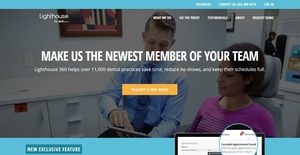
Lighthouse 360 is a powerful and an easy-to-use dental practice management software which simplifies and automates the tedious tasks of dentists and their teams. It is also a patient communication system that helps dental practices reduce no-shows, focus more on patients, and acquire new patients.
Lighthouse 360 provides users with the capability to automatically send messages to patients to remind them of their upcoming appointments and scheduled procedures. They will also be able to reach out to inactive or dormant patients. The dental practice management software generates lists of patients who haven’t confirm their appointments, enabling users to follow up on them directly from the lists. Last but not least, the software lets dental practices gain and convert more customers through patient reviews, social media, and photo galleries.
Show MoreOverview of Lighthouse 360 Benefits
Reduce No Shows And Keep Schedules Full
Lighthouse 360 assists dentists and dental practice teams in keeping their schedules full and reducing no-shows. To ensure that patients don’t miss appointments, users can send out appointment reminders to them automatically. The software has a patient recall system by which patients who are due for cleaning are automatically contacted. Lighthouse 360 also enables dentists to activate reminder messaging for every individual patient who undergoes treatment plans and needs to return for the recommended procedures.
When patients confirm their appointments through text, email, or phone; the confirmation messages and responses are sent directly and automatically to the practice management systems that dentists and their staff are currently using. Therefore, they no longer need to manually update the schedules. When patients cancel their appointments at the last minute, Lighthouse 360 automatically detects the cancelled appointments and helps users search for patients to fill in the open schedules.
Reach Out To Inactive Patients
With Lighthouse 360, dentists can reach out to inactive or dormant patients. These are those patients who haven’t made visits for quite a long time. To reactivate dormant patients, customizable recall emails and letters can be sent out to them automatically.
Send And Receive Texts From Portal
Lighthouse 360 offers automation features that help users save time and run their practices efficiently. With these features, they will be able to give their full attention to patients and improve the delivery of patient care. Among these automation features is Lighthouse 360’s portal. This portal permits dentists and patients to exchange text messages without the need of using mobile phones. Texts can be sent and received directly from the portal.
Follow-Up Lists
Another automation feature is the ability to generate follow-up lists. These are the lists of patients who haven’t confirmed their appointments despite receiving all the appointments reminders sent by users. What’s great about this feature is that users can call or text these patients directly from the lists, allowing them to track patients and resolve scheduling issues.
Front Desk Task Lists
Task lists are also created for front desk staff, assisting them in preparing and organizing all the things they need for the day. These tasks lists are automatically generated and emailed to dentists. Recommendations are combined with the task lists as well.
Acquire New Patients
Lighthouse 360 provides practices with the capability to attract potential patients and convert more customers. For instance, dentists can request and collect reviews from satisfied patients and post these reviews on their own website. They can also have online reviews be displayed on Facebook and sites like Yelp, Google Plus, and RateABiz.
The dental practice management has an easy-to-use widget which lets users create photo galleries on their website or social page. They can upload and post photos to showcase their practices and highlight the works they do.
Show MoreOverview of Lighthouse 360 Features
- Appointment Reminders
- Patient Recall
- Reminder Messaging For Treatment Plans
- Auto Confirm
- Cancellation Fill-In
- Reactivation Outreach
- Two-Way Texting
- Follow-Up Lists
- Front Desk Task Lists
- Sync Data With PMS
- Message History
- Convert More Customers
- Patient Reviews
- Family Messages
- Facebook Integration
- Photo Distribution
Lighthouse 360 Position In Our Categories
Knowing that companies have their own business-related requirements, it is only prudent that they abstain from going for an all-in-one, ”best” software solution. Nevertheless, it is futile to come across such a software solution even among sought-after software systems. The best step to do would be to tabulate the different vital aspects that call for a examination including major features, plans, skill competence of staff members, organizational size, etc. Next, you must do the research exhaustively. Go over some of these Lighthouse 360 evaluations and look into the other software systems in your list in detail. Such comprehensive product research makes sure you steer clear of mismatched apps and choose the system that meets all the tools your company requires.
Position of Lighthouse 360 in our main categories:
TOP
10
Lighthouse 360 is one of the top 10 Dental Practice Management Software products
If you are interested in Lighthouse 360 it could also be beneficial to analyze other subcategories of Dental Practice Management Software collected in our database of SaaS software reviews.
It is essential to keep in mind that almost no app in the Dental Practice Management Software category is an ideal solution able to fulfill all the goals of various company types, sizes and industries. It may be a good idea to read a few Lighthouse 360 Dental Practice Management Software reviews first as some software can excel exclusively in a really small group of applications or be prepared with a very specific industry in mind. Others can operate with a goal of being simple and intuitive and as a result lack complicated functions desired by more experienced users. There are also services that support a wide group of customers and give you a rich feature toolbox, but this frequently comes at a more significant cost of such a solution. Make sure you're aware of your needs so that you buy a service that provides all the functionalities you search for.
How Much Does Lighthouse 360 Cost?
Lighthouse 360 Pricing Plans:
Free Trial
Quote-based Plan
Contact vendor
What are Lighthouse 360 pricing details?
Lighthouse 360 Pricing Plans:
Free Trial
Quote-based Plan
Contact vendor
Lighthouse 360 SMB and enterprise pricing plan information is available only upon request. Please contact the company for more details, and ask for a quote.
User Satisfaction
Positive Social Media Mentions
35
Negative Social Media Mentions
3
We realize that when you decide to get a Dental Practice Management Software it’s important not only to see how experts score it in their reviews, but also to discover whether the real users and companies that purchased it are indeed satisfied with the service. Because of that need we’ve designer our behavior-based Customer Satisfaction Algorithm™ that gathers customer reviews, comments and Lighthouse 360 reviews across a wide range of social media sites. The data is then displayed in an easy to understand way revealing how many clients had positive and negative experience with Lighthouse 360. With that information at hand you should be ready to make an informed buying choice that you won’t regret.
Video
Technical details
Devices Supported
- Windows
- Linux
- Android
- iPhone/iPad
- Mac
- Web-based
Deployment
- Cloud Hosted
Language Support
- English
Pricing Model
- Quote-based
Customer Types
- Small Business
- Large Enterprises
- Medium Business
What Support Does This Vendor Offer?
- phone
- live support
- training
- tickets
What integrations are available for Lighthouse 360?
Lighthouse 360 supports integration with Facebook, QuickBooks, and other practice management systems such as the following:
- Abeldent
- Dentalmate
- DentalVision
- Dentisoft
- Dentrix
- Dolphin
- Dox
- Eaglesoft
- EasyDental
- EndoVision
- Ez Dent
- Ortho 2
- Open Dental
- PracticeWorks
- Softdent
- Windent

Lighthouse 360
is waiting for
your first review.

Write your own review of this product
ADD A REVIEWMore reviews from 0 actual users:


Join a community of 7,369 SaaS experts
Thank you for the time you take to leave a quick review of this software. Our community and review base is constantly developing because of experts like you, who are willing to share their experience and knowledge with others to help them make more informed buying decisions.
Sign in with LinkedIn
Why we require LinkedIn?
- Show the community that you're an actual user.
- We will only show your name and profile image in your review.
- You can still post your review anonymously.
OR
Sign in with company emailSign in with company email
Popular Lighthouse 360 Alternatives



Top Competitors To Lighthouse 360 By Price
Product name:
Price:

By quote

By quote
By quote

By quote
Trending Dental Practice Management Software Reviews


6.8
100%

Lighthouse 360 Comparisons
Product name:





Page last modified


Did you find this review useful?
Yes
No
Thank you for your feedback
How can we make this page better?
Unsure about this software?
FIND ALTERNATIVES
 Why is FinancesOnline free?