

Mapline Review



What is Mapline?
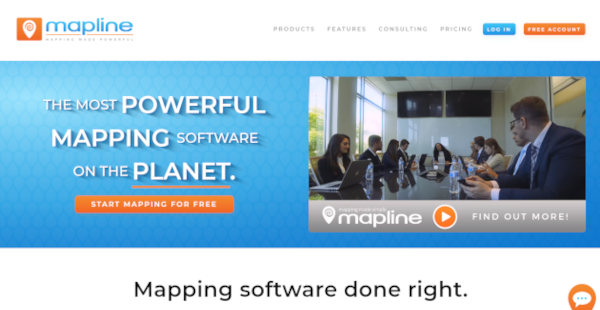
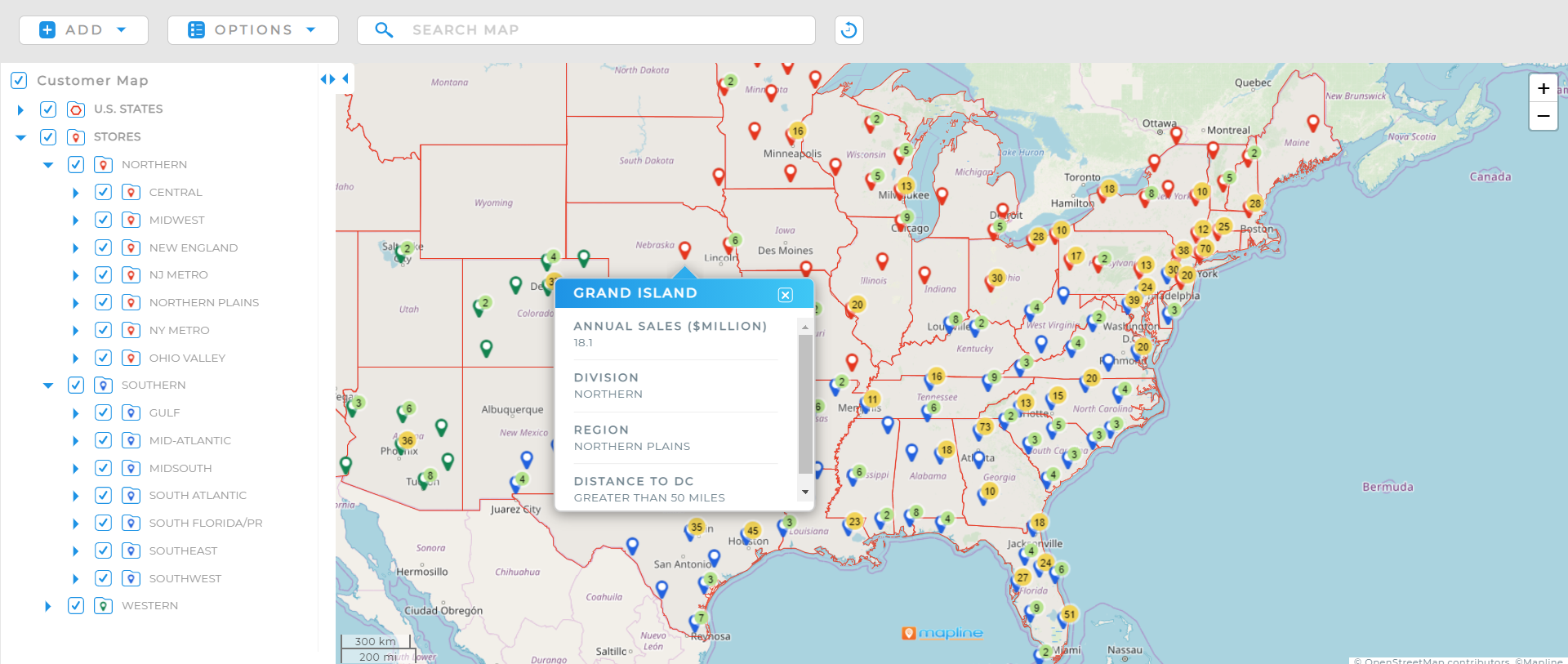
Mapline is a software mapping platform that converts the customer’s datasheets into a real-time digital map that monitors the status of offices, its branches, cities, regions, and other places that are vital to his enterprise. Its analytics feature then enables the customer to further dig deep into the information in those locations, such as market demographics, sales pipelines, traffic routes and delivery times, and movement of personnel, among others.
Among its most popular elements are as follows: the Pins, which can highlight important establishments; Filtering, which can segmentize them into various categories; Hot Spots, which alert the user to places they have to prioritize, such as booming economies or troubled stores; and the Location Distance Tool, which accurately measures the distance between several places and the time it would take to cross from one spot to another (allowing for traffic, type of vessel used, weather, and other extraneous factors).
While Mapline has enjoyed traction in many industries, it has drawn more than its fair share of interest from logistics, banking and finance, food and retail, and entertainment.
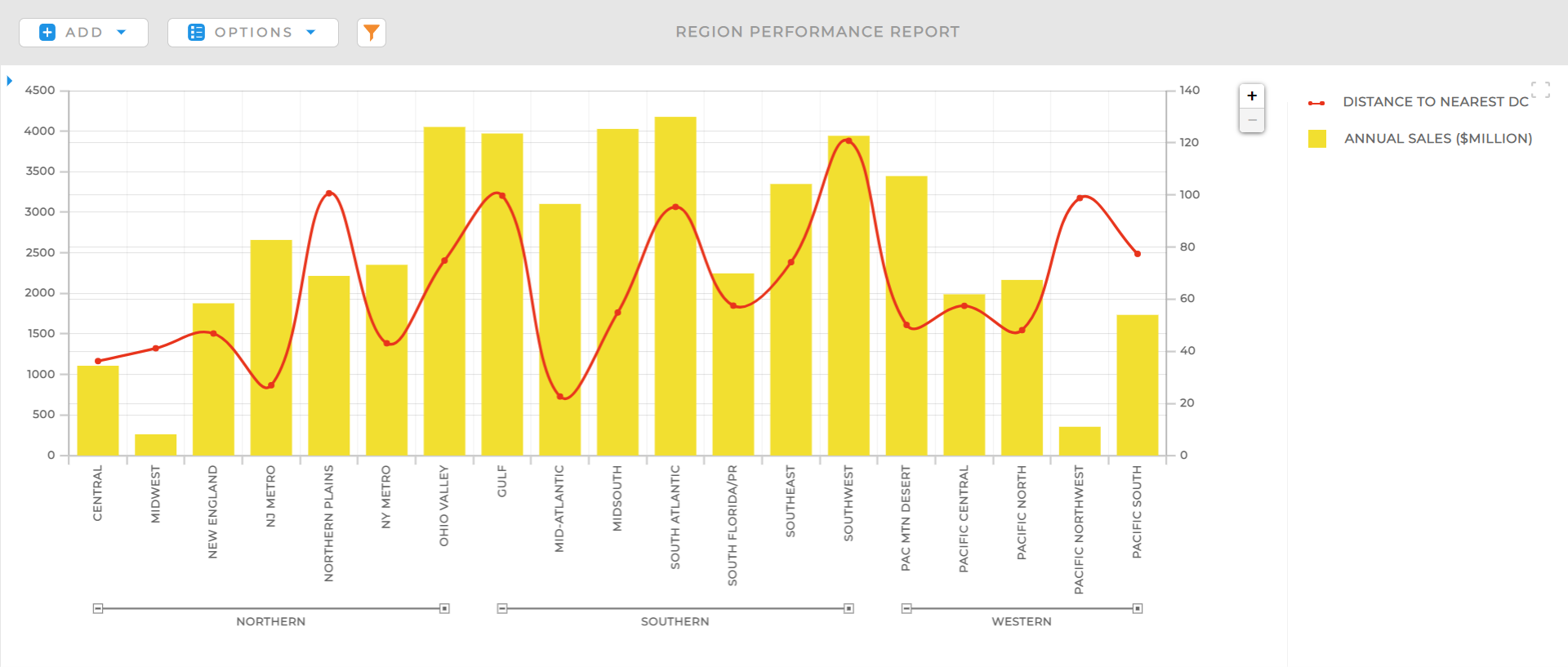
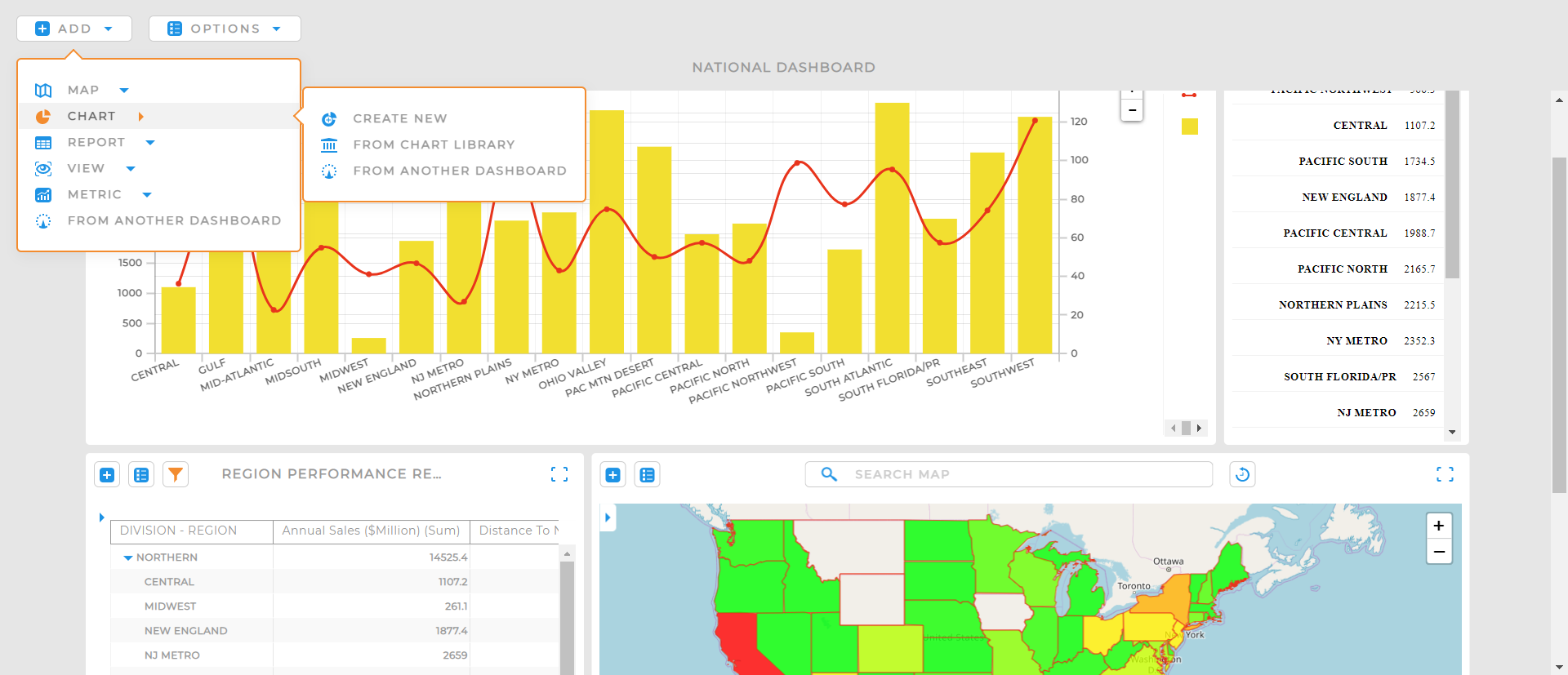
Mapline also introduced three new products in their lineup. The first is Mapline Optimizer, designed specifically to support a company’s routing needs. Second, Mapline Supersets, which connects datasets through data localization. With it, you can calculate relative distances, automate data assignment, and more. Finally, Mapline Perspective is comprised of BI tools linked to your physical data’s location so you can build charts, generate reports, and centralize all your analysis into a single source of truth with dashboards.
Show MoreOverview of Mapline Benefits
Organized Routes and Trips
Teams can properly and accurately map out the most direct and easiest paths from one location to another in their itinerary. Guesswork and error are reduced. Resources such as travel expenses are properly channeled. Through precise scheduling, the people doing the trips can make sure each stopover, visit, and layover are productive.
Territory Mapping
The strengths, weaknesses, and other traits of each location that have been placed on the map can surface for continuing study and assessment. Each city or point of contact suddenly becomes ‘alive.’ You can dig deep into the data to understand the profile of his market, the reasons why his team is succeeding to reach them (or not), and the actual factors that make the populations in these cities receptive to the company’s current campaigns. Given this overview, think of yourself as a military commander and create strategies that are supported by data. You can also move and transfer resources from these territories, sending greater support to areas that need them.
Data Interaction and Analysis
The isolated silos of seemingly unrelated data become a coherent, organized whole that helps you understand your business and your customers better. Correlating information gives you a precise picture of why your business succeeds in certain areas than others, or how other external influences like weather and the seasons can slow down the transport of products.
Risk Reduction and Business Continuity
The information given by the map will enable you to reduce the risks to your enterprise. You can also form a plan for business continuity during projected times of challenges and difficulties. For example, heavy-winter months can be anticipated, postponing the deployment of trucks into the cities that have a hard time getting through the snow. The continued decrease in sales in one territory can be seen within weeks, whereas traditional planning will only spot the trend after months. This early alarming trend can warn management to cut the losses before they worsen.
Show MoreOverview of Mapline Features
- Automated Uploads·
- Customized Pins
- Data Analytics
- Data Centralization
- Data Interaction
- Data Sharing
- Filtering
- Heat Mapping
- Risk Mitigation
- Route Building
- Segmentation
- Territory Creation
- Territory Report
Mapline Position In Our Categories
Bearing in mind businesses have particular business demands, it is logical that they avoid seeking a one-size-fits-all, ideal business program. Having said that, it is futile to find such an app even among well-known software products. The efficient thing to undertake should be to note down the varied significant factors that merit scrutiny including essential features, budget, technical skill levels of the employees, business size, etc. Then, you must double down on the product research exhaustively. Go over some Mapline reviews and look over each of the software options in your list in detail. Such detailed research ascertains you stay away from ill-fitting apps and subscribe to the system which offers all the tools your business requires to be successful.
Position of Mapline in our main categories:
TOP
50
Mapline is one of the top 50 GIS Software products
If you are interested in Mapline it could also be a good idea to analyze other subcategories of GIS Software gathered in our base of SaaS software reviews.
There are trendy and widely used solutions in each software category. But are they necessarily the best fit for your enterprise’s specific needs? A popular software solution may have thousands of users, but does it provide what you need? For this reason, do not blindly invest in popular systems. Read at least a few Mapline GIS Software reviews and think about the elements that you desire in the software such as the price, main features, available integrations etc. Then, select a few solutions that fit your needs. Try out the free trials of these apps, read online opinions, get clarifications from the seller, and do your investigation systematically. This profound research is certain to help you select the most excellent software platform for your firm’s unique wants.
How Much Does Mapline Cost?
Mapline Pricing Plans:
Free Trial
Paid plan
Contact vendor
What are Mapline pricing details?
Mapline Pricing Plans:
Free Trial
Paid plan
Contact vendor
Contact vendor for pricing. Because every company has different needs, Mapline tailors pricing to the specific products and data usage your company requires. Contact the today to discuss your company and request a quote!
User Satisfaction
Positive Social Media Mentions
122
Negative Social Media Mentions
17
We know that when you choose to get a GIS Software it’s crucial not only to learn how professionals score it in their reviews, but also to find out whether the real people and companies that purchased it are indeed content with the service. Because of that need we’ve designer our behavior-based Customer Satisfaction Algorithm™ that gathers customer reviews, comments and Mapline reviews across a vast array of social media sites. The data is then presented in a simple to digest format indicating how many customers had positive and negative experience with Mapline. With that information available you will be prepared to make an informed business decision that you won’t regret.
Video
Screenshots

Technical details
Devices Supported
- Web-based
Deployment
- Cloud Hosted
Language Support
- English
Pricing Model
- Free
- Monthly payment
- Annual Subscription
Customer Types
- Small Business
- Large Enterprises
- Medium Business
What Support Does This Vendor Offer?
- phone
- live support
- training
- tickets
What integrations are available for Mapline?
Mapline integrates with any software using their extensive API.
Mapline User Reviews
Mapline average rating:
4/5
Overall impression
5/5
Customer Support
4/5
Value for Money
4/5
Ease of Use
Write your own review of this product
ADD A REVIEWThe most favorable review

PROS: This platform makes it easier for us to connect clients to our partners anywhere. We only need to paste external data to its interface, then it instantly yields helpful results. This is how we find nearest partner companies for our clients to connect with.
CONS: There are updates that make the software somehow difficult to use. For example, some make important details hard to read on their interface.
The least favorable review
PROS: This platform makes it easier for us to connect clients to our partners anywhere. We only need to paste external data to its interface, then it instantly yields helpful results. This is how we find nearest partner companies for our clients to connect with.
CONS: There are updates that make the software somehow difficult to use. For example, some make important details hard to read on their interface.
More reviews from 2 actual users:
Sort by:
Latest
- Latest
- Most useful
- Most positive
- Most negative
Mapline has Great Customer Support
Read full review >
4/5
Overall impression
4/5
Customer Support
4/5
Value for Money
3/5
Ease of Use
Published on: 20.08.2021
Company Size: More than 100 Employees
Industry: Political Organization
PROS: The user support of Mapline is largely professional and helpful. For example, Mapline is an app that works best for USA maps, but users who have UK maps may experience problems with it. I’m on the latter case, but a professional customer support staff has helped me tweak my maps the way I need it. This lets me come up with a perfect map right away, which is a big help for my presentation.
CONS: The map resource has some discrepancies in the UK Region. Northern Ireland is clearly missing. Yes, you can do some tweaks and put Northern Ireland in it, but it would look odd in the middle of the map. The shoreline is located far out into the sea, instead of where it should supposed to be.
Professional but Convenient App for Mapping
Read full review >
4/5
Overall impression
3/5
Customer Support
4/5
Value for Money
4/5
Ease of Use
Published on: 20.04.2021
Company Size: 1-10 Employees
Industry: Non-Profit Organization Management
PROS: This platform makes it easier for us to connect clients to our partners anywhere. We only need to paste external data to its interface, then it instantly yields helpful results. This is how we find nearest partner companies for our clients to connect with.
CONS: There are updates that make the software somehow difficult to use. For example, some make important details hard to read on their interface.


Join a community of 7,369 SaaS experts
Thank you for the time you take to leave a quick review of this software. Our community and review base is constantly developing because of experts like you, who are willing to share their experience and knowledge with others to help them make more informed buying decisions.
Sign in with LinkedIn
Why we require LinkedIn?
- Show the community that you're an actual user.
- We will only show your name and profile image in your review.
- You can still post your review anonymously.
OR
Sign in with company emailSign in with company email
Popular Mapline Alternatives



Top Competitors To Mapline By Price
Product name:
Price:



Trending GIS Software Reviews



8.9
94%
Mapline Comparisons
Product name:





Mapline user reviews
Mapline has Great Customer Support
Read full review >
4/5
Overall impression
4/5
Customer Support
4/5
Value for Money
3/5
Ease of Use
Published on: 20.08.2021
Company Size: More than 100 Employees
Industry: Political Organization
Professional but Convenient App for Mapping
Read full review >
4/5
Overall impression
3/5
Customer Support
4/5
Value for Money
4/5
Ease of Use
Published on: 20.04.2021
Company Size: 1-10 Employees
Industry: Non-Profit Organization Management

Page last modified



Did you find this review useful?
Yes
No
Thank you for your feedback
How can we make this page better?
Unsure about this software?
FIND ALTERNATIVES
 Why is FinancesOnline free?