

MPA Tools Review



What is MPA Tools?
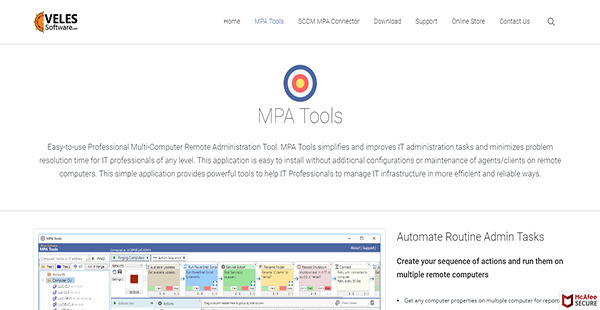
MPA Tools is a Windows-only software that makes remote administration of multiple computers possible. It is quick and easy to set up since it does not require complex configurations. More than that, the program allows system administrators to glean as much information about a remote computer as possible even when the system in question is offline. Because of this, you can manage computers and troubleshoot issues with ease.
MPA Tools also offers complete control over the use of computers. This means that administrators can see who is logged in and when users last accessed systems. They can log off users, share sessions, limit usage, and more. As a result, you can prevent malicious or unauthorized utility of your electronic resources.
Show MoreOverview of MPA Tools Benefits
Quick & Easy Setup
MPA Tools does not require complex configurations to run. System administrators can rapidly utilize the software to check on remote computers and ensure that they are ready for management. The system also makes it possible to gather in-depth information regarding a system even if it is offline. This way, you can locate units and determine to which departments they belong with ease.
Seamless Daily Management
Even if you have a hundred computers you need to manage, MPA Tools makes the process less arduous for you. That is because it provides you with the information you need almost instantaneously for you to ensure that there are no issues in any of the network’s units.
Integrated Troubleshooting
MPA Tools brings together all greatly beneficial Windows Administrative tools. This means that you can see who is currently logged in, the reboot status and log of a computer and if there is a stability issue in a unit. This way, you can troubleshoot them immediately from a single interface, saving you time.
Controlled Automation
If you have a plethora of administrative tasks, you can set them aside for MPA Tools to manage. This way, you can focus on critical elements that require human hand and control. The same thing is also applicable to file updates on servers. The program can ensure that each condition is met before executing an action and it kicks in with remediation processes in case of failures.
Show MoreOverview of MPA Tools Features
- Admin Tasks Automation
- Multiple Computers
- History Management
- File Tree Troubleshooting
- User Logs Management
What Problems Will MPA Tools Solve?
Windows 10 Migrations
If you have hundreds of computers migrating from an old version of Windows to the latest edition, you have to know if any of them has issues that may affect the migration process. MPA Tools can help you find out what these are so you can troubleshoot them before they cause further problems. Once that is completed, you can use the software to do another round of checks for assurance.
Server Patching
Patching multiple servers is a problem that requires multiple people and resources. MPA Tools changes that by automating the process so computer health checks and patching events in a matter of seconds or minutes. Because of these, the process can be run by fewer people.
Resolution of Daily Issues
MPA Tools can support daily activities especially in the realm of end-user support and troubleshooting tasks. As such, system managers can perform critical actions immediately to prevent further problems from arising.
Awards & Quality Certificates


MPA Tools Position In Our Categories
Keeping in mind businesses have particular business wants, it is only sensible they abstain from purchasing a one-size-fits-all, “perfect” business program. However, it would be difficult to try to chance on such application even among widely used software products. The correct thing to do should be to set down the varied chief functions that entail careful thought including crucial features, price plans, skill ability of the employees, company size, etc. The second step is, you must follow through the research exhaustively. Go over these MPA Tools analyses and explore each of the applications in your shortlist more closely. Such comprehensive research can make sure you keep away from unfit applications and buy the system which delivers all the aspects your business requires in sustaining growth.
Position of MPA Tools in our main categories:
TOP
500
MPA Tools is one of the top 500 IT Management Software products
If you are considering MPA Tools it might also be a good idea to analyze other subcategories of IT Management Software collected in our base of B2B software reviews.
Since each organization has specific business needs, it is sensible for them to refrain from seeking a one-size-fits-all ideal software application. Needless to say, it would be useless to try to find such an app even among popular software solutions. The intelligent thing to do would be to jot down the various essential aspects that need consideration such as key features, finances, skill levels of staff members, company size etc. Then, you should do your homework thoroughly. Read some MPA Tools IT Management Software reviews and check out each of the other apps in your shortlist in detail. Such exhaustive homework can make sure you discard ill-fitting platforms and choose the solution that presents all the elements you need for business success.
How Much Does MPA Tools Cost?
MPA Tools Pricing Plans:
Free Trial
1 License
$69/year
Bundle 5
$315/year
Bundle 10
$69/year
What are MPA Tools pricing details?
MPA Tools Pricing Plans:
Free Trial
1 License
$69/year
Bundle 5
$315/year
Bundle 10
$69/year
MPA Tools has three enterprise pricing options. The details for these are as follows.
1 License – $69.00/year
- All Future Updates
- Unlimited Client Nodes
Bundle 5 – $315.00/year
- 5 Activation Bundles
- All Future Updates
- Unlimited Client Nodes
Bundle 10 – $69.00/year
- 10 Activation Bundles
- All Future Updates
- Unlimited Client Nodes
User Satisfaction
Positive Social Media Mentions
0
Negative Social Media Mentions
0
We are aware that when you choose to buy a IT Management Software it’s important not only to learn how experts evaluate it in their reviews, but also to check whether the real clients and companies that purchased it are genuinely content with the service. Because of that need we’ve designer our behavior-based Customer Satisfaction Algorithm™ that gathers customer reviews, comments and MPA Tools reviews across a vast array of social media sites. The information is then displayed in a simple to understand form showing how many customers had positive and negative experience with MPA Tools. With that information available you should be equipped to make an informed purchasing choice that you won’t regret.
Technical details
Devices Supported
- Windows
Deployment
- On Premise
Language Support
- English
Pricing Model
- Annual Subscription
Customer Types
- Small Business
- Large Enterprises
- Medium Business
- Freelancers
What Support Does This Vendor Offer?
- phone
- live support
- training
- tickets
What integrations are available for MPA Tools?
MPA Tools can only integrate with System Center Configuration Manager.

MPA Tools
is waiting for
your first review.

Write your own review of this product
ADD A REVIEWMore reviews from 0 actual users:


Join a community of 7,369 SaaS experts
Thank you for the time you take to leave a quick review of this software. Our community and review base is constantly developing because of experts like you, who are willing to share their experience and knowledge with others to help them make more informed buying decisions.
Sign in with LinkedIn
Why we require LinkedIn?
- Show the community that you're an actual user.
- We will only show your name and profile image in your review.
- You can still post your review anonymously.
OR
Sign in with company emailSign in with company email
Popular MPA Tools Alternatives


Top Competitors To MPA Tools By Price
Product name:
Price:


Trending IT Management Software Reviews



MPA Tools Comparisons
Product name:


Page last modified


Did you find this review useful?
Yes
No
Thank you for your feedback
How can we make this page better?
Unsure about this software?
FIND ALTERNATIVES
 Why is FinancesOnline free?