

ProForecast Review



What is ProForecast?
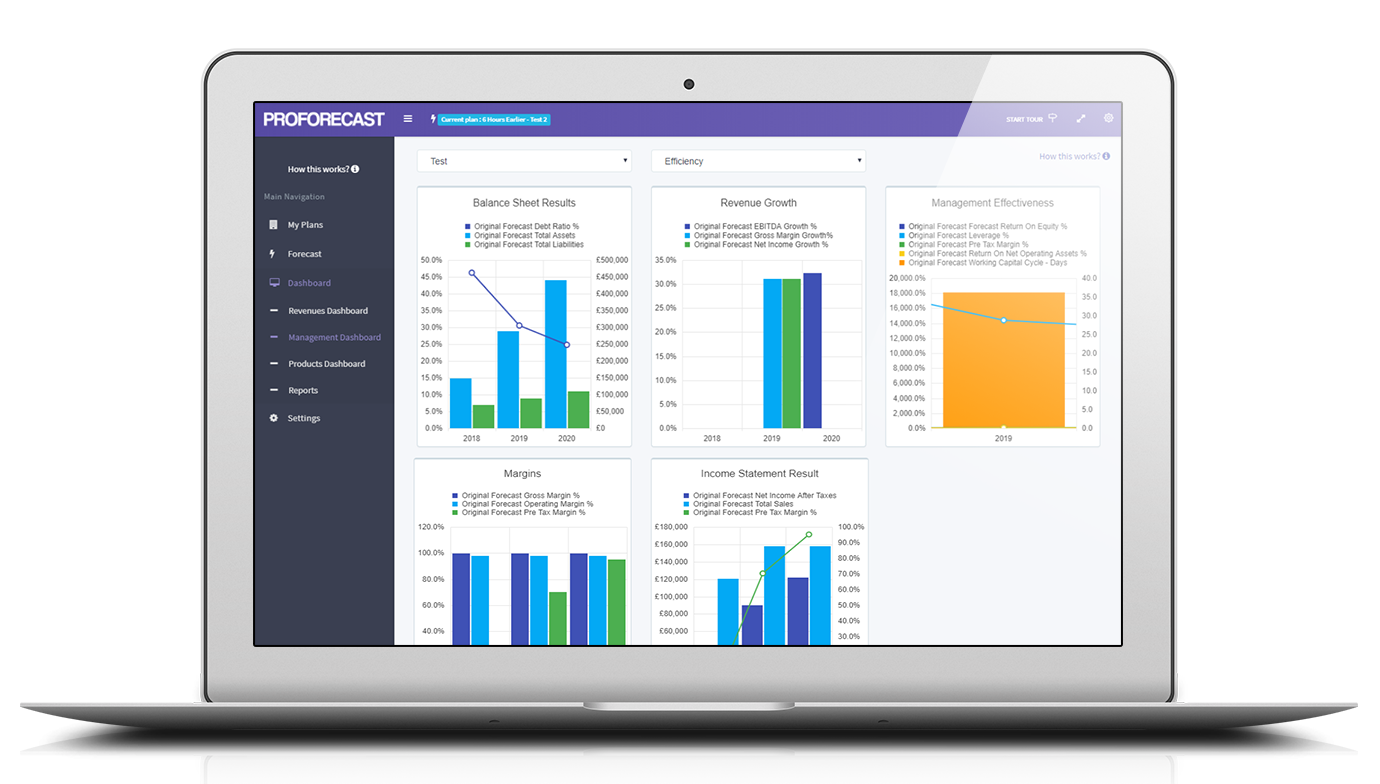
ProForecast is an intuitive financial forecasting and business planning software. It aids you in making intelligent and strategic business decisions by providing you with insights from your business performance measurements. The solution then displays such information in interactive reports, data visualizations, and corporate dashboards that you can access easily with a few clicks.
ProForecast is also capable of giving you the best reporting, planning, and cash flow forecasting options. It can do this by letting you run comprehensive cash flow forecasts, assign budgets and execute scenarios, and stress test your business’s financial future. It is also worthy of note that the software lets you perform such forecasts and analyses in a way that is precisely tailored to the needs of your business.
Show MoreOverview of ProForecast Benefits
Comprehensive Reporting Suite
ProForecast is equipped with a complete reporting suite that includes a wide range of financial and departmental reports. Information gained from these are associated with multiple financial dashboards that have more than 120 key graphs, a KPI display board, and operational graphs. On top of all that, the solution enables you to share insights with your colleagues and other stakeholders as you can export reports and dashboards to Excel, Word, or PDF.
Secure Collaboration Platform
Cloud-based software can be a cause for concern because digital threats could target them. However, you can rest assured that ProForecast is a secure platform for your business information and for your team’s collaboration activities as well. Members of your organization can safely run forecasts and export them in different formats for sharing.
Mobile Working Space
As ProForecast is all in the cloud, you and your employees can use it wherever there is an internet connection available. Aside from that, you do not have to worry about installations and updates as the application is automatically refreshed in case of modifications.
Customer-Headed Development
ProForecast listens to the needs of its customers when developing the software and creating future releases. That is what makes it unique and sets it apart from similar solutions. It is constantly evolving with its users in mind to be consistently the leading financial forecasting software.
Show MoreOverview of ProForecast Features
- Financial Forecasts
- Scenario Planning
- Sensitivity Analysis
- Step Change
- Quality Outputs & Dashboards
- Collaboration
What Problems Will ProForecast Solve?
Unique Business Needs
ProForecast understands that each business has its unique needs. That is why its financial and performance management tools are tailored to your needs and even to your clients’ circumstances.
Various Business Models
ProForecast’s forecasting adaptations can be utilized by businesses in different sectors regardless of their models. For example, it has hospitality, yield, product, agency and manual business models that can meet varying business needs.
Evolving Solution
ProForecast is a constantly evolving solution. The team behind it is constantly engaged in research and development to make sure that the software can handle the complexities of your or your clients’ businesses. That is why the application is continually developed for it to continue adapting to users’ needs.
Awards & Quality Certificates


ProForecast Position In Our Categories
Knowing that businesses have particular business requirements, it is practical they avoid going for an all-in-one, “perfect” business program. Regardless, it would be futile to try to come across such a software product even among popular software solutions. The rational thing to undertake should be to note down the numerous critical aspects which necessitate careful thought like major features, costing, technical skill competence of staff, business size, etc. Then, you must do the research systematically. Have a look at these ProForecast review articles and scrutinize the other applications in your list more closely. Such comprehensive product research makes sure you stay away from ill-fitting apps and select the system that has all the features your company requires.
Position of ProForecast in our main categories:
TOP
200
ProForecast is one of the top 200 Accounting Software products
There are well-liked and widely used applications in each software category. But are they automatically the best fit for your company’s unique wants? A popular software product may have thousands of customers, but does it provide what you require? For this reason, do not blindly spend on popular systems. Read at least a few ProForecast Financial Reporting Software reviews and think about the elements that you desire in the software such as the price, main tools, available integrations etc. Then, shortlist a few solutions that fit your requirements. Check out the free trials of these apps, read online comments, get information from the vendor, and do your homework systematically. This profound groundwork is certain to help you find the finest software application for your company’s specific wants.
How Much Does ProForecast Cost?
ProForecast Pricing Plans:
Free Trial
Training Programme
£2550/year
1-5 Users (Paid Annually)
£200/user/month
6+ Users (Paid Annually)
£60/user/month
Non Financial Data Integrations (Paid Annually)
£50/integration/month
1-5 Users (Paid Monthly)
£230/user/month
6+ Users (Paid Monthly)
£70/user/month
Non Financial Data Integrations (Paid Monthly)
£60/integration/month
What are ProForecast pricing details?
ProForecast Pricing Plans:
Free Trial
Training Programme
£2550/year
1-5 Users (Paid Annually)
£200/user/month
6+ Users (Paid Annually)
£60/user/month
Non Financial Data Integrations (Paid Annually)
£50/integration/month
1-5 Users (Paid Monthly)
£230/user/month
6+ Users (Paid Monthly)
£70/user/month
Non Financial Data Integrations (Paid Monthly)
£60/integration/month
One off Costs
Implementation & training Package.
Ensures that implementation times are minimised with system training fitting around your timelines.
Training is done on a one to one company basis and is also fully documented.
Staff leavers replaced by new personnel will be fully covered by the training programme.
Cost – £2550 +VAT Recurring Costs
Recurring Costs Per User
Paid Annually In Advance
- 1 – 5 users
Cost – £200 + VAT per user per month. - 6+ users
Cost – £60 + VAT per additional user a month.
Non Financial Data Integrations
Cost – £50 + VAT per month per integration.
Paid Monthly In Advance
- 1 – 5 users
Cost – £230 + VAT per user per month.
- 6 + users
Cost – £70 + VAT per additional user a month.
Non Financial Data Integrations
Cost – £60 + VAT per month per integration
User Satisfaction
Positive Social Media Mentions
0
Negative Social Media Mentions
0
We are aware that when you decide to get a Financial Reporting Software it’s vital not only to learn how professionals rank it in their reviews, but also to discover whether the actual users and companies that purchased it are genuinely happy with the service. That’s why we’ve created our behavior-based Customer Satisfaction Algorithm™ that gathers customer reviews, comments and ProForecast reviews across a broad range of social media sites. The data is then displayed in an easy to understand format indicating how many users had positive and negative experience with ProForecast. With that information available you will be prepared to make an informed business decision that you won’t regret.
Screenshots
Technical details
Devices Supported
- Windows
- Mac
- Web-based
Deployment
- Cloud Hosted
Language Support
- English
Pricing Model
- Monthly payment
- Quote-based
Customer Types
- Small Business
- Medium Business
- Freelancers
What Support Does This Vendor Offer?
- phone
- live support
- training
- tickets
What integrations are available for ProForecast?
Integrations That Speed Up System Adoption & Shorten Period End Closing
-
Whether using direct integrations or CSV imports – our import manager tool will make working with imported data a snip.
-
Map once – and on any subsequent import the system will automatically assign the imported data to the correct account, whether when importing the opening trial balance or monthly actuals.
-
If accounts are added – simply add the new accounts to the existing map and they will also automatically be mapped in subsequent imports.
-
Import external data – payroll, personnel and non core accounting data.
-
The import manager tool – speeds up both setup and period end closing.
-
Rapier AI – removes much of the drudgery of data setup.
-
Major cost and time savings – at setup and monthly, quarterly and annual closings, achieved by using the Import manager and Rapier AI.
-
System adoption times – can be reduced to between 4 and 12 weeks using our Integration Manager, Rapier AI and our FP&A Consultants and training programme.
ProForecast User Reviews
ProForecast average rating:
5/5
Overall impression
5/5
Customer Support
4/5
Value for Money
4/5
Ease of Use
Write your own review of this product
ADD A REVIEWMore reviews from 1 actual users:
Sort by:
Latest
- Latest
- Most useful
- Most positive
- Most negative
A great CPM system, for budgeting, forecasting and strategic planning.
Read full review >
5/5
Overall impression
4/5
Customer Support
5/5
Value for Money
4/5
Ease of Use
Published on: 27.05.2021
Company Size: 1-10 Employees
Industry: Retail
PROS: It is a very powerful but simple to use strategic planning and forecasting tool which allows everyone in our company to engage in the planning, budgeting and forecasting process and has revealed many insights to the team. It is completely different to the way we worked before and would be difficult for us to go back to our old methods as this such an improvement.
CONS: When calculating, a process which can take a minute or so, the calculation messages disappear for a while and you don't know whats happening, before they reappear to tell you that its finished.


Join a community of 7,369 SaaS experts
Thank you for the time you take to leave a quick review of this software. Our community and review base is constantly developing because of experts like you, who are willing to share their experience and knowledge with others to help them make more informed buying decisions.
Sign in with LinkedIn
Why we require LinkedIn?
- Show the community that you're an actual user.
- We will only show your name and profile image in your review.
- You can still post your review anonymously.
OR
Sign in with company emailSign in with company email
Popular ProForecast Alternatives





Top Competitors To ProForecast By Price
Product name:
Price:





Trending Financial Reporting Software Reviews



ProForecast Comparisons
Product name:








ProForecast user reviews
A great CPM system, for budgeting, forecasting and strategic planning.
Read full review >
5/5
Overall impression
4/5
Customer Support
5/5
Value for Money
4/5
Ease of Use
Published on: 27.05.2021
Company Size: 1-10 Employees
Industry: Retail

Page last modified



Did you find this review useful?
Yes
No
Thank you for your feedback
How can we make this page better?
Unsure about this software?
FIND ALTERNATIVES
 Why is FinancesOnline free?