
- Home
- POS Systems
- ShopOwner POS

ShopOwner POS Review



What is ShopOwner POS?
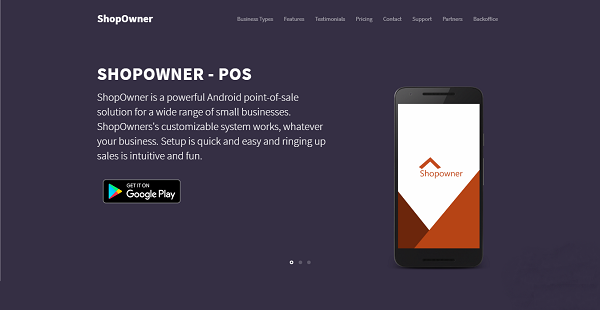
ShopOwner POS is a Point-of-Sale system built for the Android platform and designed primarily for small businesses, including salons, gift shops, restaurants, boutiques, and more. It is a customizable software that can be tailored to fit any business type and meet both basic and unique small business requirements.
This powerful Android POS features a comprehensive set of features and capabilities including menu management, Bluetooth printer connectivity, table management, staff management, customer management, analytics and reporting, customizable receipts, and offline mode among others.
ShopOwner POS is is built to support multiple hardware systems, making it extremely scalable. The software is capable of growing as the user’s business expands and grows.
Show MoreOverview of ShopOwner POS Benefits
Extremely Intuitive POS System
ShopOwner POS is a highly friendly POS solution. It is very easy to set up and use. Scalability is not an issue if you decide to further enhance its capabilities.
Inexpensive Yet Robust
ShopOwner POS provides small businesses and professional service providers with a complete POS system that doesn’t break the bank. The software is offered in three packages, three different price points that everyone can afford. If you are looking for a POS system that truly defines the old ‘bang for a buck’ adage, ShopOwner POS is it.
Perfect For Any Small Business
Whether you are running a small restaurant, a hair salon, or a professional cleaning service, ShopOwner POS is loaded with ALL the features you need to run your business. Its rich feature set simplifies your tasks, allowing for easy business management regardless of the type of business you are running. Setup is a blitz. Once it’s ready to go, you are too.
Printed and Digital Receipts
ShopOwner POS is built to support POS printers, including Bluetooth ones. You can connect your Android device to your Bluetooth receipt printer and generate paper-based receipts with a few taps. You also have the option to send the receipts to your customers via email or SMS, which is perfect if you aim to be a paperless operation.
Show MoreOverview of ShopOwner POS Features
- Menu Management
- Customizable receipts
- Offline Mode
- Analytics/ Reporting
- Free Setup & Care
- Cloud Storage
- Bluetooth Printers
- 24/7 Customer Care
- Additional Registers
- Table Management
- Staff Management
- Customer Management
- Email/ PDF Invoices
- Security Inbuilt
- Coupons & Discounts
- Payment Types (Credit Cards)
- Back office
- Cash Drawer
- Shift Management
- Email/ SMS Receipts
What Problems Will ShopOwner POS Solve?
ShopOwner POS supports a variety of business and professionals, including small retail, beauty professionals, food service, transport operators, and attractions.
Awards & Quality Certificates


ShopOwner POS Position In Our Categories
Because businesses have specific business-related requirements, it is only logical they steer clear of settling on a one-size-fits-all, “perfect” business application. However, it would be futile to discover such a software system even among widely used software products. The logical thing to do should be to write the several main factors which necessitate research like major features, price plans, technical skill ability of the users, business size, etc. The second step is, you must perform the research systematically. Browse over some ShopOwner POS review articles and check out each of the software products in your shortlist more closely. Such comprehensive research ensures you take out poorly fit software products and buy the one which provides all the benefits your business requires in sustaining growth.
Position of ShopOwner POS in our main categories:
Every company is different, and may call for a special POS Systems solution that will be adjusted to their company size, type of customers and staff and even individual industry they deal with. It's not wise to count on finding a perfect software that will be suitable for each business no matter what their background is. It may be a good idea to read a few ShopOwner POS POS Systems reviews first and even then you should keep in mind what the service is supposed to do for your company and your staff. Do you need a simple and intuitive app with only elementary functions? Will you really use the complex tools required by pros and large enterprises? Are there any specific features that are especially beneficial for the industry you work in? If you ask yourself these questions it will be much easier to get a solid software that will match your budget.
How Much Does ShopOwner POS Cost?
ShopOwner POS Pricing Plans:
Free Trial
Monthly Plan
$25/device/year
Annual Plan
$225/device/year
Lifetime
$99/device
What are ShopOwner POS pricing details?
ShopOwner POS Pricing Plans:
Free Trial
Monthly Plan
$25/device/year
Annual Plan
$225/device/year
Lifetime
$99/device
ShopOwner POS offers the following basic and enterprise pricing packages:
Monthly Plan – $25/device/month
Annual Plan – $225/device/year
Lifetime – $999/device
All Plans share the following features:
- Menu Management
- Customizable receipts
- Offline Mode
- Analytics/ Reporting
- Free Setup & Care
- Cloud Storage
- Bluetooth Printers
- 24/7 Customer Care
- Additional Registers
- Table Management
- Staff Management
- Customer Management
- Email/ PDF Invoices
- Security Inbuilt
- Coupons & Discounts
- Payment Types (Credit Cards)
- Back office
- Cash Drawer
- Shift Management
- Email/ SMS Receipts
User Satisfaction
Positive Social Media Mentions
0
Negative Social Media Mentions
0
We realize that when you make a decision to get a POS Systems it’s crucial not only to learn how professionals rank it in their reviews, but also to find out if the real clients and businesses that bought these solutions are indeed happy with the service. Because of that need we’ve created our behavior-based Customer Satisfaction Algorithm™ that collects customer reviews, comments and ShopOwner POS reviews across a vast array of social media sites. The data is then presented in a simple to digest form indicating how many clients had positive and negative experience with ShopOwner POS. With that information at hand you will be equipped to make an informed purchasing decision that you won’t regret.
Video
Technical details
Devices Supported
- Android
Deployment
- Cloud Hosted
Language Support
- English
Pricing Model
- Monthly payment
- One-time payment
Customer Types
- Small Business
- Medium Business
- Freelancers
What Support Does This Vendor Offer?
- phone
- live support
- training
- tickets
What integrations are available for ShopOwner POS?
No information available.

ShopOwner POS
is waiting for
your first review.

Write your own review of this product
ADD A REVIEWMore reviews from 0 actual users:


Join a community of 7,369 SaaS experts
Thank you for the time you take to leave a quick review of this software. Our community and review base is constantly developing because of experts like you, who are willing to share their experience and knowledge with others to help them make more informed buying decisions.
Sign in with LinkedIn
Why we require LinkedIn?
- Show the community that you're an actual user.
- We will only show your name and profile image in your review.
- You can still post your review anonymously.
OR
Sign in with company emailSign in with company email
Popular ShopOwner POS Alternatives





Top Competitors To ShopOwner POS By Price
Product name:
Price:





Trending POS Systems Reviews





ShopOwner POS Comparisons
Product name:






Page last modified



Did you find this review useful?
Yes
No
Thank you for your feedback
How can we make this page better?
Unsure about this software?
FIND ALTERNATIVES
 Why is FinancesOnline free?