

SiteMax Review



What is SiteMax?
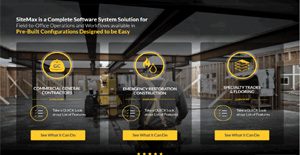
SiteMax is a cloud construction management software designed to make field-to-office processes more efficient. Its goal is to help construction companies capture data accurately via a centralized platform. The solution features pre-built customization for commercial general contractors, emergency restoration and specialty trades and flooring.
General contractors benefit from SiteMax by streamlining their communication, admin and operational workflows. Tools like shared project files, assignable tasks and sub-contractor access help teams collaborate in a timely manner. The construction software also makes admin and management processes easy with monitoring tools like: job history by day; time card system; and progress photo gallery.
Likewise, SiteMax offers sophisticated features that simplifies entries of critical but cumbersome-to-consolidate data, including 24 hour auto weather log, QR code tool inventory and geo-located time check-in. It has over 20 features that aim to help construction companies meet project timeframe, minimize delays and disruptions and operate within budget.
Field teams can also depend on SiteMax Android or iOS app to instantly access centralized processes on the go. The mobile apps feature a pared down desktop version, keeping to the most essential tools, such as, list of jobs, geolocation check-in and tag time on equipment. The apps are custom designed for different roles, including field workers, supervisors and managers.
Show MoreOverview of SiteMax Benefits
SiteMax offers plenty of benefits in areas like reporting, communication, collaboration, timekeeping, payroll processing and ancillary processes. It helps you maintain smooth communication between field and office. Processes are centralized and standardized. Monitoring tools keep progress transparent. Collaboration features make it easy to share information or pass on urgent messages in real time. Using a centralized data repository also ensures data integrity across the organization and that updates or changes are synced at once.
On the other hand, sleek at-a-glance dashboards help you organize projects with quick views for updates and changes. The dashboards also let you monitor daily progress down to detailed to-do checklists. The dashboards maintain a consistent look in phone, desktop and tablet, making it easy to follow items even if you shift platforms.
SiteMax also features daily reporting, which it aggregates throughout the project lifetime. You can sort reports by day, a handy feature for referencing past events. Its reporting is also critical to monitor day-to-day accomplishments, so you at the office get instant feedback on how things are developing on the field.
If you’re new to construction, the software offers a library of industry-grade templates for forms and reports culled from the vendor’s experience in site processes.
Similarly, capturing field working hours is convenient. Field supervisors have quick access to daily time inputs and processing report for payroll is automated. You drastically cut the waiting time between preparing timesheet to payroll processing.
Lastly, you can bring the client into the system for collaboration, monitoring or presentation. SiteMax allows you to set up access for external parties on any part of the system. You can also link them up to a gallery (photos of of daily or weekly progress, for example) without the need to log in. Furthermore, roles and permissions let you share different access levels with different members of the client team.
Show MoreOverview of SiteMax Features
- Time card system
- Geo-located time check-in
- 24 hour auto weather log
- Custom site forms
- Custom safety forms
- Progress photo gallery per project
- QR code tool inventory
- Shared project and job files
- Assignable tasks
- Vendor lists
- Client database
- Job history by day
- User management
- Customer user roles
- Selectable permissions
- Client link
- Sub-contractor access
- Digital PO book
- Comprehensive settings
- iPad, Android apps
- Apple TV app
- Punch list
- Materials usage
- Third-party contractor access
SiteMax Position In Our Categories
Bearing in mind businesses have specific business wants, it is sensible that they steer clear of picking an all-encompassing, ideal software solution. Still, it would be futile to come across such a software system even among sought-after software systems. The logical thing to do can be to write down the various main factors which merit scrutiny such as essential features, plans, technical skill ability of the users, business size, etc. Next, you must perform the product research to a full extent. Have a look at these SiteMax review articles and scrutinize the other software systems in your shortlist in detail. Such detailed research ensures you drop mismatched applications and pay for the system that provides all the function your company requires.
Position of SiteMax in our main categories:
TOP
200
SiteMax is one of the top 200 Construction Management Software products
If you are interested in SiteMax it might also be beneficial to analyze other subcategories of Construction Management Software collected in our base of B2B software reviews.
Since each organization has unique business needs, it is prudent for them to desist from looking for a one-size-fits-all perfect software system. Needless to say, it would be pointless to try to find such a platform even among market-leading software applications. The smart thing to do would be to list the various essential elements that need consideration such as key features, budget, skill levels of staff members, company size etc. Then, you should do your groundwork thoroughly. Read some SiteMax Construction Management Software reviews and look into each of the other solutions in your shortlist in detail. Such exhaustive research can ensure you discard ill-fitting platforms and select the solution that provides all the features you need for business success.
How Much Does SiteMax Cost?
SiteMax Pricing Plans:
Free Trial
General contractors
From $399 per month
Specialty trades
From $399 per month
What are SiteMax pricing details?
SiteMax Pricing Plans:
Free Trial
General contractors
From $399 per month
Specialty trades
From $399 per month
SiteMax is available in two enterprise pricing plans configured for specific sub-industries:
General contractors – from $399 per month
- 1-5 active projects
- 1-5 on-site users
Specialty trades – from $399 per month
- 1-10 on-site users
- Unlimited jobs
Larger plans are also available upon request.
User Satisfaction
Positive Social Media Mentions
0
Negative Social Media Mentions
0
We are aware that when you decide to get a Construction Management Software it’s vital not only to find out how professionals evaluate it in their reviews, but also to find out whether the actual clients and companies that use this software are genuinely content with the service. Because of that need we’ve created our behavior-based Customer Satisfaction Algorithm™ that aggregates customer reviews, comments and SiteMax reviews across a vast array of social media sites. The information is then presented in a simple to understand form revealing how many customers had positive and negative experience with SiteMax. With that information at hand you will be ready to make an informed business choice that you won’t regret.
Video
Technical details
Devices Supported
- Windows
- Linux
- Android
- iPhone/iPad
- Mac
- Web-based
Deployment
- Cloud Hosted
Language Support
- English
Pricing Model
- Monthly payment
- Quote-based
Customer Types
- Small Business
- Large Enterprises
- Medium Business
What Support Does This Vendor Offer?
- phone
- live support
- training
- tickets
What integrations are available for SiteMax?
SiteMax’s file system integrates with Dropbox and Google Drive.

SiteMax
is waiting for
your first review.

Write your own review of this product
ADD A REVIEWMore reviews from 0 actual users:


Join a community of 7,369 SaaS experts
Thank you for the time you take to leave a quick review of this software. Our community and review base is constantly developing because of experts like you, who are willing to share their experience and knowledge with others to help them make more informed buying decisions.
Sign in with LinkedIn
Why we require LinkedIn?
- Show the community that you're an actual user.
- We will only show your name and profile image in your review.
- You can still post your review anonymously.
OR
Sign in with company emailSign in with company email
Popular SiteMax Alternatives



Top Competitors To SiteMax By Price
Product name:
Price:

by quote


by quote


Trending Construction Management Software Reviews




SiteMax Comparisons
Product name:



Page last modified

 Why is FinancesOnline free?