
- Home
- ERP Software
- Techstation

Techstation Review



What is Techstation?
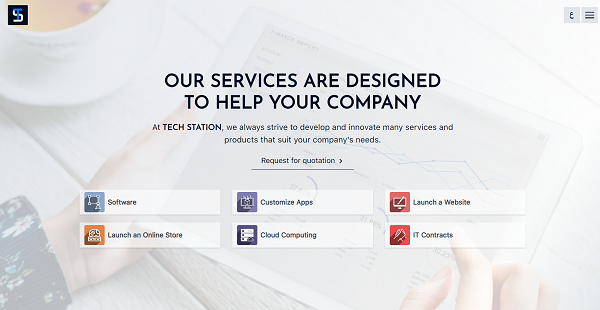
Techstation ERP is an end-to-end enterprise resource planning system that helps you manage various aspects of your business – from inventory to sales to helpdesk and more. It’s a versatile ERP platform with modules that specialize in a wide range of industries including healthcare, education, real estate, nonprofits, retail, agriculture, restaurants, and many more.
With a varied collection of tools under one platform, Techstation ERP can serve a more diverse set of customers. Its modules range from basic solutions that most businesses use such as billing, payments, and project management to industry-specific tools like land and donor management.
Techstation is also a cost-effective ERP platform since the payment is dependent upon the number of system users in your company which are usually the managers of purchase, sales, HR, and other departments. Furthermore, the system is built to scale with your business. Not only does Techstation provide training where it’s necessary but it’ll also help with any scalability issues your growing company might face.
Show MoreOverview of Techstation Benefits
Wide Variety of Modules Available
Techstation ERP offers a wide range of tools, which makes it an ideal solution for different types of industries. It has apps for billing and payments, accounting, project management, and payroll. It also has industry-specific modules as well like POS, inventory, and scheduling. Furthermore, Techstation apps cover vertical functionalities such as crop management for agriculture and grant monitoring for nonprofits.
Server Management
Server uptime is guaranteed by the use of a master-slave system. Your server enjoys a level of redundancy for data security. The apps you use will also be automatically updated whenever new patches or fixes roll out.
Flexible Deployment Options
Techstation ERP modules will run both in the cloud and in your server. This means you can completely utilize the system from most of the browser apps or simply install it in your own server. Cloud-based deployment is managed by Techstation and thus, you won’t be burdened by installation, setup, and maintenance.
Easy App Implementation
Techstation solutions are designed for self-implementation. A plethora of resources and guides are available to help new users get started. Additionally, after signing up for an account, you can get a one-on-one session with the Techstation team to learn how to configure the system. Hence, your team can implement the app even without seeking help from the vendor.
Show MoreOverview of Techstation Features
- Server management
- Email service
- Upgrade management
- Cloud- or self-hosted server
- Industry solutions
- Priority support
- Training
- Multi-lingual support
Awards & Quality Certificates


Techstation Position In Our Categories
Knowing that businesses have their own business requirements, it is prudent they avoid adopting an all-encompassing, ideal software. However, it would be almost impossible to try to chance on such application even among well-known software systems. The best thing to do should be to make a list of the varied essential functions which merit scrutiny such as key features, pricing, skill capability of staff members, business size, etc. Then, you must follow through the research thoroughly. Have a look at some of these Techstation evaluations and look into each of the applications in your shortlist in detail. Such well-rounded research ensures you drop ill-fitting applications and select the system that provides all the aspects your company requires in growing the business.
Position of Techstation in our main categories:
Every business has its own characteristics, and can call for a particular type of ERP Software solution that will be designed for their business size, type of customers and staff and even specific industry they cater to. It's not wise to count on finding an ideal app that is going to work for each company regardless of their background is. It may be a good idea to read a few Techstation ERP Software reviews first and even then you should pay attention to what the solution is intended to do for your company and your staff. Do you need an easy and straightforward solution with just elementary functions? Will you actually make use of the complex functionalities required by pros and large enterprises? Are there any particular features that are especially practical for the industry you work in? If you ask yourself these questions it will be much easier to locate a trustworthy app that will fit your budget.
How Much Does Techstation Cost?
Techstation Pricing Plans:
Free Trial
Basic Plan
$3/user/month
Pro Plan
$8/user/month
Ultimate Plan
$7/user/month
What are Techstation pricing details?
Techstation Pricing Plans:
Free Trial
Basic Plan
$3/user/month
Pro Plan
$8/user/month
Ultimate Plan
$7/user/month
TechStation ERP offers three SME and enterprise pricing plans. All plans give users access to a number of software including accounting, assets, baying, selling, stock, HR, manufacturing, CRM, projects, helpdesk, and delivery.
Basic Plan – $3/user/month
- Minimum of 5 users
- Hosting
- Standard Support
- 4 hours Onboarding Support
- 2 Companies
- 5 GB cloud storage
- 500 emails / month
- Extensible via add-ons
Pro Plan – $8/user/month
- Minimum of 5 users
- Hosting
- Account Manager
- All Modules
- Advanced Support
- 28 Hrs Onboarding Support
- Unlimited Companies
- Unlimited storage
- 2000 emails / month
- Extensible via add-ons
Ultimate Plan – $7/user/month
- Minimum of 50 users
- Hosting Included
- Account Manager
- All Modules
- Priority Support
- 28 Hrs Onboarding Support
- Unlimited Companies
- Unlimited storage
- 5000 emails / month
- Extensible via add-ons
User Satisfaction
Positive Social Media Mentions
119
Negative Social Media Mentions
0
We realize that when you make a decision to buy a ERP Software it’s important not only to learn how experts score it in their reviews, but also to check whether the real users and companies that use it are genuinely satisfied with the product. Because of that need we’ve designer our behavior-based Customer Satisfaction Algorithm™ that aggregates customer reviews, comments and Techstation reviews across a wide range of social media sites. The data is then displayed in an easy to understand format indicating how many clients had positive and negative experience with Techstation. With that information at your disposal you should be prepared to make an informed business choice that you won’t regret.
Video
Technical details
Devices Supported
- Web-based
Deployment
- Cloud Hosted
Language Support
- English
- Spanish
Pricing Model
- Monthly payment
Customer Types
- Small Business
- Large Enterprises
- Medium Business
What Support Does This Vendor Offer?
- phone
- live support
- training
- tickets
What integrations are available for Techstation?
No information available.

Techstation
is waiting for
your first review.

Write your own review of this product
ADD A REVIEWMore reviews from 0 actual users:


Join a community of 7,369 SaaS experts
Thank you for the time you take to leave a quick review of this software. Our community and review base is constantly developing because of experts like you, who are willing to share their experience and knowledge with others to help them make more informed buying decisions.
Sign in with LinkedIn
Why we require LinkedIn?
- Show the community that you're an actual user.
- We will only show your name and profile image in your review.
- You can still post your review anonymously.
OR
Sign in with company emailSign in with company email
Popular Techstation Alternatives


Top Competitors To Techstation By Price
Product name:
Price:




Trending ERP Software Reviews


Techstation Comparisons
Product name:


Page last modified



Did you find this review useful?
Yes
No
Thank you for your feedback
How can we make this page better?
Unsure about this software?
FIND ALTERNATIVES
 Why is FinancesOnline free?