
- Home
- POS Systems
- Tillpoint

Tillpoint Review



What is Tillpoint?
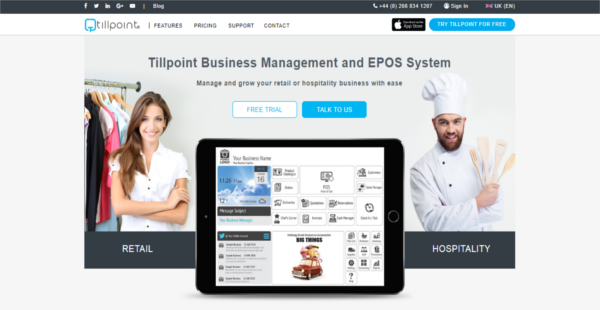
Tillpoint is an integrated business management and EPOS (electronic point-of-sale) system that caters to the common and unique needs of business in the retail and the hospitality industries. This leading EPOS system is built with retail and hospitality businesses in mind, simplifying and streamlining every aspect of their operations, like point of sale, staff scheduling and timesheet management, inventory management, customer management, and sales reporting.
While built for the retail and hospitality sector, Tillpoint is highly customizable and can be tailored to suit the needs of any business type. With its modular approach, users can pick the features and functionalities their business need, making it easy for users to fully utilize the software and make huge business gains as a result.
Show MoreOverview of Tillpoint Benefits
Tillpoint delivers a modular EPOS platform that lets you pick the features you need, allowing you to tailor Tillpoint to perfectly suit your business needs and specifications. The software’s modular construction provides you with the ability to easily scale up or down with ease and speed as your requirements change and you need to add new features to keep up with the changing times.
Apart from the flexibility to scale as you need, the modular nature of Tillpoint means that you save money as well. You are under no obligation to pay for features that you don’t need and only pay for the tools that you are using. Because Tillpoint is extremely versatile, it can be implemented in numerous industries by all sorts of business types, though it has been developed with retail and hospitality industries in mind.
Tillpoint is a very user-friendly tool with a visibly attractive design. The layouts and labeling are very clear and the interface makes navigation and usage smooth and seamless.
Deploying Tillpoint is fast, simple, and highly convenient. You can use as many devices as your business needs, including barcode scanners, printers, and mobile terminals among others. Data security is topnotch as Tillpoint utilizes multi-layered encryption to ensure that all data processed within the system is safe and secure.
Show MoreOverview of Tillpoint Features
- Dynamic Point of Sale
- Double-Entry Accounting
- Intelligent Reporting
- Clock In / Out System
- Price List Creation
- Unparalleled CRM
- Purchase Orders
- Comprehensive Staff Management
- Straightforward Reservations
- Stunning Product Catalogue
- Extensive Cash Manager
- Backroom Management System
- Full Invoicing
- Sleek Quotation Builder
- Supplier Management
- Customer Promotions
- Bespoke Table Manager
- Complete Delivery System
What Problems Will Tillpoint Solve?
1) Business owners needing to pay for multiple software to run their business (i.e. POS, Accounting, Staff Management). Tillpoint contains over 20 interconnected modules, including the ones aforementioned, each designed for one specific area of business. This means users only need to pay for one piece of software instead of several.
2) Integrating several pieces of software is unreliable in terms of data safety and security. Tillpoint requires no integration as it was developed to cover all areas of business.
3) Using several pieces of software for your business requires business owners and their staff to learn how to use different systems, which is not very cost-effective or convenient. All of Tillpoint’s pages and modules consist of similar design and function. One system to learn that covers every business need, and one place for support.
Awards & Quality Certificates


Tillpoint Position In Our Categories
Keeping in mind companies have specific business-related requirements, it is prudent that they abstain from purchasing a one-size-fits-all, ”best” business program. Regardless, it would be futile to try to stumble on such application even among recognizable software products. The logical step to undertake is to write down the various vital aspects which require research like major features, price terms, skill ability of the users, organizational size, etc. The second step is, you should follow through your research fully. Go over some Tillpoint evaluations and explore each of the solutions in your shortlist more closely. Such well-rounded product investigation guarantees you avoid unfit apps and buy the system that has all the aspects your business requires for success.
Position of Tillpoint in our main categories:
Each enterprise has different needs and needs a software that can be personalized for their size, type of staff members and customers, and the specific industry they are in. For these reasons, no system can provide perfect features off-the-shelf. When you search a software system, first be sure what you require it for. Read some Tillpoint POS Systems reviews and ask yourself do you desire basic functionality or do you require advanced tools? Are there any industry-specific functionalities that you are seeking? Obtain the answers to these questions to aid your search. There are multiple elements that you need to reflect on and these include your finances, particular business wants, your company size, integration requirements etc. Take your time, try out a few free trials, and finally zero in on the app that provides all that you want to improve your organization competence and productivity.
How Much Does Tillpoint Cost?
Tillpoint Pricing Plans:
Free Trial
Starter
$99/month
Advanced
$149/month
Multi-Store
$229/month
What are Tillpoint pricing details?
Tillpoint Pricing Plans:
Free Trial
Starter
$99/month
Advanced
$149/month
Multi-Store
$229/month
Tillpoint offers the following SMB and enterprise pricing packages for users to choose from. Give the details a look, and select the best plan for your business.
Starter – $99/month
- One License
- Unlimited Users
Advanced – $149/month
- Two Licenses
- Unlimited Users
Multi-Store – $229/month
- Two Licenses
- Two Locations
- Unlimited Users
Every plan includes access to all modules and features:
General Modules
- Point of Sale
- Inventory
- Accounting
- Staff Management, Timesheet & Payroll
- Time Clock
- CRM (Customer Management)
- Cloud Reporting & Analytics
- Cash Manager with End of Day
- Customer Loyalty, Offers, Gift Cards & Punch Cards
- Purchase Ordering
- Supplier Management
- Deliveries
- Quotations
- Invoices
- Price List Management
Hospitality-Specific Modules
- Kitchen Display System
- Table Reservations
- Bar Tab Manager
- Table Manager
- eMenu
- Guest List Management
Retail-Specific Modules
- Product Catalogue
- Stockroom Order Display
- Item Reservations
Notable Features
- Multi-Tax, Multi-Language, Multi-Currency
- Free 24/7 Support
- Custom Receipt Printing
- eReceipts (SMS & Email)
- iPhone Reporting App
- eCommerce Integrations
- Auto-Emailing of Reports
- Customizable Homepage
- Enable/Disable Modules
- Multiple Payment Methods
User Satisfaction
Positive Social Media Mentions
7
Negative Social Media Mentions
0
We know that when you decide to buy a POS Systems it’s crucial not only to learn how professionals evaluate it in their reviews, but also to check whether the real clients and enterprises that bought this software are genuinely happy with the service. Because of that need we’ve designer our behavior-based Customer Satisfaction Algorithm™ that collects customer reviews, comments and Tillpoint reviews across a wide array of social media sites. The information is then displayed in a simple to digest format revealing how many customers had positive and negative experience with Tillpoint. With that information available you should be ready to make an informed buying choice that you won’t regret.
Video
Technical details
Devices Supported
- Windows
- iPhone/iPad
- Mac
Deployment
- Cloud Hosted
Language Support
- English
Pricing Model
- Monthly payment
- Annual Subscription
Customer Types
- Small Business
- Medium Business
- Freelancers
What Support Does This Vendor Offer?
- phone
- live support
- training
- tickets
What integrations are available for Tillpoint?
Tillpoint can be integrated with any software as per user’s request. In terms of hardware, Tillpoint integrates with various receipt printers and leading payment card readers, including:
- PayPal
- iZettle
- SumUp

Tillpoint
is waiting for
your first review.

Write your own review of this product
ADD A REVIEWMore reviews from 0 actual users:


Join a community of 7,369 SaaS experts
Thank you for the time you take to leave a quick review of this software. Our community and review base is constantly developing because of experts like you, who are willing to share their experience and knowledge with others to help them make more informed buying decisions.
Sign in with LinkedIn
Why we require LinkedIn?
- Show the community that you're an actual user.
- We will only show your name and profile image in your review.
- You can still post your review anonymously.
OR
Sign in with company emailSign in with company email
Popular Tillpoint Alternatives





Top Competitors To Tillpoint By Price
Product name:
Price:

by quote




Trending POS Systems Reviews

9.4
99%


8.0
84%

7.2
100%
Tillpoint Comparisons
Product name:










Page last modified



Did you find this review useful?
Yes
No
Thank you for your feedback
How can we make this page better?
Unsure about this software?
FIND ALTERNATIVES
 Why is FinancesOnline free?