

Upflow Review



What is Upflow?
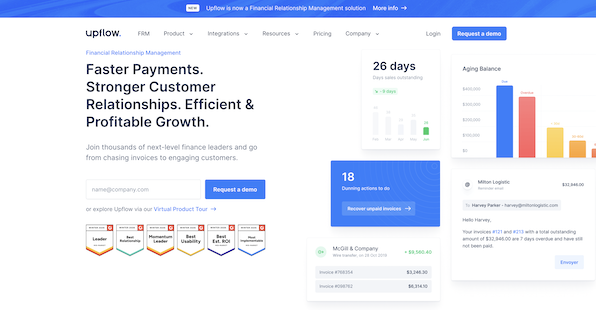
Upflow is a Financial Relationship Management platform designed to modernize the accounts receivable process for B2B companies. It is intended for finance teams, from startups to large enterprises, who need to reduce Days Sales Outstanding (DSO) and improve cash collection efficiency without compromising customer relationships. The platform distinguishes itself by shifting the focus from simple debt collection to “Financial Relationship Management,” ensuring that payment interactions strengthen rather than strain business partnerships.
The software centralizes financial data to provide a comprehensive view of cash flow health. Users can access live dashboards that track critical metrics, such as DSO and billing forecasts, enabling data-driven decision-making. Beyond analytics, Upflow automates the manual labor of collections. It allows teams to configure personalized email workflows and systematic reminders, ensuring stakeholders are engaged at the right time.
For end customers, the platform offers a modern, self-service portal to manage invoices and make payments via various methods, including Autopay. A unique aspect of Upflow is its tiered structure, which accommodates businesses at specific revenue stages, including a “Free Forever” plan for discovery and benchmarking that makes enterprise-grade analytics accessible to smaller teams.
Show MoreOverview of Upflow Benefits
Real-Time Cash Visibility
Finance teams often struggle with data scattered across spreadsheets, making accurate forecasting difficult. Upflow centralizes this information into live dashboards that track critical metrics such as Days Sales Outstanding (DSO) and cash collection in real time. This provides immediate insight for data-driven financial decision-making and benchmarking.
Automated Collection Workflows
Manual dunning is time-consuming and prone to human error or oversight. Upflow automates payment reminders using personalized email sequences that scale seamlessly with transaction volume. This ensures every customer is contacted at the right time without overburdening the finance staff.
Streamlined Customer Payments
Friction in the payment process often leads to unnecessary settlement delays. Upflow offers a dedicated customer portal where clients can view invoices and pay instantly via modern methods. Features like Autopay further reduce effort by automatically paying invoices on their due dates.
Enhanced Team Collaboration
Collections shouldn’t be a siloed finance task disconnected from the business relationship. The platform includes collaborative tools that loop in sales and account managers to resolve billing disputes quickly. This alignment ensures that commercial relationships are preserved even during the debt recovery process.
Seamless Data Reconciliation
Matching incoming payments to outstanding invoices is often a significant manual bottleneck. Upflow’s Automatic Cash Application feature reconciles received funds against open invoices instantly. This keeps accounting ledgers accurate and eliminates hours of tedious manual data entry.
Show MoreOverview of Upflow Features
- Live financial dashboards
- Native ERP/CRM integrations
- Cross-team visibility
- DSO tracking and forecasting
- Automated email workflows
- Personalized payment reminders
- Customer self-service portal
- Autopay and payment processing
- Automatic cash application
- AI-suggested “Promise to Pay”
How Much Does Upflow Cost?
Upflow Pricing Plans:
Free Trial
Discover
Free
Grow
By quote
Scale
By quote
Strategic
By quote
What are Upflow pricing details?
Upflow Pricing Plans:
Free Trial
Discover
Free
Grow
By quote
Scale
By quote
Strategic
By quote
Upflow segments its pricing plans based on the company’s Annual Recurring Revenue (ARR).
Discover – Free
- For finance teams assessing AR health
- Includes deep analytics tools
- Data discovery capabilities
- Peer benchmarking
Grow – By quote
- Targeted at startups (0−10M ARR)
- Best practices implementation
- Cash flow insights
- Workflow automation
Scale – By quote
- Targeted at scale-ups (10M−50M ARR)
- Operational streamlining tools
- Scalable financial foundations
- Best-in-class financial practices
Strategic – By quote
- Targeted at enterprises ($50M+ ARR)
- Advanced customer behavior insights
- Strategic cash flow management
Relationship engagement tools
User Satisfaction
Positive Social Media Mentions
0
Negative Social Media Mentions
0
We realize that when you decide to get a Accounts Receivable Software it’s crucial not only to see how professionals evaluate it in their reviews, but also to check if the real users and businesses that purchased this software are actually happy with the service. That’s why we’ve designer our behavior-based Customer Satisfaction Algorithm™ that aggregates customer reviews, comments and Upflow reviews across a vast range of social media sites. The information is then presented in an easy to digest way revealing how many users had positive and negative experience with Upflow. With that information at your disposal you will be prepared to make an informed buying decision that you won’t regret.
Video
Technical details
Devices Supported
- Web-based
Deployment
- Cloud Hosted
- Open API
Language Support
- English
- French
Pricing Model
- Free
- Quote-based
Customer Types
- Small Business
- Large Enterprises
- Medium Business
What Support Does This Vendor Offer?
- phone
- live support
- training
- tickets
What integrations are available for Upflow?
Upflow emphasizes seamless connectivity with existing financial stacks to ensure data synchronization between collection activities and core ledgers.
- Accounting & ERP: QuickBooks, Xero, NetSuite, Sage Intacct.
- Billing & Subscriptions: Zuora, Chargebee, Stripe Billing.
- Payment Gateways: Stripe, GoCardless.
- CRM & Communication: HubSpot, Slack (for internal collaboration).
- Automation & API: Zapier (for custom workflows) and a REST API for programmatic access to action data.

Upflow
is waiting for
your first review.

Write your own review of this product
ADD A REVIEWMore reviews from 0 actual users:


Join a community of 7,369 SaaS experts
Thank you for the time you take to leave a quick review of this software. Our community and review base is constantly developing because of experts like you, who are willing to share their experience and knowledge with others to help them make more informed buying decisions.
Sign in with LinkedIn
Why we require LinkedIn?
- Show the community that you're an actual user.
- We will only show your name and profile image in your review.
- You can still post your review anonymously.
OR
Sign in with company emailSign in with company email
Popular Upflow Alternatives





Top Competitors To Upflow By Price
Product name:
Price:
By quote

By quote

by quote


Trending Accounts Receivable Software Reviews
7.7
92%
8.0
100%


 Why is FinancesOnline free?