

VideoProc Review


What is VideoProc?
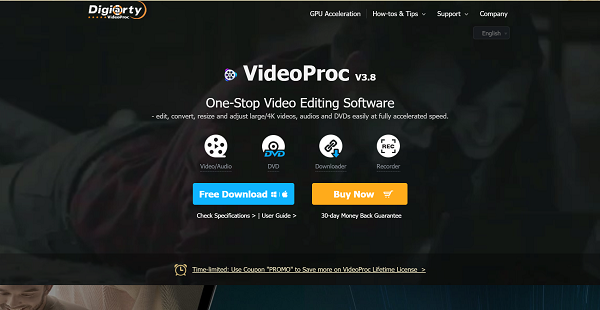
VideoProc is an all-purpose video processing software that is user-friendly enough to suit a beginner’s skill and powerful enough to meet the needs of professional video editors. This platform is capable of processing 4K/HD videos from iPhone, Android, GoPro, DJI, camcorder, or any other 4k cameras (DSLR or mirrorless). It offers both basic and advanced video editing functions.
In addition to editing capabilities, this tool can also convert media into over 400 output formats. Downloading the media you want to convert is also a breeze. VideoProc comes with a built-in media downloader engine, enabling users to download music, videos, playlists, and channels from more than a thousand video audio sites such as Twitch and SoundCloud. Basically, VideoProc is a go-to solution if you want to download, convert, and edit video at one go.
Aside from that, this software offers a screen recording feature. You can record from your webcam, record your desktop’s screen with voiceover, or do both simultaneously. It also allows adding texts, images, highlighting content, and more during recording, helping you better interact with your audience.
But this solution’s most attractive feature is its speed. It uses the massive processing power of Intel Core, NVIDIA, and AMD, delivering speedy and seamless (4K) video editing, transcoding, and rendering without compromising quality. So even a low-end computer will be able to efficiently process 4k videos, 3D and 360 degrees VR videos, large-sized videos without experiencing freezing and crashing.
Show MoreOverview of VideoProc Benefits
One-stop Video Editing Solution For Beginners and Professional Video Editors
VideoProc is a complete video toolbox, offering basic and advanced editing functionalities. You can crop, cut, merge, add subtitles, stabilize shaky video footages, and reduce or remove unwanted noise background to mention some. What’s more, its user interface is intuitive, making video editing easy even for starters.
Full Hardware Accelerated Video Processing
With Level-3 hardware acceleration, VideoProc makes it possible to do seamless editing work even on power-hungry 4K UHD files. This feature boosts video processing speed, accelerates 720p and 1080p video transcoding speed, enables stutter-free screen recording, optimizes video quality and file size, and lowers CPU usage. Also, this makes 4K video processing possible on lower-end computers.
Robust Media Converter
VideoProc supports the conversion of video to audio/video, audio to audio, and DVD to video. It has over 370 built-in audio and video codecs and supports more than 400 output formats so you can process and convert nearly any video in any codec, format, size, and quality.
Powerful Screen Recorder
VideoProc comes with screen recording functionality, making it ideal for those who like streaming videos or gameplay, vlogging, and the likes. It features three recording modes- screen recording with voiceover, recording from the webcam, and simultaneous screen and webcam recording in picture-in-picture mode. There are also utility tools such as add text, highlighting content, voiceover, etc., which makes it easier to interact with the audience.
Overview of VideoProc Features
- Level-3 Hardware Acceleration
- Basic and Advanced Editing Capabilities
- Built-in Media Downloader Engine
- 1000+ Supported Audio/Video Sites
- A-B Video Conversion
- 420+ Supported Output Formats
- Screen Recorder
What Problems Will VideoProc Solve?
Problem #1: Shaky Footages
David is an extreme sports enthusiast and also loves to shoot videos. He is now arranging videos that were filmed when moving or during sports such as swimming, surfing, hiking, cycling, mountaineering, and skiing. Unfortunately, he found out that some of the videos are jerky and shaky although he used a stabilizer. With VideoProc, this problem is solved as the software allows users to easily stabilize videos while keeping high output quality.
Problem #2: 4k Video Editing
Lisa just came back from her travel and wants to share travel videos. But she found out that her 4K videos have many segments and some parts are unnecessary. VideoProc helps its users fix this problem by offering basic editing capabilities such as cut, crop, rotate, and even merge 4K videos to polish footage.
Problem #3: Downloading, Converting, and Editing Videos at One Go
Video editors who wish to download, convert, and edit their footage at one go can find all the tools they will need from VideoProc. This tool comes with a built-in media downloader engine to allow easy file download, converter tool that supports more than 400 output formats, and editing capabilities.
Awards & Quality Certificates


VideoProc Position In Our Categories
Keeping in mind companies have their own business needs, it is reasonable they avoid preferring an all-in-one, “perfect” system. However, it is futile to stumble on such application even among branded software solutions. The sensible thing to undertake is to write the different vital functions which necessitate analysis like major features, price terms, skill competence of the users, business size, etc. Then, you should perform the research comprehensively. Browse over some of these VideoProc reviews and explore the other applications in your list more closely. Such all-encompassing research ensures you keep away from ill-fitting software solutions and select the system which has all the function your business requires for success.
Position of VideoProc in our main categories:
TOP
20
VideoProc is one of the top 20 Video Editing Software products
If you are considering VideoProc it might also be a good idea to examine other subcategories of Video Editing Software gathered in our base of B2B software reviews.
Organizations have diverse needs and requirements and no software application can be perfect in such a scenario. It is pointless to try to find an ideal out-of-the-box software system that fulfills all your business needs. The smart thing to do would be to adapt the solution for your special wants, staff member skill levels, finances, and other factors. For these reasons, do not hasten and subscribe to well-publicized trendy applications. Though these may be widely used, they may not be the ideal fit for your specific requirements. Do your research, look into each short-listed platform in detail, read a few VideoProc Video Editing Software reviews, contact the seller for explanations, and finally choose the application that offers what you require.
How Much Does VideoProc Cost?
VideoProc Pricing Plans:
Free Trial
1 Year License
$59.90
Lifetime License
$78.90
Family License
$119.90
What are VideoProc pricing details?
VideoProc Pricing Plans:
Free Trial
1 Year License
$59.90
Lifetime License
$78.90
Family License
$119.90
VideoProc is free to download but to be able to use all available features one must choose from its three SMB and enterprise pricing plans. Give the details a look, and select the best for you or your business.
1 Year License – $59.90
- 1 year/ 1 device
- Free update within 1 year
- Lifetime free tech support
Lifetime License – $78.90
- Lifetime/ 1 device
- Unlimited Downloads of up-to-date Full Version
- Free lifetime upgrade
- Lifetime free tech support
Family License -$119.90
- Lifetime /2-5 device
- Multi-user license with free lifetime upgrade
- Lifetime free tech support
User Satisfaction
Positive Social Media Mentions
106
Negative Social Media Mentions
12
We know that when you decide to get a Video Editing Software it’s crucial not only to learn how professionals evaluate it in their reviews, but also to discover whether the actual people and businesses that bought these solutions are genuinely satisfied with the product. That’s why we’ve devised our behavior-based Customer Satisfaction Algorithm™ that aggregates customer reviews, comments and VideoProc reviews across a vast array of social media sites. The information is then presented in an easy to digest form indicating how many users had positive and negative experience with VideoProc. With that information available you should be prepared to make an informed purchasing decision that you won’t regret.
Video
Technical details
Devices Supported
- Windows
- Mac
Deployment
- On Premise
Language Support
- English
- Chinese
- German
- Japanese
- Spanish
- French
Pricing Model
- One-time payment
Customer Types
- Small Business
- Large Enterprises
- Medium Business
- Freelancers
What Support Does This Vendor Offer?
- phone
- live support
- training
- tickets
What integrations are available for VideoProc?
No information available.

VideoProc
is waiting for
your first review.

Write your own review of this product
ADD A REVIEWMore reviews from 0 actual users:


Join a community of 7,369 SaaS experts
Thank you for the time you take to leave a quick review of this software. Our community and review base is constantly developing because of experts like you, who are willing to share their experience and knowledge with others to help them make more informed buying decisions.
Sign in with LinkedIn
Why we require LinkedIn?
- Show the community that you're an actual user.
- We will only show your name and profile image in your review.
- You can still post your review anonymously.
OR
Sign in with company emailSign in with company email
Popular VideoProc Alternatives


Top Competitors To VideoProc By Price
Product name:
Price:





Trending Video Editing Software Reviews



7.8
96%

VideoProc Comparisons
Product name:





Page last modified



Did you find this review useful?
Yes
No
Thank you for your feedback
How can we make this page better?
Unsure about this software?
FIND ALTERNATIVES
 Why is FinancesOnline free?