

Bybrand Review



What is Bybrand?
Bybrand is an email signature management software that enables you to quickly and comfortably create, implement, and update modern and uniform email signatures for your employees. You can use it to standardize email communications with employees and customers, improve IT and marketing team productivity, and strengthen your brand image.
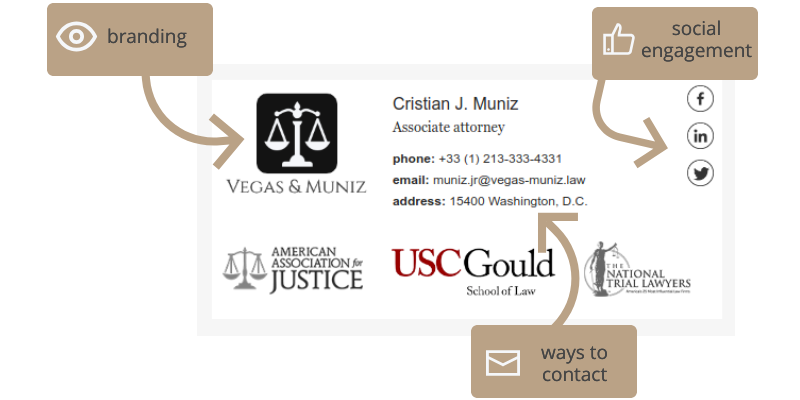
With its simple email signature editor, you can add texts, images, and social icons to employees’ email signatures, crop or resize images, share email signatures via links for deployment or collaboration, and see what they will look like through test emails.
Bybrand also integrates with G Suite, Freshdesk, and Zoho Desk to accelerate email signature development and management. This allows you to import lists of sales, marketing, and support employees from those tools, create email signatures for employees without entering their information manually, and update the content of email signatures in bulk.
Show MoreOverview of Bybrand Benefits
Standardized Email Communication
Bybrand permits you to create email signatures that contain the same type of information and content so you can standardize how employees communicate with prospects and customers via email. For instance, you can integrate Freshdesk and Zoho Desk with the software, import employee lists from those tools, and quickly generate uniform email signatures in HTML for your helpdesk agents.
You can add contact information to your helpdesk agents’ email signatures, such as phone numbers and email addresses. Moreover, Bybrand allows you to include a knowledge base, news, blog, FAQ links, social media icons, and image content in the email signatures.
Helpdesk agents can copy the email signatures you created and paste them to the emails they’re sending to customers through Freshdesk and Zoho Desk. This way, customers can gain consistent and enhanced experiences as they’re engaging with your support teams.
Increased IT Team Productivity
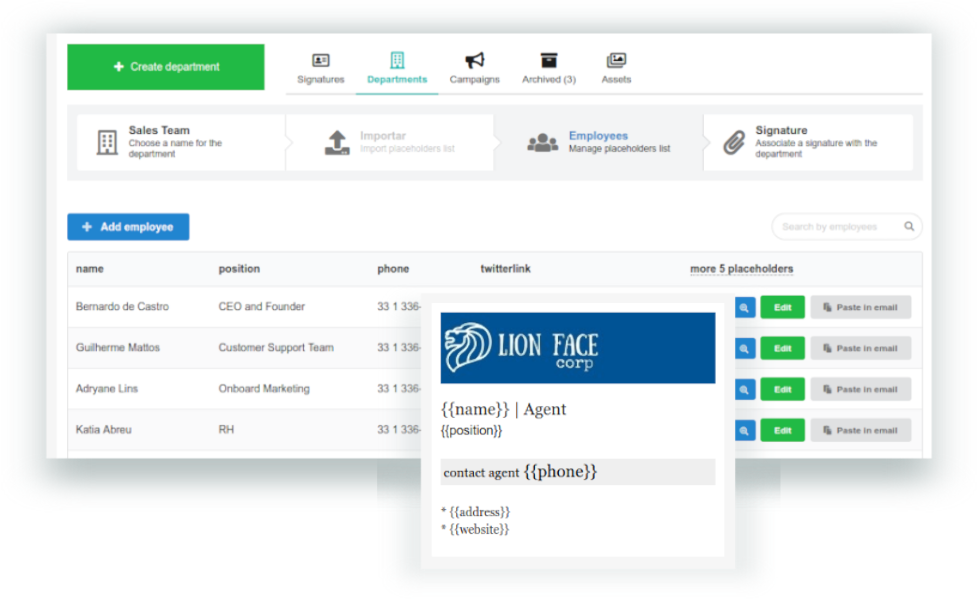
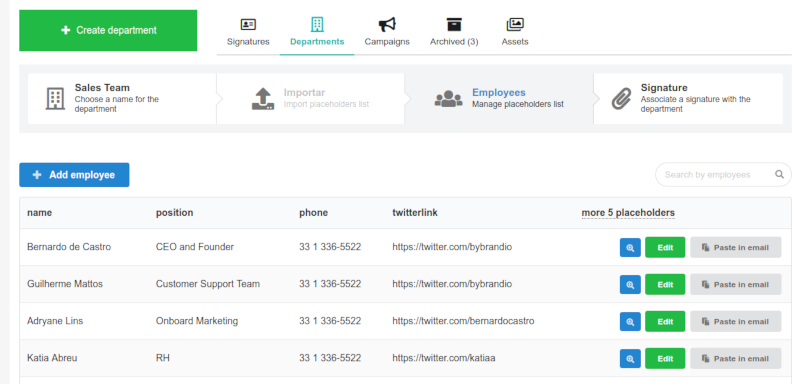
With Bybrand, your IT team no longer needs to spend much time and effort creating, deploying, and updating employee email signatures for departments or teams in your organization. Bybrand enables IT professionals to use placeholders to fill multiple email signatures with employee information at once instantly.
The software also permits them to edit or replace the logos or images of batches of email signatures without re-creating each email signature and changing its link. Furthermore, they’ll easily update the email signatures of Gmail, Freshdesk, and Zoho Desk users through integrations and send employees with instructions on how to paste email signatures to their emails and collaborate with team members in creating and managing email signatures.
Stronger Brand Image
Bybrand helps you launch effective email marketing campaigns and build a stronger brand image for your company. You can show your company logo in employees’ email signatures and add banner ads to promote events, sales, and offers. The email signatures are clickable, which means you can route potential customers to your company’s website, web pages, and social media profiles.
You can also perform A/B tests on the images, logos, and icons being used in employees’ email signatures. This way, you’ll be able to compare how well your email signature contents are performing in engaging and converting prospects.
Show MoreOverview of Bybrand Features
- Email Signature Editor
- Placeholders
- Images, Logos, & Social Icons
- Departments
- Bulk Update
- Email Signature Sharing
- Team Collaboration
- Email Marketing Campaign
- Asset Storage
- Email Testing
- Email Signature Templates
What Problems Will Bybrand Solve?
1. Fast Email Signature Implementation
Mark is the CTO of a company whose employees are using the G Suite platform. He was mandated to implement standard employee email signatures for Gmail users in the company. Since Bybrand integrates with G Suite, Mark could import a list of all company employees who are using Gmail and create uniform email signatures for them. It took Mark only a few hours to implement the email signatures instead of days.
2. Brand Image Reinforcement
Michelle, a marketing professional working in an agency, got the task of helping a new client promote and strengthen its brand image. She found out that the client’s employees are frequently using email to communicate among themselves and with prospects and customers. Fortunately, Michelle’s marketing agency has already been using Bybrand for developing email signatures. Michelle then easily created standard and modern employee email signatures through the software to help the new client build a solid brand image.
3. Collaboration
John works as a company’s VP of Marketing. He needed to create and implement email signatures for a team of newly-hired sales personnel but didn’t have enough time to work on the task. Using Bybrand’s collaboration and team features, John invited Erick, who is the CCO of the company, to work with him in building and deploying the email signatures. Erick could access the software along with all the necessary features and resources for the task.
Awards & Quality Certificates


Bybrand Position In Our Categories
Knowing that companies have distinct business-related demands, it is only logical that they steer clear of preferring an all-in-one, “perfect” software solution. At any rate, it would be difficult to try to stumble on such an app even among sought-after software systems. The practical step to undertake should be to note down the different major aspects that call for a consideration such as critical features, budget, technical skill ability of staff, organizational size, etc. The second step is, you must perform the research exhaustively. Have a look at these Bybrand review articles and scrutinize each of the software programs in your shortlist more closely. Such detailed product research guarantees you avoid ill-fitting applications and pay for the one which delivers all the features your company requires.
Position of Bybrand in our main categories:
Since each company has particular business requirements, it is prudent for them to refrain from searching for a one-size-fits-all perfect software system. Needless to say, it would be useless to try to find such a system even among popular software platforms. The clever thing to do would be to list the various important factors that need consideration such as required features, finances, skill levels of workers, company size etc. Then, you should do your groundwork thoroughly. Read some Bybrand E-Signature Software reviews and check out each of the other solutions in your shortlist in detail. Such comprehensive homework can make certain you discard ill-fitting systems and zero in on the app that presents all the elements you require for business success.
How Much Does Bybrand Cost?
Bybrand Pricing Plans:
Free Trial
Professional
$8/month
Business
$16/month
What are Bybrand pricing details?
Bybrand Pricing Plans:
Free Trial
Professional
$8/month
Business
$16/month
Bybrand only caters to the email signature management needs of SMEs, so it doesn’t offer an enterprise pricing plan. Here are the available plans you can choose from:
Professional – $8/month
- Designed for small teams
- Up to 10 email signatures
- Unlimited additional email signatures
- Email signature editor
- Integrations
- 1 Campaign
- 5 Banner ads
- Unlimited images
- Content change
- Support via email, chat, & knowledge base
Business – $16/month
- For companies who need to standardize mail communication
- Up to 10 email signatures
- Unlimited additional email signatures
- Email signature editor
- Unlimited departments
- Up to 50 employees
- Unlimited additional employees
- Employee list import from integrations
- Employee list import from CSV files
- Bulk actions in departments
- Bulk updates of email signatures
- Integrations
- 3 Campaigns
- 5 Banner ads
- Unlimited images
- Content change
- User invites
- Support via email, chat, & knowledge base
User Satisfaction
Positive Social Media Mentions
17
Negative Social Media Mentions
0
We know that when you choose to purchase a E-Signature Software it’s important not only to see how professionals score it in their reviews, but also to check whether the real clients and businesses that bought it are genuinely content with the product. Because of that need we’ve created our behavior-based Customer Satisfaction Algorithm™ that collects customer reviews, comments and Bybrand reviews across a broad range of social media sites. The data is then presented in an easy to understand way showing how many clients had positive and negative experience with Bybrand. With that information at hand you should be ready to make an informed buying choice that you won’t regret.
Video
Screenshots
Technical details
Devices Supported
- Web-based
Deployment
- Cloud Hosted
Language Support
- English
- Portugese
Pricing Model
Customer Types
- Small Business
- Medium Business
What Support Does This Vendor Offer?
- phone
- live support
- training
- tickets
What integrations are available for Bybrand?
Bybrand integrates with:
- G Suite (now Google Workspace)
- Gmail
- Freshdesk
- Zoho Desk
- Google Analytics
- Bitly

Bybrand
is waiting for
your first review.

Write your own review of this product
ADD A REVIEWMore reviews from 0 actual users:


Join a community of 7,369 SaaS experts
Thank you for the time you take to leave a quick review of this software. Our community and review base is constantly developing because of experts like you, who are willing to share their experience and knowledge with others to help them make more informed buying decisions.
Sign in with LinkedIn
Why we require LinkedIn?
- Show the community that you're an actual user.
- We will only show your name and profile image in your review.
- You can still post your review anonymously.
OR
Sign in with company emailSign in with company email
Popular Bybrand Alternatives





Top Competitors To Bybrand By Price
Product name:
Price:





Trending E-Signature Software Reviews





Bybrand Comparisons
Product name:



Page last modified



Did you find this review useful?
Yes
No
Thank you for your feedback
How can we make this page better?
Unsure about this software?
FIND ALTERNATIVES
 Why is FinancesOnline free?