

Drag Review


What is Drag?
Drag App is a task management platform that provides businesses and organizations with a shared inbox for quick and easy communication, project management, collaboration, sales, and marketing. All team members have access to a single centralized inbox where all information and tasks are located and shared.
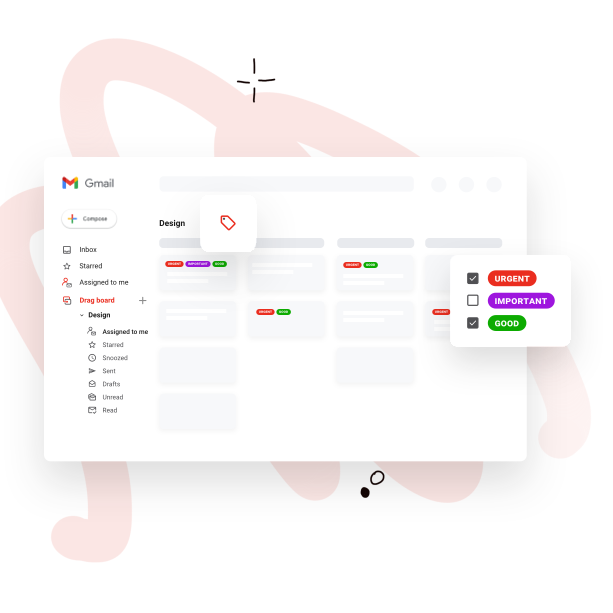
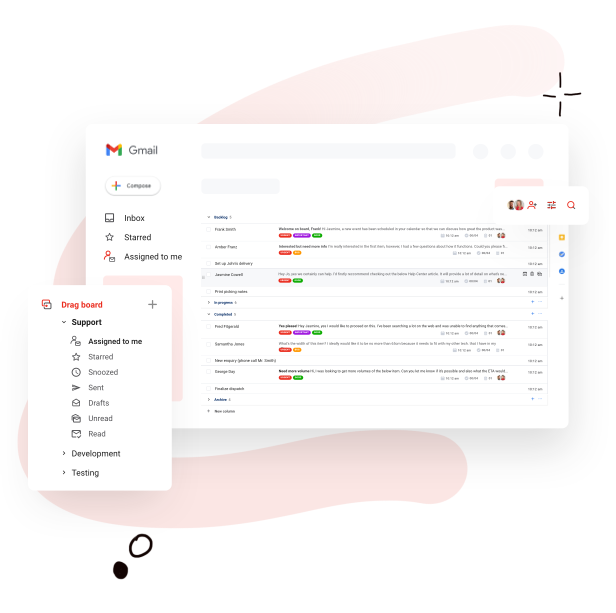
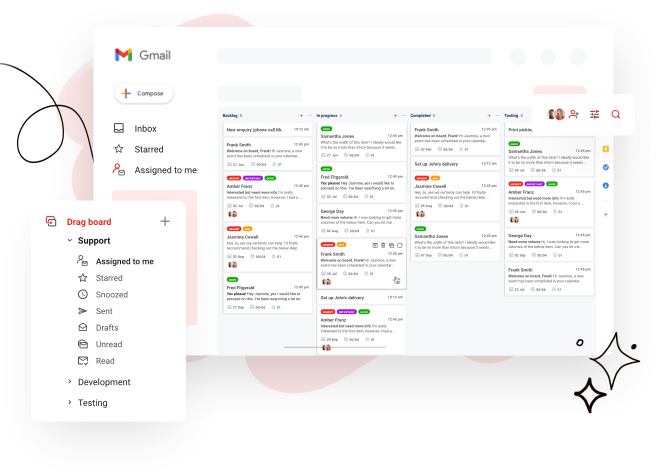
The software utilizes a kanban approach to help users visualize and organize their inbox, making it easy for them to view priorities, deadlines, schedules, and more. As everything and everyone are on the same page, Drag App allows teams to work more effectively and productively, whether as individuals or as teams. With Drag App, there is no need to exit the work inbox. Everything is shared, from emails, projects, tasks, and sales all in one place.
Show MoreOverview of Drag Benefits
Drag App transforms your inbox into a powerful and robust work board for you and the rest of your team. You have a platform that integrates the productivity of Kanban, collaboration, and information access into a single, unified inbox that everyone shares. All your information, projects, tasks, and people are working within the same environment, which drastically accelerates your workflows, enhances efficiencies, and boost productivity. All these and more without leaving your inbox.
While most collaboration tools offer a shared inbox feature that allows access via a single email address, Drag App enables users to view their inbox and perform their functions using their own email address.
Drag integrates smoothly with all Google apps, including Gmail. This functionality reduces the need for users going to and fro their inbox, tools, and calendar among others. Everything is in their inbox, which greatly improves their efficiency and productivity.
And since Drag smoothly integrates with Gmail, the main email client of choice by many email users, the software instantly feels familiar. There is no need to go through a learning curve to get acquainted with Drag. Just set it up, link it to your Gmail, and you can manage your projects, emails, schedules, and teams from your inbox.
Show MoreOverview of Drag Features
- Add tasks to inbox
- Checklists, notes, and due dates
- Unlimited boards and columns
- Sort emails and tasks
- No Drag signature
- Filter emails and tasks
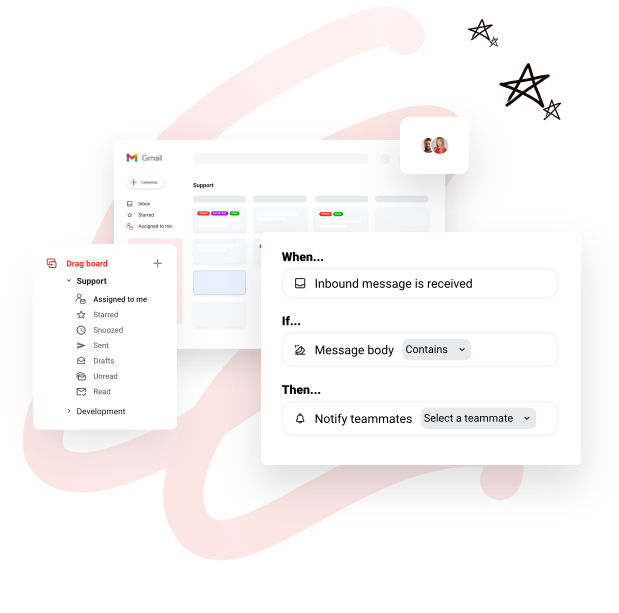
- Column automation
- Google Calendar integration
- Integrations (Calendar, CRM, other)
- Shared checklists and notes
- Shared comments
- Personal and shared boards
- Shared sales boards
- Shared helpdesk boards
- Shared marketing boards
- Shared project management boards
- Shared task boards
- Centralized billing
- User roles
What Problems Will Drag Solve?
1. Teams that share emails like support and sales
With Drag, teams can work together to reach inbox zero inside a shared inbox. With Drag you can set up your team to see and reply to inbound emails and get things closed, faster.
Example 1: A customer support team that currently uses an external, heavy Helpdesk software for customer support. Customer support tickets are emails converted into tickets, that are converted back into emails to customers. A team that migrated to Drag doesn’t need to go to any external app to manage their Helpdesk. They can do everything from inside Gmail: organize emails into kanban, assign emails to agents, add internal comments etc.
2. Make your own emails (john@) shareable to work of task forces
Choose what emails you receive personally, that you want to share. Select and send it to a board so your team can work on it.
Example 1: Duda and Nick are working on a fundraising campaign and are exchanging emails with several VCs in parallel. They can create a “Fundraising” board to keep their pipeline organized and can collaborate on interactions with VCs, where Duda can reply on behalf of Nick and vice-versa, they can add internal comments related to each potential investor, etc.
Example 2: Duda wants to delegate some of her emails to her personal assistant. Currently, she needs to use options such as cc, bcc or fwd in a very confusing way to delegate tasks to her assistant. By creating a “Delegated tasks” boards, she can instantly send emails to a shared board for her assistant to handle, while adding instructions and keeping an eye on the responses her assistant is giving. Even more, she can set Gmail rules so that some specific kind of emails go straight to a shared board with her assistant, saving Duda lots of time.
Awards & Quality Certificates


Drag Position In Our Categories
Knowing that businesses have their own business wants, it is only wise that they steer clear of picking an all-encompassing, ”best” business program. Just the same, it would be hard to try to stumble on such application even among recognizable software products. The better step to do should be to set down the different major aspects which need careful thought like critical features, price terms, technical skill capability of staff members, business size, etc. Thereafter, you must double down on the product research thoroughly. Browse over these Drag reviews and check out each of the software solutions in your list more closely. Such detailed product investigation can make sure you drop mismatched software products and buy the one that meets all the aspects your company requires in sustaining growth.
Position of Drag in our main categories:
TOP
200
Drag is one of the top 200 Communications Software products
Organizations have diverse needs and requirements and no software application can be perfect in such a scenario. It is pointless to try to find a perfect off-the-shelf software app that fulfills all your business needs. The wise thing to do would be to customize the solution for your specific wants, staff member skill levels, finances, and other elements. For these reasons, do not hurry and subscribe to well-publicized trendy solutions. Though these may be widely used, they may not be the best fit for your unique requirements. Do your research, investigate each short-listed system in detail, read a few Drag Email Management Software reviews, call the maker for explanations, and finally choose the product that provides what you need.
How Much Does Drag Cost?
Drag Pricing Plans:
Free Trial
Basic
free
Plus Plan
$8/user/month
Pro Plan
$12/user/month
What are Drag pricing details?
Drag Pricing Plans:
Free Trial
Basic
free
Plus Plan
$8/user/month
Pro Plan
$12/user/month
Basic Plan (Free Forever)
Plus Plan – $8/user/month (annual billing) or $10/user/month (monthly billing)
Pro Plan – $12/user/month (annual billing) or $15/user/month (monthly billing)
User Satisfaction
Positive Social Media Mentions
0
Negative Social Media Mentions
0
We know that when you decide to get a Email Management Software it’s important not only to find out how experts evaluate it in their reviews, but also to check whether the real users and companies that bought it are indeed satisfied with the service. Because of that need we’ve devised our behavior-based Customer Satisfaction Algorithm™ that collects customer reviews, comments and Drag reviews across a broad array of social media sites. The data is then displayed in an easy to digest form showing how many clients had positive and negative experience with Drag. With that information available you should be equipped to make an informed business choice that you won’t regret.
Video
Screenshots


Technical details
Devices Supported
- Windows
- Android
- iPhone/iPad
- Mac
- Web-based
Deployment
- Cloud Hosted
- On Premise
Language Support
- English
Pricing Model
- Free
- Monthly payment
- Annual Subscription
Customer Types
- Small Business
- Medium Business
- Freelancers
What Support Does This Vendor Offer?
- phone
- live support
- training
- tickets
What integrations are available for Drag?
Drag App integrates seamlessly with Gmail and G Suite apps such as Google Calendar, Google Groups and Gmail mobile app.

Drag
is waiting for
your first review.

Write your own review of this product
ADD A REVIEWMore reviews from 0 actual users:


Join a community of 7,369 SaaS experts
Thank you for the time you take to leave a quick review of this software. Our community and review base is constantly developing because of experts like you, who are willing to share their experience and knowledge with others to help them make more informed buying decisions.
Sign in with LinkedIn
Why we require LinkedIn?
- Show the community that you're an actual user.
- We will only show your name and profile image in your review.
- You can still post your review anonymously.
OR
Sign in with company emailSign in with company email
Popular Drag Alternatives





Top Competitors To Drag By Price
Product name:
Price:



Trending Email Management Software Reviews


Drag Comparisons
Product name:


Page last modified


Did you find this review useful?
Yes
No
Thank you for your feedback
How can we make this page better?
Unsure about this software?
FIND ALTERNATIVES
 Why is FinancesOnline free?