
- Home
- Employee Scheduling Software
- Float Schedule

Float Schedule Review



What is Float Schedule?
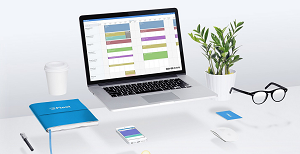
Used in more than 50 countries and trusted by top brands including AKQA, Nike, Razorfish, and Edelmen to name a few, Float Scheduling is clearly on its way to become one of the top business scheduling applications today. Launched in 2012, Float has proved to be a very valuable asset for businesses that look to be on top of every project, personnel, and time. Simply put, Float helps users answer the question who is assigned to what task and when?
Float is a powerful and flexible scheduling tool that leverages the latest innovations and web technologies, such as Backbone.js, giving project managers the power to really define, slice, dice, and duplicate assignments and tasked them to the right person within the perfect timeframe.
Aside from being a comprehensive and flexible application, Float also boasts a beautifully designed interface that has garnered a lot of approvals, nominations, and awards.
Show MoreOverview of Float Schedule Benefits
Born out of necessity, Float Scheduling claims to be the solution that will help companies take charge of multiple projects, availabilities of their personnel, shifting deadlines, and diverse skill sets. With the platform’s rising success, it is clear that Float Scheduling delivers the goods right from the get go.
- User-friendly interface loaded with tools that allow users to split, drag, duplicate and insert tasks effortlessly.
- You can determine which team member is the perfect fit for a project with the Skill tags function.
- Instantly know who is available and when by managing your team’s personal time off, annual holidays, etc.
- Maximize individuals and their time and measure their productivity with time tracking report tools.
- Be more productive by sharing scheduling duties.
- Keep your team updated with their individual schedules using the Float’s Email Notification or they can access the system and see their tasks anytime using any device.
Overview of Float Schedule Features
Resource Scheduling
- Team Workload Visualization
- Task Managment
- QUick Task Updates
- Live Notifications
- Schedule Time Off
- Manage Individual Skill and Availability
- Assign a Project Team
- Project Milestones
- Assign a Project Manager
- Billable vs non-billable
- Group projects by clients
- Add task notes
- Know your team
- Part-time availability
- Flexible permissions
- Keep track of contractors
- Add tags to track skills
- A team on reserve
- Access rights and permissions
- Keep track of utilization
- Compare staff and contractors
- Drill down to departments
- Report holidays and time off
- Set custom date ranges
Float Schedule Position In Our Categories
Since companies have unique business-related requirements, it is only wise they steer clear of paying for an all-encompassing, “perfect” system. Having said that, it is futile to try to discover such an app even among popular software systems. The best thing to undertake would be to write the several essential factors which entail investigation like crucial features, price plans, skill capability of staff members, organizational size, etc. Thereafter, you should double down on the product research systematically. Read some of these Float Schedule evaluations and scrutinize each of the applications in your shortlist more closely. Such detailed research can make sure you weed out ill-fitting apps and subscribe to the one that provides all the function your business requires.
Position of Float Schedule in our main categories:
TOP
100
Float Schedule is one of the top 100 Employee Scheduling Software products
If you are interested in Float Schedule it could also be sensible to examine other subcategories of Employee Scheduling Software listed in our base of SaaS software reviews.
It's crucial to note that hardly any software in the Employee Scheduling Software category is going to be an ideal solution that can meet all the needs of various business types, sizes and industries. It may be a good idea to read a few Float Schedule Employee Scheduling Software reviews first as certain services may perform well just in a really narrow set of applications or be prepared with a really specific industry in mind. Others may function with a goal of being easy and intuitive and as a result lack complex functions desired by more experienced users. You can also find services that focus on a wide group of customers and offer a complex feature set, but this in most cases comes at a more expensive cost of such a solution. Ensure you're aware of your needs so that you choose a service that offers exactly the elements you look for.
How Much Does Float Schedule Cost?
Float Schedule Pricing Plans:
Free Trial
Float
$5 per person
What are Float Schedule pricing details?
Float Schedule Pricing Plans:
Free Trial
Float
$5 per person
Float is priced at $5 per person scheduled.
Guest and archived team members are free. Projects and Clients are unlimited.
The free 30-day trial is full-featured including access to the iOS app, API and integrations.
User Satisfaction
Positive Social Media Mentions
161
Negative Social Media Mentions
4
We are aware that when you decide to buy a Employee Scheduling Software it’s important not only to find out how professionals score it in their reviews, but also to discover if the real people and businesses that use these solutions are genuinely satisfied with the product. That’s why we’ve created our behavior-based Customer Satisfaction Algorithm™ that collects customer reviews, comments and Float Schedule reviews across a broad array of social media sites. The data is then presented in an easy to digest format indicating how many people had positive and negative experience with Float Schedule. With that information at hand you will be prepared to make an informed buying decision that you won’t regret.
Video
Technical details
Devices Supported
- Windows
- Android
- iPhone/iPad
- Mac
- Web-based
Deployment
- Cloud Hosted
- Open API
Language Support
- English
Pricing Model
- Monthly payment
Customer Types
- Small Business
- Large Enterprises
- Medium Business
- Freelancers
What Support Does This Vendor Offer?
- phone
- live support
- training
- tickets
What integrations are available for Float Schedule?
Float supports integrations with the following business systems and applications:
- Slack App
- iOS App
- Zapier (integrate with 1,000’s of your favorite apps)
- iCal

Float Schedule
is waiting for
your first review.

Write your own review of this product
ADD A REVIEWMore reviews from 0 actual users:


Join a community of 7,369 SaaS experts
Thank you for the time you take to leave a quick review of this software. Our community and review base is constantly developing because of experts like you, who are willing to share their experience and knowledge with others to help them make more informed buying decisions.
Sign in with LinkedIn
Why we require LinkedIn?
- Show the community that you're an actual user.
- We will only show your name and profile image in your review.
- You can still post your review anonymously.
OR
Sign in with company emailSign in with company email
Popular Float Schedule Alternatives





Top Competitors To Float Schedule By Price
Product name:
Price:

By quote




Trending Employee Scheduling Software Reviews




Float Schedule Comparisons
Product name:








Page last modified



Did you find this review useful?
Yes
No
Thank you for your feedback
How can we make this page better?
Unsure about this software?
FIND ALTERNATIVES
 Why is FinancesOnline free?