

Hub Planner Review




What is Hub Planner?
Hub Planner is a cloud-based resource scheduling, project planning, and time tracking software. The platform enables businesses of all sizes to create and execute highly effective blueprints for their resources, staff, and teams. The tool is highly customizable with features that streamline resource planning on all levels for web agencies, HR firms, or consultancies. It’s an ideal solution for managers, digital producers, or anyone tired of using spreadsheets to supervise teams in multiple, geographically distributed locations.
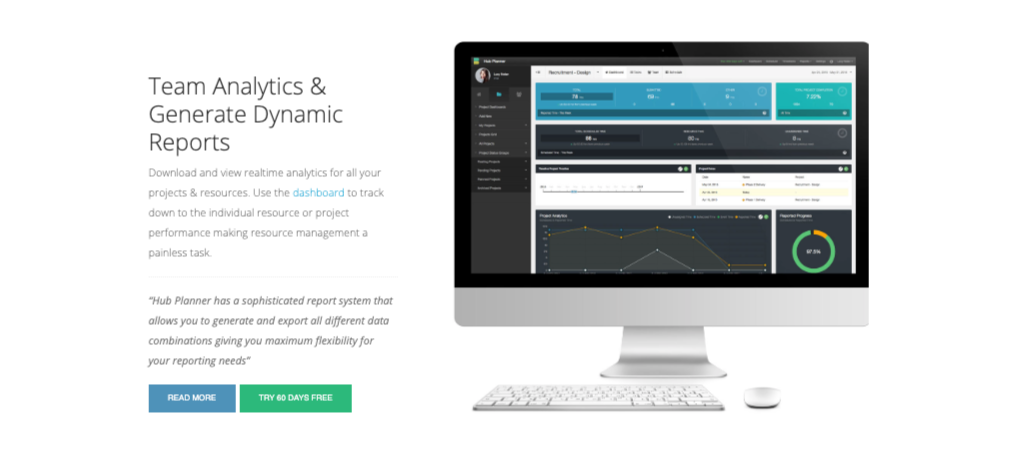
Hub Planner puts you in control and gives you an overview of all projects and resources in a unified place. It exhibits powerful capabilities with a narrow but comprehensive feature set. Some of its core functionalities include: Resource scheduling, Timesheets and approvals, Report and analytics, Project planning, and Mobile interface.
Show MoreOverview of Hub Planner Benefits
Hub Planner is engineered with creative technology that powers its information architecture and intuitive usability. It provides a generic platform that gives you unprecedented control and empowers you to mold the key-wording into your business language. It enables you to come up with a custom platform without compromising on any of the features it offers.
The solution provides a modern resource scheduling and management module. The resource scheduling suite is designed to enable project managers to enjoy complete visibility, transparency, and clarity when planning projects. The simple drag and drop technology is one of the highlights of the resource scheduling module. With the drag and drop interface, it’s easy to schedule teams on projects by simply dragging booking on the schedule. Moving or resizing bookings between members is also a breeze. Besides, the resource scheduling feature highlights availability & overbooking and integrates with iCal to give every team member complete visibility to their booking.
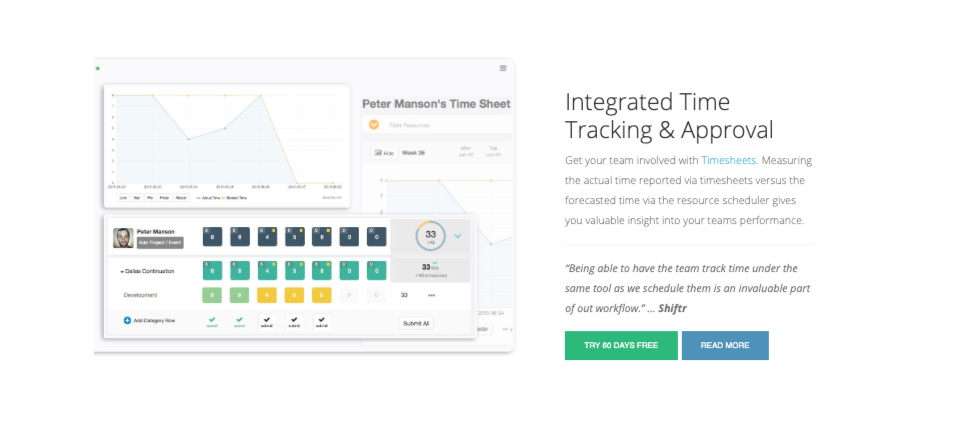
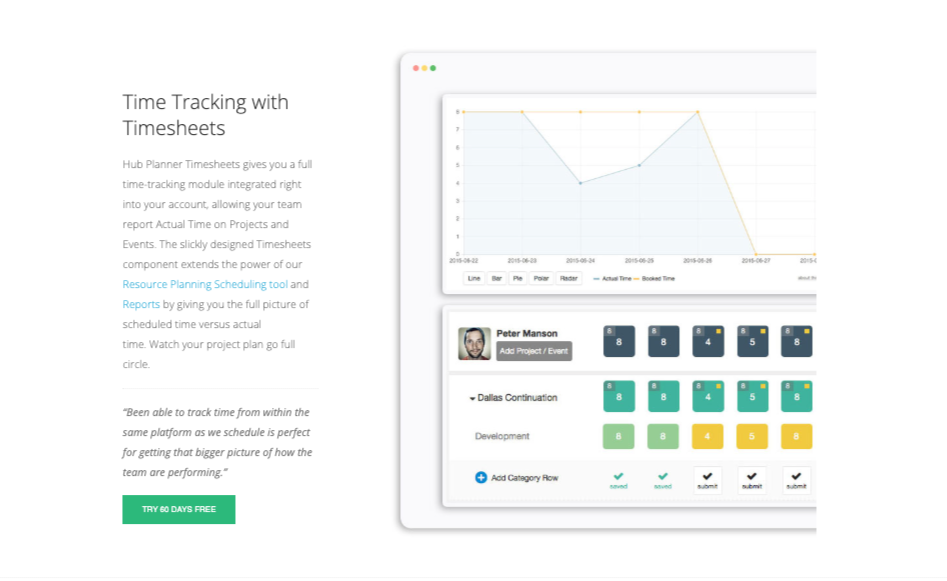
Hub Planner comes with timesheets that provide dynamic reporting features and a powerful time tracking module. The timesheets are executed with intuitive usability in mind to deliver a hassle-free and rewarding time tracking. Their smart design ensures project managers get a clear picture of the actual versus the scheduled time. They make use of charts and graphs to provide a visually interactive overview of teams and resources performance.
The software helps in project budgets, milestones, and phases planning. Its project planning module is tied directly into the scheduling module. This means project manager can easily get clear visibility of all the projects on their schedule. It gives them a portfolio view of all the specials dates, top-level milestone, and phases for the project. Each project is assigned a budget setting which enables users to create and maintain project budgets with ease.
Show MoreOverview of Hub Planner Features
- Resource scheduling
- Timesheets and approvals
- Report and analytics
- Project planning
- Mobile interface
- Premium extension
Hub Planner Position In Our Categories
Knowing that companies have special business-related wants, it is only sensible that they abstain from going for an all-in-one, ideal software. Just the same, it is hard to try to stumble on such an app even among popular software systems. The practical step to do can be to take note of the varied key factors that entail careful thought like major features, price terms, skill capability of staff, organizational size, etc. Thereafter, you must double down on the research through and through. Browse over some Hub Planner evaluations and explore each of the software solutions in your shortlist in detail. Such detailed research makes sure you stay away from ill-fitting software solutions and select the one that delivers all the function your business requires to realize efficiency.
Position of Hub Planner in our main categories:
TOP
50
Hub Planner is one of the top 50 Resource Management Software products
If you are interested in Hub Planner it may also be sensible to check out other subcategories of Resource Management Software gathered in our base of SaaS software reviews.
There are popular and widely used solutions in each software category. But are they automatically the best fit for your organization’s specific requirements? A popular software application may have thousands of users, but does it provide what you need? For this reason, do not blindly invest in popular systems. Read at least a few Hub Planner Resource Management Software reviews and think about the aspects that you desire in the software such as the price, main tools, available integrations etc. Then, choose a few apps that fit your needs. Check out the free trials of these platforms, read online opinions, get clarifications from the seller, and do your research meticulously. This in-depth research is certain to aid you choose the best software solution for your company’s specific needs.
How Much Does Hub Planner Cost?
Hub Planner Pricing Plans:
Free Trial
Plug and play
$7/resource/month
Premium
$18/resource/month
Enterprise
Contact vendor
What are Hub Planner pricing details?
Hub Planner Pricing Plans:
Free Trial
Plug and play
$7/resource/month
Premium
$18/resource/month
Enterprise
Contact vendor
Hub Planner offers a straightforward enterprise pricing structure with a 60-day free trial for each plan.
Plug and play – $7/resource/month
- Unlimited projects
- Pay per extension
- Free extension updates
- Priority feature request
- Access to premium extensions
Premium – $18/resource/month
- Everything in Plug and play
- Huge savings on extensions
- Personal Hub Planner contact
- Personalized 1 hour training sessions
- Pay by invoice
- Priority support
Enterprise – quote based
- Everything in premium
- Dedicated point of contact
- Custom branding option
- Service level agreement
User Satisfaction
Positive Social Media Mentions
75
Negative Social Media Mentions
1
We know that when you make a decision to get a Resource Management Software it’s crucial not only to find out how professionals evaluate it in their reviews, but also to find out whether the actual users and enterprises that purchased these solutions are indeed satisfied with the service. That’s why we’ve devised our behavior-based Customer Satisfaction Algorithm™ that aggregates customer reviews, comments and Hub Planner reviews across a wide range of social media sites. The data is then presented in an easy to understand format indicating how many users had positive and negative experience with Hub Planner. With that information at hand you should be equipped to make an informed business decision that you won’t regret.
Video
Screenshots






Technical details
Devices Supported
- Windows
- Mac
- Web-based
Deployment
- Cloud Hosted
- Open API
Language Support
- English
Pricing Model
- Monthly payment
- Quote-based
Customer Types
- Small Business
- Large Enterprises
- Medium Business
What Support Does This Vendor Offer?
- phone
- live support
- training
- tickets
What integrations are available for Hub Planner?
- Direct Inline Integration with Basecamp
- Zapier
- API GitHub
Hub Planner User Reviews
Hub Planner average rating:
5/5
Overall impression
5/5
Customer Support
5/5
Value for Money
5/5
Ease of Use
Write your own review of this product
ADD A REVIEWMore reviews from 1 actual users:
Sort by:
Latest
- Latest
- Most useful
- Most positive
- Most negative
Smart & Intuitive
Read full review >
5/5
Overall impression
5/5
Customer Support
5/5
Value for Money
5/5
Ease of Use
Published on: 10.05.2021
Company Size: 1-10 Employees
Industry: Design
PROS: Clever and intuitive interface - the new feature releases shows they listen to their customers. Ease of use and to navigate when it comes to scheduling new projects and resources, and clever with bulk uploads. Being able to produce so many different report variables so quickly together with the Timesheets dashboard really ties everything together that we were looking for and more. Oh and also I personally really value the Custom Fields and Smart Groups features for scheduling when you have many diverse roles and locations. Plus they have released that they will have a direct inline integration to Basecamp which will be great instead of going through Zapier.
CONS: Would love to see more direct integrations instead of using Zapier also some SSO.


Join a community of 7,369 SaaS experts
Thank you for the time you take to leave a quick review of this software. Our community and review base is constantly developing because of experts like you, who are willing to share their experience and knowledge with others to help them make more informed buying decisions.
Sign in with LinkedIn
Why we require LinkedIn?
- Show the community that you're an actual user.
- We will only show your name and profile image in your review.
- You can still post your review anonymously.
OR
Sign in with company emailSign in with company email
Popular Hub Planner Alternatives




Top Competitors To Hub Planner By Price
Product name:
Price:


Trending Resource Management Software Reviews



Hub Planner Comparisons
Product name:



Hub Planner user reviews
Smart & Intuitive
Read full review >
5/5
Overall impression
5/5
Customer Support
5/5
Value for Money
5/5
Ease of Use
Published on: 10.05.2021
Company Size: 1-10 Employees
Industry: Design

Page last modified



Did you find this review useful?
Yes
No
Thank you for your feedback
How can we make this page better?
Unsure about this software?
FIND ALTERNATIVES
 Why is FinancesOnline free?