
- Home
- Identity Management Software
- ManageEngine ADManager Plus

ManageEngine ADManager Plus Review


- What is ManageEngine ADManager Plus?
- ManageEngine ADManager Plus benefits
- Overview of ManageEngine ADManager Plus features
- What Problems Will ManageEngine ADManager Plus Solve?
- Awards & quality certificates
- ManageEngine ADManager Plus pricing
- User satisfaction
- Screenshots
- Technical details
- Support details
- User reviews


What is ManageEngine ADManager Plus?
ManageEngine ADManager Plus is a very user-friendly Windows Active Directory Management and Reporting platform that simplifies complex Active Directory Management tasks of Administrators and Help Desk Technicians. Designed with usability in the first plan, ADManager Plus can be easily implemented into your existing Windows environment.
AdManager Plus is a popular IT management system for businesses from different scales and industries. With AdManager Plus, processes such as organizing your personal and professional contacts, monitoring employees’ activities and productivity provide your company the ability to manage your user accounts en masse. This means total control of all AD-related operations and workflow with only one all-inclusive program such as this. For the purpose, you get access to a variety of advanced features such as exchange management, group/computer management, active directory cleanup and automation, and many more.
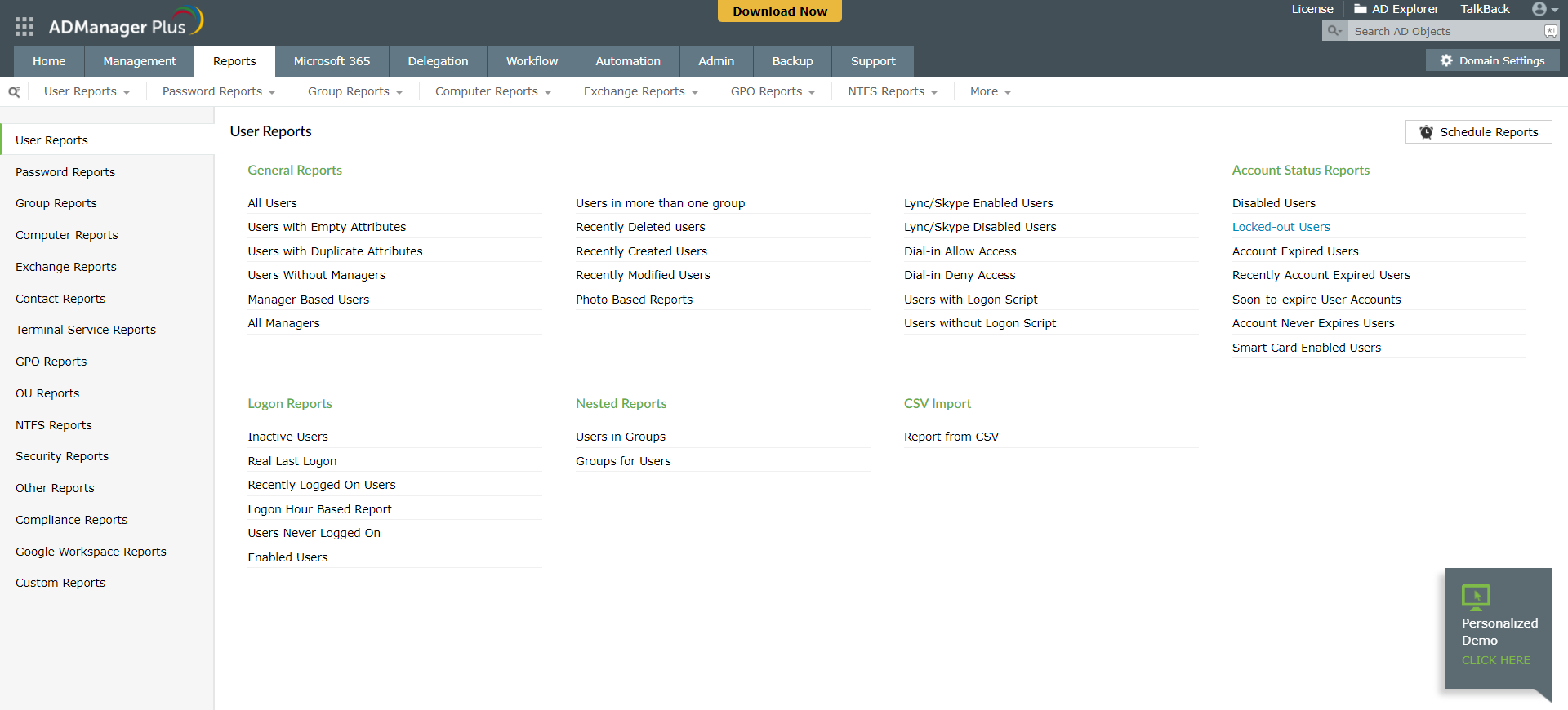
All of the system’s features are bundled in a centralized and Intuitive web-based UI, enabling users to effortlessly handle a variety of complicated tasks like Bulk Management of User accounts and other AD objects, delegates Role-based access to Help Desk Technicians, and more. Users will also enjoy a throng of other capabilities, such as generating an exhaustive list of AD Reports, a number of which are important prerequisites in meeting Compliance Audits. The functionality of the reporting kit is further enhanced with 150 automated reports, custom reports, and Real Last logon reports.
Show MoreOverview of ManageEngine ADManager Plus Benefits
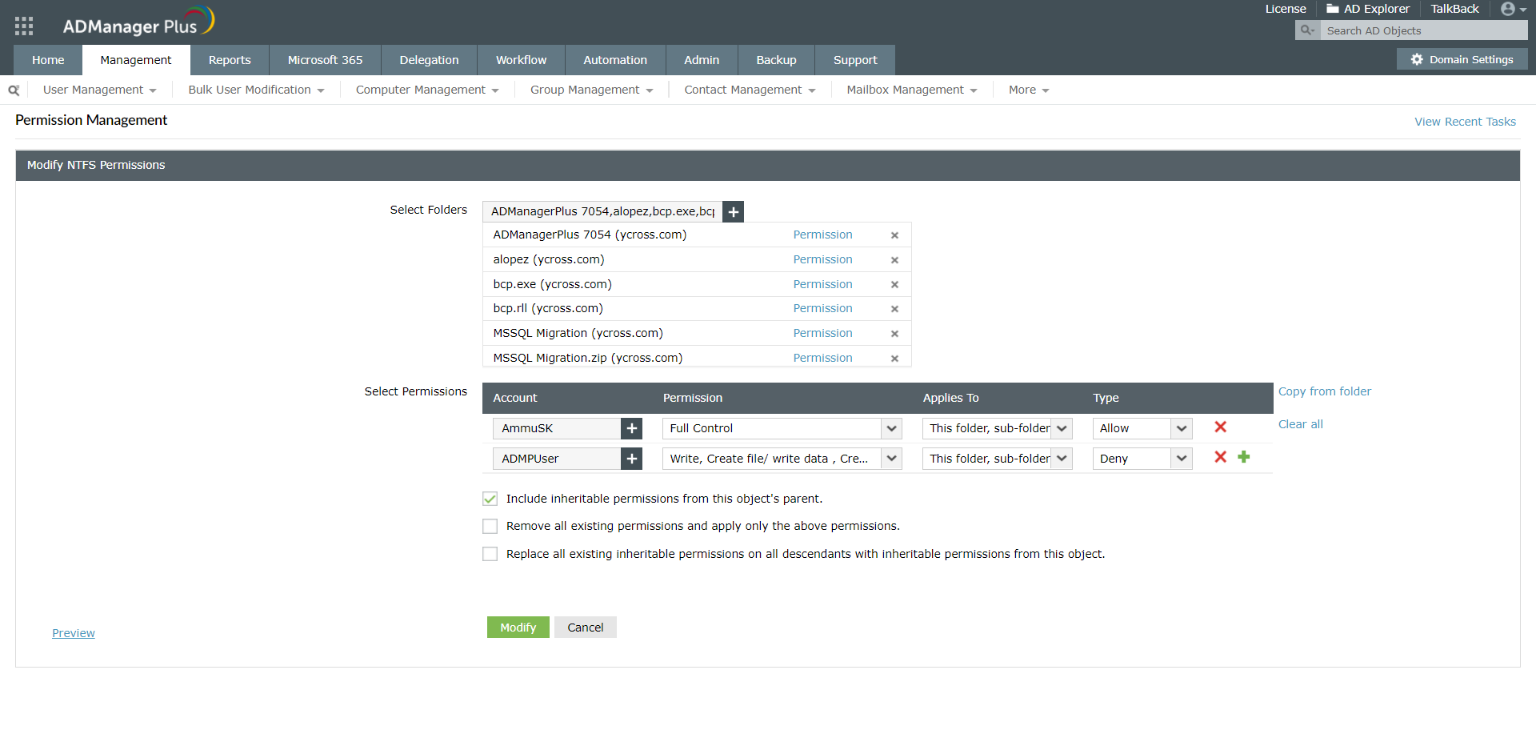
ADManager Plus offers users access to Windows NTFS and grants an admirable level of control more control over their documents. With ADManager Plus, users can set permissions and select who can view, edit, or share their documents instead of storing them privately in a computer or putting those documents in the cloud for all staff to see. This functionality is perfect for group project management minus the risks that come with unauthorized access.
ADManager Plus enables users to make distribution lists for all aspects of your organization. Users can also import distribution lists from comma-separated values (CSV) files and designate them to specific managers. Gone are the day of making new distribution lists manually for each manager or each department as users who can now easily import staffing and distribution lists based on various identifiers of their choice. ADManager Plus will eliminate the need to put each employee or client information individually, as data coming from a variety of third-party systems flows seamlessly its database.
What is more, ADManager Plus allows users to schedule automatic report generation. With such tool, they can select what report they want and when they want it, and the system will take care of the rest. If you need to generate a weekly report, ADManager Plus gives you the option of scheduled automated reporting for more than 150 types of reports. Between others, ADManager Plus gives you the opportunity to generate Real Last Logon reports and Active Directory Reports. For the purpose, you can use some of the system’s premade templates, or customize your own reports to make them more business-specific.
You can also do the same using your mobile devices. The system offers accessibility via iPhone and Android, enabling you to create last minute reports before you get to the office, or access the information you need while you are on the go.
Show MoreOverview of ManageEngine ADManager Plus Features
- Single and Bulk User Management
- Group / Computer Management
- Help Desk Delegation
- Office 365 Management & Reporting
- Active Directory Automation
- Active Directory Cleanup
- Active Directory Reports
- Real Last Logon reports
- Exchange Management
- Government licensing compatible
- Offers 150 automatic reports
- Bulk account management
- Template creation for bulk accounts
- Mobile options available
- Terminal service for remote access
- Google integration
- Mass account activation or deletion
- Allows import of data from multiple platforms
What Problems Will ManageEngine ADManager Plus Solve?
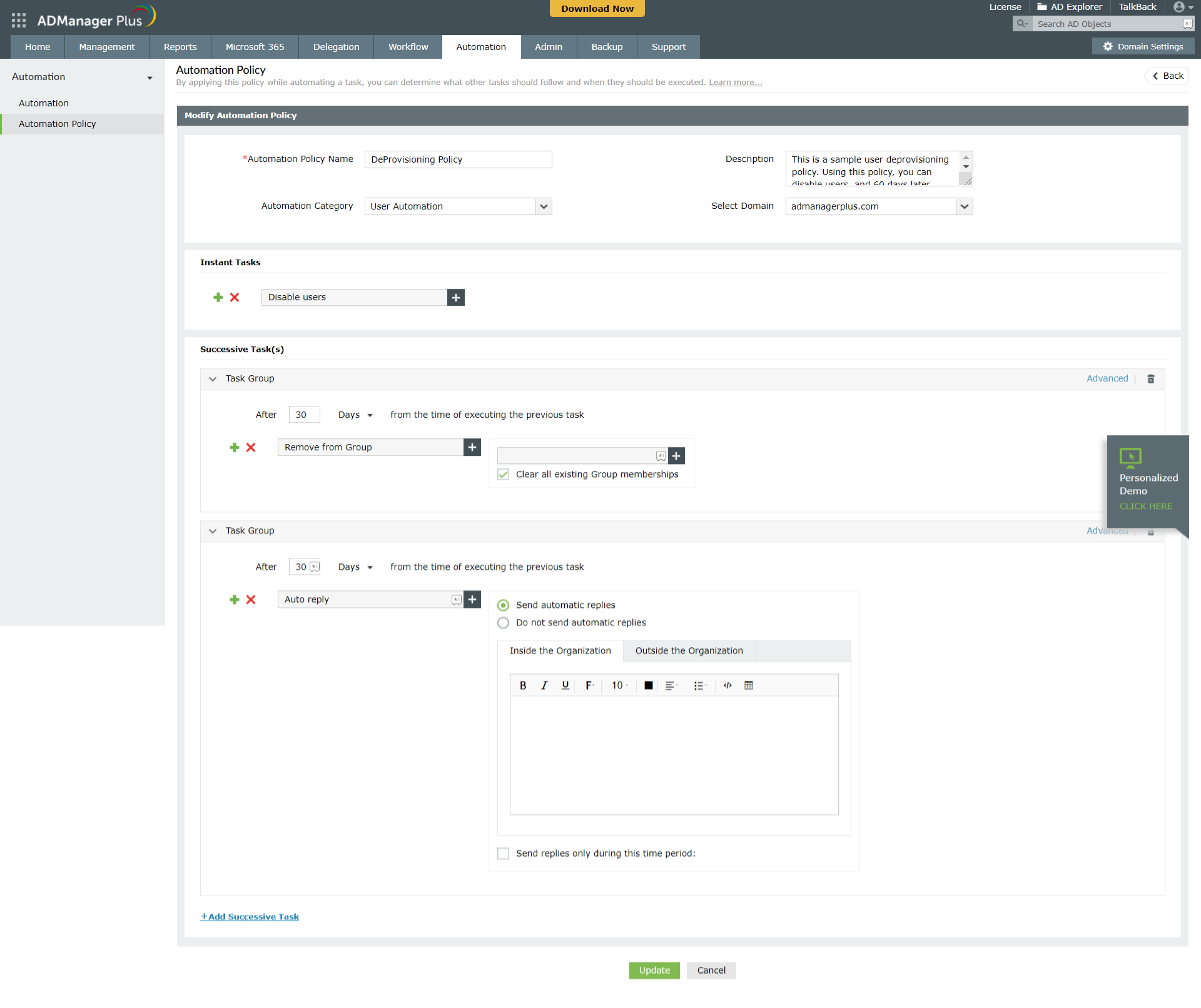
Problem #1: Avoid data entry errors or inefficient onboarding and offboarding process by automating critical AD operations, such as user account creation for new employees or de-provisioning accounts of former employees.
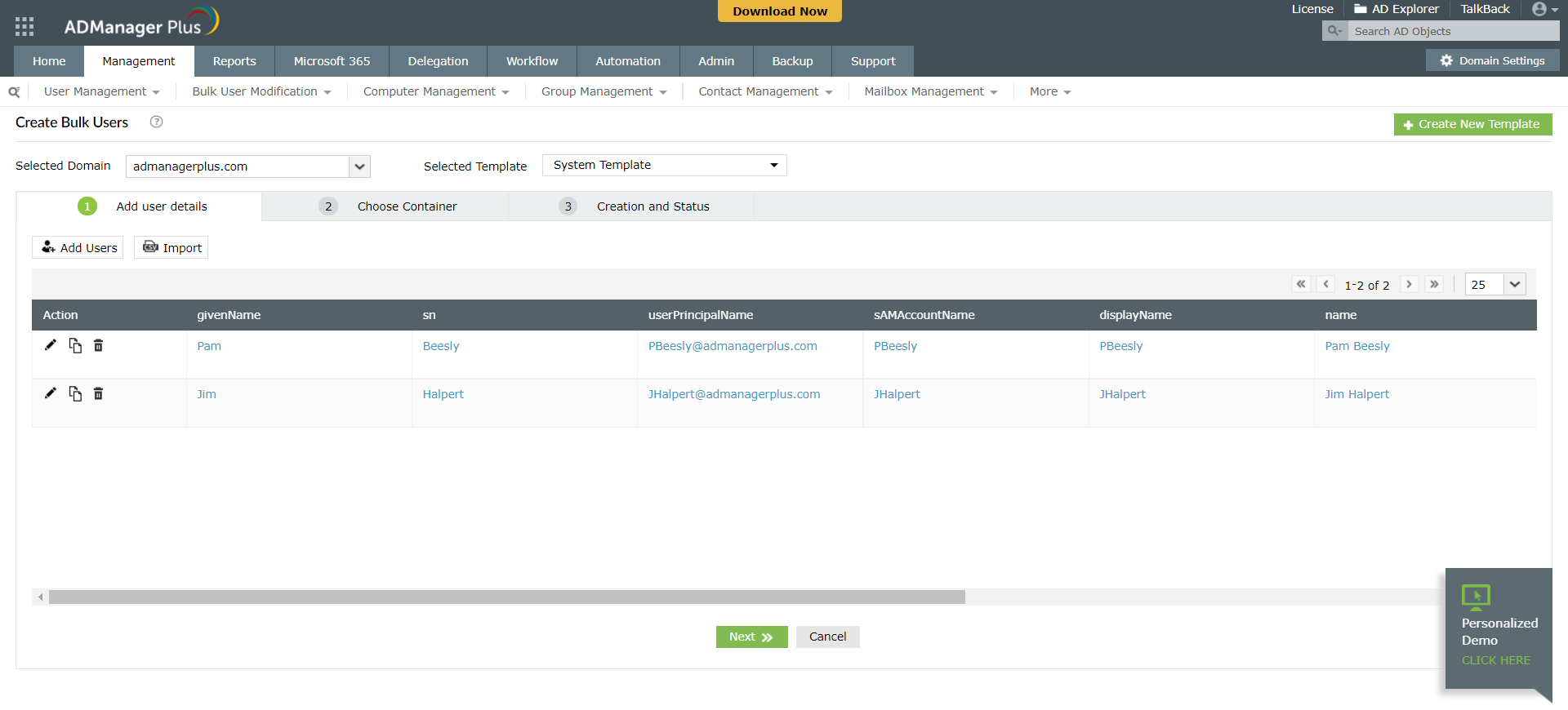
With ADManager Plus, you can simultaneously create, modify or delete accounts for users in AD, Office 365, Exchange, G Suite, and Skype for Business in just one click with the all-inclusive intelligent user creation templates. Aside from making user creation more efficient, ADManager Plus offers completely hands-free (i.e. error-free) user onboarding.
Problem #2: Enhance help desk productivity and efficiency by empowering technicians with delegated administrative rights.
ADManager Plus offers purpose-built functions to execute frequently performed operations such as resetting passwords, unlocking or enabling users, modifying users’ group membership and NTFS permissions, and moving users to another department. It allows you to securely delegate these tasks to the help desk or even non-IT staff, who can then easily execute these tasks in just a click. This feature allows administrators to focus on more important and pressing tasks.
Problem #3: Plug potential security gaps by cleaning up stale accounts and monitoring user privileges.
With ADManager Plus, you can automatically identify and clean up inactive, disabled, and expired user accounts, as well as groups without members. With predefined reports that are automatically delivered to your inbox, in different formats such as PDF, Excel, CSV, and HTML, with a built-in scheduler, you can view important security-specific information such as who has rights over other users, groups, files, or folders, users who are members of a specific security group, and users’ effective permissions (gained through nested group membership).
Awards & Quality Certificates





ManageEngine ADManager Plus Position In Our Categories
Keeping in mind companies have particular business-related requirements, it is only rational that they abstain from getting a one-size-fits-all, ”best” system. Still, it would be almost impossible to pinpoint such an app even among widely used software products. The rational thing to do should be to make a list of the different main aspects that demand investigation including critical features, price terms, technical skill ability of staff, business size, etc. Then, you must double down on the product research exhaustively. Have a look at some of these ManageEngine ADManager Plus evaluations and explore the other software solutions in your list in detail. Such well-rounded research ensure you steer clear of poorly fit applications and pay for the one that has all the benefits your company requires to be successful.
Position of ManageEngine ADManager Plus in our main categories:
TOP
50
ManageEngine ADManager Plus is one of the top 50 Identity Management Software products
TOP
200
ManageEngine ADManager Plus is one of the 200 IT Management Software products
If you are considering ManageEngine ADManager Plus it could also be beneficial to check out other subcategories of Identity Management Software gathered in our base of B2B software reviews.
Each organization has different requirements and requires a system that can be personalized for their size, type of workers and buyers, and the specific industry they are in. For these reasons, no software can proffer perfect features off-the-shelf. When you try to find a software system, first be sure what you require it for. Read some ManageEngine ADManager Plus Identity Management Software reviews and ask yourself do you want basic tools or do you need advanced functionality? Are there any industry-specific functionalities that you are searching for? Get the answers to these questions to aid your search. There are lots of factors that you need to reflect on and these include your budget, specific business needs, your company size, integration needs etc. Take your time, use a few free trials, and finally select the app that presents all that you need to enhance your firm competence and productivity.
How Much Does ManageEngine ADManager Plus Cost?
ManageEngine ADManager Plus Pricing Plans:
Free Trial
Standard 1 Domain
Free
Standard 1 Domain + 2 Help Desk Technicians
$595
Standard 1 Domain + 5 Help Desk Technicians
$1,195
Standard 1 Domain + 10 Help Desk Technicians
$2,145
Standard 1 Domain + 20 Help Desk Technicians
$3,345
Standard 1 Domain + 50 Help Desk Technicians
$5,995
Standard 1 Domain + 100 Help Desk Technicians
$7,795
Standard 1 Domain + 200 Help Desk Technicians
$10,795
Standard 1 Domain + 500 Help Desk Technicians
$11,995
Standard Each Additional Domain
$345
Professional 1 Domain
$795
Professional 1 Domain + 2 Help Desk Technicians
$1,795
Professional 1 Domain + 5 Help Desk Technicians
$3,345
Professional 1 Domain + 10 Help Desk Technicians
$5,395
Professional 1 Domain + 20 Help Desk Technicians
$7,795
Professional 1 Domain + 50 Help Desk Technicians
$10,795
Professional 1 Domain + 100 Help Desk Technicians
$11,995
Professional 1 Domain + 200 Help Desk Technicians
$15,595
Professional 1 Domain + 500 Help Desk Technicians
$17,995
Professional Each Additional Domain
$595
What are ManageEngine ADManager Plus pricing details?
ManageEngine ADManager Plus Pricing Plans:
Free Trial
Standard 1 Domain
Free
Standard 1 Domain + 2 Help Desk Technicians
$595
Standard 1 Domain + 5 Help Desk Technicians
$1,195
Standard 1 Domain + 10 Help Desk Technicians
$2,145
Standard 1 Domain + 20 Help Desk Technicians
$3,345
Standard 1 Domain + 50 Help Desk Technicians
$5,995
Standard 1 Domain + 100 Help Desk Technicians
$7,795
Standard 1 Domain + 200 Help Desk Technicians
$10,795
Standard 1 Domain + 500 Help Desk Technicians
$11,995
Standard Each Additional Domain
$345
Professional 1 Domain
$795
Professional 1 Domain + 2 Help Desk Technicians
$1,795
Professional 1 Domain + 5 Help Desk Technicians
$3,345
Professional 1 Domain + 10 Help Desk Technicians
$5,395
Professional 1 Domain + 20 Help Desk Technicians
$7,795
Professional 1 Domain + 50 Help Desk Technicians
$10,795
Professional 1 Domain + 100 Help Desk Technicians
$11,995
Professional 1 Domain + 200 Help Desk Technicians
$15,595
Professional 1 Domain + 500 Help Desk Technicians
$17,995
Professional Each Additional Domain
$595
ADManager Plus offers convenient pricing for enterprises of all sizes. ADManager Plus license is xml-based and supplied to you through e-mail. Each ADManager Plus license includes an administrator account by default.
Note: The pricing given below is for annual license only.
License Standard Professional
1 Domain – US$795
1 Domain + 2 Help Desk Technicians US$595 US$1,795
1 Domain + 5 Help Desk Technicians US$1,195 US$3,345
1 Domain + 10 Help Desk Technicians US$2,145 US$5,395
1 Domain + 20 Help Desk Technicians US$3,345 US$7,795
1 Domain + 50 Help Desk Technicians US$5,995 US$10,795
1 Domain + 100 Help Desk Technicians US$7,795 US$11,995
1 Domain + 200 Help Desk Technicians US$10,795 US$15,595
1 Domain + 500 Help Desk Technicians US$11,995 US$17,995
Each Additional Domain US$345 US$595
User Satisfaction
Positive Social Media Mentions
67
Negative Social Media Mentions
0
We know that when you choose to purchase a Identity Management Software it’s vital not only to find out how professionals rank it in their reviews, but also to discover if the real people and enterprises that use this software are actually content with the service. That’s why we’ve devised our behavior-based Customer Satisfaction Algorithm™ that gathers customer reviews, comments and ManageEngine ADManager Plus reviews across a broad range of social media sites. The information is then featured in a simple to understand way revealing how many people had positive and negative experience with ManageEngine ADManager Plus. With that information at hand you should be ready to make an informed business choice that you won’t regret.
Screenshots
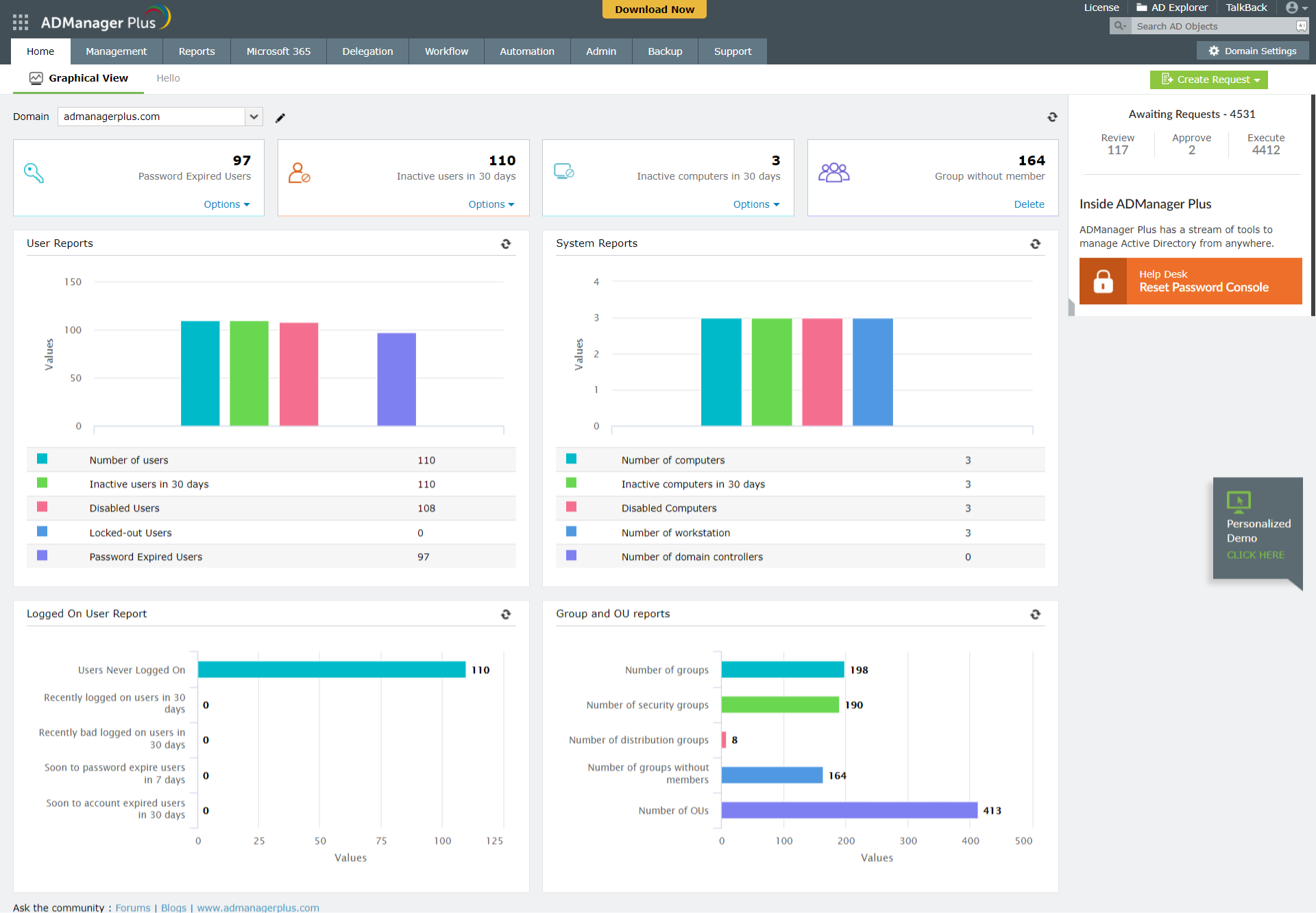
Technical details
Devices Supported
- Windows
- Android
- iPhone/iPad
- Web-based
Deployment
- On Premise
Language Support
- English
- Chinese
- Japanese
- Spanish
- French
- Dutch
- Turkish
Pricing Model
- Free
- Annual Subscription
- Quote-based
Customer Types
- Small Business
- Large Enterprises
- Medium Business
What Support Does This Vendor Offer?
- phone
- live support
- training
- tickets
What integrations are available for ManageEngine ADManager Plus?
AdManager Plus integrates with the following systems:
- ServiceDesk Plus
- Zendesk
- ServiceNow
- MS SQL
- Oracle databases
- Zoho People
- Ultipro
- BambooHR
- SysLoq
- Splunk
ManageEngine ADManager Plus User Reviews
ManageEngine ADManager Plus average rating:
5/5
Overall impression
5/5
Customer Support
5/5
Value for Money
5/5
Ease of Use
Write your own review of this product
ADD A REVIEWMore reviews from 1 actual users:
Sort by:
Latest
- Latest
- Most useful
- Most positive
- Most negative
Best Software ever used !!
Read full review >
5/5
Overall impression
5/5
Customer Support
5/5
Value for Money
5/5
Ease of Use
Published on: 02.05.2021
Company Size: 11-50 Employees
Industry: Education Management
PROS: An Active Directory (AD) management and reporting solution that allows IT administrators and technicians to manage AD objects easily and generate instant reports at the click of a button. Its just an amazing Software !!
CONS: Nothing as such !


Join a community of 7,369 SaaS experts
Thank you for the time you take to leave a quick review of this software. Our community and review base is constantly developing because of experts like you, who are willing to share their experience and knowledge with others to help them make more informed buying decisions.
Sign in with LinkedIn
Why we require LinkedIn?
- Show the community that you're an actual user.
- We will only show your name and profile image in your review.
- You can still post your review anonymously.
OR
Sign in with company emailSign in with company email
Popular ManageEngine ADManager Plus Alternatives




Top Competitors To ManageEngine ADManager Plus By Price
Product name:
Price:



Trending Identity Management Software Reviews


ManageEngine ADManager Plus Comparisons
Product name:




ManageEngine ADManager Plus user reviews
Best Software ever used !!
Read full review >
5/5
Overall impression
5/5
Customer Support
5/5
Value for Money
5/5
Ease of Use
Published on: 02.05.2021
Company Size: 11-50 Employees
Industry: Education Management

Page last modified
Award Winner

Did you find this review useful?
Yes
No
Thank you for your feedback
How can we make this page better?
 Why is FinancesOnline free?