
- Home
- Business Intelligence Software
- PDF Link Editor

PDF Link Editor Review



What is PDF Link Editor?
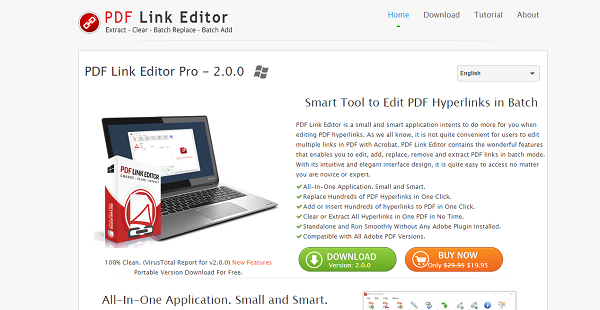
PDF Link Editor is a PDF hyperlink editing tool that does so much more than just edit PDF hyperlinks. This small and smart application makes editing multiple PDF hyperlinks with Acrobat a thing of the past by enabling users to edit, add, replace, remove and extract PDF links in batch mode. This speeds up each and every task involving PDF links, freeing up users’ time which they can use on other priorities.
PDF Link Editor is built with an intuitive and elegant interface that is so easy to use even for novice users. With just a single click, users can replace Hundreds of PDF Hyperlinks, add or Insert Hundreds of hyperlinks to PDF, quickly clear or Extract All Hyperlinks, and more. It is compatible with all Adobe PDF editions but doesn’t require users to install any Adobe plugin to make it work.
Show MoreOverview of PDF Link Editor Benefits
PDF Link Editor accelerates and simplifies the way you work with PDF hyperlinks. Gone are the days when you had to search and replace PDF links individually with basic PDF tools. It is such a cumbersome process that gobbles up a huge chunk of your time, resulting in poor efficiency and low productive output.
With PDF Link Editor, you are able to replace hundreds of PDF Links by batch. This smart tool can search all PDF hyperlinks and list them accordingly and automatically when you add a PDF file. And with a single click, you can export all your new/changed PDF links instantly. Managing your PDF links and anchors becomes a breeze.
Aside from editing PDF hyperlinks, PDF Link Editor lets you add or insert hyperlinks to your PDF files with ease and speed. With its Batch mode functionality, you can search and mark every anchor you want and PDF Link Editor will insert all the URLs you have inputted. Adding or inserting hyperlinks to PDF files need not be boring and monotonous.
And when you have clear or extract one or all hyperlinks from your PDF files, PDF Link Editor takes care of that. Same with adding and inserting PDF links, PDF Link Editor’s powerful engine can search for the links you have in your storage and clear them out or export them to a new folder.
The best part is that PDF Link Editor is a stand-alone product and doesn’t need Adobe PDF to be installed on your system in order for it to work.
Show MoreOverview of PDF Link Editor Features
- Replace Hundreds of PDF Links in Batch
- Add or Insert PDF Hyperlinks to PDF
- Clear or Extract All Hyperlinks
- Standalone and Run Without Adobe
What Problems Will PDF Link Editor Solve?
1) PDF Link Editor can Clear all hyperlinks in your PDF files by batch.
2) PDF Link Editor lets you add more than 100 hyperlinks to PDF.
3) PDF Link Editor allows you to replace more than 100 hyperlinks simultaneously and automatically.
Awards & Quality Certificates


PDF Link Editor Position In Our Categories
Because businesses have specific business requirements, it is logical that they abstain from settling on an all-in-one, “perfect” software solution. Just the same, it would be difficult to discover such an app even among widely used software systems. The better step to undertake would be to write the various vital functions which entail scrutiny such as essential features, pricing, technical skill levels of staff, company size, etc. Thereafter, you must double down on the product research thoroughly. Have a look at some of these PDF Link Editor analyses and check out each of the applications in your list more closely. Such all-encompassing product research guarantee you weed out mismatched software products and pay for the system which meets all the benefits your company requires.
Position of PDF Link Editor in our main categories:
TOP
200
PDF Link Editor is one of the top 200 Business Intelligence Software products
If you are considering PDF Link Editor it could also be sensible to examine other subcategories of Business Intelligence Software gathered in our base of SaaS software reviews.
There are well-liked and widely used applications in each software category. But are they automatically the best fit for your organization’s special requirements? A trendy software application may have thousands of users, but does it offer what you need? For this reason, do not blindly shell out for popular systems. Read at least a few PDF Link Editor Business Intelligence Software reviews and consider the factors that you wish to have in the software such as the cost, main features, available integrations etc. Then, shortlist a few solutions that fit your requirements. Try out the free trials of these products, read online reviews, get information from the seller, and do your research thoroughly. This exhaustive homework is sure to aid you select the best software solution for your organization’s specific requirements.
How Much Does PDF Link Editor Cost?
PDF Link Editor Pricing Plans:
Free Trial
PDF Link Editor Pro 2.0.0
$19.95
What are PDF Link Editor pricing details?
PDF Link Editor Pricing Plans:
Free Trial
PDF Link Editor Pro 2.0.0
$19.95
PDF Link Editor offers an enterprise pricing license package. Contact them for more product details.
- PDF Link Editor Pro 2.0.0 – $19.95
User Satisfaction
Positive Social Media Mentions
35
Negative Social Media Mentions
0
We are aware that when you make a decision to buy a Business Intelligence Software it’s important not only to see how professionals score it in their reviews, but also to discover whether the actual people and businesses that bought this software are genuinely satisfied with the product. Because of that need we’ve designer our behavior-based Customer Satisfaction Algorithm™ that gathers customer reviews, comments and PDF Link Editor reviews across a wide array of social media sites. The data is then displayed in a simple to understand form showing how many customers had positive and negative experience with PDF Link Editor. With that information at hand you should be equipped to make an informed buying decision that you won’t regret.
Technical details
Devices Supported
- Windows
Deployment
- On Premise
Language Support
- English
Pricing Model
- One-time payment
Customer Types
- Small Business
- Medium Business
- Freelancers
What Support Does This Vendor Offer?
- phone
- live support
- training
- tickets
What integrations are available for PDF Link Editor?
No information available.

PDF Link Editor
is waiting for
your first review.

Write your own review of this product
ADD A REVIEWMore reviews from 0 actual users:


Join a community of 7,369 SaaS experts
Thank you for the time you take to leave a quick review of this software. Our community and review base is constantly developing because of experts like you, who are willing to share their experience and knowledge with others to help them make more informed buying decisions.
Sign in with LinkedIn
Why we require LinkedIn?
- Show the community that you're an actual user.
- We will only show your name and profile image in your review.
- You can still post your review anonymously.
OR
Sign in with company emailSign in with company email
Popular PDF Link Editor Alternatives





Top Competitors To PDF Link Editor By Price
Product name:
Price:

by quote


Trending Business Intelligence Software Reviews




PDF Link Editor Comparisons
Product name:





Page last modified



Did you find this review useful?
Yes
No
Thank you for your feedback
How can we make this page better?
Unsure about this software?
FIND ALTERNATIVES
 Why is FinancesOnline free?