

Plaky Review



What is Plaky?
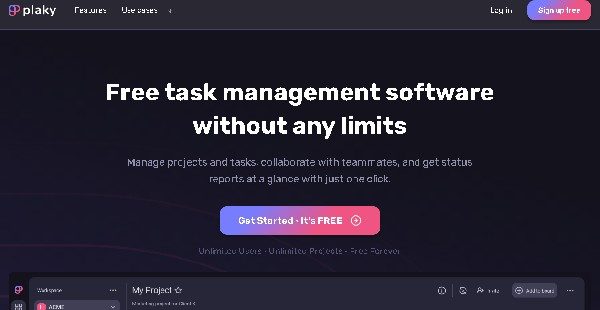
Plaky is a free project management application that serves as a centralized hub for companies, organizations, teams, and individuals to organize, handle, and streamline their work. It can be used to smoothly plan, track, and accomplish any project, process, or task. Plaky enhances client and prospect tracking monitoring, campaign and event planning, employee recruitment and onboarding, software development, nonprofit initiative, and personal task management.
The app allows you to organize and manage your work using ready-made templates and project and team-specific workspaces or boards. You’ll be able to divide tasks into smaller action items, set up multiple columns to structure and track task-related information and details, and assign team members to tasks.
Checking the progress of tasks and team members is easier through time tracking, kanban and table views, sorting and filtering, and activity logs. Users can also comment and share documents and files directly within tasks and access important notifications and updates about their work.
Show MoreOverview of Plaky Benefits
Work Management
Plaky helps you boost productivity, improve customer relationships, and attain business goals. You can achieve this by effortlessly and seamlessly organizing, planning, and handling your work in one place. Using ready-made templates, you can create dedicated boards or workspaces for specific processes, projects, or tasks.
You can break tasks into smaller, manageable, and actionable items that users can organize under different stages, teams, or periods. All important information about the tasks can be saved, tracked, and accessed through status columns and item cards.
For instance, you can categorize and prioritize tasks, delegate tasks to the right people, set deadlines, and add descriptions, checklists, and files. That way, your team members will gain greater clarity and accountability for their responsibilities and fulfill them in a more timely, organized, and productive manner.
Collaboration & Alignment
The project management app ensures that all persons involved in projects or tasks can access the tools, resources, and information they need to collaborate smoothly and work together. You and your team members can ask questions, leave comments and feedback, @mention persons or groups, and share images, visuals, links, documents, and files in context right within task or item cards.
Users will receive real-time email or bell notifications and reminders when they are assigned tasks or mentioned in comments, and changes are made in their shared boards/workspaces or subscribed tasks, or task due dates are near. Clients and vendors can also be invited to boards to view relevant and valuable information. You can keep stakeholders aligned with the goals of your business and initiatives, regardless of their company or department.
Progress Monitoring
With Plaky, you can track and analyze work from start to finish. You can visualize your tasks in kanban or table view and sort them based on relevance status, priority, date, person, and other custom dimensions. In addition, Plaky allows filters to quickly find specific tasks, such as tasks associated with particular texts, tags, descriptions, files, or comments.
Views of your tasks or action items can also be customized, saved, and retrieved. As a result, you and your team members can focus on the data that matters most. This enables you to monitor teams and employees’ work capacity, allocate resources, and prevent bottlenecks, delays, and misunderstandings effectively.
Show MoreOverview of Plaky Features
- Task Management
- Dedicated Boards/Workspaces
- Actionable Items
- Columns
- Progress Monitoring
- Kanban/Table Views
- Sorting & Filtering
- Activity Log
- Collaboration
- Task Assignment
- File Sharing
- Comments
- @Mention
- Notifications
- Templates
- Mobile App
Awards & Quality Certificates
Plaky Position In Our Categories
Because companies have distinctive business demands, it is only sensible they steer clear of settling on a one-size-fits-all, “perfect” software solution. However, it would be difficult to chance on such application even among sought-after software systems. The efficient thing to undertake would be to spell out the various critical factors that entail examination like critical features, pricing, technical skill capability of the users, organizational size, etc. The second step is, you must double down on the research through and through. Have a look at some of these Plaky review articles and scrutinize the other software programs in your list more closely. Such comprehensive research ascertains you circumvent unfit apps and pay for the one that includes all the features your company requires.
Position of Plaky in our main categories:
TOP
500
Plaky is one of the top 500 Project Management Software products
Companies have different needs and requirements and no software solution can be perfect in such a scenario. It is useless to try to find an ideal out-of-the-box software app that meets all your business requirements. The intelligent thing to do would be to adapt the solution for your specific needs, staff member skill levels, budget, and other aspects. For these reasons, do not rush and pay for well-publicized trendy systems. Though these may be widely used, they may not be the best fit for your particular requirements. Do your homework, look into each short-listed system in detail, read a few Plaky Project Collaboration Tools reviews, speak to the seller for clarifications, and finally settle for the product that offers what you need.
How Much Does Plaky Cost?
Plaky Pricing Plans:
Free Trial
Free Plan
$0
What are Plaky pricing details?
Plaky Pricing Plans:
Free Trial
Free Plan
$0
Plaky is a free, cloud-based project and task management app. You can handle an unlimited number of projects, processes, or tasks and users at no cost.
User Satisfaction
Positive Social Media Mentions
4
Negative Social Media Mentions
0
We realize that when you make a decision to get a Project Collaboration Tools it’s vital not only to see how experts score it in their reviews, but also to check whether the actual people and businesses that purchased these solutions are indeed satisfied with the service. That’s why we’ve designer our behavior-based Customer Satisfaction Algorithm™ that collects customer reviews, comments and Plaky reviews across a wide range of social media sites. The information is then featured in a simple to digest format indicating how many clients had positive and negative experience with Plaky. With that information at your disposal you will be prepared to make an informed business choice that you won’t regret.
Video
Technical details
Devices Supported
- Android
- iPhone/iPad
- Web-based
Deployment
- Cloud Hosted
Language Support
- English
Pricing Model
- Free
Customer Types
- Small Business
- Large Enterprises
- Medium Business
- Freelancers
What Support Does This Vendor Offer?
- phone
- live support
- training
- tickets
What integrations are available for Plaky?
Plaky integrates with Clockify, a time-tracking and timesheet tool developed by COING for users to monitor work hours spent across projects for free.

Plaky
is waiting for
your first review.

Write your own review of this product
ADD A REVIEWMore reviews from 0 actual users:


Join a community of 7,369 SaaS experts
Thank you for the time you take to leave a quick review of this software. Our community and review base is constantly developing because of experts like you, who are willing to share their experience and knowledge with others to help them make more informed buying decisions.
Sign in with LinkedIn
Why we require LinkedIn?
- Show the community that you're an actual user.
- We will only show your name and profile image in your review.
- You can still post your review anonymously.
OR
Sign in with company emailSign in with company email
Popular Plaky Alternatives





Top Competitors To Plaky By Price
Product name:
Price:
By quote

By quote


Trending Project Collaboration Tools Reviews
Plaky Comparisons
Product name:







Page last modified



Did you find this review useful?
Yes
No
Thank you for your feedback
How can we make this page better?
Unsure about this software?
FIND ALTERNATIVES
 Why is FinancesOnline free?