

Simul Review



What is Simul?
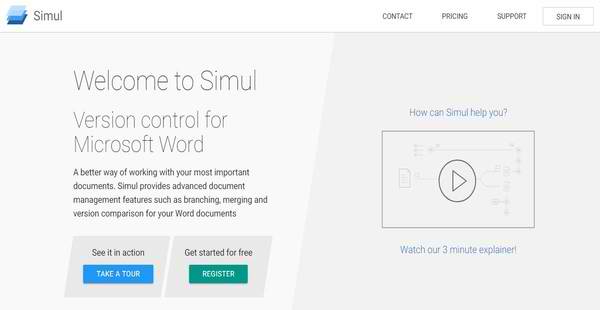
Simul is an advanced version control solution designed for creating and tracking different versions of Microsoft Word documents. It aims to help software developers , programmers, and business professionals meet critical document requirements within their organization or team and work with their most important documents better. Simul uses branches so users and authors can simultaneously work with the same documents at the same time, allowing them to generate different copies of documents stored in their own private repositories where they can independently apply modifications and revisions. Whatever changes they made to a particular document, they can combine them together through merging.
The version control solution permits users to categorize their documents as draft or published versions. Documents categorized and labelled as published versions can be further categorized into two versions: minor and major versions. Before minor or major published versions of documents are distributed, they need to be approved first by stakeholders, a process which is systematized and streamlined by Simul. Moreover, the solution provides task management capabilities that give document members workspaces where they can collaborate with each other and discuss the revisions they made to their documents. Document milestones can be planned and assigned to document members. Last but not least, Simul integrates with third-party platforms like Microsoft SharePoint, Google Drive, OneDrive, and Dropbox and synchronizes document across these platforms.
Show MoreOverview of Simul Benefits
Easy Document Versioning
Simul introduces a different approach to document management which uses branching and merging. Unlike Microsoft SharePoint and Google Docs that apply a real-time co-authoring method, Simul is a version control tool that has the objective of providing users with an easy way to track multiple versions of a document, understand the differences between these versions, and audit their entire work or project.
Independently Edit Documents And Create Versions Using Branches
So how does Simul implement branching and merging? The version control solution allows document mmembers to modify or edit the same document at the same time. It generates a branch for each document member. Through branching, each document member or author will be able to create his or her own version of the document and independently modify and change the document.
Combine Changes Made To Documents Through Merging
After a document member is done making his or her own set of revisions, these changes or revisions can be merged with those ones created by the other document members, forming a new version of the document which contains the combined changes from each document member.
Branching, Merging, And Document Synchronization Across Multiple Platforms
Branching and merging using Simul can be executed across multiple platforms. As a result, users can generate copies of a document and export them to platforms like Google Docs, SharePoint, OneDrive, and DropBox. Document members can work on their changes and revisions within these platforms and push them to the master copy of the document stored in Simul.
When changes are made to a copy of a document in an external platform and someone tries to export a new copy of the document from Simul, such changes are detected and tracked first. The software imports the altered copy of the document from the external platform and reconciles and resolves any conflicts between versions of the document, preventing data, files, and contents from being overwritten and synchronizing documents across platforms.
Task Management Solution
Simul makes it possible for users to create and track tasks associated with Microsoft Word documents. In Simul, tasks are used to set up shared workspaces where documents members can seamlessly collaborate with each other and discuss specific changes made to a document. Different tasks can be created for each document, and they are organized in a task list. Users can access the task list to view all pending and completed tasks. Additionally, document milestones can be set up and assigned to document members, specifying schedules and deadlines to ensure that works and tasks are easily monitored and completed on time.
Version Approvals
Simul offers a version approval feature. This feature helps users organize and streamline the process of reviewing changes made to documents and versions created for each document. Here, approval requests can be conveniently sent out to stakeholders who have the authority to accept or reject published versions of documents or those versions of documents that are about to be distributed and ready to consume. It eliminates the traditional way of collecting approvals and written sign-off from multiple stakeholders done via email which often leads to contradictory change requests and ambiguos responses and makes auditing such process difficult to execute.
Show MoreOverview of Simul Features
- Branching
- Merging
- Document Copies
- Version History and Comparison
- Minor/Major Published Versions
- Track and Synchronize Microsoft Word Documents across Multiple Platforms
- Collaborate
- Task Tracking
- Version Approvals
Simul Position In Our Categories
Because companies have specific business demands, it is sensible that they steer clear of seeking a one-size-fits-all, ideal business program. Regardless, it would be difficult to pinpoint such a software solution even among recognizable software products. The reasonable step to undertake is to list the different vital aspects that necessitate examination like key features, price plans, skill capability of staff members, company size, etc. The second step is, you must double down on the product research systematically. Browse through these Simul evaluations and look over each of the solutions in your list in detail. Such all-encompassing research guarantees you avoid mismatched applications and subscribe to the one which provides all the features your business requires.
Position of Simul in our main categories:
TOP
50
Simul is one of the top 50 Version Control Systems products
If you are considering Simul it could also be sensible to examine other subcategories of Version Control Systems listed in our base of SaaS software reviews.
Since each company has specific business wants, it is advisable for them to abstain from looking for a one-size-fits-all perfect software application. Needless to say, it would be useless to try to find such a system even among popular software applications. The clever thing to do would be to catalog the various essential factors that need consideration such as key features, finances, skill levels of staff members, company size etc. Then, you should do your research thoroughly. Read some Simul Version Control Systems reviews and check out each of the other systems in your shortlist in detail. Such exhaustive homework can ensure you discard ill-fitting applications and zero in on the app that provides all the aspects you need for business success.
How Much Does Simul Cost?
Simul Pricing Plans:
Free Trial
Cloud Edition-Free Plan
Free
Cloud Edition-Standard
$15/User/Mo.
Enterprise Edition
$25/User/Mo.
What are Simul pricing details?
Simul Pricing Plans:
Free Trial
Cloud Edition-Free Plan
Free
Cloud Edition-Standard
$15/User/Mo.
Enterprise Edition
$25/User/Mo.
Simul is available in two editions, namely, Simul Documents Cloud Edition and Simul Documents Enterprise Edition. The cloud offering is for teams and organizations who don’t want to host the software themselves, while the enterprise edition allows you to host the software on your existing servers, hardware, and infrastructure. The enterprise edition requires an enterprise pricing fee of $25/user/month. Here are the details:
Simul Documents Cloud Edition (Teams)
- Teams is a cloud-based offering, ideal for individuals who collaborate across organizations.
The vendor offers a 25% discount when you register more than one user per subscription.
Free
- $0
- Quotas:
- 25 Documents
- 0.5 GB Storage
- Features:
- Document History
- Major/Minor Versioning
- Sharing/Collaboration
- Work Offline
- Microsoft & Google Logins
- SharePoint Integration
Standard
- $15/User/Mo.
- Quotas:
- Unlimited Documents
- Unlimited Storage
- Features:
- Document History
- Major/Minor Versioning
- Sharing/Collaboration
- Work Offline
- Microsoft & Google Logins
- SharePoint Integration
- API Access
- Priority Support
Simul Documents Enterprise Edition
- $25/User/Mo.
- Utilize all of Simul’s benefits while still meeting the critical document requirements within your existing IT infrastructure.
- Sold in blocks of 10 and billed annually, you can swap/add user licenses at any time.
- Your IT support services will be responsible for hosting and monitoring the service
- Features:
- Control where and how your documents are stored
- Control who documents can be shared with
- Use your existing user accounts and passwords
- Inherit all of your existing security and regulatory compliance
- 60-day free trial
User Satisfaction
Positive Social Media Mentions
142
Negative Social Media Mentions
1
We realize that when you make a decision to buy a Version Control Systems it’s vital not only to learn how professionals rank it in their reviews, but also to check if the actual users and businesses that use it are genuinely content with the service. That’s why we’ve devised our behavior-based Customer Satisfaction Algorithm™ that gathers customer reviews, comments and Simul reviews across a vast range of social media sites. The data is then presented in a simple to understand form revealing how many customers had positive and negative experience with Simul. With that information at hand you should be ready to make an informed purchasing decision that you won’t regret.
Video
Technical details
Devices Supported
- Windows
- Linux
- Mac
- Web-based
Deployment
- Cloud Hosted
- On Premise
- Open API
Language Support
- English
- Chinese
- German
- Hindi
- Japanese
- Spanish
- French
- Russian
- Italian
- Dutch
- Portugese
- Polish
- Turkish
- Swedish
Pricing Model
- Free
- Monthly payment
- Quote-based
Customer Types
- Small Business
- Large Enterprises
- Medium Business
What Support Does This Vendor Offer?
- phone
- live support
- training
- tickets
What integrations are available for Simul?
Simul integrates with SharePoint, Google Docs, OneDrive, and Dropbox.com

Simul
is waiting for
your first review.

Write your own review of this product
ADD A REVIEWMore reviews from 0 actual users:


Join a community of 7,369 SaaS experts
Thank you for the time you take to leave a quick review of this software. Our community and review base is constantly developing because of experts like you, who are willing to share their experience and knowledge with others to help them make more informed buying decisions.
Sign in with LinkedIn
Why we require LinkedIn?
- Show the community that you're an actual user.
- We will only show your name and profile image in your review.
- You can still post your review anonymously.
OR
Sign in with company emailSign in with company email
Popular Simul Alternatives





Top Competitors To Simul By Price
Product name:
Price:


Trending Version Control Systems Reviews


Simul Comparisons
Product name:


Page last modified



Did you find this review useful?
Yes
No
Thank you for your feedback
How can we make this page better?
Unsure about this software?
FIND ALTERNATIVES
 Why is FinancesOnline free?