

Venn Review


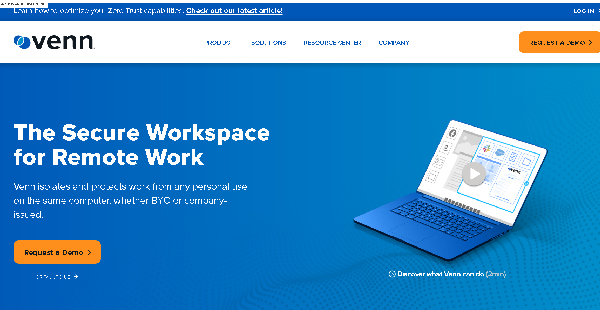

What is Venn?
Venn is a revolutionary solution for securing remote work on unmanaged or BYOD computers, eliminating the need for expensive and complex virtual desktops. Unlike traditional approaches that require purchasing, managing, and locking down individual PCs, Venn simplifies and streamlines the process. Security-conscious and compliance-driven organizations can effortlessly safeguard company data on any unmanaged or BYOD computer without the cost and intricacy associated with VDI.
Venn operates like an MDM solution but tailored for laptops, creating a company-controlled Secure Enclave on the user’s PC or Mac. Within this secure environment, business activities are isolated and shielded from personal use on the same device, ensuring data integrity and privacy.
This purpose-built Secure BYO-PC technology is the new alternative to VDI, enabling seamless and cost-effective remote work security. Venn empowers work to thrive within a company-controlled Secure Enclave on the user’s PC or Mac, offering encryption and access management for heightened protection. Say goodbye to the complexities of managing every PC, and embrace the future of secure remote work with Venn.
Show MoreOverview of Venn Benefits
Secure Work Environment
Venn allows you to build a work environment where there’s a clear delineation between applications, files, and data used for work and personal purposes. Using a lightweight driver, you can create a smart and secure virtual enclave or wrapper that separates and protects company/business apps from personal/private apps on the same Windows or Mac computer. You can monitor and manage all work-related apps and resources that are virtualized, encrypted, and enclosed in the virtual enclave.
For instance, you’ll be able to control what apps and data users can access and how they should be stored and shared. Venn permits you to set up policies for downloading and printing files, copying and pasting information, sharing computer screens, using peripheral devices, and accessing networks. This aids in protecting sensitive and confidential company or customer information from data exfiltration, leakage, loss, or compromise.
Better User Experience
With Venn, you can provide your employees with a streamlined, flexible, and seamless user experience. They’ll work more efficiently and productively and serve customers better. Venn enables them to access work applications and fulfill their responsibilities in any way and at any place they want using their own or preferred computers or mobile devices they’re more familiar and comfortable with.
Venn also runs applications directly on users’ local devices. Thus, your employees don’t need to connect to VDI or DaaS environments where apps are served and launched remotely. They can use multiple applications, conduct video meetings, collaborate with colleagues and clients, and share and download files without lags, interruptions, or delays. Moreover, they’ll enjoy complete security and privacy, as Venn prevents anyone from monitoring their personal activities.
Simple & Cost-Effective Solution
Venn helps organizations and businesses avoid the complexity and cost of purchasing, deploying, maintaining, and securing company-owned devices or traditional VDI and DaaS infrastructures and systems. The remote desktop solution can be implemented on various existing PCs, mobile devices, and operating systems within the company on a massive scale. You can implement a BYOD strategy and ensure that optimum security and compliance controls are in place. This can be done without the need to handle and protect the entire device.
You and your IT, security, and compliance teams can access real-time information and insights about application access, device inventory, and user activity via a centralized admin dashboard. You can handle employees’ access to Venn as well as remove all work data from the devices of offboarding employees with just a single click. No need to worry about unreturned company-owned PCs, VDI/DaaS performance issues, or stressed-out teams.
Show MoreOverview of Venn Features
- Secure Enclave for Work
- Work & Personal App Isolation
- Centralized Administration
- Configurable Policies & Controls
- Access Management
- Network Control
- Peripheral Use
- Employee Productivity
- VDI/DaaS Alternative
- 1-Click Data Wipe
- Integrations
Awards & Quality Certificates

Venn Position In Our Categories
Knowing that businesses have distinctive business-related requirements, it is only rational they steer clear of preferring an all-in-one, ideal software system. Regardless, it would be hard to chance on such application even among widely used software solutions. The sensible thing to do would be to write the varied key factors that necessitate inspection including major features, plans, skill ability of the employees, organizational size, etc. The second step is, you should follow through your product research comprehensively. Go over these Venn review articles and check out each of the solutions in your list more closely. Such all-encompassing product investigation guarantee you circumvent unsuitable apps and buy the system that includes all the tools your business requires to realize efficiency.
Position of Venn in our main categories:
TOP
100
Venn is one of the top 100 Remote Work Software products
TOP
50
Venn is one of the 50 Virtual Desktop Infrastructure Software products
Since each company has unique business needs, it is sensible for them to abstain from seeking a one-size-fits-all faultless software solution. Needless to say, it would be pointless to try to find such a platform even among popular software applications. The clever thing to do would be to jot down the various vital aspects that need consideration such as required features, finances, skill levels of workers, company size etc. Then, you should do your groundwork thoroughly. Read some Venn Remote Work Software reviews and check out each of the other solutions in your shortlist in detail. Such in-depth homework can ensure you discard ill-fitting systems and choose the system that presents all the elements you require for business success.
How Much Does Venn Cost?
Venn Pricing Plans:
Free Trial
Quote-based Plan
Contact vendor
What are Venn pricing details?
Venn Pricing Plans:
Free Trial
Quote-based Plan
Contact vendor
Venn Software’s SME and enterprise pricing information is available only upon request. Kindly contact the software provider for a tailored quote.
User Satisfaction
Positive Social Media Mentions
3
Negative Social Media Mentions
0
We know that when you choose to get a Remote Work Software it’s important not only to learn how experts evaluate it in their reviews, but also to check whether the actual people and enterprises that use it are genuinely happy with the service. That’s why we’ve created our behavior-based Customer Satisfaction Algorithm™ that collects customer reviews, comments and Venn reviews across a vast array of social media sites. The information is then featured in an easy to understand way showing how many clients had positive and negative experience with Venn. With that information at hand you should be ready to make an informed buying choice that you won’t regret.
Video
Technical details
Devices Supported
- Windows
- Android
- iPhone/iPad
- Mac
- Web-based
Deployment
- Cloud Hosted
- On Premise
Language Support
- English
Pricing Model
- Quote-based
Customer Types
- Small Business
- Large Enterprises
- Medium Business
What Support Does This Vendor Offer?
- phone
- live support
- training
- tickets
What integrations are available for Venn?
Venn Software integrates with:
- Box
- OneDrive
- CATO
- ZScaler
- ESET
- DUO
- Okta
- Azure
Venn User Reviews
Venn average rating:
5/5
Overall impression
5/5
Customer Support
4/5
Value for Money
4/5
Ease of Use
Write your own review of this product
ADD A REVIEWThe most favorable review

PROS: Venn offers flexibility to work how and where we want.The software provides a fast, familiar and flexible user experience on our chosen devices, letting users seamlessly toggle between work and personal tasks without sacrificing security.
CONS: It only works in Windows and Mac
The least favorable review

PROS: Solid security measures, because of its gated access mean we can control which users and devices have access to company data.
CONS: It doesn\'t support or is not compatible with all platforms, but we don\'t see this problem because most if not all our colleagues use Windows or Mac.
More reviews from 2 actual users:
Sort by:
Latest
- Latest
- Most useful
- Most positive
- Most negative
Best Software Solution for Remote work
Read full review >
4/5
Overall impression
4/5
Customer Support
4/5
Value for Money
4/5
Ease of Use
Published on: 22.05.2023
Company Size: 51-100 Employees
Industry: Information Technology and Services
PROS: Solid security measures, because of its gated access mean we can control which users and devices have access to company data.
CONS: It doesn\'t support or is not compatible with all platforms, but we don\'t see this problem because most if not all our colleagues use Windows or Mac.
Secure Remote Software for BYOD
Read full review >
5/5
Overall impression
4/5
Customer Support
4/5
Value for Money
4/5
Ease of Use
Published on: 03.03.2023
Company Size: 11-50 Employees
Industry: Information Technology and Services
PROS: Venn offers flexibility to work how and where we want.The software provides a fast, familiar and flexible user experience on our chosen devices, letting users seamlessly toggle between work and personal tasks without sacrificing security.
CONS: It only works in Windows and Mac


Join a community of 7,369 SaaS experts
Thank you for the time you take to leave a quick review of this software. Our community and review base is constantly developing because of experts like you, who are willing to share their experience and knowledge with others to help them make more informed buying decisions.
Sign in with LinkedIn
Why we require LinkedIn?
- Show the community that you're an actual user.
- We will only show your name and profile image in your review.
- You can still post your review anonymously.
OR
Sign in with company emailSign in with company email
Popular Venn Alternatives


Top Competitors To Venn By Price
Product name:
Price:
Trending Remote Work Software Reviews
Venn Comparisons
Product name:





Venn user reviews
Best Software Solution for Remote work
Read full review >
4/5
Overall impression
4/5
Customer Support
4/5
Value for Money
4/5
Ease of Use
Published on: 22.05.2023
Company Size: 51-100 Employees
Industry: Information Technology and Services
Secure Remote Software for BYOD
Read full review >
5/5
Overall impression
4/5
Customer Support
4/5
Value for Money
4/5
Ease of Use
Published on: 03.03.2023
Company Size: 11-50 Employees
Industry: Information Technology and Services

Page last modified



Did you find this review useful?
Yes
No
Thank you for your feedback
How can we make this page better?
Unsure about this software?
FIND ALTERNATIVES
 Why is FinancesOnline free?