

Acorn Review


What is Acorn?
Acorn is a learning management platform made in Australia that drives employee engagement, productivity, and performance while improving work processes and training results. This cloud-based LMS software provides essential tools that help you create and implement corporate training efficiently and effectively. Acorn gives you the flexibility and convenience of creating training content in different techniques and formats suitable for your organization.
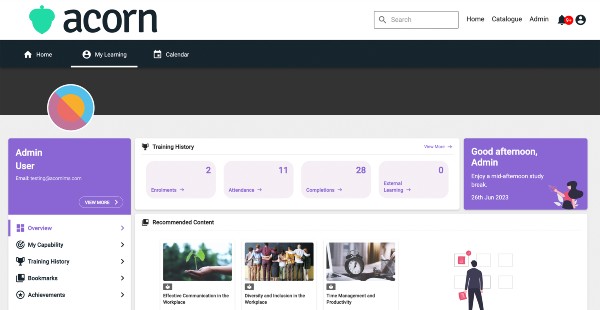
You can build courses by simply dragging and dropping content or using your own SCORM or TinCan-compatible authoring programs. It also lets you deliver training content in digital, web-based, mobile, or blended learning. Moreover, the LMS software allows you to handle training in an automated and personalized manner. You can design tailored learning paths from an intuitive dashboard, monitor all employee training and development activities in one place, and evaluate progress and performance using real-time reports.
With its workforce planning feature, users can collaborate to identify and mitigate workforce risks. Acorn is built on a multi-tenant architecture, which means you can publish and deliver content for multiple separate users. The platform also lets you facilitate employee onboarding by building course catalogs and monitoring and reporting training for newly hired employees. It supports self-service online registration, horizontal and vertical workforce upskilling, and real-time attendance tracking. Lastly, you can integrate Acorn with your existing CMS, HR and employee management, and payroll tools to automate administrative tasks.
Show MoreOverview of Acorn Benefits
Tailored Learning Experiences
Acorn allows you to create and implement corporate training tailored to your teams and employees’ specific needs. This enhances their learning experiences, leading to better training results and work performance. From a user-friendly and centralized dashboard, you can build, modify, and customize automated learning paths and capability frameworks. You can also add resources, materials, and content from various third-party training providers to your own learning paths and capability plans.
The software permits you to use different combinations of learning techniques to make your training more relevant, engaging, and personalized. For instance, you can apply traditional face-to-face teaching along with eLearning courses and digital media. You can deliver corporate training through webinars, web-based training, or m-learning (mobile learning).
Corporate Training Management
With Acorn, you can manage all aspects of your corporate training in one place, from course creation and delivery to employee progress and performance evaluation. Creating learning courses using the LMS software is fast and convenient. To build courses, you can drag and drop pre-designed learning content to the user interface. You can also integrate the software with your own tools and automatically synchronize images, videos, and other media files from those tools with Acorn.
If you’re designing SCORM or TinCan-formatted content using authoring programs, you can also instantly add them to the software. Acorn stores all your training information on a single user-friendly database. This includes attendance, learning and development activities, and teams or employees’ training progress and performance. You can generate and access reports in real-time to measure how well employees engaged and performed in the training and determine if they successfully gained the knowledge and skills they need.
Automate & People-Centric Processes
The LMS software can also automate manual and repetitive processes in your organization. It lets you implement streamlined processes in a people-centric approach. This helps you boost employee experience, engagement, and retention. You can integrate your existing HR and workforce management tools with Acorn and allow staff and new hires to quickly complete tasks during onboarding.
You can send automatic messages, notifications, and updates on onboarding or training to employees as well. Plus, you can generate checklists to ensure all tasks are accomplished and requirements are met for employee onboarding, training, and development.
Show MoreOverview of Acorn Features
- Personalized Learning
- Workforce Planning
- Learning Paths
- Capability Plans
- Course Building
- External Content Integration
- Scorm/TinCan Content
- Blended Learning
- Webinars & Mobile Training
- Progress & Performance Monitoring
- Centralized Reporting
- Multi-Tenant Infrastructure
- Onboarding
- CMS, HR, & Payroll Integrations
What Problems Will Acorn Solve?
Use case #1: Users that have obligations to do compliance training. Acorn as a whole provides an easy way to fulfil this obligation.
Use case #2: Acorn integrates with content providers, allowing for all the content to be utilised in one place. This allows for central reporting. Acorn’s extensive list of integrations can attest to our work in this area.
Use case #3: Acorn’s workforce planning and capability features help identify gaps in skillsets, development opportunities and ensure organisations have the right human capital when they need it – now and in the future.
Awards & Quality Certificates


Acorn Position In Our Categories
Knowing that businesses have distinctive business wants, it is only prudent that they abstain from selecting an all-encompassing, “perfect” system. Having said that, it would be hard to pinpoint such an app even among sought-after software products. The practical step to undertake should be to note down the various important functions which need deliberation such as major features, price terms, technical skill capability of staff, company size, etc. After which, you should do your product research exhaustively. Read these Acorn evaluations and scrutinize each of the software systems in your list more closely. Such all-encompassing research guarantee you drop mismatched applications and choose the one that offers all the benefits your business requires.
Position of Acorn in our main categories:
TOP
200
Acorn is one of the top 200 Learning Management Systems (LMS) products
If you are interested in Acorn it might also be beneficial to investigate other subcategories of Learning Management Systems (LMS) collected in our base of SaaS software reviews.
Organizations have diverse needs and requirements and no software solution can be ideal in such a scenario. It is pointless to try to find an ideal out-of-the-box software app that meets all your business wants. The wise thing to do would be to modify the system for your unique needs, worker skill levels, finances, and other aspects. For these reasons, do not hasten and subscribe to well-publicized trendy solutions. Though these may be widely used, they may not be the perfect fit for your particular requirements. Do your groundwork, look into each short-listed application in detail, read a few Acorn Learning Management Systems (LMS) reviews, contact the maker for explanations, and finally settle for the product that provides what you require.
How Much Does Acorn Cost?
Acorn Pricing Plans:
Free Trial
Below 100 Users
$375/month
101 - 500 Users
$3.50/user/month
501 - 1,500 Users
$3.00/user/month
What are Acorn pricing details?
Acorn Pricing Plans:
Free Trial
Below 100 Users
$375/month
101 - 500 Users
$3.50/user/month
501 - 1,500 Users
$3.00/user/month
Acorn provides plans under a user-based enterprise pricing model. You have the option to use the LMS software only or access both the LMS software and training content. Here are the details:
LMS Only
Below 100 Users – $375 (monthly flat rate)
101 – 500 Users – $3.50/user/month
501 – 1,500 Users – $3.00/user/month
LMS & Content Combined
Below 100 Users – $500 (monthly flat rate)
101 – 500 Users – $4.50/user/month
501 – 1,500 Users – $4.00/user/month
User Satisfaction
Positive Social Media Mentions
22
Negative Social Media Mentions
0
We know that when you choose to buy a Learning Management Systems (LMS) it’s crucial not only to learn how experts evaluate it in their reviews, but also to check whether the actual people and enterprises that use these solutions are genuinely content with the service. That’s why we’ve created our behavior-based Customer Satisfaction Algorithm™ that aggregates customer reviews, comments and Acorn reviews across a wide array of social media sites. The information is then featured in a simple to digest way showing how many users had positive and negative experience with Acorn. With that information at hand you should be equipped to make an informed business choice that you won’t regret.
Video
Technical details
Devices Supported
- Web-based
Deployment
- Cloud Hosted
Language Support
- English
- Chinese
- German
- Hindi
- Japanese
- Spanish
- French
- Russian
- Portugese
- Polish
- Turkish
- Swedish
Pricing Model
- One-time payment
Customer Types
- Large Enterprises
- Medium Business
What Support Does This Vendor Offer?
- phone
- live support
- training
- tickets
What integrations are available for Acorn?
Acorn integrates with the following systems:
- Sage
- Adobe Captivate
- Adobe Connect
- Amazon Web Services
- Aurion
- Ceridian
- Chris21
- Cisco Webex
- Salesforce
- Experience API
- Google Suite
- Good Practice
- GoTo Meeting
- GrassBlade
- Learning Locker
- LinkedIn Learning
- Microsoft Azure
- Microsoft Team
- Microsoft Active Directory Federation Services
- MindTools
- NAB
- Okta
- Oracle Peoplesoft
- PayPal
- PipeDrive
- Yet Analytics
- Commonwealth Bank
- SAP
- Skillsoft
- Skype
- Zoom
- Stripe
- VidVersity
- Watershed
- rs
- sl
- Xero

Acorn
is waiting for
your first review.

Write your own review of this product
ADD A REVIEWMore reviews from 0 actual users:


Join a community of 7,369 SaaS experts
Thank you for the time you take to leave a quick review of this software. Our community and review base is constantly developing because of experts like you, who are willing to share their experience and knowledge with others to help them make more informed buying decisions.
Sign in with LinkedIn
Why we require LinkedIn?
- Show the community that you're an actual user.
- We will only show your name and profile image in your review.
- You can still post your review anonymously.
OR
Sign in with company emailSign in with company email
Popular Acorn Alternatives


Top Competitors To Acorn By Price
Product name:
Price:


Trending Learning Management Systems (LMS) Reviews


Acorn Comparisons
Product name:





Page last modified



Did you find this review useful?
Yes
No
Thank you for your feedback
How can we make this page better?
Unsure about this software?
FIND ALTERNATIVES
 Why is FinancesOnline free?