

DeskTrack Review



What is DeskTrack?
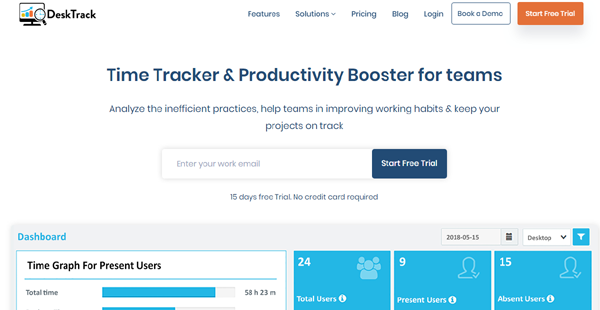
DeskTrack is an employee monitoring software designed to assist companies in capturing and tracking the time spent by their employees on the activities they do at work. It analyzes how productive employees are, thus, maintaining good and efficient work practices.
This employee productivity management solution records the number of hours spent by employees on whitelisted applications, mobile applications, websites, emails, and project-related documents and files. Then, it enables users to gain insights into employees’ productive and unproductive hours, identify inefficient work practices, and discover ways of boosting employee productivity.
DeskTrack comes with a mobile application that permits users to access employees’ daily timesheets and monitor projects and tasks from anywhere at any time. The software also provides a screen recording feature by which the desktop screens of employees are captured whenever they are spending their time on unproductive activities.
Show MoreOverview of DeskTrack Benefits
Capture Employees’ Productive & Unproductive Hours
DeskTrack delivers a modern and precise way of capturing employee work hours and monitoring employee productivity. For instance, the software allows users to define a list of applications employees should use at work and track how much time employees spent on those applications. Hours spent on the whitelisted applications are considered as productive hours.
The employee productivity management software also lets users capture and monitor the number of hours employees spent on unproductive activities. They can confirm if employees are spending too much time clicking URLs and visiting websites like Facebook and YouTube or using mobile apps which prevent them from focusing on their work. When an employee goes idle because he or she is in a meeting or discussion, DeskTrack will convert the idle hours to working hours.
Track Projects In Real-Time
DeskTrack revolutionizes how projects and the tasks required to accomplish them are being monitored. With this software, users will be able to easily link specific documents and files to projects and tasks and record the number of hours spent by employees on those documents and files. DeskTrack permits them to view the title of the document or file, the employee who worked on it, its path, and the total time spent by the employee on the document or file. Project tracking is done in real-time, making it easy for users to capture their employees’ actual billable hours, generate client invoices, and measure the profitability of projects.
Gain Employee Productivity Insights
Managers, supervisors, and team leaders can take advantage of DeskTrack’s mobile analytics app for monitoring and analyzing the productivity of their subordinates. This mobile app shows a graphical representation of each employee or team member’s total time spent on productive and unproductive activities. Users, furthermore, can utilize the mobile app to keep track of the projects and tasks they assigned to employees and determine the total time spent on them. They will be able to gain insights into employee productivity from any location at any time.
Show MoreOverview of DeskTrack Features
- Application Time Tracking
- URL Tracking
- Email Tracking
- Mobile App Tracking
- Idle Time Monitoring
- Real-Time Project Monitoring
- Mobile Productivity Analytics
What Problems Will DeskTrack Solve?
Problem #1: Automated Time Tracking
Companies who are managing remote teams can use DeskTrack to automatically record their employees’ actual worked hours and produce accurate timesheets. The software gives them access to all the reports they need so they can closely monitor how remote employees are doing their work, showing projects and tasks that are already completed as well as employees’ idle and meeting hours. As a result, they will be able to calculate salaries and bill clients accurately.
Problem #2: Real-Time Project Tracking
Companies often find it difficult to keep track of their remote teams as they work on projects and tasks. They need to check what tasks the teams are doing, how much time they are spending on completing those tasks, and if they are free to work on new assignments. Also, they have to verify if their remote teams are spending too much time on irrelevant activities like browsing websites, chatting with Facebook friends, and watching YouTube videos.
Problem #3: Reduce Operational Costs
What’s great about DeskTrack is that it gives managers of companies with remote teams the ability to monitor their projects in real-time as well as access detailed logs of the teams’ activities. They will be able to determine which projects and tasks are assigned to whom, which team members efficient and productive enough to accommodate more workloads and which projects and tasks should be prioritized.
The company’s operational costs will increase if their employees spend too much time on unproductive activities. This makes the company’s work processes inefficient and hampers business growth. DeskTrack provides a solution to this problem by enabling users to capture and monitor their employees’ actual worked hours and idle hours as well as the total time spent on projects on projects and tasks. They can check which employees are more efficient and productive and if resources are spent on unproductive activities, thereby helping them reduce their operational costs and drive business growth.
Awards & Quality Certificates


DeskTrack Position In Our Categories
Keeping in mind companies have distinctive business demands, it is only prudent that they avoid preferring an all-in-one, “perfect” solution. Be that as it may, it would be difficult to try to stumble on such application even among well-known software solutions. The clever step to undertake is to make a list of the varied vital functions that need careful thought such as important features, plans, skill competence of staff, organizational size, etc. Thereafter, you must perform the product research fully. Read some DeskTrack analyses and look into each of the software products in your list more closely. Such well-rounded product investigation can make sure you steer clear of unfit apps and subscribe to the one that includes all the aspects your business requires in sustaining growth.
Position of DeskTrack in our main categories:
TOP
50
DeskTrack is one of the top 50 Computer Monitoring Software products
TOP
50
DeskTrack Employee Monitoring Software solutions
It is essential to note that virtually no service in the Employee Monitoring Software category is going to be an ideal solution that can fulfill all the goals of various company types, sizes and industries. It may be a good idea to read a few DeskTrack Employee Monitoring Software reviews first as certain software might perform well exclusively in a very narrow group of applications or be designed with a very specific industry in mind. Others can operate with an idea of being easy and intuitive and consequently lack complex functions needed by more experienced users. There are also solutions that cater to a wide group of users and provide a complex feature base, however that usually comes at a higher price of such a software. Be certain that you're aware of your requirements so that you buy a software that offers exactly the functionalities you look for.
How Much Does DeskTrack Cost?
DeskTrack Pricing Plans:
Free Trial
Desktrack Stealth
$5.99/user/month
Desktrack Tagger
$7.99/user/month
What are DeskTrack pricing details?
DeskTrack Pricing Plans:
Free Trial
Desktrack Stealth
$5.99/user/month
Desktrack Tagger
$7.99/user/month
DeskTrack offers three SMB and enterprise pricing plans for users to choose from. Here are the details:
Desktrack Stealth – $5.99/user/month
- Automated Timesheets
- White List Applications
- Application Tracking
- Black List URL
- URL Tracking
- Invisible Working
- Gmail Tracking
- Productive & Unproductive Hours
- Daily Reports
- Integrations
Desktrack Tagger – $7.99/user/month
- Automated Timesheets
- White List Applications
- Application Tracking
- Black List URL
- URL Tracking
- Invisible Working
- Gmail Tracking
- Productive & Unproductive Hours
- Daily Reports
- Tag Report
- Integrations
- Tagging as Project
User Satisfaction
Positive Social Media Mentions
31
Negative Social Media Mentions
1
We realize that when you make a decision to purchase a Employee Monitoring Software it’s vital not only to find out how professionals evaluate it in their reviews, but also to check whether the real clients and businesses that use these solutions are actually happy with the service. That’s why we’ve designer our behavior-based Customer Satisfaction Algorithm™ that aggregates customer reviews, comments and DeskTrack reviews across a wide range of social media sites. The data is then presented in a simple to digest format showing how many clients had positive and negative experience with DeskTrack. With that information at your disposal you will be equipped to make an informed buying choice that you won’t regret.
Video
Technical details
Devices Supported
- Windows
- Linux
- Mac
- Web-based
Deployment
- Cloud Hosted
- Open API
Language Support
- English
- Chinese
Pricing Model
- Monthly payment
- Annual Subscription
Customer Types
- Small Business
- Large Enterprises
- Medium Business
- Freelancers
What Support Does This Vendor Offer?
- phone
- live support
- training
- tickets
What integrations are available for DeskTrack?
DeskTrack integrates with the following types of software:
- HRMS
- ERP
- Project Management (Slack, Xira, and Wrike)
- Invoicing
- File Storage (Dropbox)
DeskTrack User Reviews
DeskTrack average rating:
5/5
Overall impression
5/5
Customer Support
5/5
Value for Money
5/5
Ease of Use
Write your own review of this product
ADD A REVIEWThe most favorable review

PROS: DeskTrack allows us to track time spent in various applications and projects. It allows us to track which URLs and applications our teams are accessing. It has online reports which make it easy to see the information.
CONS: The reports are good, however, there are areas that could be improved. I would like to see the ease of use improved.
The least favorable review

PROS: The application designed is very easy to understand. Anyone can handle it without any issue. Installation on client machine is very easy. I am getting all activity of the user even the logs of Website the user visited. Getting the exact productive of the user. Very nice product.
CONS: additional user account on dashboard, as only admin account is there.
More reviews from 5 actual users:
Sort by:
Latest
- Latest
- Most useful
- Most positive
- Most negative
Productivity Loss prevention tool
Read full review >
4/5
Overall impression
5/5
Customer Support
4/5
Value for Money
4/5
Ease of Use
Published on: 22.12.2021
Company Size: 11-50 Employees
Industry: Computer Software
PROS: Good time tracking tool .. especially suitable for startups which cannot afford for productivity loss from the employees.
CONS: Reporting or Dash boarding is having an opportunity of improving.
Superb Software..!! Best Results & Service at an affordable price
Read full review >
5/5
Overall impression
5/5
Customer Support
5/5
Value for Money
5/5
Ease of Use
Published on: 21.11.2021
Company Size: 11-50 Employees
Industry: Automotive
PROS: We at M/s Wable Signage and Display Boards, Pune, using this software since long, resulted very well in monitoring our employees working performances remotely with details, we got this software at very economical prices with best security features and best support at all, it had truly added a great value in growth of our company... We recommend to go with it without any worries... Thank you Desktrack Team.....
CONS: Not any specific
Great experience with DeskTrack usage in my company.
Read full review >
5/5
Overall impression
5/5
Customer Support
5/5
Value for Money
5/5
Ease of Use
Published on: 21.06.2021
Company Size: 11-50 Employees
Industry: Computer & Network Security
PROS: Easy to install, easy to configure, great result. Most important is it helped me to increase the productivity of my employees.
CONS: It provides more details, sometimes it takes time to read.
good product under this value
Read full review >
4/5
Overall impression
5/5
Customer Support
4/5
Value for Money
5/5
Ease of Use
Published on: 17.03.2021
Company Size: N/A
Industry: N/A
PROS: The application designed is very easy to understand. Anyone can handle it without any issue. Installation on client machine is very easy. I am getting all activity of the user even the logs of Website the user visited. Getting the exact productive of the user. Very nice product.
CONS: additional user account on dashboard, as only admin account is there.
DeskTrack Meets Expectations by Providing Solid Staff Productivity Information
Read full review >
5/5
Overall impression
5/5
Customer Support
5/5
Value for Money
4/5
Ease of Use
Published on: 14.03.2021
Company Size: 1-10 Employees
Industry: N/A
PROS: DeskTrack allows us to track time spent in various applications and projects. It allows us to track which URLs and applications our teams are accessing. It has online reports which make it easy to see the information.
CONS: The reports are good, however, there are areas that could be improved. I would like to see the ease of use improved.


Join a community of 7,369 SaaS experts
Thank you for the time you take to leave a quick review of this software. Our community and review base is constantly developing because of experts like you, who are willing to share their experience and knowledge with others to help them make more informed buying decisions.
Sign in with LinkedIn
Why we require LinkedIn?
- Show the community that you're an actual user.
- We will only show your name and profile image in your review.
- You can still post your review anonymously.
OR
Sign in with company emailSign in with company email
Popular DeskTrack Alternatives




Top Competitors To DeskTrack By Price
Product name:
Price:


Trending Employee Monitoring Software Reviews




DeskTrack Comparisons
Product name:






DeskTrack user reviews
Productivity Loss prevention tool
Read full review >
4/5
Overall impression
5/5
Customer Support
4/5
Value for Money
4/5
Ease of Use
Published on: 22.12.2021
Company Size: 11-50 Employees
Industry: Computer Software
Superb Software..!! Best Results & Service at an affordable price
Read full review >
5/5
Overall impression
5/5
Customer Support
5/5
Value for Money
5/5
Ease of Use
Published on: 21.11.2021
Company Size: 11-50 Employees
Industry: Automotive
Great experience with DeskTrack usage in my company.
Read full review >
5/5
Overall impression
5/5
Customer Support
5/5
Value for Money
5/5
Ease of Use
Published on: 21.06.2021
Company Size: 11-50 Employees
Industry: Computer & Network Security
good product under this value
Read full review >
4/5
Overall impression
5/5
Customer Support
4/5
Value for Money
5/5
Ease of Use
Published on: 17.03.2021
Company Size: N/A
Industry: N/A
DeskTrack Meets Expectations by Providing Solid Staff Productivity Information
Read full review >
5/5
Overall impression
5/5
Customer Support
5/5
Value for Money
4/5
Ease of Use
Published on: 14.03.2021
Company Size: 1-10 Employees
Industry: N/A

Page last modified



Did you find this review useful?
Yes
No
Thank you for your feedback
How can we make this page better?
Unsure about this software?
FIND ALTERNATIVES
 Why is FinancesOnline free?