

Escreen Review



What is Escreen?
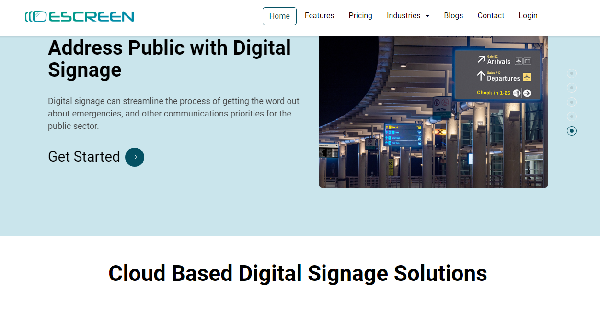
Escreen is a digital signage platform that offers effective and affordable cloud-based digital display services and solutions. They can be used by organizations and businesses across industries, including restaurant, retail, manufacturing, healthcare, transportation, hospitality, education, events, and offices.
You can inform and engage customers and employees better by showing timely, enticing, and dynamic content on digital screens. Escreen allows you to remotely handle and control your network of digital screens and content on your mobile phone from any place and at any time.
You’ll be able to quickly and smoothly create, publish, and edit content. Announcements, promotions, advertisements, menus, procedures, or updates can be shared with the target audience at the right time through content scheduling.
The digital signage platform also provides prebuilt screen layout templates, videos, and images. Moreover, you can easily set up your digital screens using Escreen’s plug-and-play hardware and ask for assistance online to fix technical issues.
Show MoreOverview of Escreen Benefits
Customer Engagement
Users can improve how they attract and delight customers with Escreen’s easy-to-use, interactive, and effective digital signage solutions. For instance, they can show relevant information along with attractive videos, images, and texts on digital screens.
They’ll communicate product ads, sales and promotions, food recipes, ingredients, and calorie counts, or hotel services and facilities to customers. They can easily promote brand awareness while providing customers with a more convenient and enjoyable experience.
Employee Productivity & Performance
Escreen helps organizations and businesses enhance communication and collaboration among their employees. They can use digital screens to share important information with employees in real time.
This includes performance reports, company news and events, training updates, and safety protocols. With access to engaging and entertaining content, employees can participate in debates and discussions and relieve themselves from the stress of day-to-day work.
Easy Management
Escreen makes it easy for users to manage their digital signage content and network. They’ll be able to access and handle multiple digital screens and contents virtually from any place and at any time.
The platform has a CMS that lets them design, publish, and edit high-quality content in an easy-to-use interface. They can also schedule content in advance. This allows them to automatically display customized and targeted messages and information to the right people at the right moment.
Show MoreOverview of Escreen Features
- Content Designing
- Scheduling
- Free Layout Templates
- Remote Management
- Screen Network Management
- Plug-and-Play Hardware
- Online Support
- Automatic Software Update
What Problems Will Escreen Solve?
Escreen has been turning its prospects into permanent customers. The cloud-based digital signage solution is used by small to large business in various industries around the world to effectively engage and retain their customers. You can place colorful, attractive, and high-quality images, videos, and texts on digital screens.
Awards & Quality Certificates

Escreen Position In Our Categories
Bearing in mind businesses have unique business wants, it is practical that they steer clear of choosing an all-in-one, ”best” software solution. Nevertheless, it would be almost impossible to try to chance on such application even among recognizable software systems. The sensible step to do can be to set down the various vital aspects which require careful thought like key features, pricing, technical skill aptitude of staff, business size, etc. Next, you must perform the research to a full extent. Have a look at some Escreen review articles and explore the other software options in your list in detail. Such comprehensive product research ensures you weed out mismatched applications and select the one which has all the features your business requires to be successful.
Position of Escreen in our main categories:
TOP
500
Escreen is one of the top 500 Marketing Software products
There are trendy and widely used solutions in each software category. But are they automatically the best fit for your enterprise’s unique requirements? A trendy software solution may have thousands of users, but does it provide what you require? For this reason, do not blindly shell out for popular systems. Read at least a few Escreen Content Marketing Software reviews and consider the factors that you want in the software such as the cost, main tools, available integrations etc. Then, choose a few solutions that fit your needs. Try out the free trials of these apps, read online reviews, get explanations from the maker, and do your investigation thoroughly. This in-depth homework is sure to aid you choose the finest software platform for your organization’s unique needs.
How Much Does Escreen Cost?
Escreen Pricing Plans:
Free Trial
Starter
$10/screen/month
Teams
$15/screen/month
Business
$25/screen/month
Enterprise
Contact vendor
What are Escreen pricing details?
Escreen Pricing Plans:
Free Trial
Starter
$10/screen/month
Teams
$15/screen/month
Business
$25/screen/month
Enterprise
Contact vendor
Escreen providers several plans for users to choose from, including an enterprise pricing plan that enables you to implement a custom digital signature solution and integrate applications or widgets. Here are the details:
Starter – $10/screen/month ($8 if billed yearly)
- 1 User
- Screen layout templates
- Play lists creation
- Content scheduling
- 100 GB storage
- 25/5 Customer support
Teams – $15/screen/month ($11 if billed yearly)
- All features in Starter Plan, Plus:
- 4 Users
- 250 GB storage
Business – $25/screen/month ($20 if billed yearly)
- All features in Team Plan, Plus:
- 6 Users
- 250 GB storage
- Reports
Enterprise – by quote
- All features in Business Plan, Plus:
- Unlimited users
- Unlimited vides and images
- Custom branding
- App/widget integrations
User Satisfaction
Positive Social Media Mentions
3
Negative Social Media Mentions
0
We are aware that when you choose to purchase a Content Marketing Software it’s important not only to learn how professionals evaluate it in their reviews, but also to discover whether the actual clients and companies that purchased these solutions are indeed happy with the product. That’s why we’ve created our behavior-based Customer Satisfaction Algorithm™ that aggregates customer reviews, comments and Escreen reviews across a broad range of social media sites. The data is then presented in an easy to understand form revealing how many customers had positive and negative experience with Escreen. With that information available you will be equipped to make an informed purchasing decision that you won’t regret.
Technical details
Devices Supported
- Windows
- Mac
- Web-based
Deployment
- Cloud Hosted
Language Support
- English
Pricing Model
- Annual Subscription
- Quote-based
Customer Types
- Small Business
- Large Enterprises
- Medium Business
- Freelancers
What Support Does This Vendor Offer?
- phone
- live support
- training
- tickets
What integrations are available for Escreen?
Escreen integrates with:
- Google Docs

Escreen
is waiting for
your first review.

Write your own review of this product
ADD A REVIEWMore reviews from 0 actual users:


Join a community of 7,369 SaaS experts
Thank you for the time you take to leave a quick review of this software. Our community and review base is constantly developing because of experts like you, who are willing to share their experience and knowledge with others to help them make more informed buying decisions.
Sign in with LinkedIn
Why we require LinkedIn?
- Show the community that you're an actual user.
- We will only show your name and profile image in your review.
- You can still post your review anonymously.
OR
Sign in with company emailSign in with company email
Popular Escreen Alternatives


Top Competitors To Escreen By Price
Product name:
Price:


Trending Content Marketing Software Reviews


Escreen Comparisons
Product name:


Page last modified



Did you find this review useful?
Yes
No
Thank you for your feedback
How can we make this page better?
Unsure about this software?
FIND ALTERNATIVES
 Why is FinancesOnline free?