
- Home
- File Sharing Software
- FileWhopper

FileWhopper Review



What is FileWhopper?
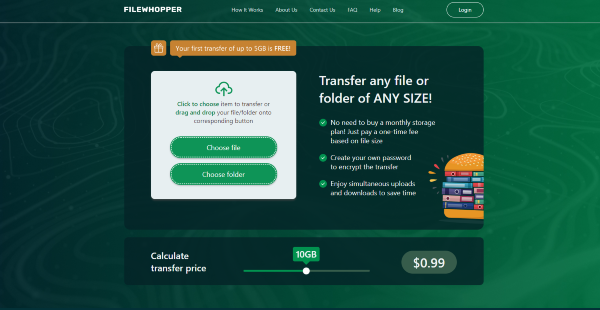
FileWhopper is a simple yet robust file transfer service that lets you transfer files online of any format or size. You only need to pay for the service when you need it—no need for monthly or annual subscription plans.
FileWhopper ensures that your recipients receive the files rapidly with its multi-threaded data transfer technology. This way, workflows are not interrupted or blocked in different stages to ensure the productivity of individuals and teams.
What’s more, FileWhopper makes certain that every data that goes through it is secure. It encrypts files automatically and it offers password protection. This is advantageous if you are transferring sensitive information. As such, you can be sure that only the intended recipients see the disclosed data.
Show MoreOverview of FileWhopper Benefits
No File Size Limit
FileWhopper lets you transfer large files with ease. Since there is no file size limit, you can work on any transferring files regardless of size with no hitches.
One-Time Transfer Fee
Unlike similar services, FileWhopper requires only a one-time payment for every use of the platform. This means that if you are going to transfer files only twice, you only have to pay two times, too. The fee is based on the file size and you do not have to shell out more than that. And if you are wondering how much you have to pay, you have to select a file or folder first, then FileWhopper gives you an automatic quote. With that, the minimum fee is $0.99.
Fast Upload & Transfer Speed
With FileWhopper, you can rest assured that your recipients get the files they need quickly. That is because the service uses multi-threaded data transfer technology to tap into the fastest speeds possible.
Data Integrity Maintenance
In case data transfers are interrupted, such as when the computer reboots, FileWhopper can continue where it left off. There is little to worry about data loss because the system ensures the integrity of the files to be transferred.
All-Around Security
FileWhopper has stringent security measures despite being a simple service. It encrypts every bit of data to be relayed to the recipient and doubly protects them by providing a password-protection option. Because of this, you can rest assured that only your intended recipients can access the transferred files.
Minimum Effort Required
Using FileWhopper requires little effort on your part because you have to access it via a web browser to begin the file transfer process. With the help of its quick tool, it speeds up the upload procedure, especially for large files. Once the transfer is done, this desktop app deletes automatically so it does not take up any of your resources afterward.
Show MoreOverview of FileWhopper Features
- No File Size Limit
- File Transfer
- Bulk File Transfer
- Pay-per-Transfer
- Automatic Quote
- File Encryption
- Password Protection
- 14-day File Storage
What Problems Will FileWhopper Solve?
Problem #1: No Subscription Required
Freelance workers who need to share large file sizes with their clients can use FileWhopper for one-time transfers. All they have to do is upload the file to the service’s interface to get a quote based on the file size. Once the payment is done, FileWhopper boots a desktop web client to facilitate the uploading process and to protect it with a password before the user sends it to their client.
Problem #2: Multiple Recipients
Technical departments that need to distribute a licensed software package to different locations at once can count on FileWhopper for their needs. Staffs can upload a whole folder, regardless of the size, to FileWhopper.com where they get an automatic price quote. Since there is a need for the folder to be available to multiple recipients, users can purchase an extended service that can support numerous downloads. After the payments and uploads are done, the folder becomes available to recipients who need to enter a password to open it.
Problem #3: Secure File Transfer
Executives and managers deal with sensitive information all the time. That is why FileWhopper encrypts files uploaded into its system and generates a password for them automatically. Because recipients need to input the password before they can download the file, senders can rest assured that only the intended viewer can open the sensitive data.
Awards & Quality Certificates


FileWhopper Position In Our Categories
Knowing that businesses have distinctive business wants, it is only prudent that they abstain from settling on a one-size-fits-all, ideal software system. Needless to say, it is almost impossible to try to chance on such application even among branded software solutions. The clever thing to undertake is to list the varied chief functions that call for a deliberation such as essential features, budget, skill capability of staff members, organizational size, etc. Thereafter, you should double down on the research systematically. Browse over these FileWhopper evaluations and scrutinize each of the software solutions in your list in detail. Such detailed research ensure you avoid poorly fit applications and buy the system that includes all the features your company requires.
Position of FileWhopper in our main categories:
TOP
50
FileWhopper is one of the top 50 File Sharing Software products
TOP
100
FileWhopper is one of the 100 Remote Work Software products
Since each company has particular business needs, it is advisable for them to abstain from looking for a one-size-fits-all faultless software system. Needless to say, it would be futile to try to find such an app even among popular software applications. The smart thing to do would be to list the various vital factors that require consideration such as key features, finances, skill levels of workers, company size etc. Then, you should do your research thoroughly. Read some FileWhopper File Sharing Software reviews and look into each of the other apps in your shortlist in detail. Such comprehensive research can ensure you reject ill-fitting platforms and zero in on the system that presents all the aspects you need for business success.
How Much Does FileWhopper Cost?
FileWhopper Pricing Plans:
Free Trial
FileWhopper
$0.99
What are FileWhopper pricing details?
FileWhopper Pricing Plans:
Free Trial
FileWhopper
$0.99
FileWhopper’s enterprise pricing depends on the total file size of files or folders to be transferred. The first transfer up to 5GB is totally free for new users. With that, the service pricing starts at $0.99.
User Satisfaction
Positive Social Media Mentions
19
Negative Social Media Mentions
2
We are aware that when you choose to buy a File Sharing Software it’s important not only to learn how professionals score it in their reviews, but also to discover whether the actual users and enterprises that bought it are indeed content with the service. That’s why we’ve designer our behavior-based Customer Satisfaction Algorithm™ that aggregates customer reviews, comments and FileWhopper reviews across a wide array of social media sites. The information is then displayed in a simple to digest way indicating how many clients had positive and negative experience with FileWhopper. With that information available you should be prepared to make an informed business choice that you won’t regret.
Technical details
Devices Supported
- Windows
- Web-based
Deployment
- Cloud Hosted
Language Support
- English
Pricing Model
- One-time payment
- Quote-based
Customer Types
- Small Business
- Medium Business
- Freelancers
What Support Does This Vendor Offer?
- phone
- live support
- training
- tickets
What integrations are available for FileWhopper?
No information available.
FileWhopper User Reviews
FileWhopper average rating:
4/5
Overall impression
5/5
Customer Support
3/5
Value for Money
5/5
Ease of Use
Write your own review of this product
ADD A REVIEWMore reviews from 1 actual users:
Sort by:
Latest
- Latest
- Most useful
- Most positive
- Most negative
A worthy file or folder transfer service with no size limitations
Read full review >
4/5
Overall impression
5/5
Customer Support
5/5
Value for Money
3/5
Ease of Use
Published on: 29.01.2021
Company Size: 1-10 Employees
Industry: Public Safety
PROS: - reasonable price that starts from as little as $0.99 - any file or folder can be sent, any type of a file - no size limits - encryption
CONS: - payment methods: first I tried to pay with PayPal and the payment was not processed. Then I tried to pay with a debit card and it went through well


Join a community of 7,369 SaaS experts
Thank you for the time you take to leave a quick review of this software. Our community and review base is constantly developing because of experts like you, who are willing to share their experience and knowledge with others to help them make more informed buying decisions.
Sign in with LinkedIn
Why we require LinkedIn?
- Show the community that you're an actual user.
- We will only show your name and profile image in your review.
- You can still post your review anonymously.
OR
Sign in with company emailSign in with company email
Popular FileWhopper Alternatives





Top Competitors To FileWhopper By Price
Product name:
Price:

by quote




$29.95
Trending File Sharing Software Reviews




FileWhopper Comparisons
Product name:






FileWhopper user reviews
A worthy file or folder transfer service with no size limitations
Read full review >
4/5
Overall impression
5/5
Customer Support
5/5
Value for Money
3/5
Ease of Use
Published on: 29.01.2021
Company Size: 1-10 Employees
Industry: Public Safety

Page last modified



Did you find this review useful?
Yes
No
Thank you for your feedback
How can we make this page better?
Unsure about this software?
FIND ALTERNATIVES
 Why is FinancesOnline free?