

Igiko Review



What is Igiko?
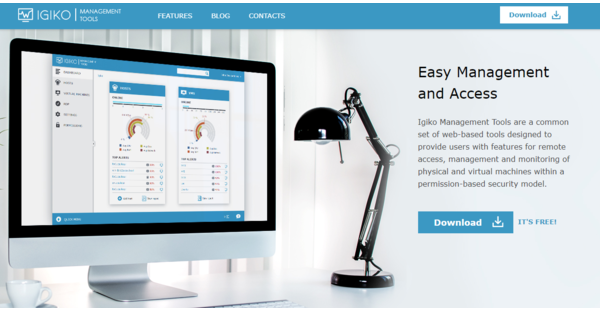
Igiko is a computer management software built for remote access. It is comprised of a set web-based tools enabling users to access, monitor, and manage physical and virtual machines (VMs) in a single web console. It operates under a permission-based security model where users are granted permission to access infrastructure to track performance and perform basic computer operations. They are also notified about any degradation of performance to avoid further damage to operations.
The platform is specially designed for SMEs, IT administrators, QA Engineers and software developers, training centers, and companies with remote servers in various facilities. It comes with special charts and information dashboard for easy navigation. It also has an embedded RDP gateway with HTML5 RDP client control, allowing remote connection with your hosts and VMs from anywhere.
Show MoreOverview of Igiko Benefits
Remote access
Igiko comes with a built-in remote desktop gateway allowing you to connect with any computer or VM in your local network. Its HTML5 RDP client control integrated into the web console enables you to work with remote desktops from anywhere via a web browser.
Comprehensive monitoring
Igiko enables constant performance monitoring of every available object. Valuable data is presented in graphs for easy trend analysis. The platform also alarms you of any performance degradation. These tools make it easy for users to monitor physical and virtual machines and make sure nothing is amiss.
Simple to operate
From starting to shutting down, restarting, pausing, resuming a host or a VM, everything can be done with a single click. You can also choose to perform operations right away or schedule them for a later time. Installing and uninstalling the software remotely is also possible.
Configurable User Permissions
Administrators can set specific permissions for particular objects. This means a user can only see objects and perform only those functions that the administrator has allowed him or her to do so.
Easy to use
Access the web console from anywhere via the internet. To redirect traffic to the machine IP, you only have to configure external ports on your router. It also comes with a very intuitive design.
Easy to install
Igiko only requires a Windows machine with .NET Framework 4.5. Moreover, an agent is not necessary if you wish to add hosts to the console. All you need is a configured WinRM.
Show MoreOverview of Igiko Features
- Web-based console
- Dashboard
- Performance monitoring
- Built-in remote desktop gateway
- SSL traffic encryption
- Extended data collection
- Enterprise-level SQL servers
What Problems Will Igiko Solve?
Problem #1: Time consuming and costly on-site work
When one of the employees needs remote access to the working computer, you need the person who is at the office at that time to go to the right computer, turn it on, install the same application as the employee who needs access. Then they need to enter the code or password in the application for remote access. Using Igiko, you can do all these using the tool remotely. You can monitor and manage your network even when you are not in the office.
Awards & Quality Certificates


Igiko Position In Our Categories
Since companies have specific business-related requirements, it is only wise they abstain from going for a one-size-fits-all, ideal solution. Just the same, it is troublesome to try to find such an app even among well-known software systems. The practicable step to do would be to write the various chief aspects that entail examination like major features, budget, skill levels of staff members, company size, etc. The second step is, you should follow through your research through and through. Go over some of these Igiko analyses and explore the other software systems in your shortlist in detail. Such all-encompassing research ensure you weed out unsuitable apps and choose the system that offers all the aspects your company requires.
Position of Igiko in our main categories:
TOP
50
Igiko is one of the top 50 Application Performance Monitoring Software products
TOP
500
Igiko is one of the 500 IT Management Software products
If you are interested in Igiko it might also be a good idea to investigate other subcategories of IT Management Software gathered in our database of B2B software reviews.
There are popular and widely used applications in each software category. But are they essentially the best fit for your company’s specific wants? A market-leading software application may have thousands of customers, but does it offer what you need? For this reason, do not blindly shell out for popular systems. Read at least a few Igiko IT Management Software reviews and think about the factors that you desire in the software such as the price, main features, available integrations etc. Then, choose a few apps that fit your wants. Check out the free trials of these products, read online comments, get information from the maker, and do your homework meticulously. This in-depth groundwork is sure to help you choose the best software application for your firm’s specific needs.
How Much Does Igiko Cost?
Igiko Pricing Plans:
Free Trial
Free
By quote
Contact vendor
What are Igiko pricing details?
Igiko Pricing Plans:
Free Trial
Free
By quote
Contact vendor
Igiko is free to install. Meanwhile, you can request a quote from the vendor for enterprise pricing if you need more functionality or prefer a customized version.
User Satisfaction
Positive Social Media Mentions
26
Negative Social Media Mentions
0
We know that when you decide to buy a IT Management Software it’s crucial not only to learn how experts score it in their reviews, but also to check whether the actual users and enterprises that use these solutions are indeed satisfied with the product. That’s why we’ve designer our behavior-based Customer Satisfaction Algorithm™ that gathers customer reviews, comments and Igiko reviews across a broad range of social media sites. The information is then featured in a simple to digest way showing how many people had positive and negative experience with Igiko. With that information available you will be prepared to make an informed purchasing choice that you won’t regret.
Technical details
Devices Supported
- Windows
- Web-based
Deployment
- Cloud Hosted
- On Premise
Language Support
- English
Pricing Model
- Free
- Quote-based
Customer Types
- Small Business
- Large Enterprises
- Medium Business
- Freelancers
What Support Does This Vendor Offer?
- phone
- live support
- training
- tickets
What integrations are available for Igiko?
No information available.

Igiko
is waiting for
your first review.

Write your own review of this product
ADD A REVIEWMore reviews from 0 actual users:


Join a community of 7,369 SaaS experts
Thank you for the time you take to leave a quick review of this software. Our community and review base is constantly developing because of experts like you, who are willing to share their experience and knowledge with others to help them make more informed buying decisions.
Sign in with LinkedIn
Why we require LinkedIn?
- Show the community that you're an actual user.
- We will only show your name and profile image in your review.
- You can still post your review anonymously.
OR
Sign in with company emailSign in with company email
Popular Igiko Alternatives


Top Competitors To Igiko By Price
Product name:
Price:


Trending IT Management Software Reviews


Igiko Comparisons
Product name:


Page last modified



Did you find this review useful?
Yes
No
Thank you for your feedback
How can we make this page better?
Unsure about this software?
FIND ALTERNATIVES
 Why is FinancesOnline free?